Community listing page, reviews here may not be monitored by the author.
Super Factory Manager Retro


No reviews yet
Build Super Factory Manager programs on a visual node canvas instead of writing SFML by hand. Drag nodes, wire them together, search items and fluids by name, and import/export programs you have already written.
Community voices
Reviews
No reviews yet. Be the first to review this project!
Get it on
Available Platforms
Compatibility
Supported Environments
Must be installed on both the client and the server.
About
Project Details
For authors
Embed Badge
If you're the author of this project, you can embed a live badge anywhere that supports HTML or Markdown. It updates automatically whenever ratings change.
Use HTML for any page that supports it, or Markdown for README files and Markdown-based descriptions.
Identifiers
Platform IDs
About
Description
Retro Factory Manager
An addon for Super Factory Manager that lets you write SFM programs as a node graph instead of as text.
Requires Super Factory Manager.
What you get
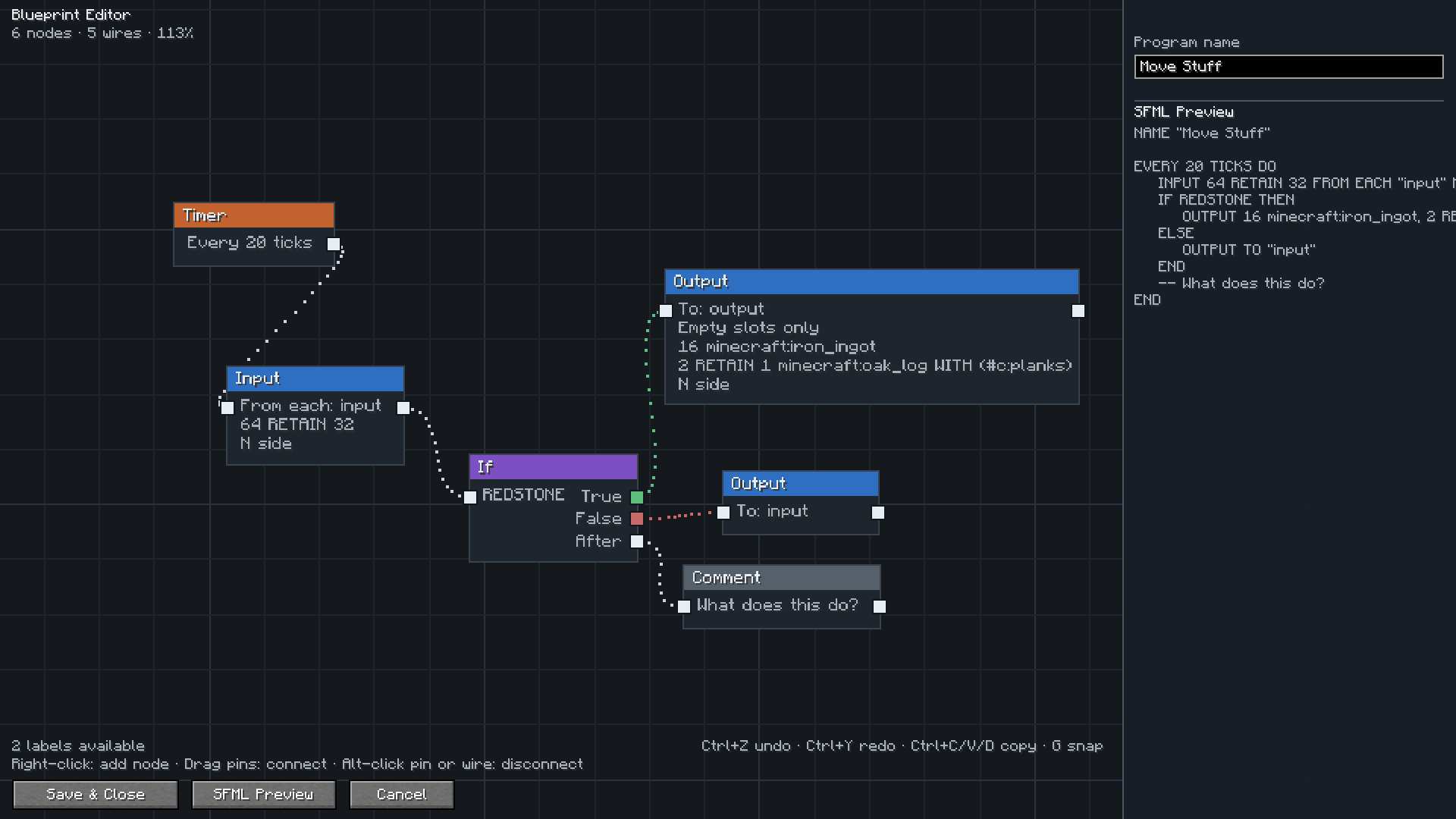
Open a Disk or a Factory Manager and you get a canvas instead of a text box. Place a trigger, chain Input and Output nodes onto it, branch with If nodes, and the SFML is written for you as you go. The preview panel shows exactly what will be saved.
Everything the language can do is in the editor: intervals and redstone triggers, amounts and retain amounts, multiple filters per node, item and tag filters, except lists, sides, slot ranges, round robin, conditions, Forget and Comment nodes.
Picking items and labels
Type a few letters and pick what you want from a list with icons. Items, fluids, gases and energy are all searchable, so you do not need to remember ids.
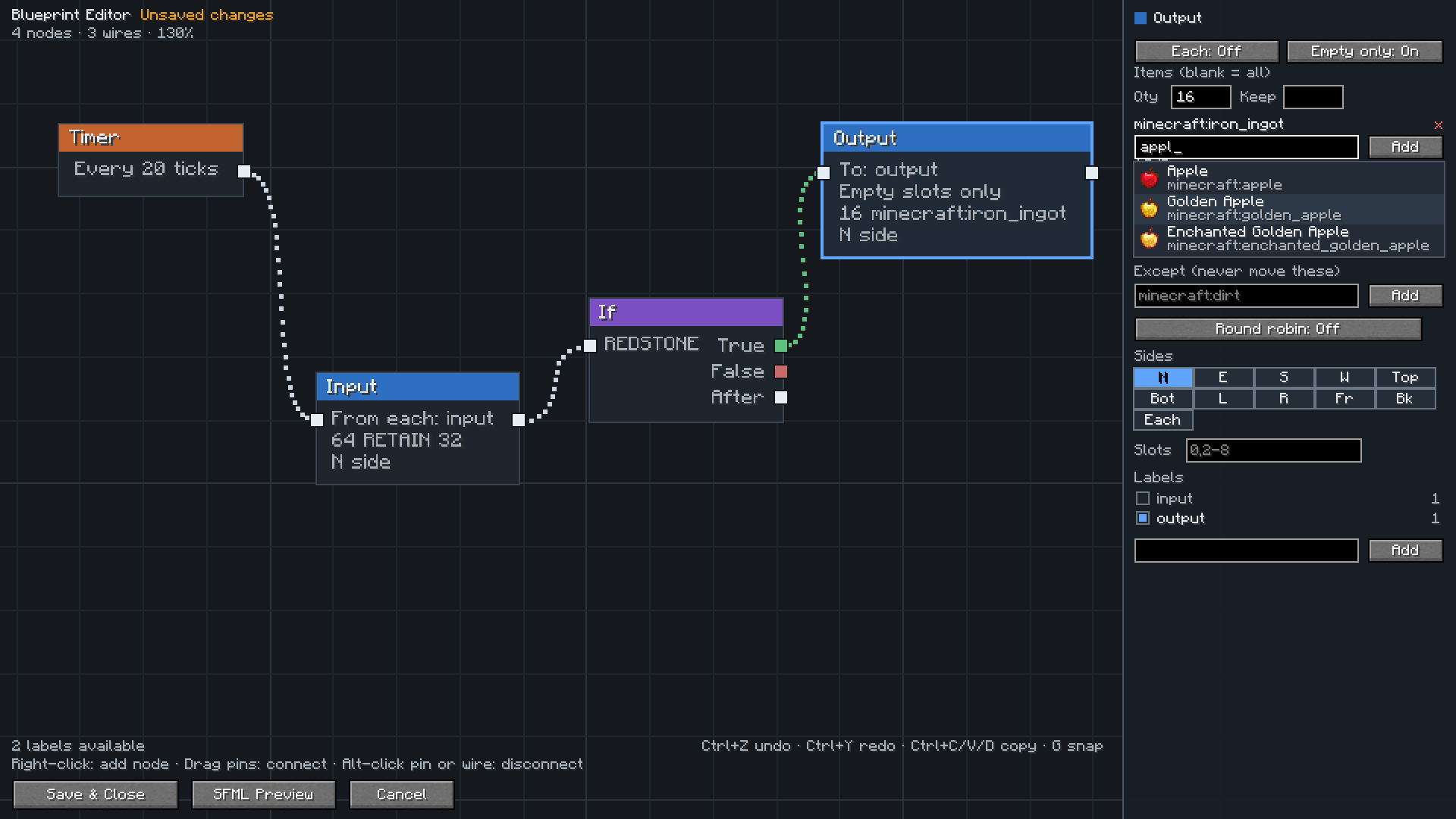
Labels come from your label gun, and the editor shows how many blocks each label covers so you can spot one you forgot to assign.
Already have programs?
Open one and press Import to canvas. It is rebuilt as a graph, and the editor checks its own work and tells you whether anything was lost.
Your programs stay normal SFM programs. You can copy the text, share it, or switch back to the text editor whenever you want. The node layout is saved with the program, so reopening the editor gives you your graph back.
Setup
Install both mods, then open config/sfm-client-program-editor.toml and set:
preferredEditor = "retrofactorymanager:blueprint"
Right click a Disk, or press Edit in a Factory Manager, and the canvas opens. Set it back to sfm:v1 at any time to return to the text editor.
Controls
| Action | How |
|---|---|
| Add a node | Right click the canvas |
| Add a connected node | Drag from a pin and release on empty space |
| Connect nodes | Drag from one pin to another |
| Disconnect | Alt click a pin or a wire |
| Move around | Drag with middle or right mouse button |
| Zoom | Scroll wheel |
| Select | Click, shift click, or drag a box |
| Delete | Select and press Delete |
| Undo and redo | Ctrl+Z and Ctrl+Y |
| Copy, paste, duplicate | Ctrl+C, Ctrl+V, Ctrl+D |
| Snap to grid | Press G |
| Frame everything | Press Home |
Credits
Thanks to TeamDman for Super Factory Manager and for making the editor pluggable, and to vswe for the original Steve's Factory Manager.
Retro Factory Manager
An addon for Super Factory Manager that lets you write SFM programs as a node graph instead of as text.
Requires Super Factory Manager.
What you get
Open a Disk or a Factory Manager and you get a canvas instead of a text box. Place a trigger, chain Input and Output nodes onto it, branch with If nodes, and the SFML is written for you as you go. The preview panel shows exactly what will be saved.
Everything the language can do is in the editor: intervals and redstone triggers, amounts and retain amounts, multiple filters per node, item and tag filters, except lists, sides, slot ranges, round robin, conditions, Forget and Comment nodes.
Picking items and labels
Type a few letters and pick what you want from a list with icons. Items, fluids, gases and energy are all searchable, so you do not need to remember ids.
Labels come from your label gun, and the editor shows how many blocks each label covers so you can spot one you forgot to assign.
Already have programs?
Open one and press Import to canvas. It is rebuilt as a graph, and the editor checks its own work and tells you whether anything was lost.
Your programs stay normal SFM programs. You can copy the text, share it, or switch back to the text editor whenever you want. The node layout is saved with the program, so reopening the editor gives you your graph back.
Setup
Install both mods, then open config/sfm-client-program-editor.toml and set:
preferredEditor = "retrofactorymanager:blueprint"
Right click a Disk, or press Edit in a Factory Manager, and the canvas opens. Set it back to sfm:v1 at any time to return to the text editor.
Controls
| Action | How |
|---|---|
| Add a node | Right click the canvas |
| Add a connected node | Drag from a pin and release on empty space |
| Connect nodes | Drag from one pin to another |
| Disconnect | Alt click a pin or a wire |
| Move around | Drag with middle or right mouse button |
| Zoom | Scroll wheel |
| Select | Click, shift click, or drag a box |
| Delete | Select and press Delete |
| Undo and redo | Ctrl+Z and Ctrl+Y |
| Copy, paste, duplicate | Ctrl+C, Ctrl+V, Ctrl+D |
| Snap to grid | Press G |
| Frame everything | Press Home |
Credits
Thanks to TeamDman for Super Factory Manager and for making the editor pluggable, and to vswe for the original Steve's Factory Manager.
Screenshots
Gallery
-
 logo.png logo.png
 -
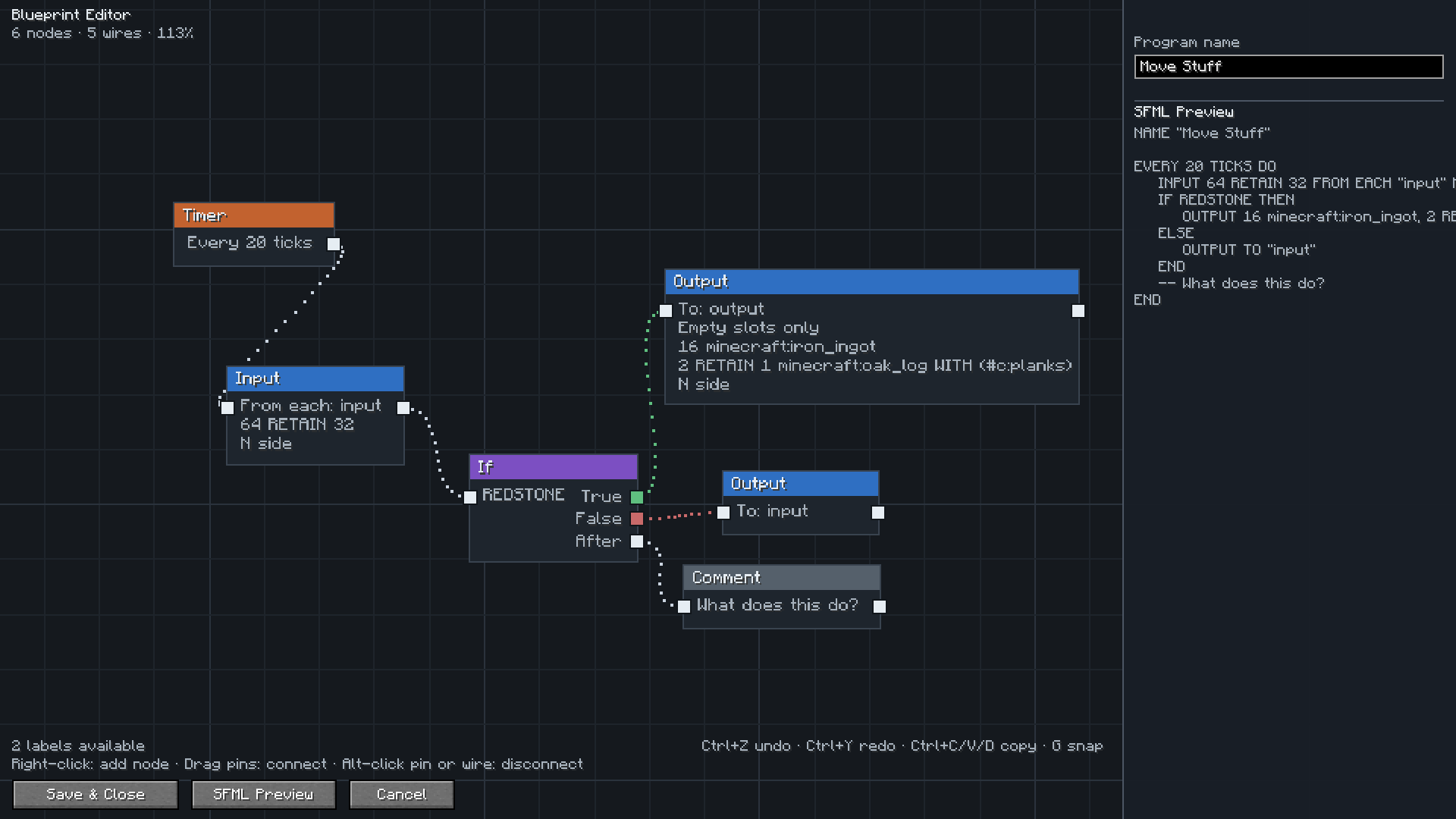 editor-overview.png editor-overview.png
 -
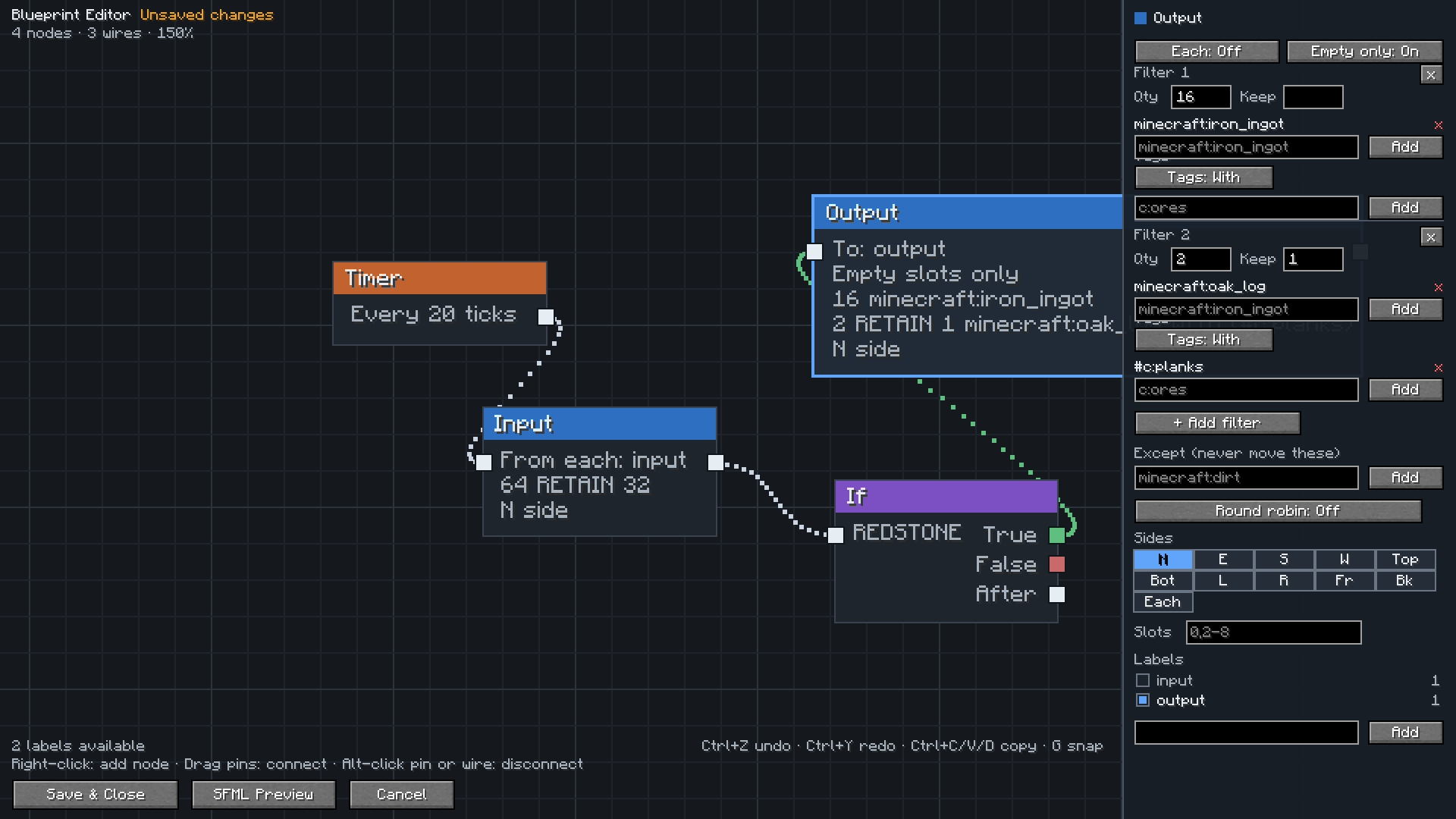 filter-groups.png filter-groups.png
 -
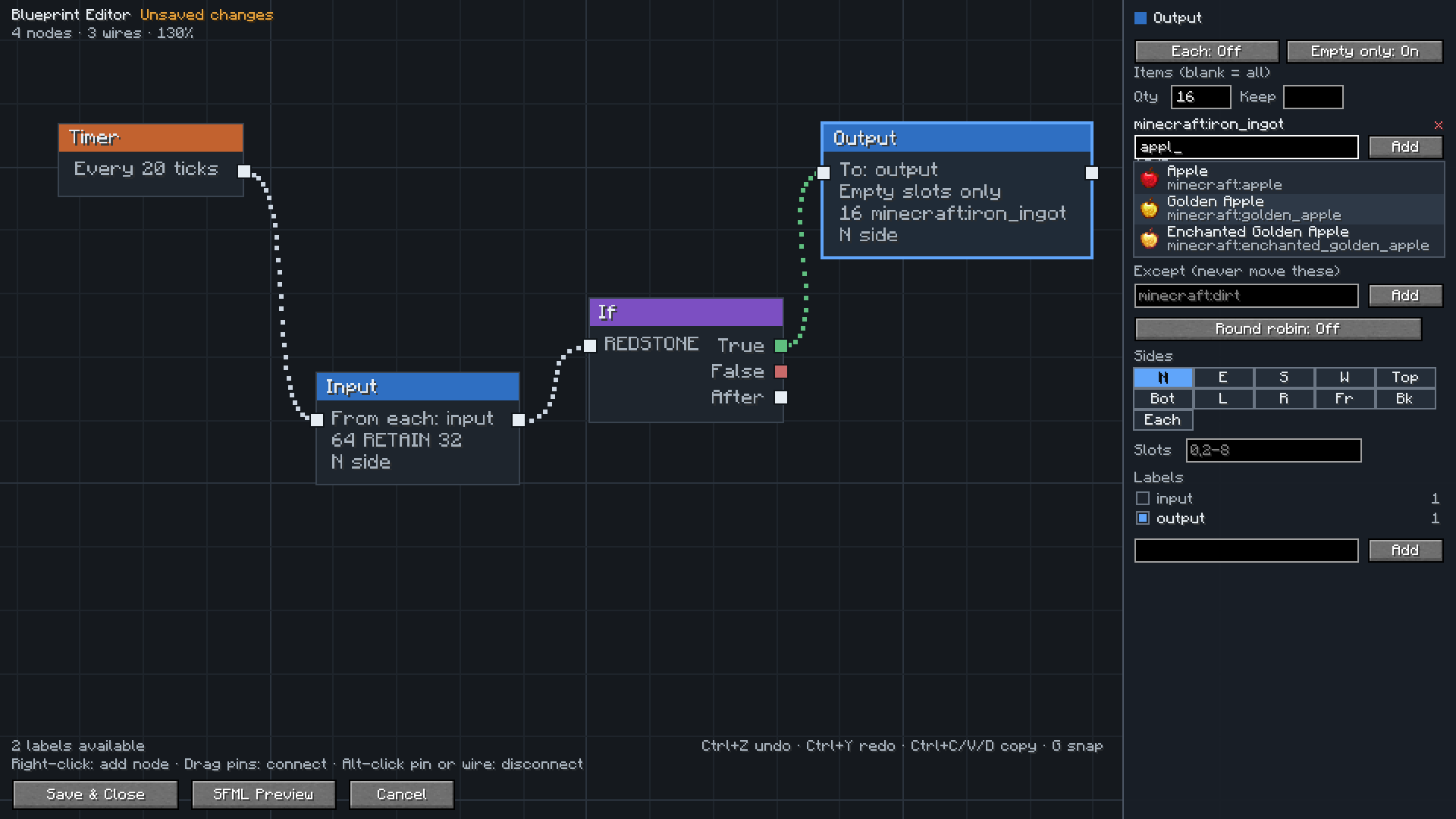 item-search.png item-search.png
-
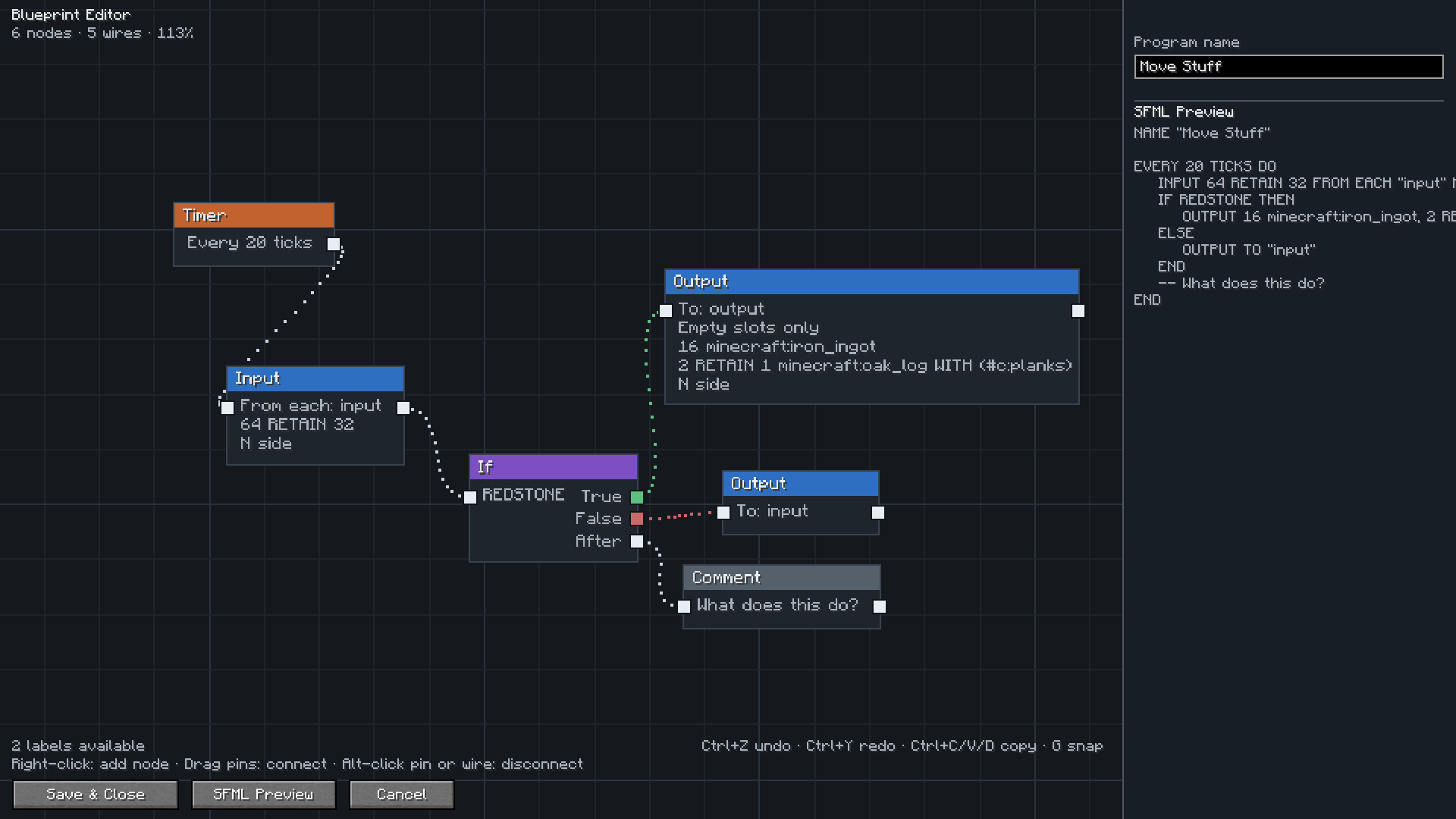 Edior Overview In game UI for editing program flows
Versions
Files
Relations
Project Relations
More like this
Similar Mods
Suggestions use data such as tags, dependencies, dependents, descriptions, titles, and more to rank how much they overlap with this mod.
On ModDex
Community snapshot
By the numbers
Statistics
Want to reach Minecraft players?
We're looking for a server hosting partner to feature here and other parts of the site. Interested? Send us a message!
Get in touchGet it on
Available Platforms
On ModDex
Community snapshot
By the numbers