
Community listing page, reviews here may not be monitored by the author.
Super Trader

No reviews yet
Super Trader is a server-side Fabric mod that revamps the Wandering Trader economy. Manage custom trades in-game using an interactive GUI, supporting enchanted items, Shulker contents, and Data Components.
Community voices
Reviews
No reviews yet. Be the first to review this project!
Get it on
Available Platforms
Compatibility
Supported Environments
Runs entirely on the server. Also works in singleplayer.
About
Project Details
For authors
Embed Badge
If you're the author of this project, you can embed a live badge anywhere that supports HTML or Markdown. It updates automatically whenever ratings change.
Use HTML for any page that supports it, or Markdown for README files and Markdown-based descriptions.
Identifiers
Platform IDs
Resources
External Links
About
Description
Super Trader
English Description
Super Trader is a powerful, 100% Server-Side Fabric mod that completely revamps the Wandering Trader economy. Say goodbye to editing boring .json configs manually! This mod provides a fully interactive in-game GUI that allows server admins to create custom trade groups, set up complex barters, and manage RNG drops—all without requiring players to download the mod.
Features
- Fully Server-Side
- Your players can join with a vanilla client.
- No mod installation required on their end!
- In-Game GUI Editor
- Manage everything through a beautiful chest-like menu.
- No need to restart the server or edit files manually.
- Settings and new trades are applied instantly.
- Perfect NBT & Shulker Saving
- Drag and drop enchanted swords, renamed items, or fully loaded Shulker Boxes into the trade editor.
- The mod saves them with 100% accuracy using Base64 serialization to prevent any data loss.
- Advanced RNG & Groups
- Organize trades into separate configurable "Groups".
- Set the Spawn Chance (e.g., 20% chance for a "Rare Artifacts" group to appear).
- Set Random Picks (e.g., the trader randomly selects 2 out of 10 available items from that group).
- Dual Bartering
- Set up complex trades using multiple item inputs.
- Ask for 8 Diamonds + 64 Quartz in exchange for 1 Custom Item.
- Safe "Ghost Slots"
- The configuration GUI uses ghost items (holograms) for setup.
- Completely safe and fully protected against duplication bugs (dupes).
- Language Localization Support
- Built-in Bilingual Support (English and Russian).
- Switch the admin GUI language on the fly with a simple command.
Commands and Permissions
| Command | Description | Permission |
|---|---|---|
/trader menu |
Opens the main configuration GUI menu | OP Level 2+ |
/trader lang <en/ru> |
Switches the admin menu language | OP Level 2+ |
/trader reload |
Manually reloads the configuration from the disk | OP Level 2+ |
How to use
- Type
/trader menuto open the GUI. - Click the
Book & Quillto create a new Trade Group (e.g., "Rare Armor"). - Configure the group's spawn chance and trade limits via the
Anvilicon. - Click on the Group to open it, then click the
Lime Concreteto add a new trade. - Simply click with your items in the Ghost Slots to set the price and the reward. Save it, and you're done! Spawn a new Wandering Trader to see the changes.
Описание на Русском
Super Trader — это мощный, полностью серверный Fabric-мод, который кардинально меняет экономику Странствующих торговцев. Забудьте о скучном редактировании .json файлов вручную! Мод добавляет удобный внутриигровой GUI-редактор, позволяющий администраторам создавать кастомные группы торгов, настраивать сложный бартер и управлять шансами появления товаров прямо в игре.
Главные особенности
- Полностью Серверный
- Игрокам не нужно скачивать мод на свои ПК.
- Они могут заходить с абсолютно чистого ванильного клиента.
- Внутриигровой GUI Редактор
- Управляйте экономикой через удобное меню.
- Настройки применяются мгновенно, без перезагрузки сервера.
- 100% Сохранение NBT и Шалкеров
- Просто кликните зачарованным мечом, переименованным предметом или полным шалкером в редакторе сделок.
- Мод идеально запомнит их содержимое благодаря бинарной (Base64) сериализации без потери данных.
- Умный Рандом и Группы
- Распределяйте товары по настраиваемым "Группам".
- Настраивайте Шанс появления (например, 20% шанс, что появится группа "Редкие артефакты").
- Настраивайте Случайный выбор (торговец выберет только 2 случайных товара из 10 возможных в этой группе).
- Двойной бартер
- Создавайте сложные торговые цепочки из нескольких предметов.
- Например, требуйте 8 Алмазов и 64 Кварца за 1 уникальный предмет.
- Безопасные "Призрачные слоты"
- Меню использует голограммы предметов для настройки.
- Мод надежно защищен от багов на дюп (клонирование) вещей.
- Двуязычный интерфейс
- Встроенная поддержка Русского и Английского языков.
- Мгновенно переключайте язык админ-меню с помощью команды.
Команды и Права
| Команда | Описание | Права |
|---|---|---|
/trader menu |
Открывает главное меню конфигураций | OP Level 2+ |
/trader lang <en/ru> |
Переключает язык интерфейса админ-меню | OP Level 2+ |
/trader reload |
Ручная перезагрузка файла конфигурации с диска | OP Level 2+ |
Как это работает
- Напишите
/trader menu, чтобы открыть интерфейс. - Нажмите на
Книгу с пером, чтобы создать новую Группу (например, "Редкая броня"). - Настройте шанс появления и лимиты через иконку
Наковальни. - Зайдите в группу и нажмите на
Зеленый Бетон, чтобы добавить сделку. - Просто кликните нужными предметами из вашего инвентаря по ячейкам оплаты и выдачи. Нажмите сохранить! Заспавните нового Странствующего торговца, чтобы увидеть результат.
Feedback & Community / Обратная связь
Found a bug or have a suggestion? Join our Discord!
Нашли баг или есть предложение? Присоединяйтесь к нашему Discord серверу!
Big thanks to Asuko Kato for designing the mod icon.
Огромная благодарность Asuko Kato за создание иконки для мода.
Screenshots
Gallery
-
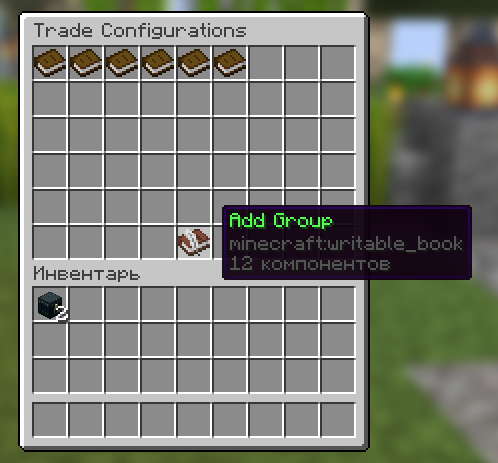 Main Trade Overview Open configuration menu
 -
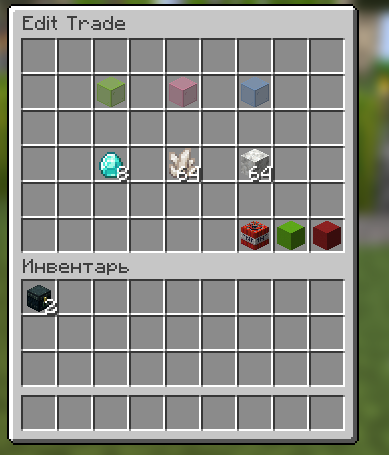 Edit Custom Trade Window for editing a specific transaction with items in slots
 -
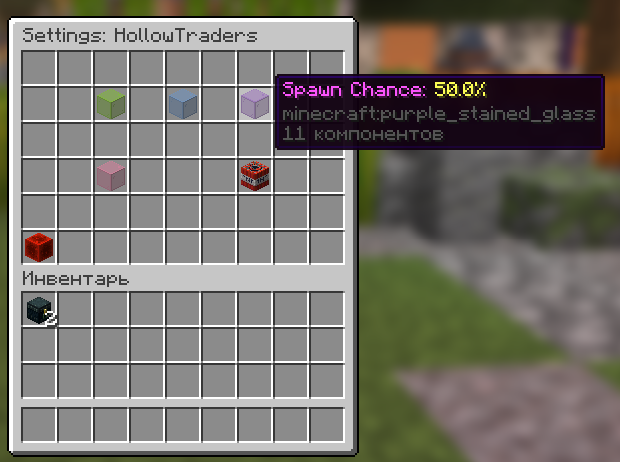 Interactive Settings Group settings editor with colored glasses (on/off, limit, chance)
 -
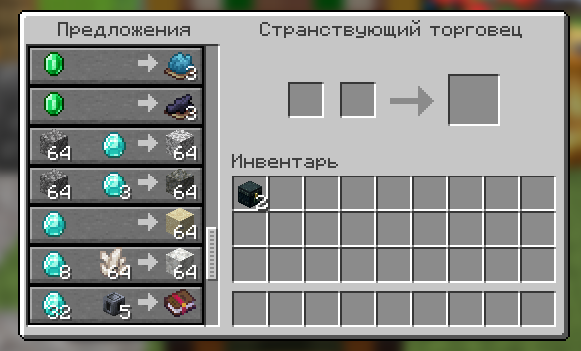 Wandering Trader UI
Versions
Files
Relations
Project Relations
More like this
Similar Mods
Suggestions use data such as tags, dependencies, dependents, descriptions, titles, and more to rank how much they overlap with this mod.
On ModDex
Community snapshot
By the numbers
Statistics

Want to reach Minecraft players?
We're looking for a server hosting partner to feature here and other parts of the site. Interested? Send us a message!
Get in touchGet it on
Available Platforms
On ModDex
Community snapshot
By the numbers
Statistics
Resources