
Community listing page, reviews here may not be monitored by the author.
SurvivalTabs

No reviews yet
SurvivalTabs will allow mod developers to add their own survival tabs that will correspond with other tabs and will work together side-by-side!
Community voices
Reviews
Filters
Click once to include, again to exclude, again to clear
No reviews yet. Be the first to review this project!
Get it on
Available Platforms
About
Project Details
For authors
Embed Badge
If you're the author of this project, you can embed a live badge anywhere that supports HTML or Markdown. It updates automatically whenever ratings change.
Use HTML for any page that supports it, or Markdown for README files and Markdown-based descriptions.
Identifiers
Platform IDs
Resources
External Links
About
Description

SurvivalTabs will allow mod developers to add their own survival tabs that
will correspond with other tabs and will work together side-by-side!
Getting Started
All that you need in order to get started using the mod is to click on the inventory button that you have set in your minecraft controls!
The default key is E.
For Mod Developers:
In the downloads, mod developers will be able to download the API in oreder to create thier own survival tabs!
What Are The Benefits Of This Mod :
This mod will give the option to mod developers to create thier own tabs very easily and fast without overriding other mod tabs..
How To Setup a New Inventory Tab
This guide will show you how to create your own basic tab!
In this tutorial we will only add the minecraft default inventory and we will not make a new texture and container!
First of all, we need to add the API to the project by right clicking on the source folder "/src/main/Java" and selecting "import".
After that, select "Archive File" from the list in the "General" section. Afterwards, click "Next" and "Browse" for the API archive and click Finish!
screenshots:
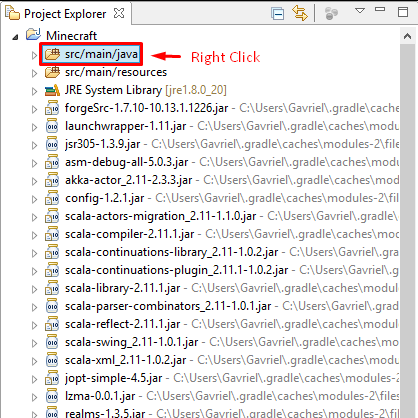
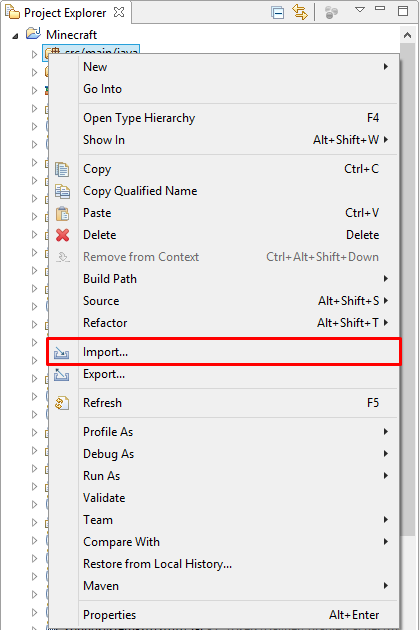

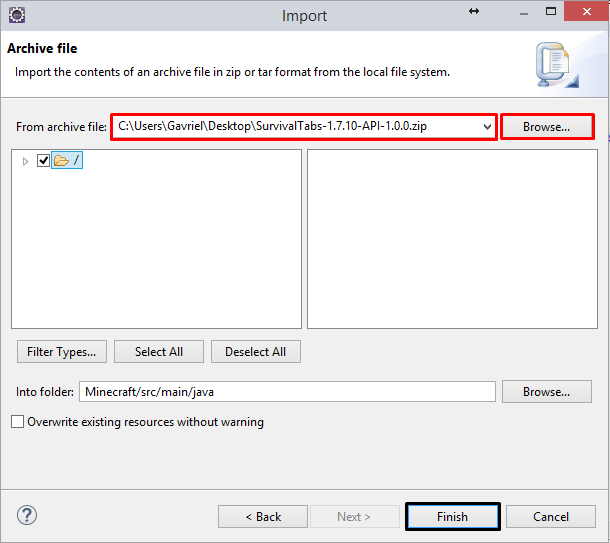
Now, we will create the tab-class (use any name you want), I will call mine "InventoryTab". We will extend it with the SurvivalTabs class from our API!
Then, you will have to add the constructor with the two variables, and we will add the unimplemented methods!
In the method "getTabIconItem()" we will return the item that will be on the tab, I will choose a diamond chestplate.
Now, we will add the Container in the "getContainer()" method.
First, I will add a new vairable of Minecraft in oreder to get the player that is currently playing.
Because I will return a new normal player's inventory container that is built in the game's "ContainerPlayer".
Now I want the GUI to present me the player in the black square that we have in the GUI texture.
In the constructor I will add this command..
this.addPlayer(fromLeftSize, fromTheTop, scale); -> this.addPlayer(51, 75, 30);
InventoryTab Class:
package com.example.examplemod;
import net.minecraft.client.Minecraft;
import net.minecraft.init.Items;
import net.minecraft.inventory.Container;
import net.minecraft.inventory.ContainerPlayer;
import net.minecraft.item.Item;
import net.minecraft.util.ResourceLocation;
import com.iTooly.survivaltabs.api.SurvivalTabs;
public class InventoryTab extends SurvivalTabs {
public static Minecraft mc = Minecraft.getMinecraft();
public InventoryTab(String lable, ResourceLocation guiTexture) {
super(lable, guiTexture);
this.addPlayer(51, 75, 30);
}
@Override
public Item getTabIconItem() {
return Items.diamond_chestplate;
}
@Override
public Container getContainer() {
return new ContainerPlayer(mc.thePlayer.inventory, !mc.theWorld.isRemote, mc.thePlayer);
}
}
Now we will create our own tab from the main class of the mod by using this code of line:
public static final SurvivalTabs inventoryTab = new InventoryTab("inventory", new ResourceLocation("textures/<wbr />gui/container/inventory.png"))<wbr />;
The vraiable name can be as you want..
The first argument is the label name for the tab (This will need to be registered in the lang file as "itemGroup.LabelName").
The second argument is the resource location of your GUI...
Main Class:
package com.example.examplemod;
import com.iTooly.survivaltabs.api.SurvivalTabs;
import net.minecraft.init.Blocks;
import net.minecraft.util.ResourceLocation;
import cpw.mods.fml.common.Mod;
import cpw.mods.fml.common.Mod.EventHandler;
import cpw.mods.fml.common.event.FMLInitializationEvent;
@Mod(modid = ExampleMod.MODID, version = ExampleMod.VERSION)
public class ExampleMod
{
public static final String MODID = "examplemod";
public static final String VERSION = "1.0";
public static final SurvivalTabs inventoryTab = new InventoryTab("inventory", new ResourceLocation("textures/gui/container/inventory.png"));
@EventHandler
public void init(FMLInitializationEvent event)
{
// some example code
System.out.println("DIRT BLOCK >> "+Blocks.dirt.getUnlocalizedName());
}
}
That's it! your tab is ready to go! But don't forget that if you want it to work you need to add the SurvivalTabs mod to your mods folder.
Result:


Screenshots
Gallery
Versions
Files
Relations
Project Relations
More like this
Similar Mods
Suggestions use data such as tags, dependencies, dependents, descriptions, titles, and more to rank how much they overlap with this mod.
On ModDex
Community snapshot
By the numbers
Statistics
Want to reach Minecraft players?
We're looking for a server hosting partner to feature here and other parts of the site. Interested? Send us a message!
Get in touchGet it on
Available Platforms
On ModDex
Community snapshot
By the numbers
Statistics
Resources