
Suspicious Shapes
No reviews yet
Use glTF models in resource packs and mods!
Provides a framework or library for other mods to use.
Community voices
Reviews
Click once to include, again to exclude, again to clear
No reviews yet. Be the first to review this project!
Get it on
Available Platforms
 Modrinth
Compatibility
Supported Environments
About
Project Details
For authors
Embed Badge
If you're the author of this project, you can embed a live badge anywhere that supports HTML or Markdown. It updates automatically whenever ratings change.
Use HTML for any page that supports it, or Markdown for README files and Markdown-based descriptions.
Identifiers
Platform IDs
About
Description
glTF models for everything
Using frapi (the fabric-rendering API), this mod intercepts requests for block models, and if they refer to glTF files, provides them as static models that get baked into the chunk geometry as normal. Entirely clientside, this mod can be used to power "cursed" resource packs that replace existing blocks with non-cuboid shapes that vanilla can't make.
It can also be used as an "included" mod to power non-cuboid blocks in your mods.
The Details
The easiest way to create a compatible model is in Blockbench.
- From the app, select "New -> Low Poly / Generic Model" and hit the "Create new model" button.
- Any identifier, UV mode, or other settings are fine.
- When you're satisfied with your model, hit "File -> Export -> Export glTF Model".
- Blockbench ignores most of these settings, and the defaults are perfectly fine.
- Find the file you exported and put it where you would normally put a json blockmodel (e.g.
assets/minecraft/models/block) - make a child model which refers to the gltf model as a parent, with a root key-value pair of
"loader": "suspicious_shapes:gltf". You can fill-in texture references and set color indices here too. - Edit the text of the glTF model to replace the texture's data URL with a texture reference.
The last part there is the hard part. In the file you'll see something like,
"images":[{"mimeType":"image/png","uri":"data:image/png;base64,iVBORw0KGgoAAAANSUhEUgAAABAAAAAQCAYAAAAf8/9hAAAAr0lEQVQ4y6WTMQrCQBBFt0xtk0YQL+QR0mpnYyk5QbDObTc84YVB0NnFgSGTyf7/5w+bUpJ4LMdaeuI6jzWC5/Vcm0kAAyAleE6Hd00vkn8Fq0oCJv32up9yEg6REPGEQDLemyYR6DS3y7ATp3tQTTCEWqH3U50DcQccRl0b9lKSuAvV0wXG+AQyRTOYiDughkB76bXVgiDr5gkEeYEAu8iuf0L/WiD/Iii94diZ+gZo3N9oOnqLFAAAAABJRU5ErkJggg=="}]
This is a base-64 encoded image of the texture you used. Since block models can't use random textures that aren't in the atlas, we'll have to fix that. Replace each of the unreadable strings marked "uri" with a minecraft texture reference, like this
"images":[{"mimeType":"image/png","uri":"minecraft:blocks/stone"}]
Or, if you're making several models with this shape, you can use it as a parent with a texture up-reference like normal:
"images":[{"mimeType":"image/png","uri":"#all"}]
Your child model can look something like this:
{
  "parent": "minecraft:block/sphere_all.gltf",
  "loader": "suspicious_shapes:gltf",
  "textures": {
    "all": "minecraft:block/acacia_leaves"
  },
  "colorIndexes": [ 0 ]
}
And that's it! Load up minecraft or reload resource packs and you should see your model!
Screenshots
Gallery
-
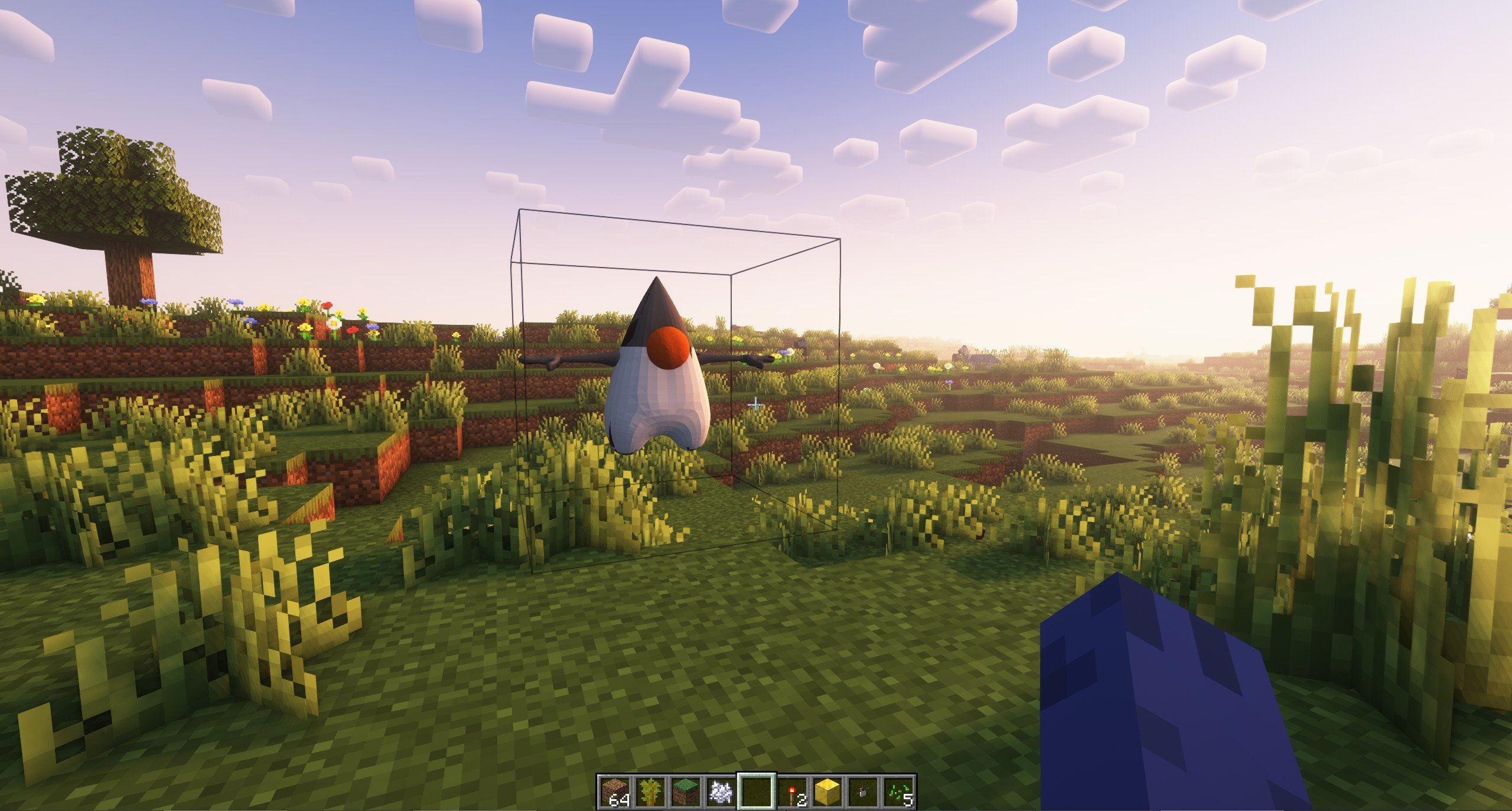 Duke In this image we have replaced TNT with a high-poly model of Duke, the Java mascot.
Versions
Files
Relations
Project Relations
More like this
Similar Mods
Suggestions use data such as tags, dependencies, dependents, descriptions, titles, and more to rank how much they overlap with this mod.
On ModDex
Community snapshot
By the numbers
Statistics

Want to reach Minecraft players?
We're looking for a server hosting partner to feature here and other parts of the site. Interested? Send us a message!
Get in touchGet it on
Available Platforms
On ModDex
Community snapshot
By the numbers