
Community listing page, reviews here may not be monitored by the author.
SwordSight


No reviews yet
SwordSight makes weapons ignore grass tall grass and so on! Customizeable to any block.

Community voices
Reviews
No reviews yet. Be the first to review this project!
Get it on
Available Platforms
Compatibility
Supported Environments
Required on the client. Installing it on the server adds functionality.
About
Project Details
For authors
Embed Badge
If you're the author of this project, you can embed a live badge anywhere that supports HTML or Markdown. It updates automatically whenever ratings change.
Use HTML for any page that supports it, or Markdown for README files and Markdown-based descriptions.
Identifiers
Platform IDs
About
Description
⚔️ SwordSight: Server-Authoritative Hit Through the Clutter
SwordSight enhances combat by preventing blocks like tall grass, flowers, and other non-solid clutter from blocking your weapon's line of sight, allowing you to hit enemies behind them seamlessly.
Alongside the original server-authoritative configuration system, SwordSight ships with a full in-game configuration menu — a JEI/REI-style dual-list picker for choosing exactly which blocks are ignored, with dedicated handling for growth-stage crops so you can decide whether a fully-grown plant should still be farmable with your weapon.
🎯 Features
🖱️ In-Game Configuration Menu
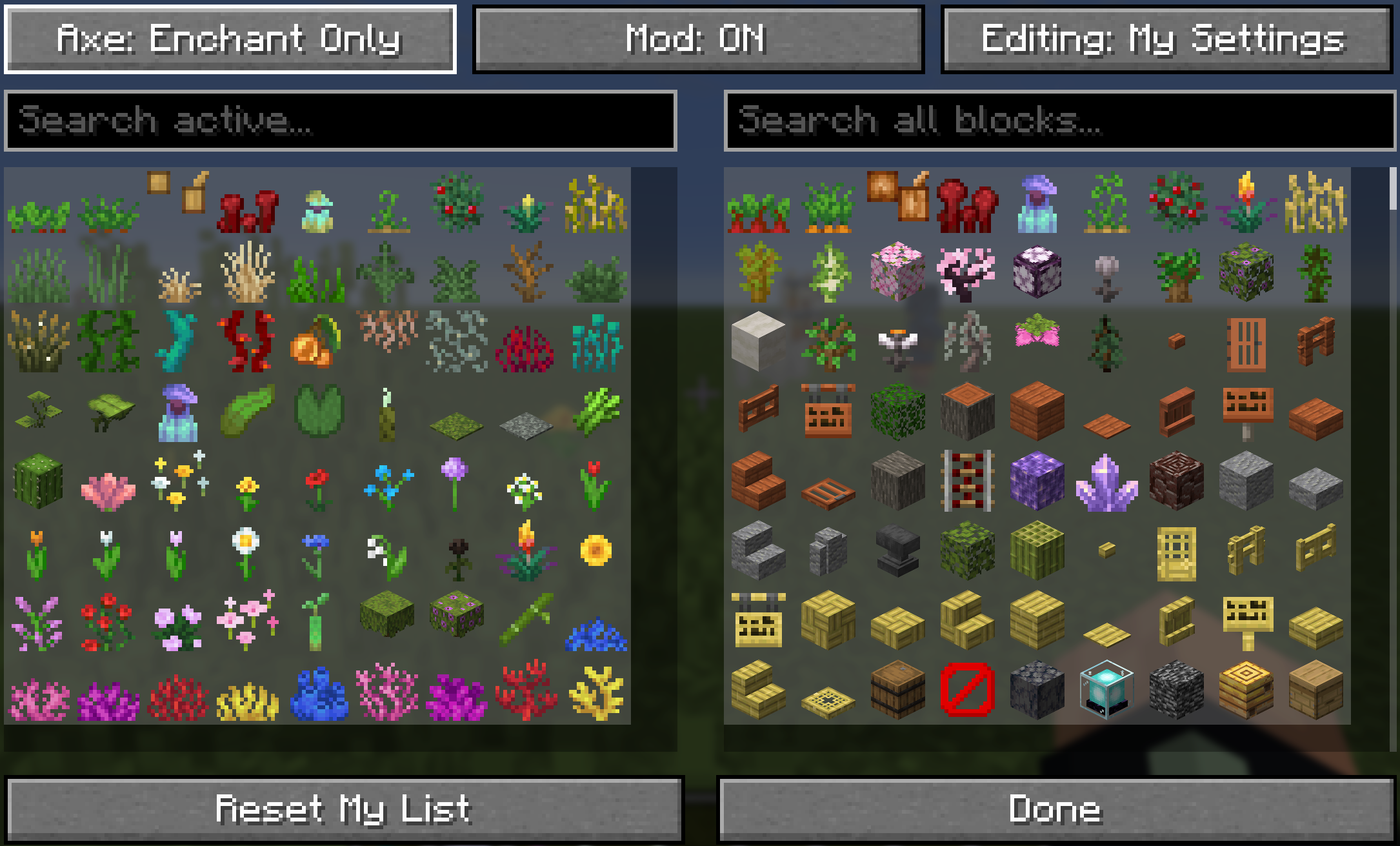
Press M (default, fully rebindable in Controls) or run /swordsight or /swords to open the configuration menu directly.
- Two-List Picker: An Active list on the left (blocks currently ignored) and an All Blocks list on the right (everything else you can enable), just like a JEI/REI item browser. Click an entry on either side to move it across.
- Smart Sorting: The Active list follows a curated order: grasses → other greens → flowers → saplings → coral fans → coral → vanilla creative inventory order. The All Blocks list prioritizes plant matter and modded flora over solid blocks.
- Two Editing Profiles:
My Settings: Always yours to edit, personal, and independent of any server.Editing: Server: Available only in single-player or to authenticated server operators. Server-editing mode tints the list yellow to prevent accidental global overrides.
- Growth-Stage Crops: Wheat, carrots, potatoes, beetroots, cocoa, nether wart, torchflowers, pitcher plants, and sweet berry bushes each get two dedicated entries rendered with their real growth textures:
- Second-to-last stage active: Hits pass through early growth stages, but the fully-grown plant still blocks hits so it remains easily farmable.
- Fully-grown stage active: Hits pass through the plant across all growth stages.
- Clean Icons: Textureless blocks are filtered out, custom player skulls are excluded, and block variants (like torches vs. wall torches) are merged into single entries.
- Reset Profile: Restore your personal profile back to default values at any time.
🌐 Server-Authoritative Configuration
- Multiplayer Consistency: On dedicated servers, the server's block list serves as the source of truth for what can be bypassed.
- Your Settings, Server Permitting: Your personal preferences remain intact, but operate strictly within the bounds of what the server allows.
- Server Operators: Players with operator permissions can toggle to
Editing: Serverto configure the global whitelist in real time. - Vanilla Server Fallback: Connecting to a server without SwordSight automatically switches the client to a bundled, safe fallback list.
- Single-Player: Functions as a self-contained local setup where personal preferences govern all behavior.
🤺 Combat & Weapon Mechanics
- Raycast Override: Intercepts the engine's targeted raycast check, treating non-solid clutter on the whitelist as an empty hitbox for combat swings.
- Performance Cached: Ignored blocks are cached internally as resolved
Blockreferences to maintain zero tick-rate or hit latency. - Automatic Weapon Eligibility: Works automatically with Swords (via the
#minecraft:swordsitem tag), Tridents, and Maces. - Toggleable Axe Support: Configure axe behavior via the menu or chat commands (
Disabled→Enchant Only→Always Enabled).- Enchant Only requires Sharpness, Smite, Bane of Arthropods, or Fire Aspect before hit-through activates.
📧 Contact Me & Support Information
💬 Primary Support Channel (Preferred)
All general questions, feature requests, and non-urgent bug reports should be posted in the appropriate channels on our Discord Server. We actively monitor the server and will respond as soon as possible. This ensures that the whole community can benefit from the discussion and solutions.
🆘 Urgent Private Messaging (PM) Policy
While we prefer all issues to be handled via Discord first, you are welcome to PM me directly under specific urgent circumstances:
- Allowed Reason: Your server is crashing or experiencing critical, game-breaking errors directly related to one of my mods/plugins.
- Requirement: You must be the owner of the server.
- Time Zone: Operating in the Central European Time zone (CET / CEST).
- PM Hours: Please only send private messages between 10:00 AM and 10:00 PM (Brussels Time).
Immediate responses are not guaranteed; private messaging is a professional courtesy, not an entitlement. Thank you for your understanding and cooperation!
📝 Default Ignored Blocks
The shipped default configuration includes a comprehensive list of non-solid plant and clutter blocks:
// --- GRASSES, FERNS, BUSHES ---
"minecraft:short_grass",
"minecraft:tall_grass",
"minecraft:dead_bush",
"minecraft:fern",
"minecraft:large_fern",
"minecraft:short_dry_grass",
"minecraft:tall_dry_grass",
"minecraft:bush",
"minecraft:firefly_bush",

// --- CROPS & GROWABLES ---
"minecraft:sugar_cane",
"minecraft:wheat",
"minecraft:carrots",
"minecraft:potatoes",
"minecraft:beetroots",
"minecraft:cocoa",
"minecraft:nether_wart",
"minecraft:torchflower_crop",
"minecraft:pitcher_crop",
"minecraft:sweet_berry_bush",
"minecraft:bamboo",
"minecraft:bamboo_sapling",
"minecraft:cactus",
"minecraft:cactus_flower",

// --- FLOWERS (Short & Tall) ---
"minecraft:poppy",
"minecraft:dandelion",
"minecraft:allium",
"minecraft:azure_bluet",
"minecraft:red_tulip",
"minecraft:orange_tulip",
"minecraft:white_tulip",
"minecraft:pink_tulip",
"minecraft:oxeye_daisy",
"minecraft:cornflower",
"minecraft:lily_of_the_valley",
"minecraft:wither_rose",
"minecraft:blue_orchid",
"minecraft:torchflower",
"minecraft:sunflower",
"minecraft:lilac",
"minecraft:rose_bush",
"minecraft:peony",
"minecraft:pink_petals",
"minecraft:wildflowers",

// --- VINES, ROOTS, FOLIAGE ---
"minecraft:vine",
"minecraft:twisting_vines",
"minecraft:twisting_vines_plant",
"minecraft:weeping_vines",
"minecraft:weeping_vines_plant",
"minecraft:cave_vines",
"minecraft:cave_vines_plant",
"minecraft:hanging_roots",
"minecraft:glow_lichen",
"minecraft:mangrove_propagule",
"minecraft:mushroom_stem",
"minecraft:crimson_roots",
"minecraft:warped_roots",
"minecraft:azalea",
"minecraft:flowering_azalea",
"minecraft:small_dripleaf",
"minecraft:big_dripleaf",
"minecraft:pitcher_plant",

// --- WATER PLANTS & CORALS ---
"minecraft:seagrass",
"minecraft:tall_seagrass",
"minecraft:kelp",
"minecraft:kelp_plant",
"minecraft:lily_pad",
"minecraft:tube_coral",
"minecraft:brain_coral",
"minecraft:bubble_coral",
"minecraft:fire_coral",
"minecraft:horn_coral",
"minecraft:tube_coral_fan",
"minecraft:brain_coral_fan",
"minecraft:bubble_coral_fan",
"minecraft:fire_coral_fan",
"minecraft:horn_coral_fan",
"minecraft:sea_pickle",
"minecraft:moss_carpet",
"minecraft:pale_moss_carpet"
⚙️ In-Game Commands
Commands accept either /swordsight or /swords. In multiplayer, players without operator permissions can view configuration parameters or modify their personal profile, while server-wide changes require elevated permissions.
| Command | Description | Permission / Context |
|---|---|---|
/swordsight |
Displays command usage links and launches the config menu. | All Players |
/swordsight reload |
Reloads config from disk and refreshes the runtime cache. | Singleplayer / Operators |
/swordsight list |
Prints all active ignored blocks in chat. | All Players |
/swordsight list <item_id> |
Toggles a specific block in the active list. | Singleplayer / Operators |
/swordsight axe |
Cycles Axe Hit-Through (Disabled / Enchant Only / Always Enabled). | Singleplayer / Operators |
/swordsight axe enchant |
Toggles the combat enchantment requirement for axes. | Singleplayer / Operators |
📦 Modpack Policy
- Permitted: You are free to include this mod in any public or private modpack.
- Integrity: Do not modify, re-host, or alter the original mod binary/JAR file directly.
- Monetization: Neither the modpack itself nor access to this mod within the pack may be monetized or locked behind a paywall.
⚔️ SwordSight: Server-Authoritative Hit Through the Clutter
SwordSight is a mod designed to enhance combat by preventing blocks like tall grass, flowers, and other non-solid clutter from blocking your weapon's line of sight, allowing you to hit enemies behind them seamlessly.
Alongside the original server-authoritative configuration system, SwordSight now ships with a full in-game configuration menu — a JEI/REI-style dual-list picker for choosing exactly which blocks are ignored, with dedicated handling for growth-stage crops so you can decide whether a fully-grown plant should still be farmable with your weapon.
📧 Contact Me & Support Information
💬 Primary Support Channel (Preferred)
All general questions, feature requests, and non-urgent bug reports should be posted in the appropriate channels on our Discord Server. We actively monitor the server and will respond as soon as possible. This ensures that the whole community can benefit from the discussion and solutions.
🆘 Urgent Private Messaging (PM) Policy
While we prefer all issues to be handled via the Discord server first, you are welcome to PM me directly under specific urgent circumstances:
- Allowed Reason: Your server is crashing or experiencing critical, game-breaking errors directly related to one of my mods/plugins.
- Requirement: You must be the owner of the server.
- Time Zone: I am operating in the (CET/CEST) Time Zone.
- PM Hours: Please only send private messages between 10:00 AM and 10:00 PM (Brussels Time).
I will endeavor to answer your PM as soon as I can to be helpful and see what I can do to resolve your urgent issue. However, please understand that immediate responses are not guaranteed, and private messaging is a professional courtesy, not an entitlement. Thank you for your understanding and cooperation!
🎯 Features
🖱️ In-Game Configuration Menu (Keybind: M)
Press M (default, fully rebindable in Controls) or run /swordsight//swords to open SwordSight's config menu directly — no more chat commands needed to see what's active.
- Two-list picker: an Active list on the left (blocks currently ignored) and an All Blocks list on the right (everything else you can enable), just like a JEI/REI item browser. Click an entry on either side to move it across.
- Smart sorting: the Active list follows a curated, farming-friendly order — grasses (short, tall, dry, sea) → other greens → flowers (short, then tall) → saplings → coral fans → coral → everything else in the same order as the vanilla creative inventory. The All Blocks list surfaces plant matter first (including modded flora), pushing logs and other solid blocks further down.
- Two editing profiles: My Settings is always yours to edit, personal and independent of any server. Editing: Server is available only in single-player, or to players with genuine server-verified permission in multiplayer — the button is always visible, but simply won't switch modes without the right access. Server-editing mode tints the list yellow so you always know which profile you're touching.
- Growth-stage crops, done properly: wheat, carrots, potatoes, beetroots, cocoa, nether wart, torchflower, pitcher plant, and sweet berry bush each get two dedicated entries — second-to-last stage and fully grown — rendered with their real in-game growth textures rather than a generic seed icon. Toggling them controls exactly how each crop behaves:
- Second-to-last stage active: your weapon passes through every earlier growth stage, but the fully-grown plant still blocks hits — so it stays farmable.
- Fully-grown stage also active: the plant is protected at every stage, including once it's fully grown.
- Clean icons: entries with a missing or broken texture are automatically filtered out, non-vanilla/custom skull blocks are excluded, and paired blocks like torch/wall-torch or a mob skull and its wall variant are merged into a single entry so you never see duplicates.
- Reset My List restores your personal profile back to the shipped defaults at any time.
🌐 Server-Authoritative Configuration
- Multiplayer Consistency: when installed on a dedicated server, the server's own block list acts as the source of truth for what's available at all — regular players only ever see and use blocks the server currently permits, keeping every player's experience consistent with server intent.
- Your Settings, Server Permitting: your own Active/Inactive choices always remain yours — the server doesn't overwrite your personal picks. Instead, it defines the boundary of what's possible: anything outside the server's allowed list simply won't function or appear, no matter your own preferences.
- Server Operators: players with server permission can switch to Editing: Server in the menu (or use the equivalent chat commands) to change the list every player on the server is bound by.
- Vanilla Server Fallback: connecting to a server that doesn't have SwordSight installed automatically falls back to a bundled, curated "safe" block list, so basic hit-through functionality still works immediately without any server-side setup.
- Single-Player: acts as a fully local, self-contained mod — your personal settings are all that matter, with no server boundary to worry about.
📝 Default Ignored Blocks
The shipped default configuration includes a comprehensive list of non-solid plant and clutter blocks, covering grasses, crops, flowers, vines, corals, and more.
📦 Default Block List
// --- GRASSES, FERNS, BUSHES ---
"minecraft:short_grass",
"minecraft:tall_grass",
"minecraft:dead_bush",
"minecraft:fern",
"minecraft:large_fern",
"minecraft:short_dry_grass",
"minecraft:tall_dry_grass",
"minecraft:bush",
"minecraft:firefly_bush",

// --- CROPS & GROWABLES (with dedicated growth-stage handling — see In-Game Configuration Menu) ---
"minecraft:sugar_cane",
"minecraft:wheat",
"minecraft:carrots",
"minecraft:potatoes",
"minecraft:beetroots",
"minecraft:cocoa",
"minecraft:nether_wart",
"minecraft:torchflower_crop",
"minecraft:pitcher_crop",
"minecraft:sweet_berry_bush",
"minecraft:bamboo",
"minecraft:bamboo_sapling",
"minecraft:cactus",
"minecraft:cactus_flower",

// --- FLOWERS (Short & Tall) ---
"minecraft:poppy",
"minecraft:dandelion",
"minecraft:allium",
"minecraft:azure_bluet",
"minecraft:red_tulip",
"minecraft:orange_tulip",
"minecraft:white_tulip",
"minecraft:pink_tulip",
"minecraft:oxeye_daisy",
"minecraft:cornflower",
"minecraft:lily_of_the_valley",
"minecraft:wither_rose",
"minecraft:blue_orchid",
"minecraft:torchflower",
"minecraft:sunflower",
"minecraft:lilac",
"minecraft:rose_bush",
"minecraft:peony",
"minecraft:pink_petals",
"minecraft:wildflowers",

// --- VINES, ROOTS, FOLIAGE ---
"minecraft:vine",
"minecraft:twisting_vines",
"minecraft:twisting_vines_plant",
"minecraft:weeping_vines",
"minecraft:weeping_vines_plant",
"minecraft:cave_vines",
"minecraft:cave_vines_plant",
"minecraft:hanging_roots",
"minecraft:glow_lichen",
"minecraft:mangrove_propagule",
"minecraft:mushroom_stem",
"minecraft:crimson_roots",
"minecraft:warped_roots",
"minecraft:azalea",
"minecraft:flowering_azalea",
"minecraft:small_dripleaf",
"minecraft:big_dripleaf", // its stem segment always follows automatically
"minecraft:pitcher_plant",

// --- WATER PLANTS/CORALS ---
"minecraft:seagrass",
"minecraft:tall_seagrass",
"minecraft:kelp",
"minecraft:kelp_plant",
"minecraft:lily_pad",
"minecraft:tube_coral",
"minecraft:brain_coral",
"minecraft:bubble_coral",
"minecraft:fire_coral",
"minecraft:horn_coral",
"minecraft:tube_coral_fan",
"minecraft:brain_coral_fan",
"minecraft:bubble_coral_fan",
"minecraft:fire_coral_fan",
"minecraft:horn_coral_fan",
"minecraft:sea_pickle",
"minecraft:moss_carpet",
"minecraft:pale_moss_carpet"
Bypass Vision-Obscuring Blocks
- Raycast Override: the mod intercepts the game's raycast check and forces non-solid clutter blocks defined in the active config to return an empty hitbox, allowing your weapon's line-of-sight to pass through them.
- Performance Cache: an internal cache of ignored blocks as resolved
Blockobjects keeps lookups fast during gameplay, with no per-hit performance cost.
Configurable Weapon Eligibility
The hit-through functionality is strictly controlled by weapon type:
- Automatic Eligibility: works automatically with Swords (via the
#minecraft:swordsitem tag), Tridents, and Maces. - Axe Support (Toggleable): cycle axe behavior between Disabled → Enchant Only → Always Enabled from the in-game menu or via
/swordsight axeand/swordsight axe enchant.- Enchant Only requires the axe to carry a combat enchantment (Sharpness, Smite, Bane of Arthropods, or Fire Aspect) before hit-through kicks in.
⚙️ In-Game Commands
Commands are accessible using either /swordsight or the alias /swords, and now open the in-game configuration menu directly in addition to their usual chat output.
| Command | Description | Context |
|---|---|---|
/swordsight |
Displays the command list and links, and opens the configuration menu. | All contexts |
/swordsight reload |
Reloads the config from disk and updates the block cache. | Single-player / Server operators |
/swordsight list |
Shows all currently ignored blocks. | All contexts |
/swordsight list <item_id> |
Toggles an item/block in the ignored list. | Single-player / Server operators |
/swordsight axe |
Cycles Axe Hit-Through between Disabled / Enchant Only / Always Enabled. | Single-player / Server operators |
/swordsight axe enchant |
Toggles the enchantment requirement for axes. | Single-player / Server operators |
In multiplayer, players without server permission can still view the current configuration and freely manage their own personal profile through the in-game menu — only changes to the server's shared list require operator permission.
Modpack Policy
- You ARE PERMITTED to include this mod in any modpack.
- Please do not modify the mod's JAR file directly.
- The modpack itself, or access to this mod within the modpack, must not be sold.
Screenshots
Gallery
-

-
 Brand new ingame menu!
Versions
Files
Relations
Project Relations
More like this
Similar Mods
Suggestions use data such as tags, dependencies, dependents, descriptions, titles, and more to rank how much they overlap with this mod.
On ModDex
Community snapshot
By the numbers
Statistics
 (opens in a new tab)
Get it on
Available Platforms
On ModDex
Community snapshot
By the numbers