
Sync Re-Ported
No reviews yet
Transfer your consciousness between shells! One mind. Many bodies.
Adds new methods of transportation for players.
Fabric is a mod loader for versions 1.14+ of Minecraft, particularly popular for client side and optimization mods.
Community voices
Reviews
Click once to include, again to exclude, again to clear
No reviews yet. Be the first to review this project!
Get it on
Available Platforms
 Modrinth
Compatibility
Supported Environments
About
Project Details
For authors
Embed Badge
If you're the author of this project, you can embed a live badge anywhere that supports HTML or Markdown. It updates automatically whenever ratings change.
Use HTML for any page that supports it, or Markdown for README files and Markdown-based descriptions.
Identifiers
Platform IDs
About
Description
Disclaimer
This mod is an unofficial port of this mod. The following description is from the original mod's page on Modrinth.
This port may be updated, but is currently not maintained, and only serves as a port to newer versions of the game. There may be bugs and issues with this port that will not be resolved.
This mod was ported upon my request thanks to IMS.
This port will be taken down if either of the original mod authors request it.
You can reach me at palm1 on discord.

Sync (Fabric)





Sync (Fabric) is an unofficial reimplementation of the Sync mod, that was originally developed by iChun.
As for the brief description of the mod, I think the original one says it all:
This mod provides clones, or as we like to call it, "shells". These shells are basically new individuals, with their own inventory, experience level, and even gamemode.
However, they lack a mind that would control them. That's where the player comes in. Each shell is biometrically tied to the player whose sample was used to create it, and allows the player to "sync" their mind with it, essentially creating multiple player instances.
Crafting recipes
Sync Core:

Sync Core (for Hardcore players):

P.S. - If you aren't brave enough to fight the Wither in Hardcore, you can use this datapack (it will bring back the original Sync Core recipe). Please read this article, if you don't know how to do it.
Shell Constructor:

Shell Storage:

Treadmill:

How to play
- You need to craft a
shell constructorand place it down. - Then you need to provide it with a sample - just
right-clickthe thing. ⚠️WARNING: this action will kill you! In order to create a shell with full health, the constructor must absorb 20HP (40 for Hardcore players). If you don't want to die, you can eat a golden apple to increase your maximum health, or you can hold a totem of undying during the process (which is the only option for Hardcore players). - The shell constructor needs power to work, so put a
treadmillnext to it (it should touch any side of any part of the shell constructor) and lure apigor awolfto its center to start generating piggawatts.
You should end up with something like this:
You don't really need a comparator, it's here just to demonstrate that you can determine progress of the shell construction process via strength of the comparator output. - Once your new shell is constructed, you need to craft a
shell storageand place it down. - Supply it with
redstone power. - Once doors of the shell storage are open, you can
walk into it. - You'll see a radial
menuthat displays your shells:
Selectthe shell you want to transfer your mind into, and enjoy the process!
Notes
- You can color-code shells stored in shell storages. Just right-click a shell storage with dye.
- Syncing works cross dimensional, and should support custom dimensions.
- If you die while using a shell, you'll be immediately synced with your original body (if you still have one; otherwise your mind will be transferred to a random shell).
- Death of a shell doesn't increase your death counter.
- Shell can be equipped (or unequipped) with armor, tools, etc. via hoppers connected to a corresponding shell container.
- Shell storage should be constantly supplied with power in order to keep stored shell alive.
- Shell storage can be powered by redstone, if the
shellStorageAcceptsRedstoneoption is set totrue. - Shell storage can be powered by any valid energy source (e.g., treadmills, machinery from popular tech mods, etc.).
- It's possible to measure a shell container's state with a comparator.
- You can determine progress of the shell construction process via strength of the comparator output.
- You can measure the fullness of a shell's inventory via strength of the comparator output.
- You can change a comparator output type by right-clicking on a shell container with a wrench.
- Shell storage and shell constructor are pretty fragile, so don't try to mine them without
silk touchenchantment.
- Shell storage can be powered by redstone, if the
Config
The mod is highly configurable. The config is located at ./config/sync.json and by default looks like this:
{
  "enableInstantShellConstruction": false,
  "warnPlayerInsteadOfKilling": false,
  "fingerstickDamage": 20.0,
  "hardcoreFingerstickDamage": 40.0,
  "shellConstructorCapacity": 256000,
  "shellStorageCapacity": 320,
  "shellStorageConsumption": 16,
  "shellStorageAcceptsRedstone": true,
  "shellStorageMaxUnpoweredLifespan": 20,
  "energyMap": [
    {
      "entityId": "minecraft:chicken",
      "outputEnergyQuantity": 2
    },
    {
      "entityId": "minecraft:pig",
      "outputEnergyQuantity": 16
    },
    {
      "entityId": "minecraft:player",
      "outputEnergyQuantity": 20
    },
    {
      "entityId": "minecraft:wolf",
      "outputEnergyQuantity": 24
    },
    {
      "entityId": "minecraft:creeper",
      "outputEnergyQuantity": 80
    },
    {
      "entityId": "minecraft:enderman",
      "outputEnergyQuantity": 160
    }
  ],
  "syncPriority": [
    { "priority": "NATURAL" }
  ],
  "wrench": "minecraft:stick",
  "updateTranslationsAutomatically": false
}
| Name | Description | Default value |
|---|---|---|
enableInstantShellConstruction |
If this option is enabled, creative-like shells will be constructed immediately, without the use of energy | false |
warnPlayerInsteadOfKilling |
If this option is enabled, a player won't be killed by a shell constructor if they don't have enough health to create a new shell | false |
fingerstickDamage |
The amount of damage that a shell constructor will deal to a player when they try to create a new shell | 20.0 |
hardcoreFingerstickDamage |
The amount of damage that a shell constructor will deal to a player in the Hardcore mode when they try to create a new shell | 40.0 |
shellConstructorCapacity |
The amount of energy required to construct a new shell | 256000 |
shellStorageCapacity |
Determines capacity of a shell storage's inner battery | 320 |
shellStorageConsumption |
Energy consumption of a shell storage's life support systems (per tick) | 16 |
shellStorageAcceptsRedstone |
If this option is enabled, a shell storage can be powered by redstone | true |
shellStorageMaxUnpoweredLifespan |
Determines how many ticks a shell can survive without a power supply connected to the corresponding shell storage | 20 |
energyMap |
Specifies a list of entities that can produce energy via treadmills | ... |
syncPriority |
The order of shell selection for synchronization in case of death Available priority values:
|
[{ "priority": "NATURAL" }] |
wrench |
Identifier of an item that can be used as a wrench in order to change a shell constructor's state | minecraft:stick |
updateTranslationsAutomatically |
If this option is enabled, translations will be updated every time the game is launched | false |
You can edit any of these values directly in the config file or via ModMenu.
Translations

Sync (Fabric) makes use of crowd sourced translations.
You can help translate the mod to additional languages here: crowdin.com.
Installation
Requirements:
- Minecraft
1.18.x - Fabric Loader
>=0.12.0 - Fabric API
>=0.43.1
You can download the mod from:
- GitHub Releases (recommended)
- Modrinth
- CurseForge
- GitHub Actions (these builds may be unstable, but they represent the actual state of the development)
Developers
build.gradle:
repositories {
    maven {
        name = "Modrinth"
        url = "https://api.modrinth.com/maven"
        content {
            includeGroup "maven.modrinth"
        }
    }
}
dependencies {
modImplementation "maven.modrinth:sync-fabric:${project.sync_version}"
}
gradle.properties:
sync_version=/* latest version goes here */
There's no documentation for the project's api yet, but you can find some useful examples in the compat package.
Building from sources
Requirements:
- JDK
16
Linux/MacOS
git clone https://github.com/Kir-Antipov/sync-fabric.git
cd sync-fabric
chmod +x ./gradlew
./gradlew build
cd build/libs
Windows
git clone https://github.com/Kir-Antipov/sync-fabric.git
cd sync-fabric
gradlew build
cd build/libs
License
Created by Kir_Antipov, licensed under MIT license.
Originally made by iChun under GNU LGPLv3 license.
Copyright (C) 2021 Kir_Antipov
Permission is hereby granted, free of charge, to any person obtaining a copy
of this software and associated documentation files (the "Software"), to deal
in the Software without restriction, including without limitation the rights
to use, copy, modify, merge, publish, distribute, sublicense, and/or sell
copies of the Software, and to permit persons to whom the Software is
furnished to do so, subject to the following conditions:
The above copyright notice and this permission notice shall be included in all
copies or substantial portions of the Software.
THE SOFTWARE IS PROVIDED "AS IS", WITHOUT WARRANTY OF ANY KIND, EXPRESS OR
IMPLIED, INCLUDING BUT NOT LIMITED TO THE WARRANTIES OF MERCHANTABILITY,
FITNESS FOR A PARTICULAR PURPOSE AND NONINFRINGEMENT. IN NO EVENT SHALL THE
AUTHORS OR COPYRIGHT HOLDERS BE LIABLE FOR ANY CLAIM, DAMAGES OR OTHER
LIABILITY, WHETHER IN AN ACTION OF CONTRACT, TORT OR OTHERWISE, ARISING FROM,
OUT OF OR IN CONNECTION WITH THE SOFTWARE OR THE USE OR OTHER DEALINGS IN THE
SOFTWARE.
Sync (Fabric) was originally licensed under GNU LGPLv3 license to conform to the original mod, but since the project is not a port, but a reimplementation with its own unique codebase, I got permission from iChun to change the license to MIT.
You can find more about the MIT license on this website.

Screenshots
Gallery
-
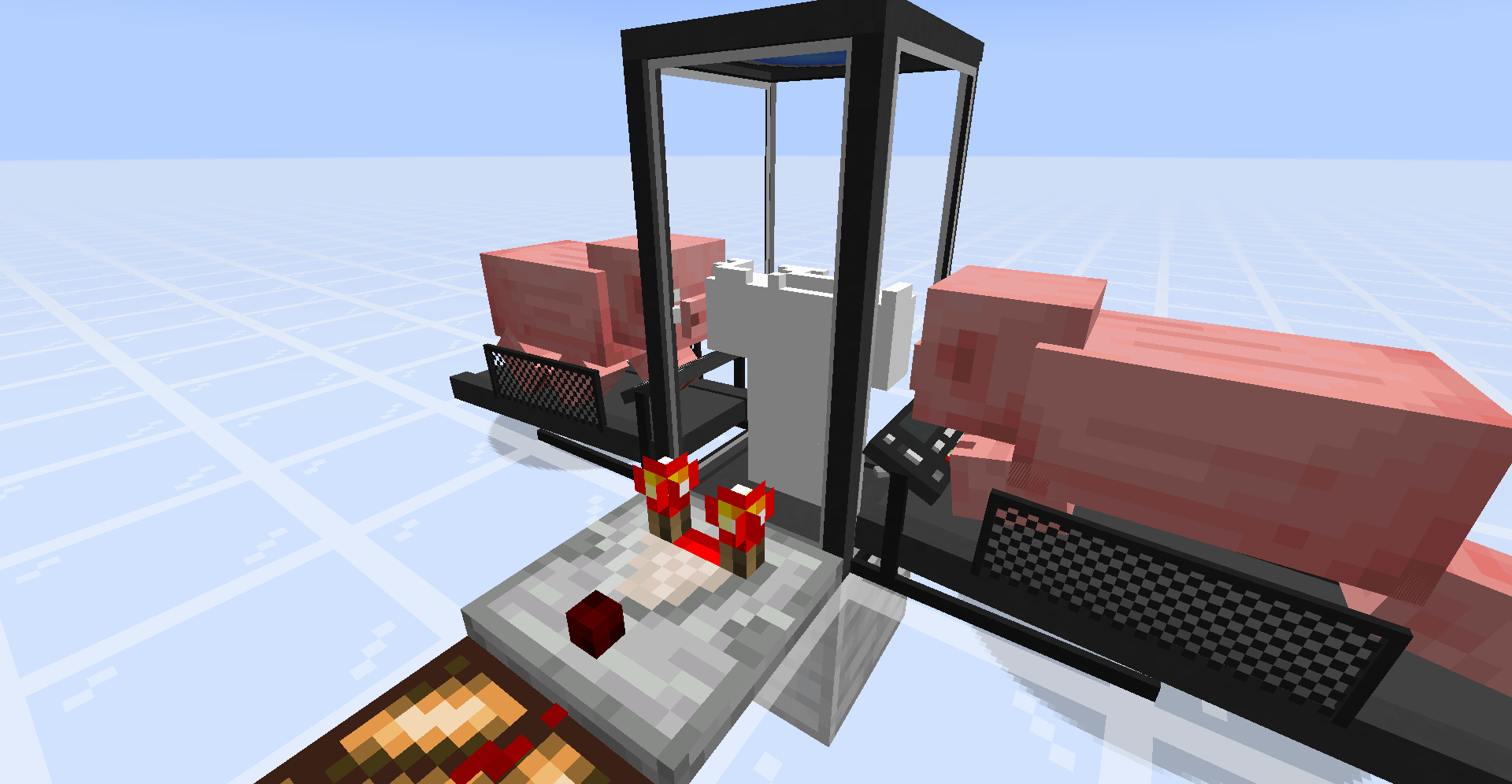 Shell Construction The shell constructor will create new shells and add them to storage.
 -
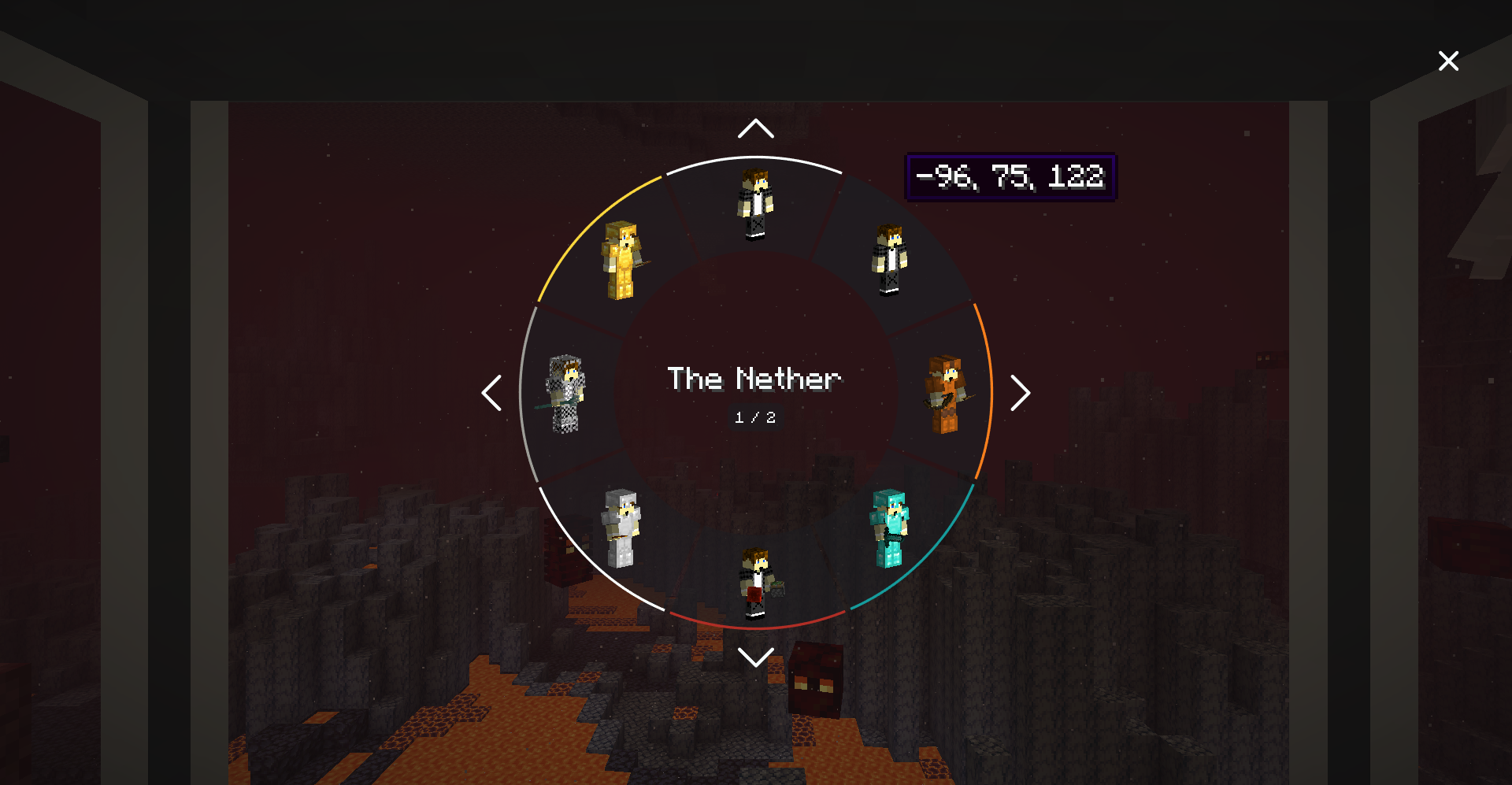 Shell Storage The shell storage can be used to access and transfer to all of the shells you have saved across your world.
 -
 Sync Core Recipe Essential component to the shell constructor and shell storage items.
 -
 Sync Core Recipe (Hardcore) Essential component to the shell constructor and shell storage items.
 -
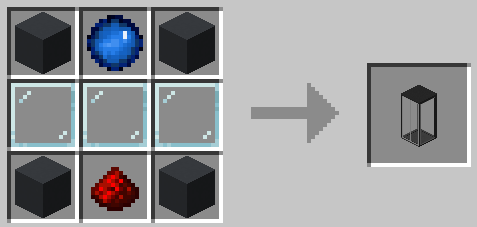 Shell Constructor Recipe Used to construct new shells.
 -
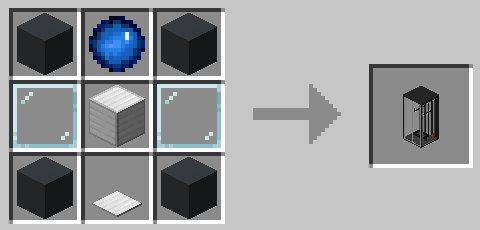 Shell Storage Recipe Used to access stored shells.
 -
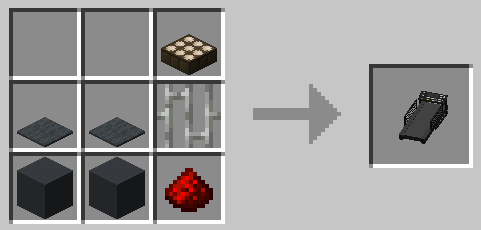 Treadmill Recipe Acts as a power source for the shell constructor.
 -
 Complete Setup An example of a complete shell setup.
Versions
Files
Relations
Project Relations
More like this
Similar Mods
Suggestions use data such as tags, dependencies, dependents, descriptions, titles, and more to rank how much they overlap with this mod.
On ModDex
Community snapshot
By the numbers
Statistics

Want to reach Minecraft players?
We're looking for a server hosting partner to feature here and other parts of the site. Interested? Send us a message!
Get in touchGet it on
Available Platforms
On ModDex
Community snapshot
By the numbers