
Community listing page, reviews here may not be monitored by the author.
T-Minus

No reviews yet
A multifunctional utility for managing server shutdowns and restarts
Community voices
Reviews
No reviews yet. Be the first to review this project!
Get it on
Available Platforms
About
Project Details
For authors
Embed Badge
If you're the author of this project, you can embed a live badge anywhere that supports HTML or Markdown. It updates automatically whenever ratings change.
Use HTML for any page that supports it, or Markdown for README files and Markdown-based descriptions.
Identifiers
Platform IDs
Resources
External Links
About
Description
T-Minus
T-Minus is a lightweight, robust, and highly customizable server-side utility designed to manage server restarts and shutdowns. Whether you are running a small private server or a massive public network, T-Minus ensures your scheduled maintenance and manual restarts run seamlessly, keeping your players informed every step of the way.
Unlike older restart utilities, T-Minus features an optimized, non-blocking scheduler that broadcasts quiet countdown announcements hours in advance without locking up server commands or causing pre-emptive lag.
Key Features
- Flexible Scheduling Engine: Schedule shutdowns or restarts at specific times of the day (everyday) or on a targeted date (YYYY-MM-DD).
- Time Zone Support: Define your scheduled tasks using standard time zones (e.g., UTC offsets like +3, -5, or 0), making coordination with global players effortless.
- Smart Announcements: Create custom announcement intervals for hours, minutes, and seconds (e.g., alert players at 10 hours, 2 hours, 30 minutes, 5 minutes, and then count down every second for the last 10 seconds).
- Multiple Output Modes: Broadcast countdowns directly to the player Chat, on the Action Bar (above the hotbar) for high visibility, or Both.
- Fully Customizable Messages: Modify every prefix, warning, error, kick screen, and reason. Full support for standard Minecraft color formatting codes (
§) is included. - Live Configuration Reloads: Tweak settings, adjust upcoming schedules, or localize message text, then reload the configuration live without rebooting the server.
- Operator Level Security: Set a required Operator (OP) permission level (from 1 to 4) to restrict who can manage server cycles.
Commands & Usage
All commands require operator permissions (configured via opLevel in the configuration file).
/tminus status - Displays the mod's current state, required operator level, broadcast output modes, and lists upcoming scheduled shutdowns and restarts along with their exact remaining time.
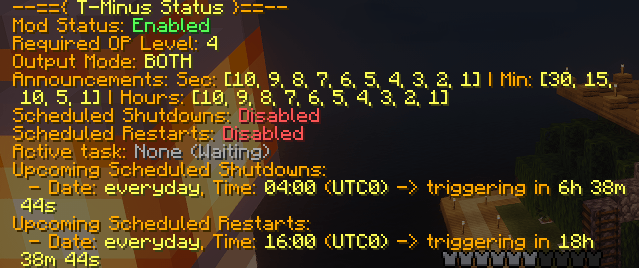
/tminus reload - Reloads the configuration file (config/tminus.toml) live. Useful for quick schedule or message updates.

/tminus stop <seconds> [reason] - Initiates a manual shutdown sequence with a custom countdown. If no reason is specified, it defaults to the configuration's fallback shutdown reason.
('/tminus stop 120 gn yall'):

/tminus restart <seconds> [reason] - Initiates a manual restart sequence with a custom countdown. If no reason is specified, it defaults to the configuration's fallback restart reason.
('/tminus restart 460 im bored'):

/tminus cancel - Abruptly stops any active countdown (manual or scheduled) and notifies players that the sequence has been canceled.


Configuration (tminus.toml)
Upon your first launch, the mod generates a clean, well-commented configuration file located at config/tminus.toml. Below is an example configuration showcasing its flexibility:
# T-Minus Mod Configuration

# Enable or disable the entire mod
enabled = true

# Required Operator (OP) level to execute commands (1 to 4)
opLevel = 4

# Message broadcast mode:
# "CHAT" - only in player chat
# "ACTIONBAR" - only on actionbar (above hotbar)
# "BOTH" - both in chat and actionbar
outputMode = "BOTH"

# Prefix before all mod messages in chat (supports Minecraft color codes like §)
textPrefix = "§r§f[Server] §r"

# Announcement intervals for shutdown/restart notifications
[announcements]
seconds = [10, 9, 8, 7, 6, 5, 4, 3, 2, 1]
minutes = [30, 15, 10, 5, 1]
hours = [10, 9, 8, 7, 6, 5, 4, 3, 2, 1]

# Enable/disable scheduled shutdowns and restarts separately
shutdownScheduleEnabled = false
restartScheduleEnabled = false

# Scheduled shutdowns
# date: can be "everyday" or specific "YYYY-MM-DD"
# time: in "HH:MM" (24-hour format)
# timezone: UTC offset (e.g., "-5", "0", "+3")
# repeatHours: (optional) repeat every N hours starting from the specified date & time
[[shutdownSchedule]]
date = "everyday"
time = "04:00"
timezone = "0"

# Scheduled restarts
[[restartSchedule]]
date = "everyday"
time = "16:00"
timezone = "0"

# System messages and phrases
[messages]
shutdownInitiated = "§cServer is shutting down in §6%time%§c for: §e%reason%§r"
shutdownCancelled = "§aServer shutdown cancelled by administrator!§r"
restartInitiated = "§eServer is restarting in §6%time%§e for: §6%reason%§r"
restartCancelled = "§aServer restart cancelled by administrator!§r"
countdownHours = "§cTime remaining: §6%time% hr.§c Reason: §e%reason%§r"
countdownMinutes = "§cTime remaining: §6%time% min.§c Reason: §e%reason%§r"
countdownSeconds = "§cTime remaining: §6%time% sec!§c Reason: §e%reason%§r"
shutdownKickMessage = "§cServer is shutting down for maintenance.\n§cReason: §6%reason%§r"
restartKickMessage = "§eServer is restarting.\n§eReason: §6%reason%§r"
noActiveTask = "§7There is no active shutdown or restart process.§r"
shutdownActive = "§6Active task: §cShutdown§r"
restartActive = "§6Active task: §eRestart§r"
waitingForTask = "§6Active task: §7None (Waiting)§r"
timeRemaining = "§cTime remaining: §6%time% sec.§r"
currentReason = "§cReason: §e%reason%§r"
prefixRequired = "§cOnly operators with level §e%level%§c can use this command!§r"
configReloaded = "§aT-Minus configuration reloaded successfully!§r"
alreadyRunning = "§cA task is already running! Cancel it first.§r"
shutdownInitiatedCommand = "§cInitiated shutdown in §6%time% seconds.§c Reason: §e%reason%§r"
restartInitiatedCommand = "§eInitiated restart in §6%time% seconds.§e Reason: §6%reason%§r"
statusHeader = "§6--=={ §eT-Minus Status§6 }==--§r"
statusEnabled = "§6Mod Status: §aEnabled§r"
statusDisabled = "§6Mod Status: §cDisabled§r"
statusOpLevel = "§6Required OP Level: §e%level%§r"
statusOutputMode = "§6Output Mode: §e%mode%§r"
statusCountdownTrigger = "§6Announcements: Sec: §e%seconds%§6 | Min: §e%minutes%§6 | Hours: §e%hours%§r"
statusShutdownScheduleEnabled = "§6Scheduled Shutdowns: §aEnabled§r"
statusShutdownScheduleDisabled = "§6Scheduled Shutdowns: §cDisabled§r"
statusRestartScheduleEnabled = "§6Scheduled Restarts: §aEnabled§r"
statusRestartScheduleDisabled = "§6Scheduled Restarts: §cDisabled§r"
upcomingShutdowns = "§6Upcoming Scheduled Shutdowns:§r"
upcomingRestarts = "§6Upcoming Scheduled Restarts:§r"
noUpcomingTasks = "§7  No upcoming scheduled tasks.§r"
scheduledTaskFormat = "§6  - Date: §e%date%§6, Time: §e%time%§6 (§eUTC%timezone%)§6 -> triggering in §e%remaining%§r"
modDisabledError = "§7T-Minus mod is currently §cdisabled§7 in the configuration!§r"
errorMissingSecondsStop = "§cError: Missing required argument 'seconds'! Usage: §6/tminus stop <seconds> [reason]§r"
errorMissingSecondsRestart = "§cError: Missing required argument 'seconds'! Usage: §6/tminus restart <seconds> [reason]§r"
errorInvalidNumber = "§cError: Invalid number format for 'seconds'! Must be a positive integer, got: §6'%input%'§r"
errorNegativeNumber = "§cError: 'seconds' must be a positive integer (1 or more)! Got: §6'%input%'§r"
repeatsEveryFormat = " §6(Repeats every §e%hours%h§6)§r"
scheduledRestartReason = "Scheduled Restart (%time% UTC%timezone%)§r"
scheduledShutdownReason = "Scheduled Shutdown (%time% UTC%timezone%)§r"
defaultShutdownReason = "Maintenance"
defaultRestartReason = "Restart"
How It Works Under the Hood
Unlike traditional shutdown scripts that spawn a heavy, continuous task hours before execution, T-Minus implements a dual-phase scheduling logic:
- Passive Announcements Phase: As long as the scheduled event is far in the future, the mod runs passive hourly/minutely checks. If a time match hits one of your predefined intervals (e.g., 2 hours remaining), a clean alert is sent directly to players, leaving the main server loop unaffected.
- Active Countdown Phase: When the remaining time drops to your configured
[announcements], the mod initializes the real-time visual countdown engine, displaying ticking warnings on the action bar and completing the task with a clean disconnect kick screen.
Screenshots
Gallery
-
stop.png /tminus stop 120 gn yall
-
restart.png /tminus restart 460 im bored
-
cancel-1.png /tminus cancel
-
cancel-2.png /tminus cancel
-
status.png /tminus status
-
reload.png /tminus reload
Versions
Files
Relations
Project Relations
More like this
Similar Mods
Suggestions use data such as tags, dependencies, dependents, descriptions, titles, and more to rank how much they overlap with this mod.
On ModDex
Community snapshot
By the numbers
Statistics
Want to reach Minecraft players?
We're looking for a server hosting partner to feature here and other parts of the site. Interested? Send us a message!
Get in touchGet it on
Available Platforms
On ModDex
Community snapshot
By the numbers
Statistics
Resources