
Community listing page, reviews here may not be monitored by the author.
Tab Info


No reviews yet
Shows useful player stats like deaths, kills, playtime, position, and current dimension to everyone through a compact, configurable readout in the player list.
Community voices
Reviews
No reviews yet. Be the first to review this project!
Get it on
Available Platforms
Compatibility
Supported Environments
Runs entirely on the server. Also works in singleplayer.
About
Project Details
For authors
Embed Badge
If you're the author of this project, you can embed a live badge anywhere that supports HTML or Markdown. It updates automatically whenever ratings change.
Use HTML for any page that supports it, or Markdown for README files and Markdown-based descriptions.
Identifiers
Platform IDs
Resources
External Links
About
Description
Tab Info
➜ The data pack version of this mod can be found here
Shows useful player stats like deaths, kills, playtime, position, and current dimension to everyone through a compact, configurable readout in the player list.
The readout rotates every 2 seconds, works in multiplayer and singleplayer, and is fully server-side, so players do not need to install anything.
Perfect for PvP servers, local worlds with friends, and more.

Installation
After adding the data pack/mod to your world or server, you should be able to open the about panel, which is fully controllable with the mouse:
/function tab_info:about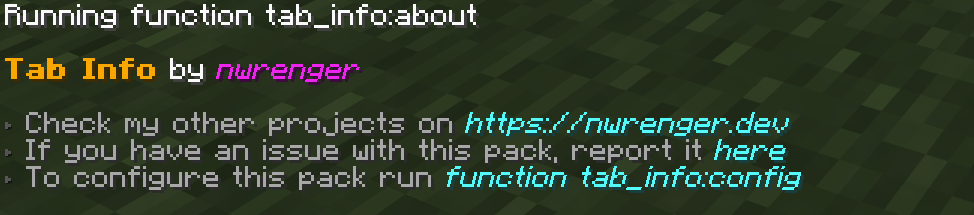
Configuration
Open the configuration panel by the following command:
/function tab_info:config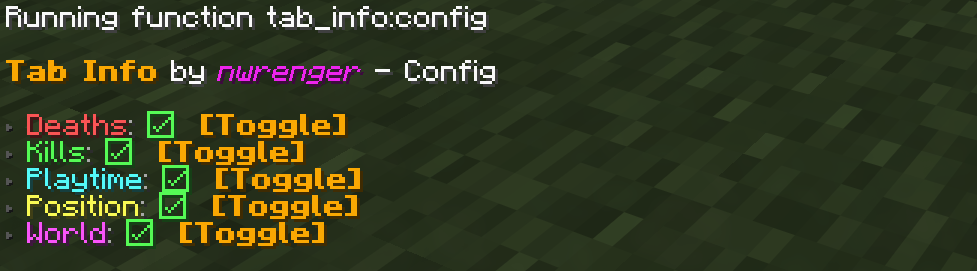
From here, you can toggle each info entry on or off. If every entry is disabled, Tab Info is hidden from the player list.
Uninstallation
To remove the vacant entry inside the player list after disabling/removing the data pack/mod, run the following command:
/scoreboard objectives setdisplay listContributing & Issues
I warmly welcome:
- Bug reports
- Feature requests
- Pull requests
Please open issues or PRs on GitHub.
License
This project is licensed under the LGPLv3 License. See LICENSE for details.
Tab Info
Shows useful player stats like deaths, kills, playtime, position, and current dimension to everyone through a compact, configurable readout in the player list.
The readout rotates every 2 seconds, works in multiplayer and singleplayer, and is fully server-side, so players do not need to install anything.
Perfect for PvP servers, local worlds with friends, and more.

Installation
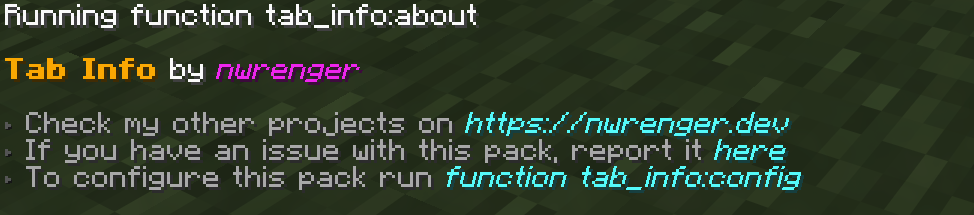
After adding the data pack/mod to your world or server, you should be able to open the about panel, which is fully controllable with the mouse:
/function tab_info:about
Configuration
Open the configuration panel by the following command:
/function tab_info:config
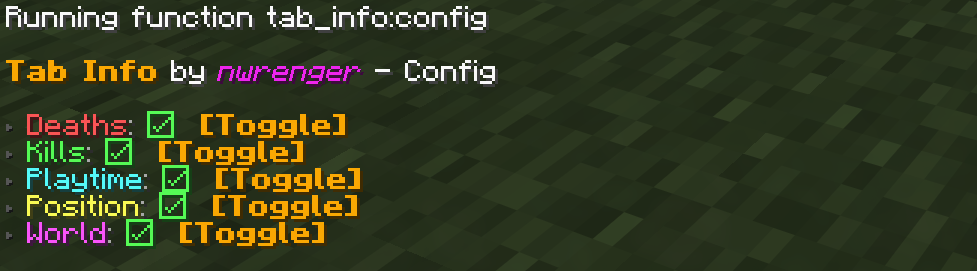
From here, you can toggle each info entry on or off. If every entry is disabled, Tab Info is hidden from the player list.
Uninstallation
To remove the vacant entry inside the player list after disabling/removing the data pack/mod, run the following command:
/scoreboard objectives setdisplay list
Contributing & Issues
I warmly welcome:
- Bug reports
- Feature requests
- Pull requests
Please open issues or PRs on GitHub.
License
This project is licensed under the LGPLv3 License. See LICENSE for details.
Screenshots
Gallery
-
Player list with all info entries enabled
-
About Panel Message
-
Config Panel Message
Versions
Files
Relations
Project Relations
More like this
Similar Mods
Suggestions use data such as tags, dependencies, dependents, descriptions, titles, and more to rank how much they overlap with this mod.
On ModDex
Community snapshot
By the numbers
Statistics
Want to reach Minecraft players?
We're looking for a server hosting partner to feature here and other parts of the site. Interested? Send us a message!
Get in touchGet it on
Available Platforms
On ModDex
Community snapshot
By the numbers
Statistics
Resources