Community listing page, reviews here may not be monitored by the author.
Tab Player Highlighter
 , R4mBLe
- DeL1TMeАвтор модификации
,
- R4mBLe_Разработчик мода
,
- Stormy-RPGМенеджер по связям
No reviews yet
Modification to highlight certain players in the table by UUID.

Community voices
Reviews
No reviews yet. Be the first to review this project!
Get it on
Available Platforms
Compatibility
Supported Environments
Runs entirely on the client. Works on vanilla servers.
About
Project Details
For authors
Embed Badge
If you're the author of this project, you can embed a live badge anywhere that supports HTML or Markdown. It updates automatically whenever ratings change.
Use HTML for any page that supports it, or Markdown for README files and Markdown-based descriptions.
Identifiers
Platform IDs
Resources
External Links
About
Description
RU
Важно!
- Для работы Tab Player Highlighter необходима библиотека Cloth Config Lib.
- Рекомендуется использовать Notepad++ для редактирования JSON конфигурации.
- UUID игрока можно узнать на NameMC.
Что делает мод?
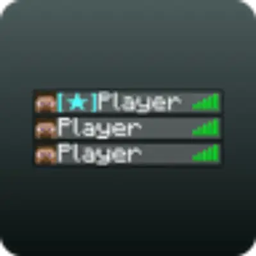
TPH — модификация, позволяющая выделить в табе игры определенных игроков по UUID.
Выглядит это следующим образом:

Настройка конфига
Файл конфигурации находится по пути:
.minecraft\config\tab_player_highlighter.jsonИ выглядит следующим образом:
{
  "onlineMod": false,
  "API_URL": "localhost:3000/get_roles",
  "playersPrefixes": {
  }
}
На место UUID в конфиге мода Tab Player Highlighter вы должны указать необходимые вам идентификаторы игроков и задать им роли. Вы можете указать несколько UUID, чтобы выделить нескольких пользователей в игре. Приведу пример, как это должно выглядеть в вашем файле конфигурации:
{
  "onlineMod": false,
  "API_URL": "localhost:3000/get_roles",
  "playersPrefixes": {
    "uuid1": "§a[Admin]",
    "uuid2": "§a[Moderator]",
    "uuid3": "§a[Helper]",
    ...
    "uuid100": "§a[Cheater]"
  }
}
Также, если включить onlineMod, то при заходе на сервер, префиксы игроков будут браться с API_URL, а playersPrefixes будет игнорироваться. Чтобы онлайн-режим работал правильно ответ от API_URL должен быть в JSON и иметь такой вид:
{
  "players": {
    "6a640b67-87f0-456a-8f4d-a65aeb55f4f4": "[Moderator]",
    "53e45cf5-c017-427a-9e67-7b6f00d47219": "§a[Admin]"
  }
}
Соблюдайте правильную структуру текстового файла и ответа от API, чтобы модификация работала корректно.
EN
Important!
- To use Tab Player Highlighter, you need the Cloth Config Lib.
- We recommend using Notepad++ for editing JSON configuration files.
- You can find player UUIDs on NameMC.
What does the mod do?
TPH is a modification that allows highlighting specific players by UUID in the game's tab list. Here's how it looks:
</details>
Config Setup
The configuration file is located at:
.minecraft\config\tab_player_highlighter.json
And looks like this:
{
  "onlineMod": false,
  "API_URL": "localhost:3000/get_roles",
  "playersPrefixes": {
  }
}
In the Tab Player Highlighter mod config, you need to replace the UUIDs with the player IDs you want to highlight and assign them roles. You can specify multiple UUIDs to highlight multiple players in the game. Here's an example of how your configuration file should look:
{
  "onlineMod": false,
  "API_URL": "localhost:3000/get_roles",
  "playersPrefixes": {
    "uuid1": "§a[Admin]",
    "uuid2": "§a[Moderator]",
    "uuid3": "§a[Helper]",
    ...
    "uuid100": "§a[Cheater]"
  }
}
Also, if you enable onlineMod, when joining a server, player prefixes will be fetched from API_URL, and playersPrefixes will be ignored. For online mode to work correctly, the response from API_URL must be in JSON format and look like this: text
{
  "players": {
    "6a640b67-87f0-456a-8f4d-a65aeb55f4f4": "[Moderator]",
    "53e45cf5-c017-427a-9e67-7b6f00d47219": "§a[Admin]"
  }
}
Make sure to maintain the correct file structure and API response format for the modification to work properly.

RU
Важно!
- Для работы Tab Player Highlighter необходима библиотека Cloth Config API.
- Рекомендуется использовать Notepad++ для редактирования JSON конфигурации.
- UUID игрока можно узнать на NameMC.
Что делает мод?
Spoiler
TPH — модификация, позволяющая выделить в табе игры определенных игроков по UUID.
Выглядит это следующим образом:
Настройка конфига
Spoiler
Файл конфигурации находится по пути:
.minecraft\config\tab_player_highlighter.json
И выглядит следующим образом:
{
  "onlineMod": false,
  "API_URL": "localhost:3000/get_roles",
  "playersPrefixes": {
  }
}
На место UUID в конфиге мода Tab Player Highlighter вы должны указать необходимые вам идентификаторы игроков и задать им роли. Вы можете указать несколько UUID, чтобы выделить нескольких пользователей в игре. Приведу пример, как это должно выглядеть в вашем файле конфигурации:
{
  "onlineMod": false,
  "API_URL": "localhost:3000/get_roles",
  "playersPrefixes": {
    "uuid1": "§a[Admin]",
    "uuid2": "§a[Moderator]",
    "uuid3": "§a[Helper]",
    ...
    "uuid100": "§a[Cheater]"
  }
}
Также, если включить onlineMod, то при заходе на сервер, префиксы игроков будут браться с API_URL, а playersPrefixes будет игнорироваться. Чтобы онлайн-режим работал правильно ответ от API_URL должен быть в JSON и иметь такой вид:
{
  "players": {
    "6a640b67-87f0-456a-8f4d-a65aeb55f4f4": "[Moderator]",
    "53e45cf5-c017-427a-9e67-7b6f00d47219": "§a[Admin]"
  }
}
Соблюдайте правильную структуру текстового файла и ответа от API, чтобы модификация работала корректно.
EN
Important!
- To use Tab Player Highlighter, you need the Cloth Config API.
- We recommend using Notepad++ for editing JSON configuration files.
- You can find player UUIDs on NameMC.
What does the mod do?
Spoiler
TPH is a modification that allows highlighting specific players by UUID in the game's tab list. Here's how it looks:
Config Setup
Spoiler
The configuration file is located at:
.minecraft\config\tab_player_highlighter.json
And looks like this:
{
  "onlineMod": false,
  "API_URL": "localhost:3000/get_roles",
  "playersPrefixes": {
  }
}
In the Tab Player Highlighter mod config, you need to replace the UUIDs with the player IDs you want to highlight and assign them roles. You can specify multiple UUIDs to highlight multiple players in the game. Here's an example of how your configuration file should look:
{
  "onlineMod": false,
  "API_URL": "localhost:3000/get_roles",
  "playersPrefixes": {
    "uuid1": "§a[Admin]",
    "uuid2": "§a[Moderator]",
    "uuid3": "§a[Helper]",
    ...
    "uuid100": "§a[Cheater]"
  }
}
Also, if you enable onlineMod, when joining a server, player prefixes will be fetched from API_URL, and playersPrefixes will be ignored. For online mode to work correctly, the response from API_URL must be in JSON format and look like this: text
{
  "players": {
    "6a640b67-87f0-456a-8f4d-a65aeb55f4f4": "[Moderator]",
    "53e45cf5-c017-427a-9e67-7b6f00d47219": "§a[Admin]"
  }
}
Make sure to maintain the correct file structure and API response format for the modification to work properly.
Screenshots
Gallery
Versions
Files
Relations
Project Relations
More like this
Similar Mods
Suggestions use data such as tags, dependencies, dependents, descriptions, titles, and more to rank how much they overlap with this mod.
On ModDex
Community snapshot
By the numbers
Statistics
 (opens in a new tab)
Get it on
Available Platforms
On ModDex
Community snapshot
By the numbers
Statistics
Resources