
Community listing page, reviews may not be monitored by the author.
TD-Hearts

No reviews yet
Displays the player's hearts above their username.

Community voices
Reviews
No reviews yet. Be the first to review this project!
Get it on
Available Platforms
Compatibility
Supported Environments
Runs entirely on the client. Works on vanilla servers.
About
Project Details
For authors
Embed Badge
If you're the author of this project, you can embed a live badge anywhere that supports HTML or Markdown. It updates automatically whenever ratings change.
Use HTML for any page that supports it, or Markdown for README files and Markdown-based descriptions.
Identifiers
Platform IDs
Resources
External Links
About
Description
🔵 DESCRIPTION
See how much health players and mobs have left, and customize how hearts look in your game.
🔵 FEATURES
- Live health: display hearts above players and mobs, with a separate option to show hearts above your own character.
- Your health display: keep Minecraft's default hearts above the hotbar or use your selected TD-Hearts style.
- Mob filters: show health for all mobs, hostile mobs, passive mobs or animals. You can also disable mob hearts.
- Four styles: choose Vanilla, Square, Round or a health bar, with a selection of colors.
- Size options: choose small or large icons for Square and Round styles, or small, medium or large health bars.
- Adjustable layout: change the height above characters, the spacing between hearts and the distance between rows.
- Health animations: highlight missing health or damage from the last hit, add flashing outlines or turn blinking off.
- Golden and Hardcore hearts: supports absorption hearts, such as those from golden apples, and Hardcore heart designs.
- Configuration profiles: save different setups, switch between them, update them or delete them. The built-in Default profile lets you restore the original settings.
- Customizable settings menu: choose its theme, color and scrolling speed, and use search to find options.
- English and Polish: select either language or follow your Minecraft language setting.
- Optimized rendering: designed to reduce the performance impact when many mobs are visible.
🔵 COMMANDS
- /td-hearts » Opens the configuration screen.
- /td-hearts reload » Reloads the configuration without requiring a game restart.
🔵 SUPPORT
If you encounter an error or need assistance, please contact support on Discord.
DISCORD: https://discord.gg/M3FENPR9fN


Screenshots
Gallery
-
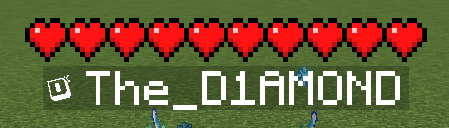 VANILLA Heart Theme: VANILLA
-
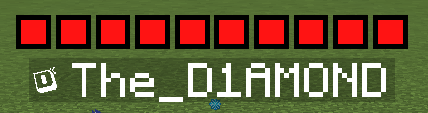 SQUARE Heart Theme: SQUARE
-
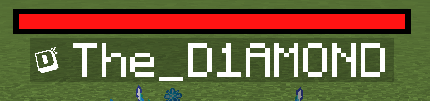 BAR Heart Theme: BAR
-
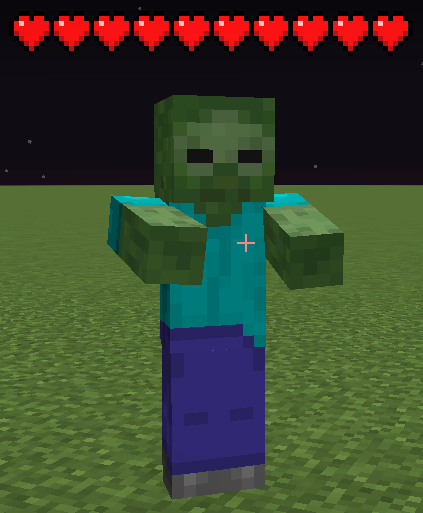 HEARTS MOB Appearance of hearts above mobs
Versions
Files
Relations
Project Relations
More like this
Similar Mods
Suggestions use data such as tags, dependencies, dependents, descriptions, titles, and more to rank how much they overlap with this mod.
On ModDex
Community snapshot
By the numbers
Statistics


Get it on
Available Platforms
On ModDex
Community snapshot
By the numbers
Statistics
Resources