
Community listing page, reviews may not be monitored by the author.
TeamCommand

No reviews yet
A command for players to create and manage teams. Similar to factions but based on Vanilla scoreboard teams.

Community voices
Reviews
No reviews yet. Be the first to review this project!
Get it on
Available Platforms
Compatibility
Supported Environments
Runs entirely on the server. Also works in singleplayer.
About
Project Details
For authors
Embed Badge
If you're the author of this project, you can embed a live badge anywhere that supports HTML or Markdown. It updates automatically whenever ratings change.
Use HTML for any page that supports it, or Markdown for README files and Markdown-based descriptions.
Identifiers
Platform IDs
About
Description
TeamCommand
This mod adds a new command to Minecraft which allows players to create and manage their own teams. The command is
similar to factions which you might know from other mods but is based on the Vanilla /team command which only
operators can use.

Commands
/t create <name> <color>Create a new team and be its first member./t list [<team>]Lists all teams or the players in a specific team./t invite <player>Invite a new player to join your team./t acceptAccept the last invitation and join the team./t setdisplayName <name>Change the displayed name of your team.color <color>Change the color of your team.friendlyFire <allowed>Specify wether players in your team can inflict damage to each other or not.seeInvisibles <allowed>Specify wether members of your team can see invisible teammates.
/t leaveLeave your current team.
Additionally, players can use every vanilla or modded feature integrated with teams like /teammsg to send a chat
message to all teammates.
Configuration
The mods configuration file is located at teamcommand.toml in your servers config folder.
commandName: The name of the new team command (default:t).allowDuplicateColors: Specify wether there can be multiple teams with the same color (default:true).allowDuplicateDisplaynames: Specify wether there can be multiple teams with the same name (default:false).prefixFormat: A format string which will determine the team prefix based on the displayName (default:[%.1s]).prefixUseTeamColor: Wether the prefix will be in the teams color or a secondary color. (default:false)suffixFormat: A format string which will determine the team suffix based on the displayName (default: empty string)suffixUseTeamColor: Wether the suffix will be in the teams color or a secondary color. (default:false)
Prefix & Suffix Format Strings
The format string for prefix and suffix is passed the displayed name of the team. You can look up the official syntax for java format strings here.
Examples:
[%.1s]display the first letter of the displayed name in square brackets (default prefix)- (empty string) display nothing (default suffix)
TEAM %sdisplay the letters "TEAM", a whitespace and the team name%Sthe team name in uppercase characters%.3Sthe first three letters of the team name in uppercase characters
It is recommeded to end the prefix and begin the suffix with a whitespace to prevent them from looking like a part of the players name.
Limitations
- There is no hierarchy in teams, everybody can invite new members.
- It's not possible to change the actual name of a team, only the displayed name.
- The amount of teams is limited at 16 if
allowDuplicateColorsis disabled as Minecraft only allows 16 colors.
Screenshots
Gallery
-
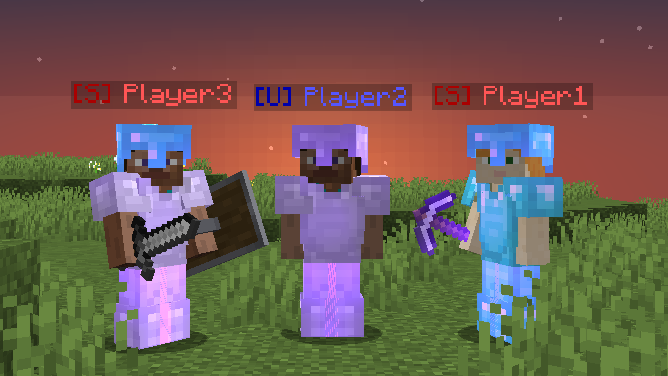 Players
 -
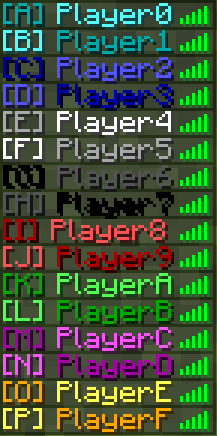 Player List
Versions
Files
Relations
Project Relations
More like this
Similar Mods
Suggestions use data such as tags, dependencies, dependents, descriptions, titles, and more to rank how much they overlap with this mod.
On ModDex
Community snapshot
By the numbers
Statistics


Get it on
Available Platforms
On ModDex
Community snapshot
By the numbers