
Tearcraft
No reviews yet
Turn your Minecraft worlds into miniature Teardown maps!
Fabric is a mod loader for versions 1.14+ of Minecraft, particularly popular for client side and optimization mods.
Community voices
Reviews
Click once to include, again to exclude, again to clear
No reviews yet. Be the first to review this project!
Get it on
Available Platforms
 Modrinth
Compatibility
Supported Environments
About
Project Details
For authors
Embed Badge
If you're the author of this project, you can embed a live badge anywhere that supports HTML or Markdown. It updates automatically whenever ratings change.
Use HTML for any page that supports it, or Markdown for README files and Markdown-based descriptions.
Identifiers
Platform IDs
About
Description
Tearcraft
Warning
DO NOT AND I REPEAT DO NOT SET THE RANGE TOO HIGH! IT WILL RESULT IN LARGE AMOUNTS OF FILES AND THERE IS NO WAY TO CANCEL EXPORTS OTHER THAN CLOSING YOUR GAME! Other than that!
Usage
First things first is define a range:
Define a range - Method 1
Run /vox pos1 at location 1 and /vox pos2 at location 2
Both of those also support directly inputing coordinates!
Define a range - Method 2
Run /vox pos x1 y1 z1 x2 y2 z2 to define a full range!
Next is to run /vox export FILENAME it will then tell you if it's going to split into files if its to big for the spec 256^3 in each direction and will start the export with some metrics.
Lastly it will tell you where the files were dumped. Putting it together in Teardown is a very puzzling goal but my advice is to just align all the bottom heights and just move parts around, see where water lines up. That stuff because putting worlds together is legitimatley a puzzle!
About
Example of what it could look like in the editor for Teardown
 (If you cant see that image it's most likley because my server is broken!)
Currently my logic for materials could be so much better and I am working on making it the best I can!
This mod aims to replicate the .vox spec because I didn't find native Java re-implementations of it.
It supports:
- RGBA Colour Palette: Perfectly aligned with Teardown material properties.
- Material Rendering: Support for materials like glass to generate accurate alpha channels - this took some serious effort!
Screenshots
Gallery
-
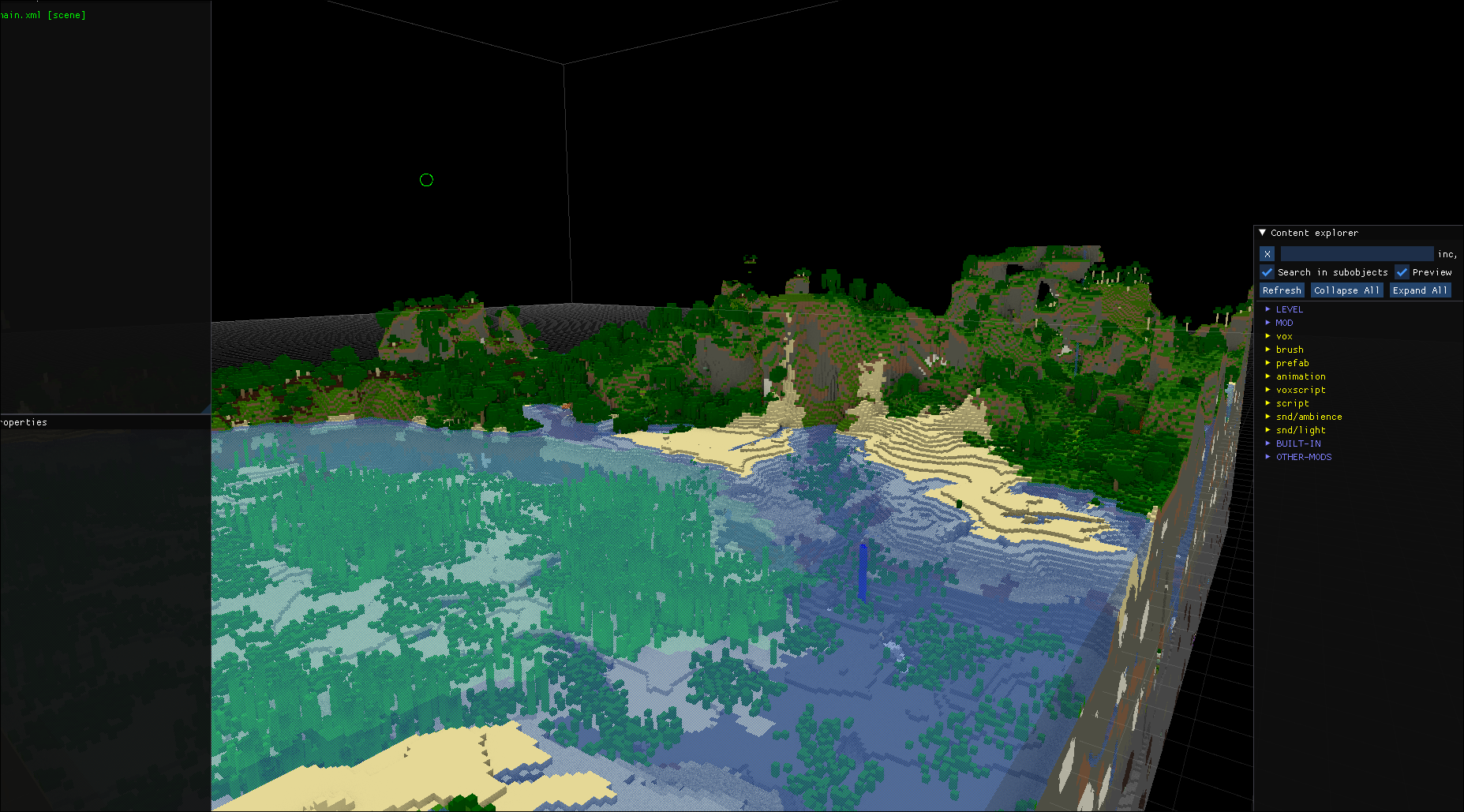 In teardowm
Versions
Files
Relations
Project Relations
More like this
Similar Mods
Suggestions use data such as tags, dependencies, dependents, descriptions, titles, and more to rank how much they overlap with this mod.
On ModDex
Community snapshot
By the numbers
Statistics

Want to reach Minecraft players?
We're looking for a server hosting partner to feature here and other parts of the site. Interested? Send us a message!
Get in touchGet it on
Available Platforms
On ModDex
Community snapshot
By the numbers