
Community listing page, reviews here may not be monitored by the author.


Community voices
Reviews
No reviews yet. Be the first to review this project!
Get it on
Available Platforms
Compatibility
Supported Environments
Runs on a dedicated server only; does not work in singleplayer.
About
Project Details
For authors
Embed Badge
If you're the author of this project, you can embed a live badge anywhere that supports HTML or Markdown. It updates automatically whenever ratings change.
Use HTML for any page that supports it, or Markdown for README files and Markdown-based descriptions.
Identifiers
Platform IDs
About
Description
A Fabric mod that bridges your Minecraft server with a Telegram group.
Features
- Chat Bridging: Forward in-game chat to your Telegram group and relay messages from Telegram back to the Minecraft server.
- Remote Commands: Execute server commands (e.g.,
/list,/whitelist) directly from Telegram with a flexible permission system. - Player Notifications: Broadcast player join, leave, and death notifications to your Telegram chat.
Build
./gradlew build
Setup Guide
Follow these steps to get TeleFabric up and running.
1. Create a Telegram Bot
- Open Telegram and send a direct message to @BotFather.
- Send the
/newbotcommand and follow the on-screen instructions.- Note: Pay attention to the distinction between the bot's name and username. You will need the username later.
- Once the bot is created, copy the bot token provided by BotFather.
- Add your new bot to the Telegram group you want to link.
2. Install the Mod
- Download the latest
.jarfile from the Releases page. - Place the
.jarfile into your server'smodsdirectory (/path/to/server/mods/).
3. Initial Configuration
- Start your server once to generate the configuration file.
- Stop the server.
- Open and edit the new file at
/path/to/server/config/telefabric.yml. - Fill in the
bot_tokenandbot_usernamefields with the credentials you received from BotFather.
4. Get Your Chat & User IDs
- Start your server again. The bot should now be online.
- In the Telegram group where you added the bot, type the command
/getid. - The bot will reply with the Chat ID and your personal User ID. Copy these values.
- Important: Group Chat IDs start with a hyphen (
-). Don't forget to include it.
- Important: Group Chat IDs start with a hyphen (
5. Finalize Configuration
-
Stop the server and open
telefabric.ymlagain. -
Add the Chat ID(s) and admin User ID(s) to the appropriate fields.
# A list of chat IDs the bot will listen to and broadcast messages to. chats: [-100123456789, -1145141919810] # <-- Replace with your Chat ID(s) features: # ... bot_cmd_command: enabled: true commands: whitelist: # A list of user IDs allowed to execute this command from Telegram. allowed_users: [123456789] # <-- Replace with an admin's User ID permission: users # ... # ... -
Save the file and start your server. The bridge is now fully configured!
-
If you need to apply changes later without restarting the server, you can use the
/telefabric reloadcommand in the server console.
Troubleshooting
Incorrect Bot Settings
- Symptom: The bot responds to commands (like
/getid) in a direct message but ignores all commands in the group chat. - Solution: This is likely due to the bot's privacy settings.
- DM @BotFather and send the
/mybotscommand. - Select your bot from the list.
- Navigate to
Bot Settings->Group Privacy. - Ensure that group privacy is turned OFF. When disabled, the bot can receive all messages sent in the group.
- DM @BotFather and send the
Acknowledgements
This project was created in memory of a fellow developer.
While searching for a Fabric-Telegram bridge mod for Minecraft 1.21.4, I came across CuteNekoOwO/FabricTgBridge. I was deeply saddened to learn that its creator, MeowBot233, had passed away, and the project would remain on version 1.20 forever. 🕯️
Inspired by their work, I decided to create a new mod with similar functionality for modern versions of Minecraft. And so, TeleFabric was born.
Dependencies
This project relies on the following open-source libraries:
- Minecraft - Proprietary License
- Fabric - Apache License 2.0
- TelegramBots - MIT License
- SnakeYAML - Apache License 2.0
Screenshots
Gallery
-
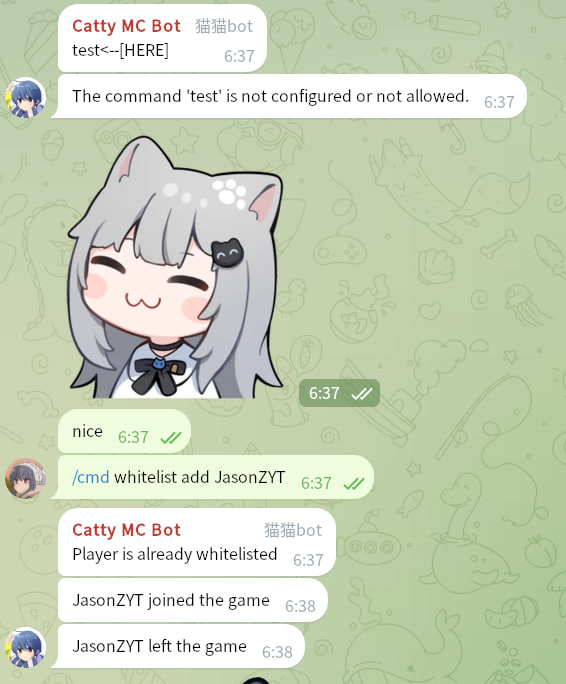 Executing Command on Telegram
Versions
Files
Relations
Project Relations
More like this
Similar Mods
Suggestions use data such as tags, dependencies, dependents, descriptions, titles, and more to rank how much they overlap with this mod.
On ModDex
Community snapshot
By the numbers
Statistics

 (opens in a new tab)
Get it on
Available Platforms
On ModDex
Community snapshot
By the numbers