Community listing page, reviews here may not be monitored by the author.
Telepathic Maid


No reviews yet
Player can shares the Maid's perspective, controls her movement, remotely switches her task mode, and can open/close the Maid's GUI at will.
Community voices
Reviews
No reviews yet. Be the first to review this project!
Get it on
Available Platforms
Compatibility
Supported Environments
Must be installed on both the client and the server.
About
Project Details
For authors
Embed Badge
If you're the author of this project, you can embed a live badge anywhere that supports HTML or Markdown. It updates automatically whenever ratings change.
Use HTML for any page that supports it, or Markdown for README files and Markdown-based descriptions.
Identifiers
Platform IDs
About
Description
Telepathic Maid / Remote Control Maid
This addon mod for Touhou Little Maid, requiring DiligentStalker as a prerequisite, allows the player to directly control their Maid. By binding a Maid to a figurine, the player can enter "Telepathic Control Mode" at any time, regardless of distance, to assist the Maid's actions.
In this mode, the player shares the Maid's perspective, controls her movement, remotely switches her task mode, and can open/close the Maid's GUI at will.
With this mod, your Maid is no longer just cute but sometimes clueless. When necessary, the player can take direct control to achieve a synergistic effect greater than the sum of its parts.
Getting Started
Before using telepathic control, you must first create a special figurine of your Maid:
- Craft a Camera and take a photo of the Maid.
- Hold the Maid's photo in your off-hand and a Carving Knife in your main hand to carve a 1x1 Clay Statue.
- Place the Clay Statue above a fire source. After some time, it will be fired into the finished Figurine.
Hold the Maid Figurine in your main hand and sneak + right-click on the Maid to bind it to that specific Maid entity. A figurine can only be bound once.
The binding between the figurine and the Maid is confirmed by three conditions:
- The owner of the figurine is the Maid's owner.
- The UUID recorded by the figurine matches the Maid's UUID.
- The figurine's model matches the Maid's model.
When all conditions are met, holding the figurine will highlight the corresponding Maid.

Telepathic Control
Hold the bound Maid Figurine in your main hand and right-click to enter the Maid's perspective. A special HUD will appear:
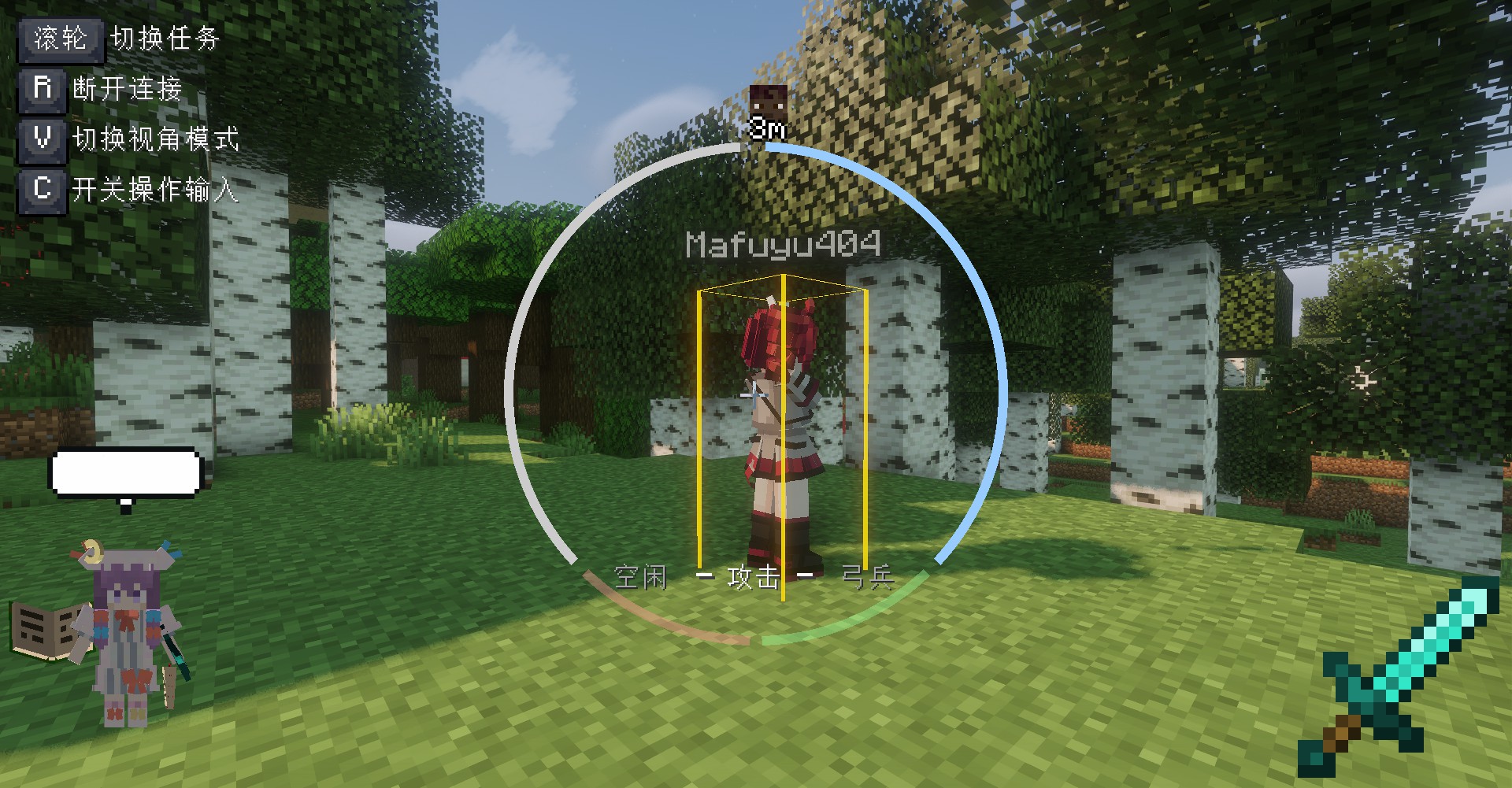
The center of the screen shows the Maid's status, such as Signal and Energy. Control is impossible if the signal is out of range. The Energy mechanic is currently unused in this version; if implemented later, Sugar will likely be consumed as fuel.
The bottom left shows a render of the Maid entity, reflecting her current state. The bottom right shows the item the Maid is holding.
The top of the screen shows the direction and distance to the Master. This icon's position changes dynamically.
The text at the very bottom center is the Task Indicator, showing the Maid's currently assigned task. Use the mouse wheel to quickly cycle through tasks.
The top left shows key hints (recommended to use with the Controlling addon for flexible keybinding display). Key functions are as follows:
- Press
R(default) to exit Telepathic Control Mode. If the Maid is in Follow mode when exiting, she will teleport to the Master. - Press
C(default) to toggle control input. When ON, your movement (WASD), jump, and sneak inputs will directly control the Maid's actions. When OFF, the Maid will revert to her normal AI behavior. - Press
V(default) to cycle through view modes: Free, Follow, and Control. Follow mode is like Spectator mode watching the Maid. In Control mode, you can directly control where the Maid looks.
A highlight box appears around the entity the Maid is looking at, allowing you to easily see her target.
Additionally, Telepathic Control has the following features:
- It works over any distance. Even if the Maid is in an unloaded chunk, the mod will force-load the chunk to establish a connection. The controlled Maid will keep surrounding chunks loaded and rendered, similar to a player.
- While controlling, pressing the inventory key (
E) opens the Maid's GUI instead of your own inventory. This allows easy management of the Maid's inventory. - Telepathic Control cannot be used across dimensions.
Notes
- In Follow mode, if the Maid is under Telepathic Control, she will not automatically teleport to the Master.
- If you want the Maid to stay in a faraway location, set her to HOME mode before exiting Telepathic Control.
- If you experience issues like an unresponsive camera or chunks not loading while in Telepathic Control mode, please report them to the QinLaoStalker issue tracker.
- Coordination is key! For example, with the Ranged Attack task, you can control positioning and target selection, while the Maid handles automatic firing and recoil control.
Future Plans
- Quick-swap the Maid's held items during Telepathic Control, similar to using the player's hotbar.
- Implement an energy cost for Telepathic Control, requiring Sugar in the Maid's inventory.
- Add new accessories related to this mod's functions, such as ones that increase the signal range.
Telepathic Maid / Remote Control Maid
This addon mod for Touhou Little Maid, requiring DiligentStalker as a prerequisite, allows the player to directly control their Maid. By binding a Maid to a figurine, the player can enter "Telepathic Control Mode" at any time, regardless of distance, to assist the Maid's actions.
In this mode, the player shares the Maid's perspective, controls her movement, remotely switches her task mode, and can open/close the Maid's GUI at will.
With this mod, your Maid is no longer just cute but sometimes clueless. When necessary, the player can take direct control to achieve a synergistic effect greater than the sum of its parts.
Getting Started
Before using telepathic control, you must first create a special figurine of your Maid:
- Craft a Camera and take a photo of the Maid.
- Hold the Maid's photo in your off-hand and a Carving Knife in your main hand to carve a 1x1 Clay Statue.
- Place the Clay Statue above a fire source. After some time, it will be fired into the finished Figurine.
Hold the Maid Figurine in your main hand and sneak + right-click on the Maid to bind it to that specific Maid entity. A figurine can only be bound once.
The binding between the figurine and the Maid is confirmed by three conditions:
- The owner of the figurine is the Maid's owner.
- The UUID recorded by the figurine matches the Maid's UUID.
- The figurine's model matches the Maid's model.
When all conditions are met, holding the figurine will highlight the corresponding Maid.
Telepathic Control
Hold the bound Maid Figurine in your main hand and right-click to enter the Maid's perspective. A special HUD will appear:
The center of the screen shows the Maid's status, such as Signal and Energy. Control is impossible if the signal is out of range. The Energy mechanic is currently unused in this version; if implemented later, Sugar will likely be consumed as fuel.
The bottom left shows a render of the Maid entity, reflecting her current state. The bottom right shows the item the Maid is holding.
The top of the screen shows the direction and distance to the Master. This icon's position changes dynamically.
The text at the very bottom center is the Task Indicator, showing the Maid's currently assigned task. Use the mouse wheel to quickly cycle through tasks.
The top left shows key hints (recommended to use with the Controlling addon for flexible keybinding display). Key functions are as follows:
- Press
R(default) to exit Telepathic Control Mode. If the Maid is in Follow mode when exiting, she will teleport to the Master. - Press
C(default) to toggle control input. When ON, your movement (WASD), jump, and sneak inputs will directly control the Maid's actions. When OFF, the Maid will revert to her normal AI behavior. - Press
V(default) to cycle through view modes: Free, Follow, and Control. Follow mode is like Spectator mode watching the Maid. In Control mode, you can directly control where the Maid looks.
A highlight box appears around the entity the Maid is looking at, allowing you to easily see her target.
Additionally, Telepathic Control has the following features:
- It works over any distance. Even if the Maid is in an unloaded chunk, the mod will force-load the chunk to establish a connection. The controlled Maid will keep surrounding chunks loaded and rendered, similar to a player.
- While controlling, pressing the inventory key (
E) opens the Maid's GUI instead of your own inventory. This allows easy management of the Maid's inventory. - Telepathic Control cannot be used across dimensions.
Notes
- In Follow mode, if the Maid is under Telepathic Control, she will not automatically teleport to the Master.
- If you want the Maid to stay in a faraway location, set her to HOME mode before exiting Telepathic Control.
- If you experience issues like an unresponsive camera or chunks not loading while in Telepathic Control mode, please report them to the QinLaoStalker issue tracker.
- Coordination is key! For example, with the Ranged Attack task, you can control positioning and target selection, while the Maid handles automatic firing and recoil control.
Future Plans
- Quick-swap the Maid's held items during Telepathic Control, similar to using the player's hotbar.
- Implement an energy cost for Telepathic Control, requiring Sugar in the Maid's inventory.
- Add new accessories related to this mod's functions, such as ones that increase the signal range.
Screenshots
Gallery
Versions
Files
Relations
Project Relations
More like this
Similar Mods
Suggestions use data such as tags, dependencies, dependents, descriptions, titles, and more to rank how much they overlap with this mod.
On ModDex
Community snapshot
By the numbers
Statistics
Want to reach Minecraft players?
We're looking for a server hosting partner to feature here and other parts of the site. Interested? Send us a message!
Get in touchGet it on
Available Platforms
On ModDex
Community snapshot
By the numbers