
Community listing page, reviews may not be monitored by the author.
Teleport Block


No reviews yet
Teleport Block is a Minecraft Fabric mod that allows players to easily create teleportation links between two points.

Community voices
Reviews
No reviews yet. Be the first to review this project!
Get it on
Available Platforms
Compatibility
Supported Environments
Runs entirely on the server. Also works in singleplayer.
About
Project Details
For authors
Embed Badge
If you're the author of this project, you can embed a live badge anywhere that supports HTML or Markdown. It updates automatically whenever ratings change.
Use HTML for any page that supports it, or Markdown for README files and Markdown-based descriptions.
Identifiers
Platform IDs
About
Description
TeleportBlock Mod
Overview
The TeleportBlock Mod is a Fabric Minecraft mod that allows administrators to create teleport links between two blocks using a honeycomb item. Players can be teleported by stepping on one of the linked blocks. Only administrators have permission to create and remove teleport links.
Features
- Set teleport links between two blocks
- Only administrators can create and remove teleport links
- Players will be teleported when stepping on a linked block
- Supports permissions and configurable language strings
Installation
- Place the mod JAR file in the
modsfolder of your Minecraft installation directory. - Run the game and the mod will automatically generate the necessary configuration files.
Commands
/tport set1 name
- Use this command after selecting the first block with the honeycomb to set the name of the first block (Block A).
/tport set2 name
- Use this command after selecting the second block with the honeycomb to set the name of the second block (Block B) and complete the teleport link between Block A and Block B.
/tport cancel
- Cancel the current teleport setup.
/tport reload
- Reload the teleport links and language configuration files.
/tport usage
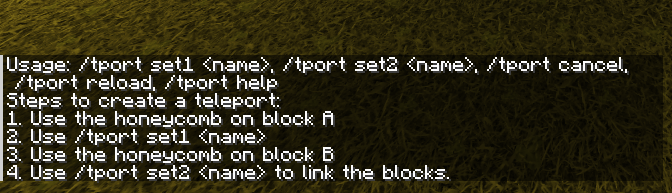
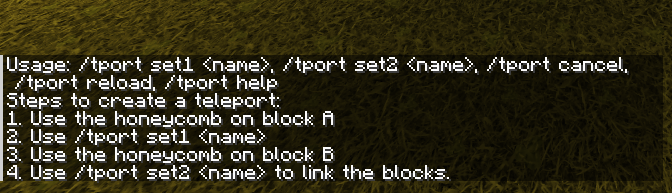
- Display help information for using the mod, including steps to set up teleport links.
Usage
- Select the first block (Block A) by right-clicking on it with the honeycomb.
- Run the command
/tport set1 nameto set the name for Block A. - Select the second block (Block B) by right-clicking on it with the honeycomb.
- Run the command
/tport set2 nameto link Block A and Block B. - Once linked, players stepping on one block will be teleported to the other.
- Destroying either of the two blocks will remove the link.
Configuration
- The mod automatically generates a configuration directory at
config/teleportblockwith two important files:teleport_links.json: Contains the data for teleport links.language.txt: Contains customizable language strings for the mod's messages.
Permissions
- Only players with admin-level permissions (level 4) can create and remove teleport links.
- Non-admin players are prevented from breaking teleport-linked blocks.
Language Customization
- You can customize the mod's messages by editing the
language.txtfile. Each line corresponds to a specific message in the mod, and you can modify these to suit your server's language or style.
TeleportBlock Mod
Overview
The TeleportBlock Mod is a Fabric Minecraft mod that allows administrators to create teleport links between two blocks using a honeycomb item. Players can be teleported by stepping on one of the linked blocks. Only administrators have permission to create and remove teleport links.
Features
- Set teleport links between two blocks
- Only administrators can create and remove teleport links
- Players will be teleported when stepping on a linked block
- Supports permissions and configurable language strings
Installation
- Place the mod JAR file in the
modsfolder of your Minecraft installation directory. - Run the game and the mod will automatically generate the necessary configuration files.
Commands
/tport set1 <name>
- Use this command after selecting the first block with the honeycomb to set the name of the first block (Block A).
/tport set2 <name>
- Use this command after selecting the second block with the honeycomb to set the name of the second block (Block B) and complete the teleport link between Block A and Block B.
/tport cancel
- Cancel the current teleport setup.
/tport reload
- Reload the teleport links and language configuration files.
/tport usage
- Display help information for using the mod, including steps to set up teleport links.
Usage
- Select the first block (Block A) by right-clicking on it with the honeycomb.
- Run the command
/tport set1 <name>to set the name for Block A. - Select the second block (Block B) by right-clicking on it with the honeycomb.
- Run the command
/tport set2 <name>to link Block A and Block B. - Once linked, players stepping on one block will be teleported to the other.
- Destroying either of the two blocks will remove the link.
Configuration
- The mod automatically generates a configuration directory at
config/teleportblockwith two important files:teleport_links.json: Contains the data for teleport links.language.txt: Contains customizable language strings for the mod's messages.
Permissions
- Only players with admin-level permissions (level 4) can create and remove teleport links.
- Non-admin players are prevented from breaking teleport-linked blocks.
Language Customization
- You can customize the mod's messages by editing the
language.txtfile. Each line corresponds to a specific message in the mod, and you can modify these to suit your server's language or style.
Screenshots
Gallery
-
 screenshot.png screenshot.png
-
 Usage Teleport Block Mod usage
Versions
Files
Relations
Project Relations
More like this
Similar Mods
Suggestions use data such as tags, dependencies, dependents, descriptions, titles, and more to rank how much they overlap with this mod.
On ModDex
Community snapshot
By the numbers
Statistics
 (opens in a new tab)
Get it on
Available Platforms
On ModDex
Community snapshot
By the numbers