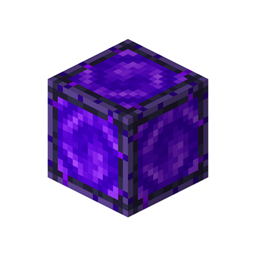
Community listing page, reviews here may not be monitored by the author.
TeleportBlock


No reviews yet
This mod adds a Teleport Block that allows teleportation between two linked ports, making travel faster and more convenient. Teleport distance and cooldown duration can be fully customized through a separate config file to fit different playstyles.
Community voices
Reviews
No reviews yet. Be the first to review this project!
Get it on
Available Platforms
Compatibility
Supported Environments
Must be installed on both the client and the server.
About
Project Details
For authors
Embed Badge
If you're the author of this project, you can embed a live badge anywhere that supports HTML or Markdown. It updates automatically whenever ratings change.
Use HTML for any page that supports it, or Markdown for README files and Markdown-based descriptions.
Identifiers
Platform IDs
About
Description
Teleport Block
Place two blocks. Link them,Teleport instantly. No GUI,No commands. Just simple block-based travel.
Introduction
Ever wanted a simple way to travel between two points without commands or complex setups? Teleport Block does exactly that.
Craft the block using vanilla materials, place two of them wherever you need, and link them together with a Shift+Right Click. From that moment, a right click on either block instantly moves you to the other. No menus, no configuration required — just place and go.
Features
If you want to tweak things, a config file "teleportblock-common.toml" lets you change the maximum linking distance and the cooldown between teleports — useful if you're running a server and want to balance things your way.
Mod compatibility (in the latest version):
- Jade — shows link status and target coordinates when looking at the block
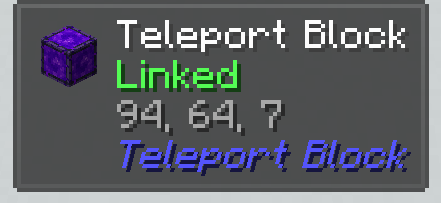
- REI / EMI — crafting recipe visible in recipe browsers
- Waystones — works alongside without conflicts
Teleport Block
Place two blocks. Link them. Teleport instantly. No commands. Just simple block-based travel.
How It Works
Craft the block using vanilla materials, place two of them wherever you need, and link them together with a Shift+Right Click. From that moment, a right click on either block instantly moves you to the other.
No configuration required — just place and go. Want to tweak something? There's an optional in-game settings menu.
Features
Passive Mode
Toggle between active (click to teleport) and passive (step on to teleport) with Shift+Right Click while holding a Teleport Block. Both sides of the link switch together. Hold Shift to safely walk over a passive portal without triggering it. The block you arrive on won't send you back until you step off it.
Named Links
Apply a Name Tag to a linked block to give your portal pair a custom name. The name appears in Jade tooltips and in the JourneyMap waypoint.
Colored Links
Each link gets a unique random color — visible in Jade tooltips, JourneyMap waypoints and the debug overlay. Colors help you tell multiple portals apart at a glance.
Map Markers
Right-click a linked block with a Filled Map to add both portals as persistent markers on that map.
Ender Pearl Teleport
Throw an ender pearl at a linked block — you teleport to the paired block instead of landing on the spot. Works with both block-to-block and Waystone links. If the teleport can't happen, the pearl lands normally.
Redstone Signal Relay
A linked pair relays redstone signal through the link, attenuated by half (rounded up). Comparator output reads 8 when linked, 0 when not.
Safe Teleports
- Teleporting into lava, fire, portals, cobwebs, powder snow, sweet berry bushes or wither roses is blocked
- If the paired block was moved or destroyed, the broken link is detected and removed automatically
- Both blocks must be in the same dimension
Advancements & Statistics
Track your teleportation count with a custom statistic. Five built-in advancements reward linking your first pair, your first teleport, and heavy usage.
Block Properties
- Explosion resistance 1200 (higher than obsidian) — only the Wither can break it
- Light level 15
- Fire resistant item (survives lava)
- Immovable by pistons
- Animated portal particle effect
Settings
Open the Mods list (from the main menu or the pause menu), select Teleport Block and press Config. Sliders, toggles, Undo and Reset to defaults are all built in.
The mod picks the right settings automatically:
- Singleplayer — settings for your own worlds, including worlds opened to LAN. Stored in
config/teleportblock-singleplayer.toml - Server — on a dedicated server only the server's settings apply. Admins edit
config/teleportblock-server.tomlon the server. The singleplayer settings are greyed out while you're connected to a server
| Setting | Default | Description |
|---|---|---|
| Teleport cooldown | 2 s | Delay between teleports through the same pair of blocks |
| Ender pearl cooldown | 1 s | Delay between ender pearl teleports through the same pair |
| Max link distance | 1024 blocks | Maximum distance between two linked blocks |
| Check distance on every teleport | Off | Enforce the distance limit on each teleport, not only when linking (useful for ships) |
| XP cost per 100 blocks | 0 (free) | Optional cost in experience points (not levels), based on straight-line distance |
| Max XP cost per teleport | 0 (no limit) | Upper limit for the cost of one teleport |
| Only owner can change links | Off | Only the player who linked a pair (or a server operator) can re-link, rename or switch its mode. Everyone can still teleport |
Creative and spectator players always teleport for free.
Mod Compatibility
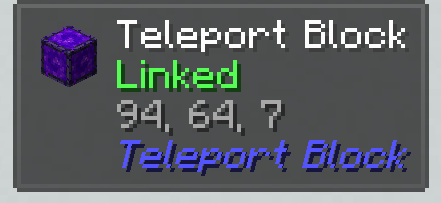
Jade
Shows link status, target coordinates, link name, and link color when looking at the block.
JEI / EMI / REI
Crafting recipe and item description visible in all three recipe browsers.
Waystones
Link a Teleport Block directly to a Waystone — Shift+Click the Teleport Block first, then Shift+Click the Waystone with a Teleport Block in hand. One-way instant travel to any named waystone.
Sable / Create: Aeronautics
Fully compatible with moving contraptions and sub-levels. Place portals on airships — coordinates are automatically converted to global space. If the ship is too far away and unloaded, the teleport is safely cancelled. Uses the official Sable Companion library (bundled).
FTB Chunks
Players cannot teleport into chunks claimed by other teams — including through blocks on ships parked inside a claim. Teleporting into your own claimed chunks works as normal.
JourneyMap
Linked blocks automatically appear as colored waypoints on the minimap (client-side, non-persistent), in the correct dimension.
Create (Ponder)
Two built-in Ponder scenes explain linking and teleporting with interactive animations.
Crafting Recipe
| Glowstone Dust | Respawn Anchor | Glowstone Dust |
|---|---|---|
| Respawn Anchor | Eye of Ender | Respawn Anchor |
| Glowstone Dust | Respawn Anchor | Glowstone Dust |
Resource Packs
Faithful texture packs available:
Screenshots
Gallery
Versions
Files
Relations
Project Relations
More like this
Similar Mods
Suggestions use data such as tags, dependencies, dependents, descriptions, titles, and more to rank how much they overlap with this mod.
On ModDex
Community snapshot
By the numbers
Statistics
Want to reach Minecraft players?
We're looking for a server hosting partner to feature here and other parts of the site. Interested? Send us a message!
Get in touchGet it on
Available Platforms
On ModDex
Community snapshot
By the numbers