Community listing page, reviews here may not be monitored by the author.
Telex / Teleport X

No reviews yet
Very fast teleports for multiple views and work location or multiple work sites. Good for creative builds and survival navigation.
Community voices
Reviews
No reviews yet. Be the first to review this project!
Get it on
Available Platforms
About
Project Details
For authors
Embed Badge
If you're the author of this project, you can embed a live badge anywhere that supports HTML or Markdown. It updates automatically whenever ratings change.
Use HTML for any page that supports it, or Markdown for README files and Markdown-based descriptions.
Identifiers
Platform IDs
Resources
External Links
About
Description
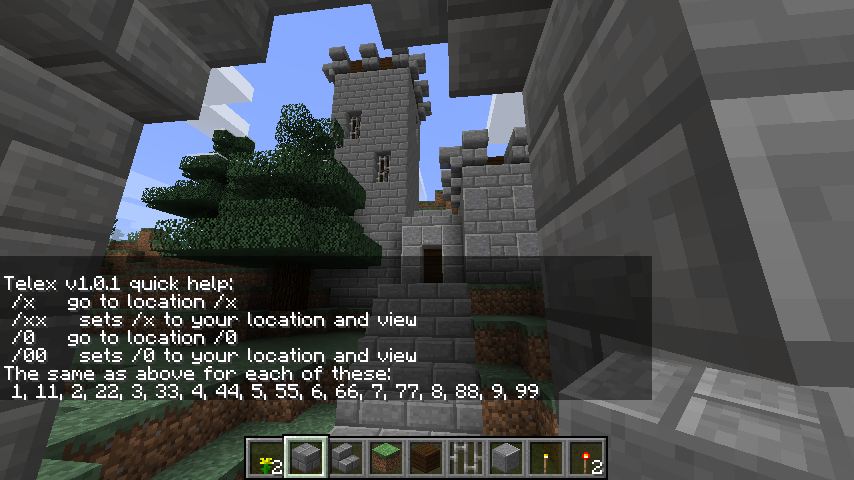
Type /telex for this quick help.
Teleport X allows very fast chat commands to teleport to 11 different positions. Intended to jump between a work location(x) and up to 10 other locations(0-9). They are user specific teleport points that also preserve your view angles. /x to go and /xx to set location.
Creative Example: I am building a small castle but I want to adjust its architecture to look good from the road coming up to it and from the river nearby. I also want the entrance gate to have a great impressive view. Where I am working now I just type /xx to mark my work spot. At each of the views I stand looking at my project then type /11 at the first spot and /22 at the second spot and finally /33 down by the gate. Now i can hop between these views to see how its coming along just by typing /1 /2 or /3 and then /x to go back to work. Its very fast.
Survival Example: I am in survival mode and I found a great ravine and cave system to go mine in. I can mark the entrance to it with /11 and the latest work area there with /22. I can hop back with just /1 or /2 at any time. oh and I marked my base with /xx so to go home after a full pack from mining, I just type /x
USAGE:
There are 11 locations: x 0 1 2 3 4 5 6 7 8 9
Type the double digit to set the location. example /55
Type the single digit to go there instantly. example /5
Thats it.
The locations are private for each player.
Your angle of view is kept from when the location was set.
There is a quick help in-game if you type /telex
Very fast to type and instant teleport.
DOWNLOAD and INSTALL
Click here for the best and official download page to select the download for your version of Minecraft.
Put the jar file in the /mods folder for your game and restart the game just like most forge mods.
NOTES:
Works in minecraft 1.9.4 through 1.12.2 at this time.
This is compatible with the mod SpawnCommands Teleport but does not require it.
It can cross dimensions.
Source code is included in the jar file.
Works in single player and in multiplayer servers.
This is a forge mod. No bukkit is needed.
Config: the digits/commands can be renamed, disabled, or even set to operator use only.
This only needs to be on the server side for multiplayer servers.
This mod may be added or removed at any time without any problem for your server.
.
When crossing to the nether for the first time after you started the game: it may crash the client side due to a Minecraft bug. Going to the Nether after using a Nether portal once clears the problem and feel free to teleport all you like after that. All other dimensions work smoothly. Give your new location a moment to load. This is not a bug in this mod but a bug in Minecraft code.
PERMISSIONS:
Yes.
You may use and or redistribute this any way you like.
Yes that includes modpacks.
REQUIREMENTS:
have fun =)
.
Screenshots
Gallery
-
Telex Teleport Help Page Type /telex for this quick help.
Versions
Files
Relations
Project Relations
More like this
Similar Mods
Suggestions use data such as tags, dependencies, dependents, descriptions, titles, and more to rank how much they overlap with this mod.
On ModDex
Community snapshot
By the numbers
Statistics
Want to reach Minecraft players?
We're looking for a server hosting partner to feature here and other parts of the site. Interested? Send us a message!
Get in touchGet it on
Available Platforms
On ModDex
Community snapshot
By the numbers
Statistics
Resources