Community listing page, reviews here may not be monitored by the author.
Temperature Block

No reviews yet
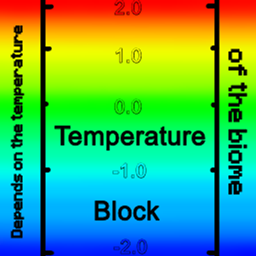
Temperature Block for Minecraft (NeoForge) is a block with dynamic temperature and a color gradient from blue to red.
Community voices
Reviews
No reviews yet. Be the first to review this project!
Get it on
Available Platforms
About
Project Details
For authors
Embed Badge
If you're the author of this project, you can embed a live badge anywhere that supports HTML or Markdown. It updates automatically whenever ratings change.
Use HTML for any page that supports it, or Markdown for README files and Markdown-based descriptions.
Identifiers
Platform IDs
Resources
External Links
About
Description
What’s new in Temperature Block? 🔥
We’ve turned a simple thermal block into a responsive environmental sensor — now it doesn’t just show temperature, it reacts to the world around it. The mod brings dynamic thermal logic and vivid visual feedback to your builds, letting you track heat distribution at a glance.
✅ What’s new: smarter temperature detection and visual response
We’ve refined how Temperature Block reads and adapts to its surroundings:
- The block now calculates its base temperature from the biome’s thermal value, then adjusts it based on nearby heat or cold sources — lava adds +50, fire adds +30, and water subtracts −20.
- Temperature values are capped cleanly between 0 and 400, so every build stays consistent and predictable.
- The color gradient shifts smoothly from blue (cold) through green to red (hot), giving an instant visual readout of the block’s thermal state.
🎨 Fine-tuned color logic: seamless thermal gradients
We’ve optimized the color rendering to make temperature changes feel natural and easy to read:
- Below 200, the block blends from deep blue to bright green, highlighting cooler zones.
- Above 200, it transitions from green to intense red, clearly marking hot areas.
- The color is calculated per-block state, so each Temperature Block reflects its own thermal value without relying on external overlays.
💡 Tip: Use Temperature Blocks in redstone circuits or thermal monitoring setups — the visible color shift makes it easy to spot temperature spikes or drops without extra tools.
🧱 Under-the-hood improvements: clean client-side rendering
We’ve streamlined the mod’s rendering logic to keep visuals smooth and performance stable:
- Block color handling runs entirely on the client via
RegisterColorHandlersEvent, so the server stays lightweight. - The color calculation uses a simple, efficient blend function that works reliably across all supported versions.
- Item color is set to a neutral green by default, making the block easy to spot in your inventory.
⚠️ Important warning: thermal setups and performance
Temperature Block is designed to be lightweight, but large-scale thermal displays can still affect client performance:
- Avoid placing hundreds of Temperature Blocks in a single area if you’re running on lower-end hardware — the constant color updates can impact FPS.
- If you notice lag or stuttering, try reducing the number of active blocks or spacing them out more.
- Always test new thermal layouts in a separate world before adding them to your main build.
💡 Tip: safe testing with thermal zones
When designing thermal monitoring setups:
- Start with a small test area of 5–10 blocks to see how the temperature values and colors behave.
- Place blocks near known heat or cold sources (like lava or water) to confirm the adjustments work as expected.
- Check the color gradient to make sure the transition from blue to red looks smooth and readable.
- If something feels off, break and re-place the block — this ensures a clean state and helps isolate any unexpected behavior.
📋 Compatibility
- Platform: Minecraft NeoForge.
- Loader: NeoForge only (Forge and Fabric are not supported).
Screenshots
Gallery
-
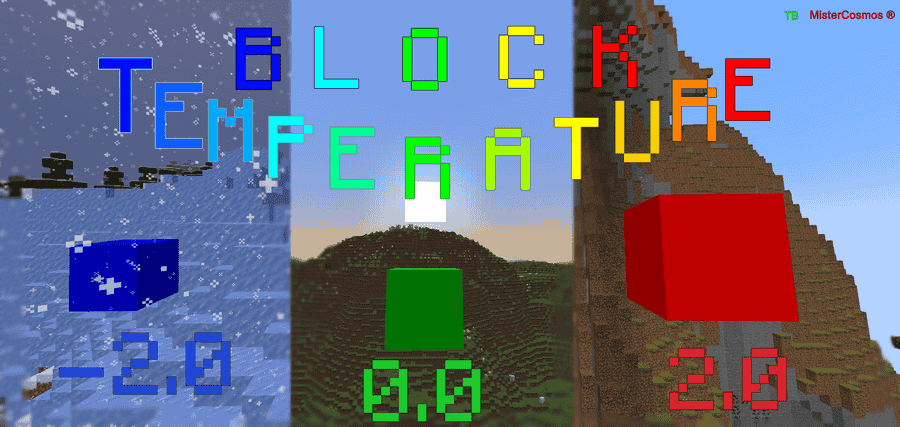 Example: how this block works The temperature block changes color at a certain temperature of the biome, and if there is lava or water nearby, it lowers or raises the temperature.
Versions
Files
Relations
Project Relations
More like this
Similar Mods
Suggestions use data such as tags, dependencies, dependents, descriptions, titles, and more to rank how much they overlap with this mod.
On ModDex
Community snapshot
By the numbers
Statistics
Want to reach Minecraft players?
We're looking for a server hosting partner to feature here and other parts of the site. Interested? Send us a message!
Get in touchGet it on
Available Platforms
On ModDex
Community snapshot
By the numbers
Statistics
Resources