
Community listing page, reviews may not be monitored by the author.
Terramap


No reviews yet
An addon to Terra++ providing an in-game world map

Community voices
Reviews
No reviews yet. Be the first to review this project!
Get it on
Available Platforms
Compatibility
Supported Environments
Works on the client or the server alone, but does more when on both.
About
Project Details
For authors
Embed Badge
If you're the author of this project, you can embed a live badge anywhere that supports HTML or Markdown. It updates automatically whenever ratings change.
Use HTML for any page that supports it, or Markdown for README files and Markdown-based descriptions.
Identifiers
Platform IDs
About
Description
Terramap

A dynamic world map within Minecraft
Terramap is an addon to the Terraplusplus Minecraft mod. It renders real world maps inside of the game with extended features. It is still in beta and lacks intended features.
Useful links:
- Terramap Discord server: Report bugs, make suggestions and get access to in-development builds.
- Terramap CurseForge page: Download the mod from there.
- Terramap Modrinth page: An other way to download the mod.
- Terramap wiki: Advanced users can learn about more technical features there.
- Terramap Trello: Discover what's being planed and worked on.
Features:
- Fully fledged full-screen world map (only raster maps for now)
- Minimap and compass with an intuituve configuration UI
- Easy world-wide teleportation using the maps
- Displays players on the maps, no matter how far away they are from you
- Quick access to technical information about a place, including distortion or region coordinates
- Quick access to other map services
- Support for customized map endpoints, with server to client config synchronization
Planned features
- Raster maps
- Geocoding
- Support for more modding framework (Forge, Fabric, Bukkit)
- Support for more modern Minecraft versions
Installation
Make sure you have Minecraft Forge 1.12.2 installed, as well as the necessary mod dependencies: Terraplusplus, CubicChunks, and CubicWorldGen. Installing a Forge mod is as simple as dropping the mod file in the mods folder in your Minecraft installation directory (I will not go into the details here, there are plenty of great guides online). Alternatively, Terramap comes included in the Build The Earth modpack installer.
Screenshots
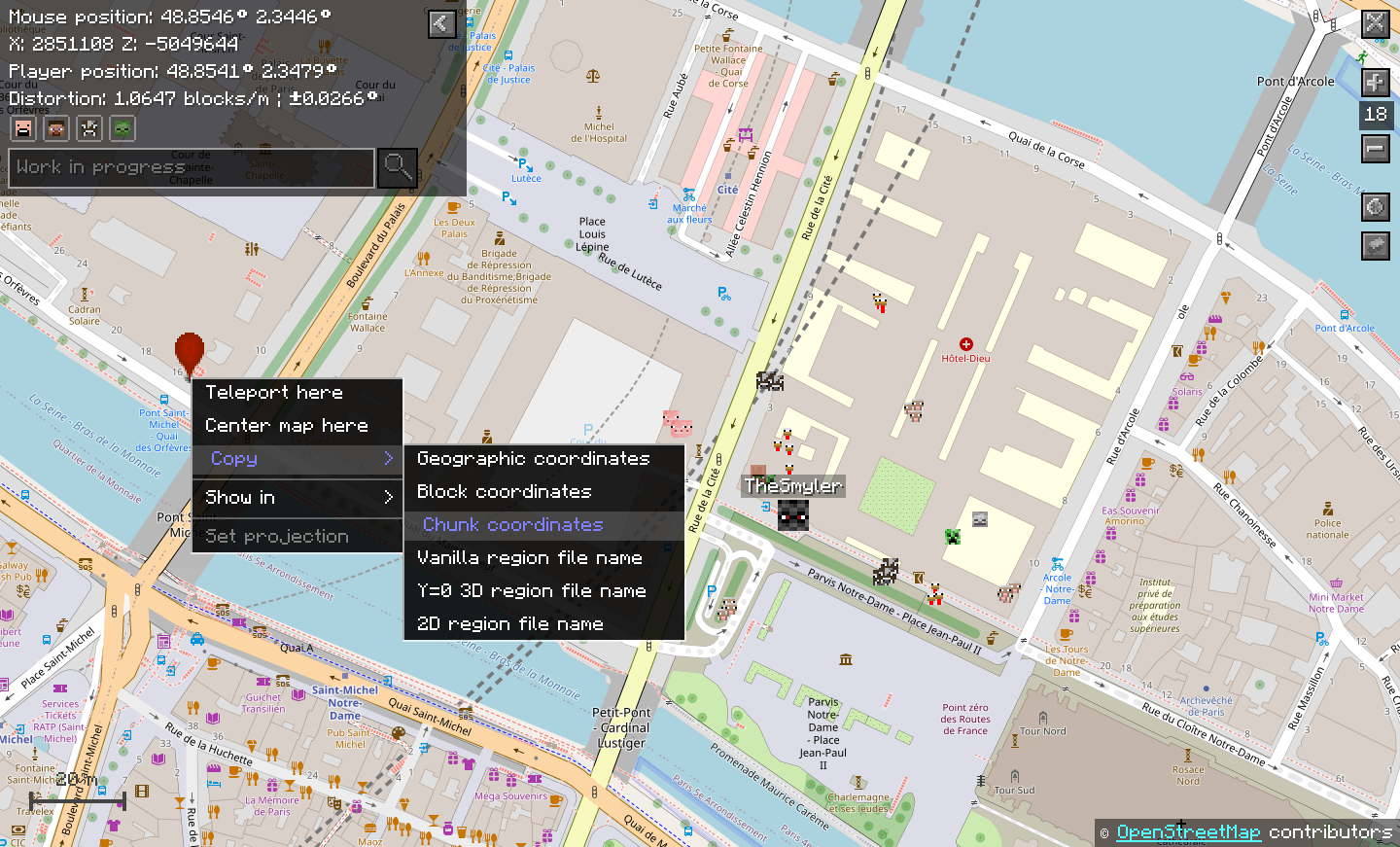
Terramap on a solo world, with the vanilla osm style:
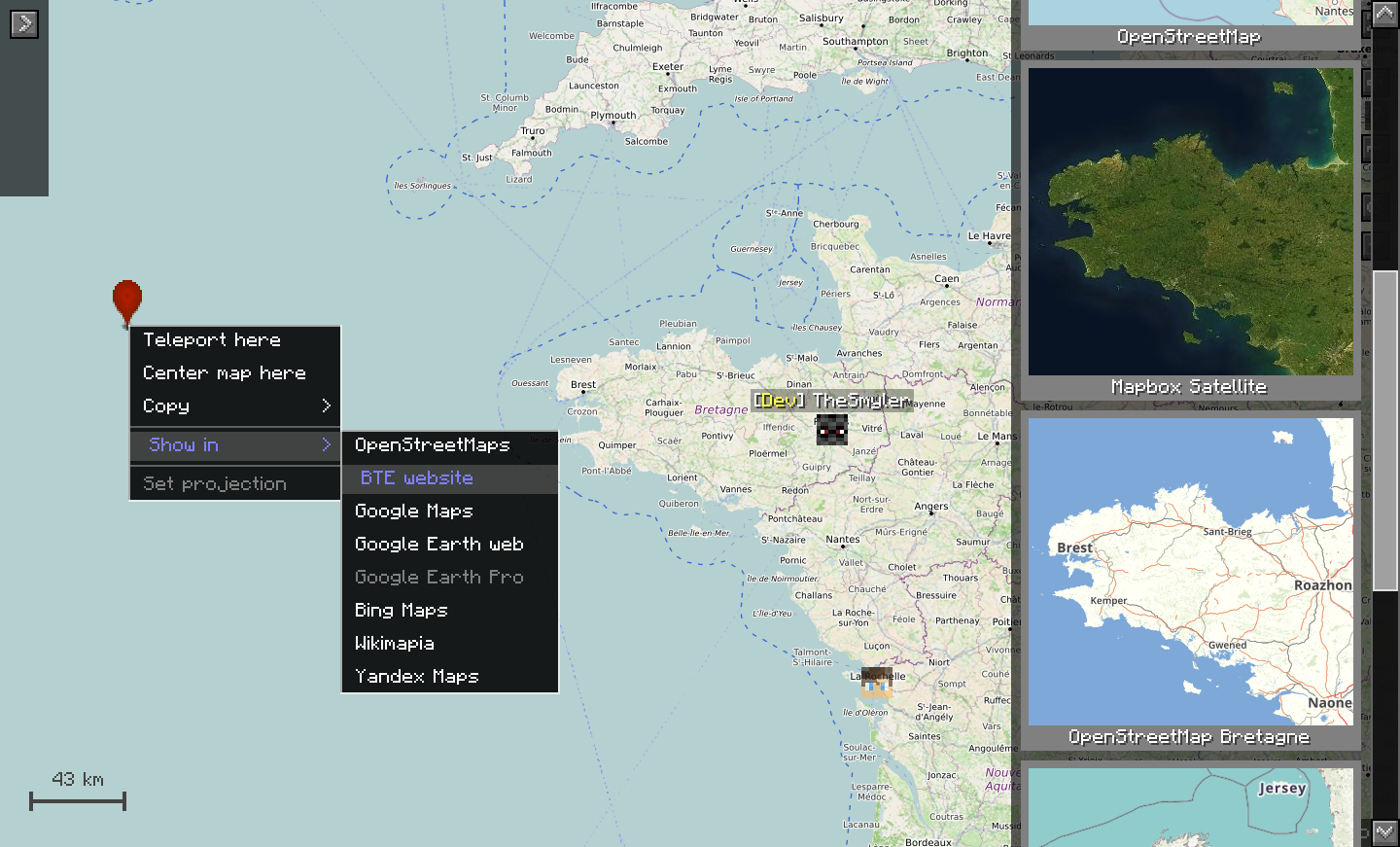
Custom map styles on BTE-France:
How to use it:
In game, press m to open the full-screen map (by default, but it can be changed in the config) Drag it, zoom in and out, and explore the world just like with any other digital map. Right-click somwhere to get a menu with various useful tools (see the screenshots). Additionally, you can: press p to toggle debug mod, press control to enable quick tp mode, change the map style in the map style menu, change entity display preferences, follow an entity or player by double clicking it, configure the minimap in the mod's config, add your own map styles, and more... Checkout the wiki for more technical information.
Terramap will work best if it is installed both on the server and the client. This is because it needs to synchronize the map projection used by the server to the client. It is still usable if installed only on the client, as long as you know and take the time to manually set the projection used.
Contributing to the project:
In case you want to contribute, please make sure you join the Discord. You will get a contributor role there.
Code
Future updates are already planned ahead, so please contact me before contributing code so we can discuss the changes you want to make first. In any case, please fork this repository and create a pull request from your fork. You can clone your fork to your computer and work from your IDE there. Make sure you follow the Minecraft Forge instructions to setup the development environment.
Translation
Contribution for translations are welcomed at any time. Please note however that the mod will still change quite a lot, and your translation will probably need to be updated to reflect theese changes. You don't have to stay available to update it personally, but your work may end up being modified by someone else if needs to be. If you are not comfortable using Github you can send me your translation file on the Discord or ask me anything there.
Terramap
A dynamic world map within Minecraft




Terramap is an addon to the Terraplusplus Minecraft mod. It renders real world maps inside of the game with extended features. It is still in beta and lacks intended features.
Useful links:
- Terramap Discord server: Report bugs, make suggestions and get access to in-development builds.
- Terramap CurseForge page: Download the mod from there.
- Terramap Modrinth page: An other way to download the mod.
- Terramap wiki: Advanced users can learn about more technical features there.
- Terramap Trello: Discover what's being planed and worked on.
Features:
- Fully fledged full-screen world map (only raster maps for now)
- Minimap and compass with an intuituve configuration UI
- Easy world-wide teleportation using the maps
- Displays players on the maps, no matter how far away they are from you
- Quick access to technical information about a place, including distortion or region coordinates
- Quick access to other map services
- Support for customized map endpoints, with server to client config synchronization
Planned features
- Raster maps
- Geocoding
- Support for more modding framework (Forge, Fabric, Bukkit)
- Support for more modern Minecraft versions
Installation
Make sure you have Minecraft Forge 1.12.2 installed, as well as the necessary mod dependencies: Terraplusplus, CubicChunks, and CubicWorldGen. Installing a Forge mod is as simple as dropping the mod file in the mods folder in your Minecraft installation directory (I will not go into the details here, there are plenty of great guides online). Alternatively, Terramap comes included in the Build The Earth modpack installer.
Screenshots
Terramap on a solo world, with the vanilla osm style:
Custom map styles on BTE-France:
How to use it:
In game, press m to open the full-screen map (by default, but it can be changed in the config) Drag it, zoom in and out, and explore the world just like with any other digital map. Right-click somwhere to get a menu with various useful tools (see the screenshots). Additionally, you can: press p to toggle debug mod, press control to enable quick tp mode, change the map style in the map style menu, change entity display preferences, follow an entity or player by double clicking it, configure the minimap in the mod's config, add your own map styles, and more... Checkout the wiki for more technical information.
Terramap will work best if it is installed both on the server and the client. This is because it needs to synchronize the map projection used by the server to the client. It is still usable if installed only on the client, as long as you know and take the time to manually set the projection used.
Contributing to the project:
In case you want to contribute, please make sure you join the Discord. You will get a contributor role there.
Code
Future updates are already planned ahead, so please contact me before contributing code so we can discuss the changes you want to make first. In any case, please fork this repository and create a pull request from your fork. You can clone your fork to your computer and work from your IDE there. Make sure you follow the Minecraft Forge instructions to setup the development environment.
Translation
Contribution for translations are welcomed at any time. Please note however that the mod will still change quite a lot, and your translation will probably need to be updated to reflect theese changes. You don't have to stay available to update it personally, but your work may end up being modified by someone else if needs to be. If you are not comfortable using Github you can send me your translation file on the Discord or ask me anything there.
Screenshots
Gallery
Versions
Files
Relations
Project Relations
More like this
Similar Mods
Suggestions use data such as tags, dependencies, dependents, descriptions, titles, and more to rank how much they overlap with this mod.
On ModDex
Community snapshot
By the numbers
Statistics

Get it on
Available Platforms
On ModDex
Community snapshot
By the numbers