
Community listing page, reviews may not be monitored by the author.
TetrisCraft


No reviews yet
This puts a Tetris mini-game right inside your Minecraft game, so you can play it any time you're bored or battle against other players online.

Community voices
Reviews
No reviews yet. Be the first to review this project!
Get it on
Available Platforms
Compatibility
Supported Environments
Runs entirely on the client. Works on vanilla servers.
About
Project Details
For authors
Embed Badge
If you're the author of this project, you can embed a live badge anywhere that supports HTML or Markdown. It updates automatically whenever ratings change.
Use HTML for any page that supports it, or Markdown for README files and Markdown-based descriptions.
Identifiers
Platform IDs
Resources
External Links
About
Description
# TetrisCraft
- Tetris right inside Minecraft!
Play solo, find an opponent online, or create a room for your friends.
- ❗❗❗Stable version of Leaderboard 2.0❗❗❗
# - 🎮 Four Game Modes
- Standard
Place pieces, clear completed lines, and score points. As your level increases, the pieces fall faster.
- 40 Lines
Clear 40 lines as quickly as possible. As your level increases, the pieces fall faster.
- Garbage
Garbage rows with gaps regularly appear at the bottom, pushing the blocks on your board upward. As your level increases, the pieces fall faster.
- Custom Mode
Customize the game to your liking: change the board size, falling speed, and piece randomizer. Enable or disable Hold, the next-piece preview, and the ghost piece that shows where your piece will land. You can also enable garbage and adjust how often it appears, how many rows are added, and where the gaps are placed.
# - 🌐 Online
- Public Match
Choose a mode, and the game will find an opponent for a 1v1 match. Available modes: Standard, 40 Lines, and Garbage.
- Private Room
Create a room and invite friends using a room code. Choose your match format:
- 1v1 — two players.
- 1v1v1 — three players.
- 1v1v1v1 — four players.
Private rooms also support Standard, 40 Lines, and Garbage.
# - 🏆 Leaderboards
Compare your results with other players and climb the rankings! Standard and Garbage rank players by score, while 40 Lines ranks players by their fastest completion time.
Search for players and view their profiles.
# - 👤 Personal Profile and Achievements
Track your progress in your personal profile: solo games played, playtime, lines cleared, Tetrises, and personal bests. You can also view your wins, losses, and win rate in public matches.
Unlock achievements of varying difficulty, from your first milestones to demanding challenges.
# - ⚙️ Settings
Customize the visuals and controls:
Block textures: choose how your pieces look — Minecraft, classic Tetris, and other texture sets.
Controls: customize key bindings for game actions.
Language: English is the default; Russian, Ukrainian, and Spanish are also available.
Board background: choose a solid or transparent background.
Board grid: show or hide the grid lines.
Background dimming: adjust how much the surrounding world is darkened.
# - 🎬 Replays
Save your games and revisit your best moments. Record all games, only personal-best runs, or turn recording off entirely.
Replay playback supports pausing, seeking, and adjustable playback speed. Replays are stored on your computer, and you can open their folder directly from the mod’s menu.
- Inspired by nukebob! https://modrinth.com/user/nukebob https://modrinth.com/mod/tetrismc
TetrisCraft
-
Tetris right inside Minecraft! Play solo, find an opponent online, or create a room for your friends.
-

-
❗❗❗Stable version of Leaderboard 2.0❗❗❗
- 🎮 Four Game Modes
- Standard Place pieces, clear completed lines, and score points. As your level increases, the pieces fall faster.
- 40 Lines Clear 40 lines as quickly as possible. As your level increases, the pieces fall faster.
- Garbage Garbage rows with gaps regularly appear at the bottom, pushing the blocks on your board upward. As your level increases, the pieces fall faster.
- Custom Mode Customize the game to your liking: change the board size, falling speed, and piece randomizer. Enable or disable Hold, the next-piece preview, and the ghost piece that shows where your piece will land. You can also enable garbage and adjust how often it appears, how many rows are added, and where the gaps are placed.
- 🌐 Online
- Public Match Choose a mode, and the game will find an opponent for a 1v1 match. Available modes: Standard, 40 Lines, and Garbage.
- Private Room Create a room and invite friends using a room code. Choose your match format:
- 1v1 — two players.
- 1v1v1 — three players.
- 1v1v1v1 — four players. Private rooms also support Standard, 40 Lines, and Garbage.
- 🏆 Leaderboards
Compare your results with other players and climb the rankings! Standard and Garbage rank players by score, while 40 Lines ranks players by their fastest completion time. Search for players and view their profiles.
- 👤 Personal Profile and Achievements
Track your progress in your personal profile: solo games played, playtime, lines cleared, Tetrises, and personal bests. You can also view your wins, losses, and win rate in public matches. Unlock achievements of varying difficulty, from your first milestones to demanding challenges.
- ⚙️ Settings
Customize the visuals and controls: Block textures: choose how your pieces look — Minecraft, classic Tetris, and other texture sets. Controls: customize key bindings for game actions. Language: English is the default; Russian, Ukrainian, and Spanish are also available. Board background: choose a solid or transparent background. Board grid: show or hide the grid lines. Background dimming: adjust how much the surrounding world is darkened.
- 🎬 Replays
Save your games and revisit your best moments. Record all games, only personal-best runs, or turn recording off entirely. Replay playback supports pausing, seeking, and adjustable playback speed. Replays are stored on your computer, and you can open their folder directly from the mod’s menu.
- Inspired by nukebob! https://modrinth.com/user/nukebob https://modrinth.com/mod/tetrismc
Screenshots
Gallery
-
 image.png image.png
-
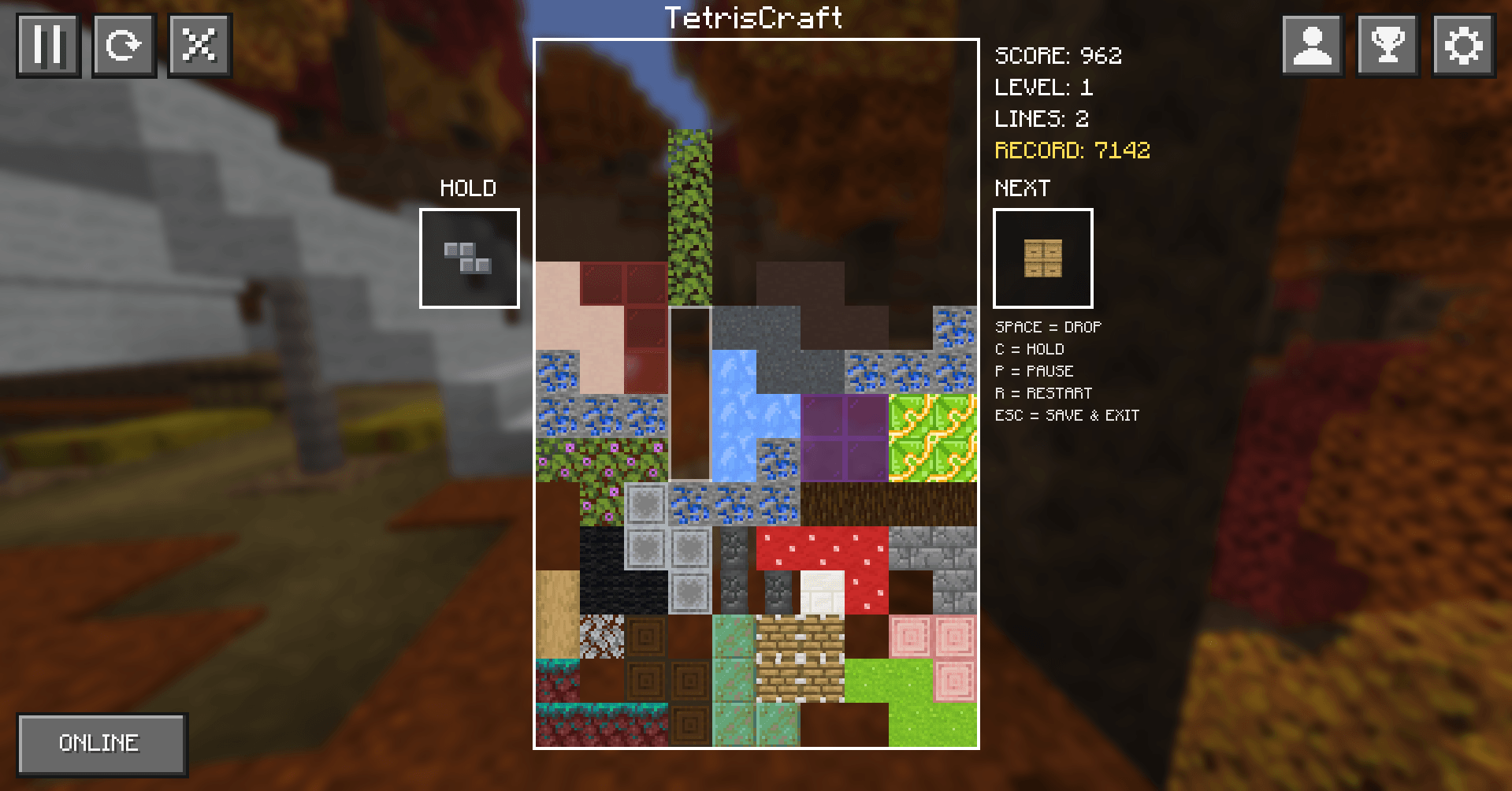 image-attachment_3b342796-12c1-4800-b943-738086698d2e.png
-

-

-

-

-

-

-
TetrisCraft 2.0
Versions
Files
Relations
Project Relations
More like this
Similar Mods
Suggestions use data such as tags, dependencies, dependents, descriptions, titles, and more to rank how much they overlap with this mod.
On ModDex
Community snapshot
By the numbers
Statistics

Get it on
Available Platforms
On ModDex
Community snapshot
By the numbers
Statistics
Resources