
Community listing page, reviews here may not be monitored by the author.
Third Person (F5)


No reviews yet
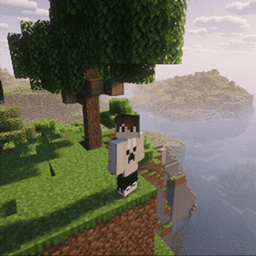
An extremely lightweight and simple third-person view mod
Community voices
Reviews
No reviews yet. Be the first to review this project!
Get it on
Available Platforms
Compatibility
Supported Environments
Runs entirely on the client. Works on vanilla servers.
About
Project Details
For authors
Embed Badge
If you're the author of this project, you can embed a live badge anywhere that supports HTML or Markdown. It updates automatically whenever ratings change.
Use HTML for any page that supports it, or Markdown for README files and Markdown-based descriptions.
Identifiers
Platform IDs
About
Description
Third Person Mod
Please download the latest version at “https://modrinth.com/mod/thirdperson”.
A Fabric mod that allows you to customize the camera distance in Minecraft’s third-person view (toggled with the F5 key). You can freely adjust the camera distance, and optionally disable the automatic camera zoom-in that occurs when the camera collides with blocks or walls—allowing the camera to clip through and maintain its position.
Main Features
Adjustable Camera Distance
Freely set the distance between the player and the camera in third-person view.
The default value is 4.0.
Clip Through Blocks
Normally, when a wall or block is behind the player, the camera moves closer.
When this setting is enabled, the camera will ignore blocks and maintain its distance.
Useful for taking screenshots in tight spaces or checking builds.
Requirements
This mod requires the following mods:
- Fabric Loader
- Fabric API
- Cloth Config API
- Mod Menu
How to Configure
- If Mod Menu is installed, you can change settings in-game.
- From the title screen or pause menu, click the Mods button.
- Search for "Third Person" in the mod list and select it.
- Click the settings icon.
Configuration Options
Camera Distance:
Adjust the camera distance using a slider or numeric input.
Clip Through Blocks:
Set to True to allow the camera to clip through walls.
Copyright (c) 2025 MichiJP. All Rights Reserved.
Third Person Mod
A Fabric mod that allows you to customize the camera distance in Minecraft’s third-person view (toggled with the F5 key). You can freely adjust the camera distance, and optionally disable the automatic camera zoom-in that occurs when the camera collides with blocks or walls—allowing the camera to clip through and maintain its position.
Main Features
Adjustable Camera Distance
Freely set the distance between the player and the camera in third-person view.
The default value is 4.0.
Clip Through Blocks
Normally, when a wall or block is behind the player, the camera moves closer.
When this setting is enabled, the camera will ignore blocks and maintain its distance.
Useful for taking screenshots in tight spaces or checking builds.
Requirements
This mod requires the following mods:
- Fabric Loader
- Fabric API
- Simple GUI API
- Mod Menu
How to Configure
- If Mod Menu is installed, you can change settings in-game.
- From the title screen or pause menu, click the Mods button.
- Search for "Third Person" in the mod list and select it.
- Click the settings icon.
Configuration Options
Camera Distance:
Adjust the camera distance using a slider or numeric input.
Clip Through Blocks:
Set to True to allow the camera to clip through walls.
Copyright (c) 2025 MichiJP. All Rights Reserved.
Screenshots
Gallery
Versions
Files
Relations
Project Relations
More like this
Similar Mods
Suggestions use data such as tags, dependencies, dependents, descriptions, titles, and more to rank how much they overlap with this mod.
On ModDex
Community snapshot
By the numbers
Statistics
Want to reach Minecraft players?
We're looking for a server hosting partner to feature here and other parts of the site. Interested? Send us a message!
Get in touchGet it on
Available Platforms
On ModDex
Community snapshot
By the numbers