
Community listing page, reviews here may not be monitored by the author.
TieredZ Tooltip Overhaul Compat

No reviews yet
Adds editable Tooltip Overhaul rarity frames for TieredZ refinements while preserving equipment comparison tooltips.
Community voices
Reviews
No reviews yet. Be the first to review this project!
Get it on
Available Platforms
About
Project Details
For authors
Embed Badge
If you're the author of this project, you can embed a live badge anywhere that supports HTML or Markdown. It updates automatically whenever ratings change.
Use HTML for any page that supports it, or Markdown for README files and Markdown-based descriptions.
Identifiers
Platform IDs
Resources
External Links
About
Description
TieredZ Tooltip Overhaul Compat
TieredZ Tooltip Overhaul Compat is a client-side compatibility addon for Minecraft 1.20.1 Fabric that integrates TieredZ refinement rarities with Tooltip Overhaul.
It allows refined tools and armor to use customizable rarity frames while preserving Tooltip Overhaul's equipment comparison functionality.
Features
- TieredZ Rarity Frames — Adds dedicated Tooltip Overhaul frames for Common, Uncommon, Rare, Epic, Legendary, and Unique TieredZ refinements.
- Dynamic Rarity Detection — Automatically reads the refinement data stored by TieredZ and selects the appropriate frame for each refined item.
- Equipment Comparisons — Preserves Tooltip Overhaul's comparison functionality for refined armor, weapons, and tools.
- Editable Frames — All added rarity frames can be viewed and customized through Tooltip Overhaul's Custom Frames visual editor.
- TieredZ Attributes Preserved — TieredZ continues to provide refinement attributes, modifiers, stat changes, and colored item names.
- TieredZ-Inspired Design — Includes six adapted frame textures based on TieredZ's original rarity border designs.
- Stable Frame IDs — TieredZ rarity frames use stable identifiers for improved compatibility with Tooltip Overhaul's custom frame system.
- Independent Configuration — The addon provides its own custom frame resource without requiring users to replace or overwrite their existing Tooltip Overhaul configuration.
- Client-Side Only — The addon does not need to be installed on a dedicated server.
Included Files
The TieredZ custom frame definitions are included inside the addon JAR at:
assets/tiered_tooltip_overhaul_compat/tooltipoverhaul/custom_frames.json
This file is bundled as a resource of the addon and is automatically detected by Tooltip Overhaul's Custom Frames system.
The addon does not place custom_frames.json directly in the root of the JAR and does not require users to manually copy it into their Tooltip Overhaul configuration folder.
Installation
- Install TieredZ, Tooltip Overhaul, and their required dependencies.
- Place TieredZ Tooltip Overhaul Compat in your client
modsfolder. - Launch Minecraft.
- Tooltip Overhaul will automatically detect the custom frame configuration provided by the addon.
-
In TieredZ's configuration, set:
tieredTooltip=false - Restart Minecraft.
No manual copying or replacement of Tooltip Overhaul's custom_frames.json is required.
About custom_frames.json
The addon provides its TieredZ custom frame definitions through its bundled resource:
assets/tiered_tooltip_overhaul_compat/tooltipoverhaul/custom_frames.json
The file provides six custom frames for TieredZ's refinement rarities:
- Common
- Uncommon
- Rare
- Epic
- Legendary
- Unique
The swords displayed in the TieredZ sections of Tooltip Overhaul's Custom Frames editor are preview items only. During gameplay, the addon dynamically selects the appropriate frame according to each item's TieredZ refinement data.
The custom frame definitions are provided independently from the user's existing Tooltip Overhaul configuration.
Configuration
TieredZ's original tooltip frame renderer must remain disabled:
tieredTooltip=false
TieredZ will continue applying refinement attributes, modifiers, stat changes, and colored item names. Tooltip Overhaul will handle the tooltip layout, rarity frames, and equipment comparisons.
The added rarity frames can be customized through Tooltip Overhaul's Custom Frames visual editor.
When Mod Menu is installed, Tooltip Overhaul's configuration screen can be accessed through the in-game mod list.
When editing the TieredZ custom frames, Tooltip Overhaul creates a local copy when changes are saved. This allows the customized frames to be stored separately from the original resource provided by the addon.
Requirements
- Minecraft 1.20.1
- Fabric Loader
- Java 17
- TieredZ 1.3.3 or newer compatible version — CurseForge — Required
- Tooltip Overhaul 2.0.2 or newer compatible version — CurseForge — Required
- Mod Menu — CurseForge — Optional, for accessing Tooltip Overhaul's in-game configuration screen.
Original Projects
This addon provides compatibility between:
- TieredZ
This is an independent compatibility addon and is not an official release of either original project.
Credits
TieredZ Tooltip Overhaul Compat created by zclashtm.
TieredZ and its original rarity designs were created by Globox_Z and the TieredZ contributors.
Tooltip Overhaul and its customizable tooltip system were created by xylonity and the Tooltip Overhaul team.
License
TieredZ Tooltip Overhaul Compat is licensed under the MIT License.
Screenshots
Gallery
-
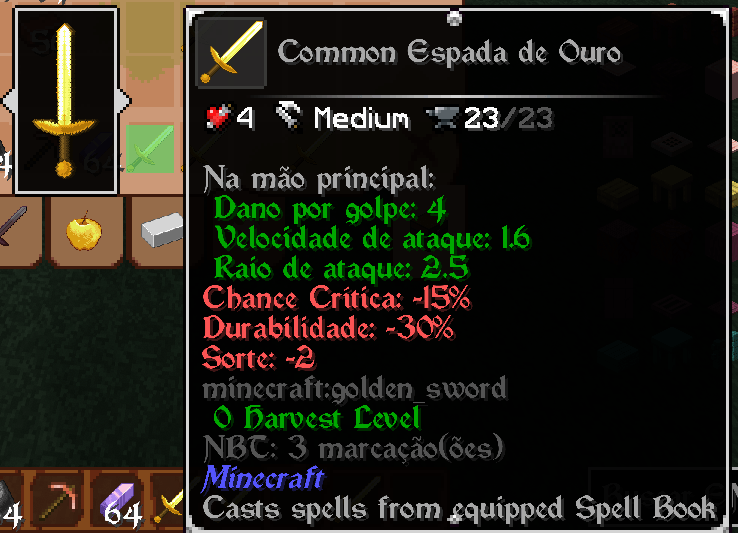 Tooltip with Rarity Common Tooltip with Rarity Common
 -
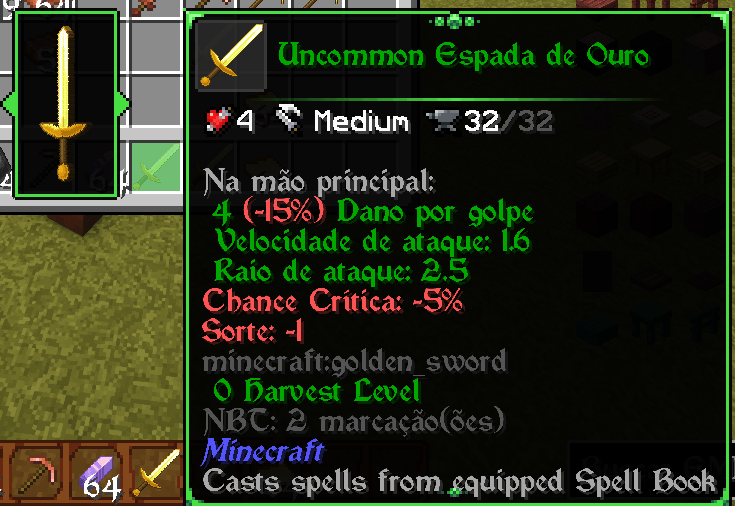 Tooltip with Rarity Uncommon Tooltip with Rarity Uncommon
 -
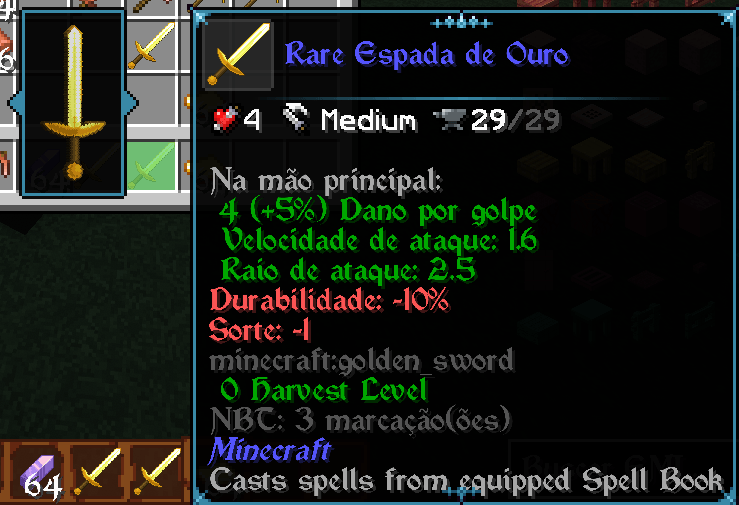 Tooltip with Rarity Rare Tooltip with Rarity Rare
 -
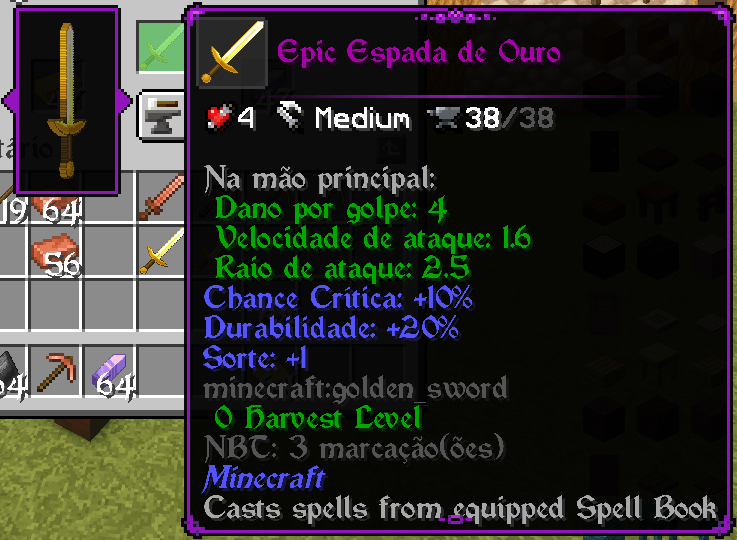 Tooltip with Rarity Epic Tooltip with Rarity Epic
 -
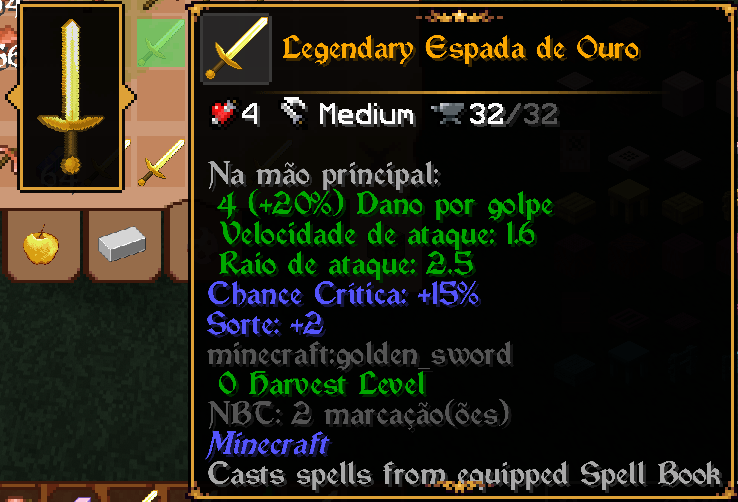 Tooltip with Rarity Legendary Tooltip with Rarity Legendary
 -
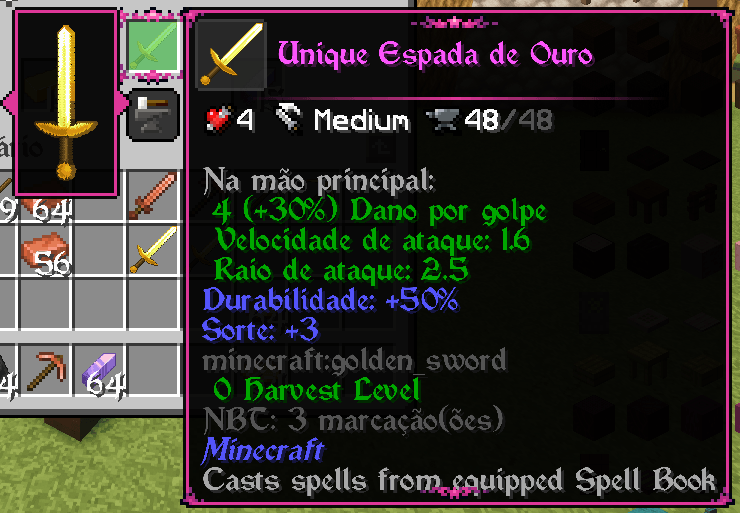 Tooltip with Rarity Unique Tooltip with Rarity Unique
Versions
Files
Relations
Project Relations
More like this
Similar Mods
Suggestions use data such as tags, dependencies, dependents, descriptions, titles, and more to rank how much they overlap with this mod.
On ModDex
Community snapshot
By the numbers
Statistics
Want to reach Minecraft players?
We're looking for a server hosting partner to feature here and other parts of the site. Interested? Send us a message!
Get in touchGet it on
Available Platforms
On ModDex
Community snapshot
By the numbers
Statistics
Resources