
Community listing page, reviews may not be monitored by the author.


Community voices
Reviews
No reviews yet. Be the first to review this project!
Get it on
Available Platforms
About
Project Details
For authors
Embed Badge
If you're the author of this project, you can embed a live badge anywhere that supports HTML or Markdown. It updates automatically whenever ratings change.
Use HTML for any page that supports it, or Markdown for README files and Markdown-based descriptions.
Identifiers
Platform IDs
Resources
External Links
About
Description
*removed AI generated artwork cover-photo, replaced with a (poorly) handmade image taken in Minecraft with Complementary Shaders
When you start a Time Wealth world, or join a Time Wealth server, you start the game with 5 minutes (by default, can be changed with gamerule "spawnDeathTimer") on your timer. The timer counts down if gamerule "useDeathTimer" is set to "True". If the timer hits 0; you die. A chat message, lightning, and a small explosion (that doesn't damage anything), mark the end of your run! If you die from anything else in the game, you just receive a (default) 35 second penalty.
The penalty can be adjusted using gamerule deathTimerPenalty (set to 35 seconds by default) or the deathtimer command below
Commands include:
/deathtimer start
/deathtimer stop
/deathtimer penalty (seconds) [changes gamerule deathTimerPenalty]
/deathtimer set (player) (seconds) [sets chosen player(s) death timer(s)]
/deathtimer add (player) (seconds) [adds time to chosen player(s)'s death timer(s)]
/deathtimer hardcore (true/false) [changes gamerule isTimerHardcore]
/deathtimer respawntime (seconds) [changes gamerule spawnDeathTimer]
Gamerules exist so you can create a singleplayer world, and enable the gamerules before you get in. The commands exist so that you can adjust things as you go in multiplayer (or cheats-on) worlds
You can see your timer at the top of your screen:

In your inventory you'll get a much more detailed breakdown of how much time you have:
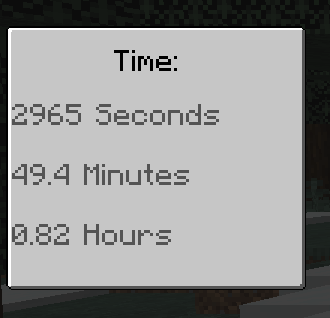
If gamerule "isTimerHardcore" is set to "True", when your timer runs out you will respawn in Spectator mode, as if you were playing in a hardcore world. If set to "False", you will respawn with however much time gamerule "spawnDeathTimer" is set to, minus whatever gamerule "deathTimerPenalty" is set to!
In order to keep your timer filled, you will need to find and consume various resources by pressing "R" with the resource in your hand. There's an in-game list you can find by pressing "G", that tells you the resources you can consume, as well as how much time they give. I'll also list that here.
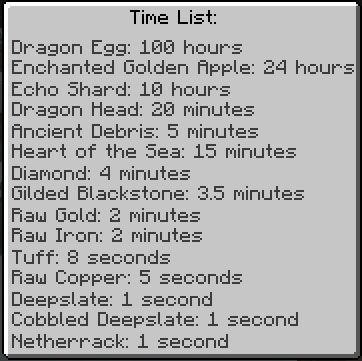
If you save up enough time, craft yourself a "Time Shop"!
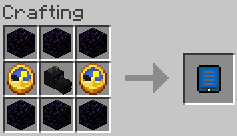
With the Time Shop item in hand, you can shift-right-click to save your current location at any time. If you just right click with it you open the Time Shop!
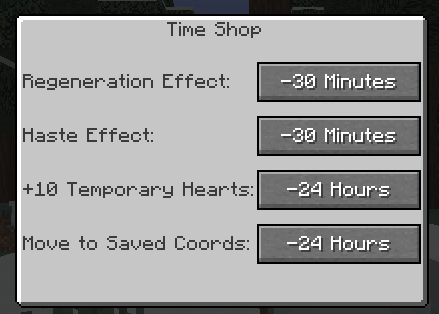
Haste and Regeneration effects last for 15 seconds, however you can always make the purchase again to get it again later! (all of these numbers are still being worked on, please leave feedback on how it feels to play with)
You get 10 absorption hearts for an entire 5 minutes!
Or at any time you can teleport back to whatever location you saved. This works cross-dimensionally!
Multiplayer:
In multiplayer there are some additional functions!
If you right click on another player you will give them a second of your time, adding it to their time. Inversely, if you shift-right click on another player, you will steal a second from them...
If you kill another player outright (using a sword or other weapon) they will respawn with their initial 5 minute timer AND YOU WILL GET ALL OF THEIR TIME (minus 5 minutes, to prevent time duping)
If you kill a player that has less than 5 minutes, you will lose time equal to the amount they had below 5 minutes.
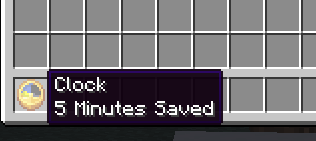
Want to disincentivise players killing you and stealing all of your hard-earned time? Make a clock! While holding a (single) clock item in your main hand, if you have more than 5 minutes (again to prevent time duping) you can right click to add 1 minute to the clock, removing it from your personal timer, shift-right click to remove time from the clock and add it back to your personal timer. The clock gets a special tooltip to show however much time is stored in it! (this works in singleplayer as well, but I'm not sure why you'd want to do that)
I think that's about it! Let me know if you have any feedback, please feel free to add this to modpacks, make playthroughs of it, that kind of thing. Please don't steal it and reupload it :)
Screenshots
Gallery
Versions
Files
Relations
Project Relations
More like this
Similar Mods
Suggestions use data such as tags, dependencies, dependents, descriptions, titles, and more to rank how much they overlap with this mod.
On ModDex
Community snapshot
By the numbers
Statistics
 (opens in a new tab)
Get it on
Available Platforms
On ModDex
Community snapshot
By the numbers
Statistics
Resources