Community listing page, reviews may not be monitored by the author.
Tome O’ Treasures

No reviews yet
Every treasure has a story. Discover items from across your modpack, explore their origins, recipes and connections, and switch off the ones you don't want.

Community voices
Reviews
No reviews yet. Be the first to review this project!
Get it on
Available Platforms
About
Project Details
For authors
Embed Badge
If you're the author of this project, you can embed a live badge anywhere that supports HTML or Markdown. It updates automatically whenever ratings change.
Use HTML for any page that supports it, or Markdown for README files and Markdown-based descriptions.
Identifiers
Platform IDs
Resources
External Links
About
Description

Nameplate font: Minecraft Pixel Font 5x5 by Withered Emperor 2006
Tome O’ Treasures, part of the Almanac O’ Adventures modpack utility series.

Tome O’ Treasures is a book of the special items and blocks worth finding, from every mod in your game. Nothing is written by hand and nothing is tied to any one mod: add or remove mods and the book changes with them.
Open it from the book button on the pause menu, next to Back to Game. You can also type /catalog, or bind a key under Controls.
What it does
- Know what you’ve found: what it does, its properties and its original description.
- How to get it: crafting, chests, dig sites and creature drops.
- What it makes: every recipe that takes it.
- Sets stay together: armour sets, variants and families share a page.
- Turn it in your hands: 3D and animated items up close, with related variants a click away.
- Looks like your pack: special items take their colours from your tooltip mod.
- Switch an item off from its page (needs Item Obliterator).
Everything is connected
Every item page links onward. Dropped by takes you to the creature, In chests of to the structure that holds it, Found in to its biome, and Used to make shows what it becomes. Click a link to jump straight there, then press Back to return to where you were. The links lead into the other O’ series books, so they work best with the Almanac, which has them all.
How it changes your game
It adds no blocks, items or creatures of its own. It adds a book button to the pause menu and the book behind it. Nothing is removed from your game unless you switch an item off yourself.
Also in the book
- Journal O’ Journeys: your screenshots as polaroids, a scrapbook, and stickers you win by playing.
- Manual O’ Mods: a page for every mod you have installed.
- Search by what a thing is, a page slider with every mod marked by its icon, and survival mode, where a page stays hidden until you have found the thing yourself.
- Profiles: everything you have switched off, as one code you can paste into another pack.
Requirements
- Lore O’ Libs: required. It is the book itself, shared by every O’ series mod.
- Item Obliterator: needed only for the on/off switches. Without it the book is a field guide.
- Currently for Minecraft 1.20.1 on Forge.
Part of the O’ series
Install this book alone or alongside the other O’ series books. All five come in one file as Almanac O’ Adventures. Do not install the Almanac and this file together.
Found a problem? Report it from the book
Open the close-up of anything that looks wrong and press the ! button. Pick what the problem is, and the book takes a screenshot of the page and opens our GitHub page with the report already written for you. The screenshot is waiting on your clipboard: click the box, press Ctrl+V, then Submit. You need a free GitHub account, and nothing is sent until you press Submit yourself.
Reports turn into fixes for everyone. When you join a world the book reads one small public list of fixes, so a creature, structure or item that was reported gets put right without waiting for a new download. Nothing about you is sent, and it can be switched off in the config.
⭐ Add to favorites to remember the mod ⭐


The other books on their own:
with love and intention.
-Shrine.
Screenshots
Gallery
-
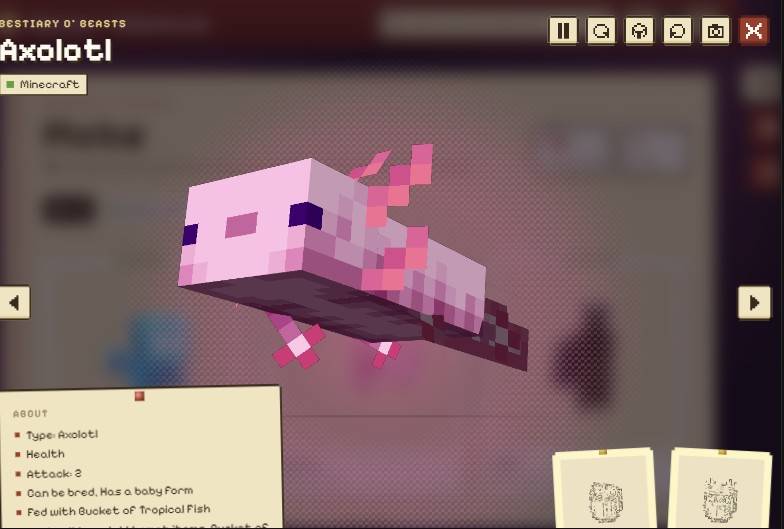 Coming Soon: the webpage’s 3D viewer A sneak peek at Export as Webpage, coming soon to the O’ Series: every creature, structure, biome and item of your modpack on one site, with 3D previews.
Versions
Files
Relations
Project Relations
More like this
Similar Mods
Suggestions use data such as tags, dependencies, dependents, descriptions, titles, and more to rank how much they overlap with this mod.
On ModDex
Community snapshot
By the numbers
Statistics

Get it on
Available Platforms
On ModDex
Community snapshot
By the numbers
Statistics
Resources