Tonten
No reviews yet
This mod adds simple building assistance tools that can be used in survival mode.
Includes quality of life improvements and small tweaks to enhance and customize gameplay.
Community voices
Reviews
Click once to include, again to exclude, again to clear
No reviews yet. Be the first to review this project!
Get it on
Available Platforms
 CurseForge
 Modrinth
Compatibility
Supported Environments
About
Project Details
For authors
Embed Badge
If you're the author of this project, you can embed a live badge anywhere that supports HTML or Markdown. It updates automatically whenever ratings change.
Use HTML for any page that supports it, or Markdown for README files and Markdown-based descriptions.
Identifiers
Platform IDs
Resources
External Links
About
Description
This mod is a building assistance tool designed for use in survival mode.
This mod removes complex GUIs and instead uses Ctrl + Mouse Wheel to switch modes, prioritizing intuitive and fast-paced building.
Because of this design, it is not intended for massive construction projects or large-scale terrain editing. However, it allows you to build smoothly without constantly opening menus or GUIs.
Each tool is not simply a stronger or weaker version of another. Every tool has its own unique functionality, allowing you to switch between them naturally without interrupting the flow of building.
Note: I am Japanese, and this is my very first Minecraft mod. Most of it was created using CodeX. I am still a beginner programmer, so I would appreciate it if experienced modders could kindly watch over this project. Also, sorry for my imperfect English.
Shared Modes
Flat Mode
By clicking a block with a Tonkachi, blocks will be placed along the flat surface direction of the selected block. The placement range depends on the tool being used.
Vertical Mode
By clicking a block with a Tonkachi, blocks will extend straight outward in the opposite direction. The maximum number of blocks that can be placed depends on the tool.
Stairs Mode
Automatically places blocks in a staircase pattern. The block orientation is also aligned correctly, making stair placement quick and easy. The maximum number of blocks that can be placed depends on the tool.
Extend Mode
Blocks can be placed in midair as long as they are connected to an adjacent block. No more awkward sneaking while trying to place blocks at the edge!
In this mode, you must hold the block you want to place in your off-hand.
Unique Modes
Stone Tonkachi
Has a special block rotation mode.
- Rotate — Changes block orientation horizontally (front/back/left/right).
- Upside Down — Changes block orientation vertically (up/down).
Iron Tonkachi
Has advanced variants of Vertical Mode.
- Vertical (Up) — Places blocks upward.
- Vertical (Down) — Places blocks downward.
These modes are easier to control than normal Vertical Mode when you only want movement in one direction.
Diamond Tonkachi
Has an Air Place Mode.
Unlike Extension Mode, this allows blocks to be placed freely in the air even without adjacent blocks.
Just like Extension Mode, you must hold the block to place in your off-hand.
Wooden Tonkachi
Has low durability and no special abilities.
Its range is extremely limited, and it cannot use Flat Mode. However, because it has fewer modes, switching between them is simpler and faster.
Useful for smaller builds, and very cheap to repair since it uses logs as the repair material.
Modpacks: Allowed.
You may include TONTEN in modpacks.
Please do not redistribute modified versions or reupload the mod separately.
About the Name
“Tonkachi” is a Japanese word for a small hammer commonly used by carpenters.
The mod name comes from the Japanese onomatopoeia “ton-ten-kan-ten,” which imitates the sound of hammering during carpentry work.
This mod is a building assistance tool designed for use in survival mode.
This mod removes complex GUIs and instead uses Ctrl + Mouse Wheel to switch modes, prioritizing intuitive and fast-paced building.
Because of this design, it is not intended for massive construction projects or large-scale terrain editing. However, it allows you to build smoothly without constantly opening menus or GUIs.
Each tool is not simply a stronger or weaker version of another. Every tool has its own unique functionality, allowing you to switch between them naturally without interrupting the flow of building.
Note: I am Japanese, and this is my very first Minecraft mod. Most of it was created using CodeX. I am still a beginner programmer, so I would appreciate it if experienced modders could kindly watch over this project. Also, sorry for my imperfect English.
Shared Modes
Flat Mode
By clicking a block with a Tonkachi, blocks will be placed along the flat surface direction of the selected block. The placement range depends on the tool being used.
Vertical Mode
By clicking a block with a Tonkachi, blocks will extend straight outward in the opposite direction. The maximum number of blocks that can be placed depends on the tool.
Stairs Mode
Automatically places blocks in a staircase pattern. The block orientation is also aligned correctly, making stair placement quick and easy. The maximum number of blocks that can be placed depends on the tool.
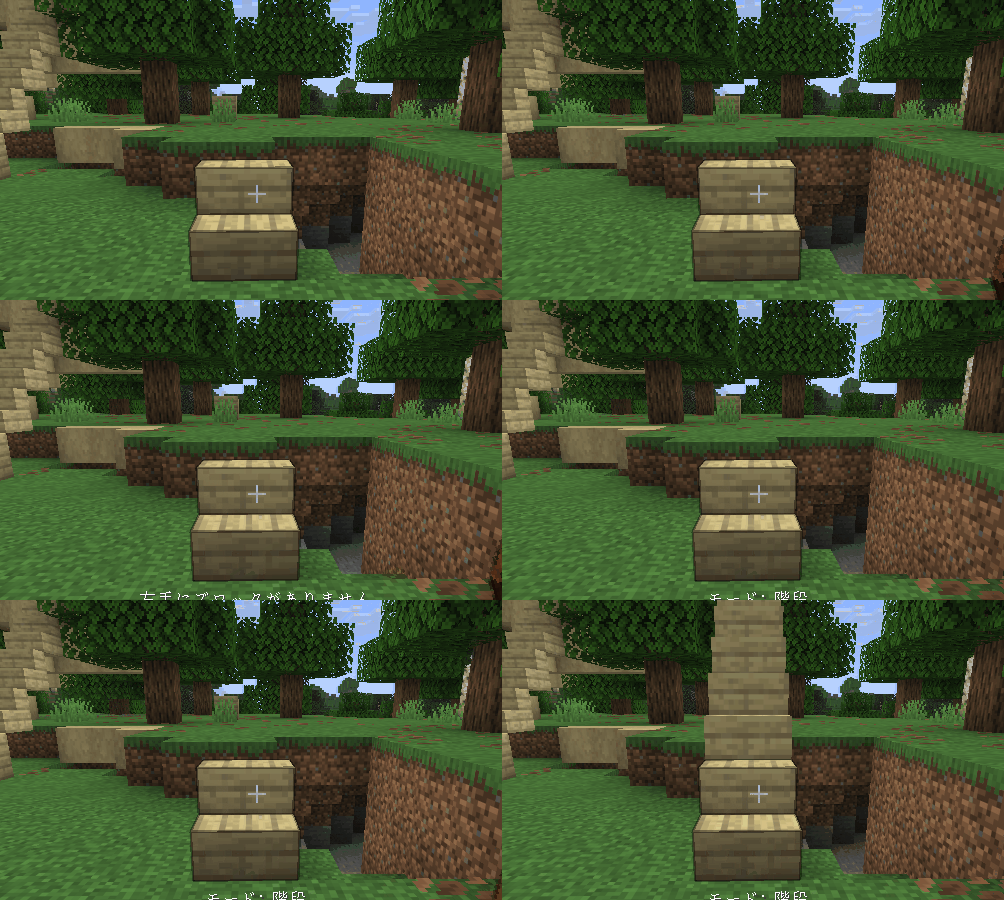
Extend Mode
Blocks can be placed in midair as long as they are connected to an adjacent block. No more awkward sneaking while trying to place blocks at the edge!
In this mode, you must hold the block you want to place in your off-hand.
Recipe

Unique Modes
Stone Tonkachi
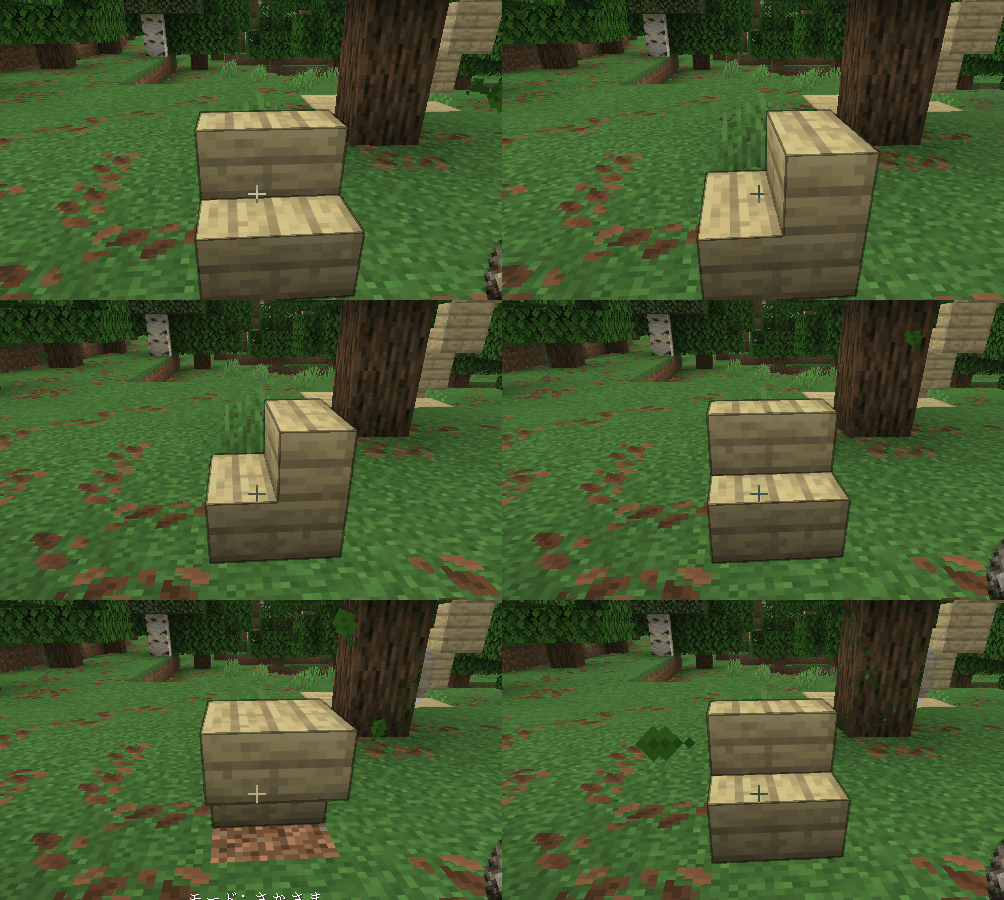
Has a special block rotation mode.
- Rotate — Changes block orientation horizontally (front/back/left/right).
- Upside Down — Changes block orientation vertically (up/down).
Iron Tonkachi
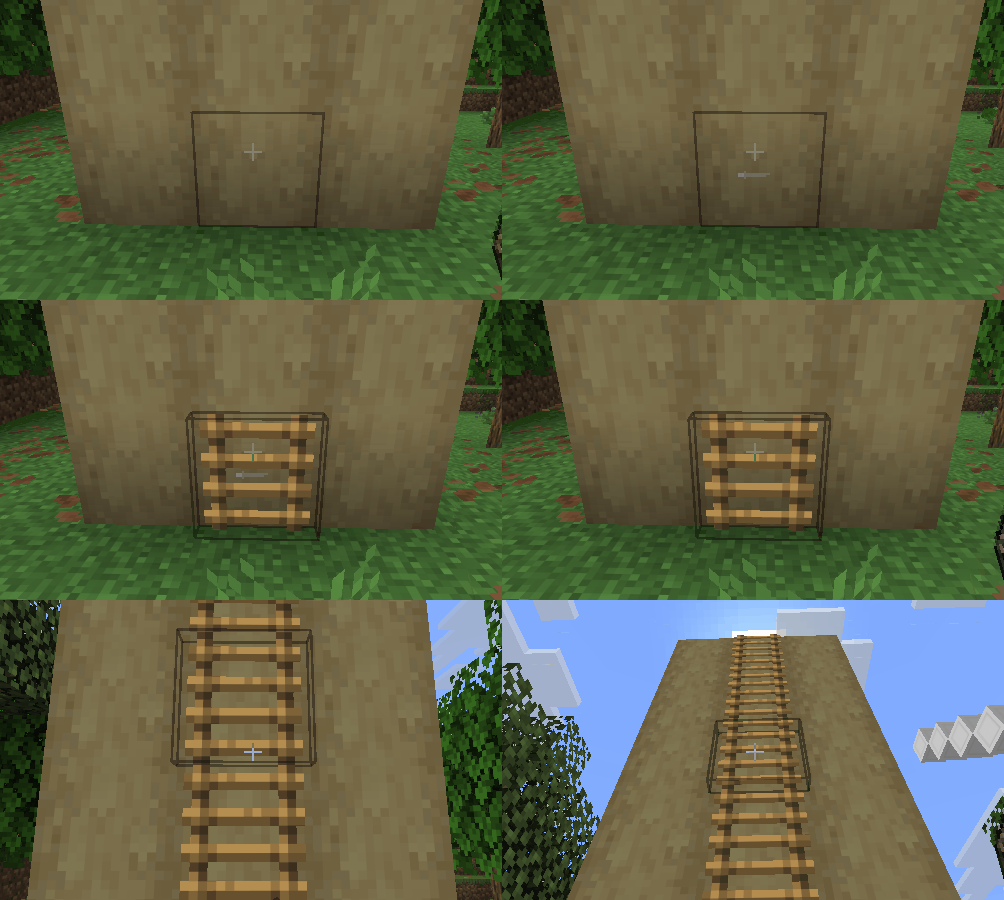
Has advanced variants of Vertical Mode.
- Vertical (Up) — Places blocks upward.
- Vertical (Down) — Places blocks downward.
These modes are easier to control than normal Vertical Mode when you only want movement in one direction.
Diamond Tonkachi
Has an Air Place Mode.
Unlike Extension Mode, this allows blocks to be placed freely in the air even without adjacent blocks.
Just like Extension Mode, you must hold the block to place in your off-hand.
Wooden Tonkachi
Has low durability and no special abilities.
Its range is extremely limited, and it cannot use Flat Mode. However, because it has fewer modes, switching between them is simpler and faster.
Useful for smaller builds, and very cheap to repair since it uses logs as the repair material.
About the Name
“Tonkachi” is a Japanese word for a small hammer commonly used by carpenters.
The mod name comes from the Japanese onomatopoeia “ton-ten-kan-ten,” which imitates the sound of hammering during carpentry work.
Screenshots
Gallery
-
Rotate
-
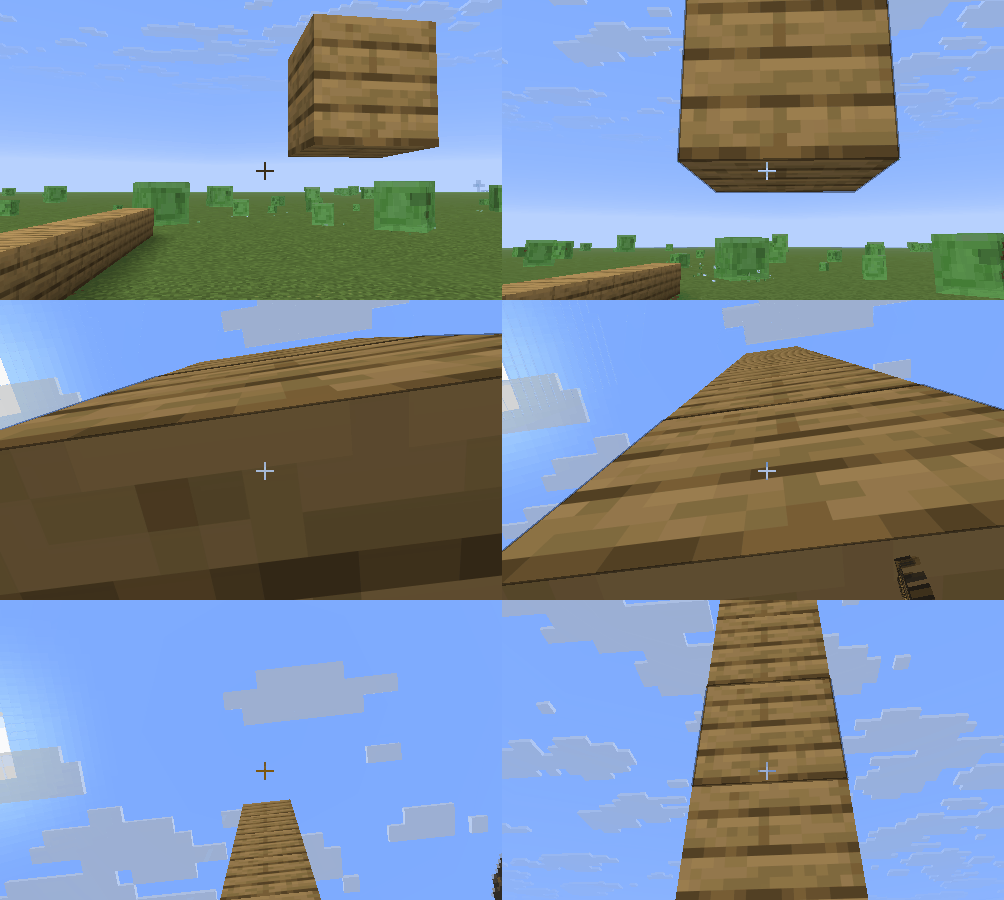 Vertical 01
 -
Vertical Mode (Up) You can place ladders upward like this.
-
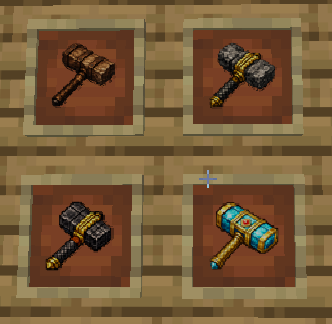 tonkachi
 -
Stairs Automatically places blocks in a staircase pattern.
-
recipe
-
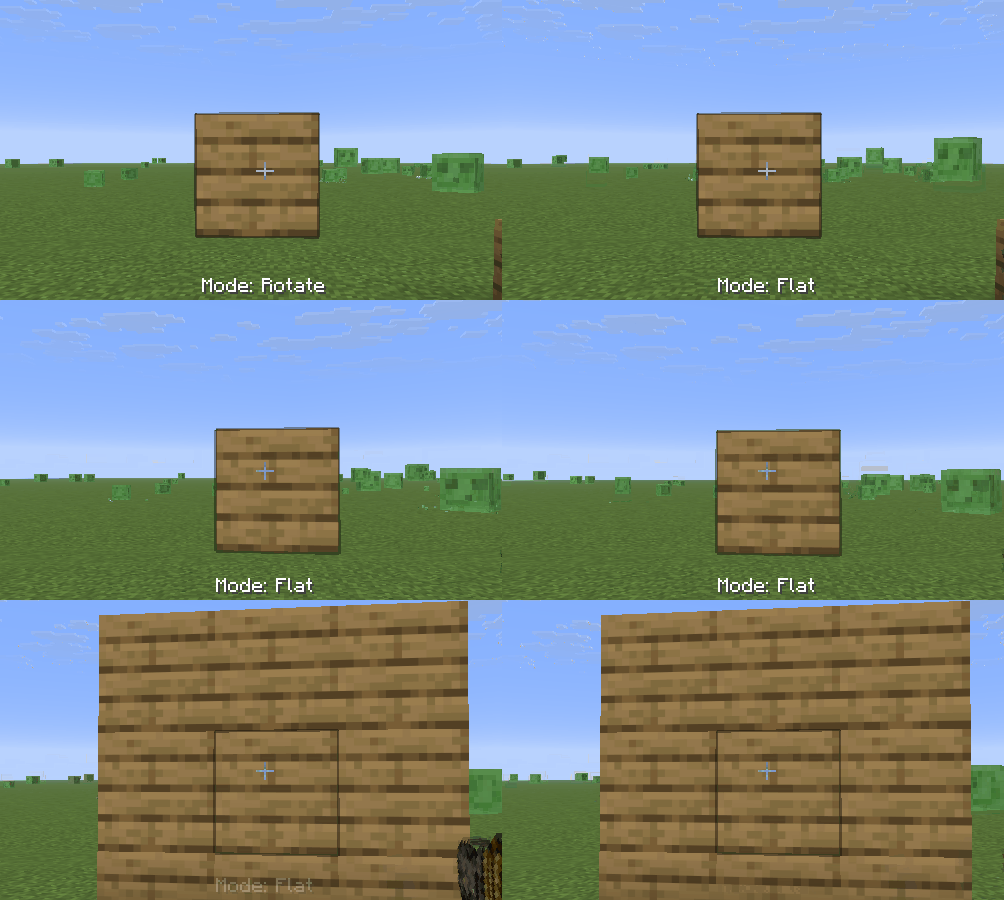 flat
flat
Versions
Files
Relations
Project Relations
More like this
Similar Mods
Suggestions use data such as tags, dependencies, dependents, descriptions, titles, and more to rank how much they overlap with this mod.
On ModDex
Community snapshot
By the numbers
Statistics
Want to reach Minecraft players?
We're looking for a server hosting partner to feature here and other parts of the site. Interested? Send us a message!
Get in touchGet it on
Available Platforms
On ModDex
Community snapshot
By the numbers
Statistics
Resources