Community listing page, reviews may not be monitored by the author.
Tools of Netherrack

No reviews yet
Craft stone tools from Netherrack, complete with a different name and texture to match

Community voices
Reviews
No reviews yet. Be the first to review this project!
Get it on
Available Platforms
About
Project Details
For authors
Embed Badge
If you're the author of this project, you can embed a live badge anywhere that supports HTML or Markdown. It updates automatically whenever ratings change.
Use HTML for any page that supports it, or Markdown for README files and Markdown-based descriptions.
Identifiers
Platform IDs
Resources
External Links
About
Description
This datapack allows you to craft tools out of Netherrack, to aid you in any long journeys through the Nether. You'll no longer need to use up any of the cobblestone you may have brought with you or hunt down any Blackstone deposits if you're caught with your last tools about to break.
Things to Note
-
The "Netherrack tools" are actually stone tools with a different name and texture. They work identically to normal stone tools, and can be repaired with cobblestone, cobbled deepslate, or blackstone on an anvil.
-
When repairing Netherrack tools in the crafting grid by combining two of the same tool together, the output will be a regular stone tool. However, when repairing a Netherrack tool with items on the anvil, the repaired tool will keep its special name and Netherrack-colored texture.
-
This is all 100% Vanilla-friendly, no modloaders needed.
-
The accompanying resource pack is not compatible with any other resource pack that modifies the stone tools' item models.
I've also included some functions to easily give yourself any Netherrack tool via commands. Here's a complete list, with the preceeding /function part included:
- /function toolsofnetherrack:axe
- /function toolsofnetherrack:hoe
- /function toolsofnetherrack:pickaxe
- /function toolsofnetherrack:shovel
- /function toolsofnetherrack:sword
Installation (IMPORTANT)
-
On this project page, navigate to the "Versions" tab
-
Locate and click your desired version on the list
-
Scroll down (if necessary) to find both the data pack and its required resource pack. Download them both. Without the resource pack, the tools will just appear as normal stone tools
-
Place the resource pack (the one with "Resources" in the filename) in your Minecraft directory's "resourcepacks" folder, and the data pack (the one with "Datapack" in the filename) in your world's "datapacks" folder. Don't forget to enable the resource pack (and then restart the game if enabling it through the in-game menu). Any players connecting to the world in multiplayer will also need to install the resource pack to see the textures.
-
Enjoy your tools
F.A.Q.
Will you port to [insert Minecraft version below 1.20.5 here]?
No, because even in the older versions that do support data packs, trying to make a custom recipe that outputs an item with specific NBT data in those versions requires some extremely awkward workarounds. It wouldn't be pretty.
Will you port to [insert higher Minecraft version here]?
That's the plan. c: I'd like to have this available for every version 1.20.5 and above, but that kind of thing takes time. Please be patient.
The tools look like regular stone tools.
Make sure you've downloaded the required resource pack, placed it in your Minecraft directory's "resourcepacks" folder, and enabled it. If you've enabled the resource pack via the in-game "Resource Packs" menu, you will need to restart the game for the textures to actually show up. Please refer to the installation instructions above the F.A.Q. section.
Screenshots
Gallery
-
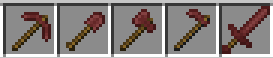 Netherrack Tools All of the "Netherrack tools" that can be crafted with this pack
Versions
Files
Relations
Project Relations
More like this
Similar Mods
Suggestions use data such as tags, dependencies, dependents, descriptions, titles, and more to rank how much they overlap with this mod.
On ModDex
Community snapshot
By the numbers
Statistics


Get it on
Available Platforms
On ModDex
Community snapshot
By the numbers
Statistics
Resources