
Tool Trims Alternative
No reviews yet
Allows you to trim weapons and tools. There are over 1200 combinations!
Does not follow a specific thematic focus apart from vanilla Minecraft.
Features content that solely expands on Vanilla mechanics and gameplay.
Includes aesthetic items like decoration, clothing, and visual effects.
Includes quality of life improvements and small tweaks to enhance and customize gameplay.
Paper is a fork of Spigot that adds its own plugin API on top of the Bukkit API. All Spigot plugins are compatible with paper, not all paper plugins are compatible with Spigot.
Community voices
Reviews
Click once to include, again to exclude, again to clear
No reviews yet. Be the first to review this project!
Get it on
Available Platforms
 Modrinth
Compatibility
Supported Environments
About
Project Details
For authors
Embed Badge
If you're the author of this project, you can embed a live badge anywhere that supports HTML or Markdown. It updates automatically whenever ratings change.
Use HTML for any page that supports it, or Markdown for README files and Markdown-based descriptions.
Identifiers
Platform IDs
About
Description
⚠️ Resource Pack Required
Grab the Resource Pack from the original
You can already trim armor, but what about weapons and tools? Well, with this Plugin, you can trim them!
Features
- All features from the original with a few changes:
-
Removed Toolsmithing Table (Use vanilla smithing table to trim tools)
-
Simplified commands into one creative command
/function tooltrims:give_templates -
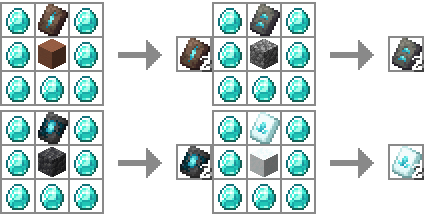
Tool Trims can be duplicated using a crafting table (instead of the Toolsmithing Table)
-
Installation
- Stop the server
- Delete the original data pack if you have it
- Download and put in the plugins folder
- Configure the server to serve the resource pack from the original creation
- Re(start) server
- Depending on the version you may need to wait for the server to be up and restart again to load the datapack.
Geyser
- Do normal install (listed above)
- If you want bedrock players to be able to craft with these trims, install this fix
- Click the featured version.
- Download, and unzip "Geyser Hook" (Secondary download, under the versions tab)
- Put "Tool Trims (plugin) Geyser RP.mcpack" in the packs folder of Geyser
- Put "Tool Trims (plugin) Geyser mappings.json" in the custom_mappings folder of Geyser
- Put "en_us.json" in the locales/overrides folder of Geyser
- Re(start) server
Credits
Thanks to:
- JoeFly: Amazing idea, resource pack, and data pack
Screenshots
Gallery
-
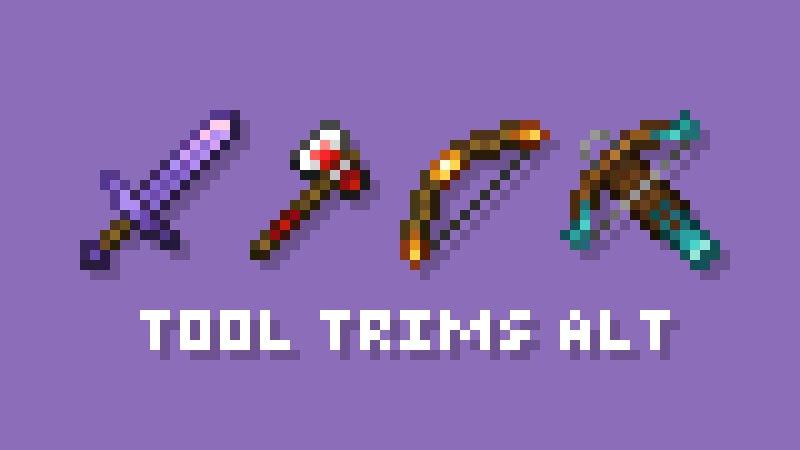 Banner
 -
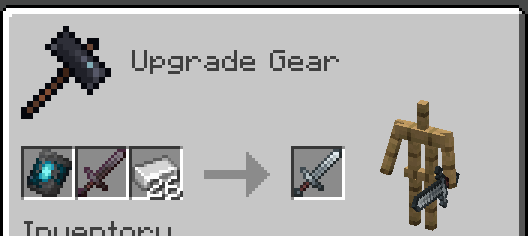 Smithing Table Use the vanilla Smithing Table instead of Toolsmithing Table
 -
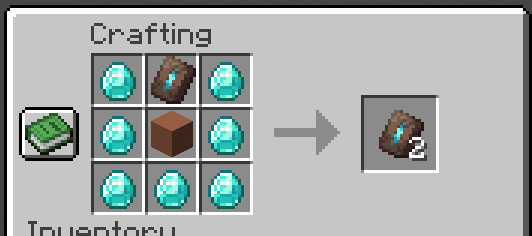 Duplication Recipe Use vanilla duplication recipe instead of Toolsmithing Table
Versions
Files
Relations
Project Relations
More like this
Similar Mods
Suggestions use data such as tags, dependencies, dependents, descriptions, titles, and more to rank how much they overlap with this mod.
On ModDex
Community snapshot
By the numbers
Statistics

Want to reach Minecraft players?
We're looking for a server hosting partner to feature here and other parts of the site. Interested? Send us a message!
Get in touchGet it on
Available Platforms
On ModDex
Community snapshot
By the numbers