
Community listing page, reviews may not be monitored by the author.
Toss To Trash

No reviews yet
TossToTrash is a server-side Fabric mod that eliminates entity lag by replacing dropped items with a virtual disposal bin. Players simply use the /trash command to open a UI where items are permanently deleted upon closing.

Community voices
Reviews
No reviews yet. Be the first to review this project!
Get it on
Available Platforms
Compatibility
Supported Environments
Runs entirely on the server. Also works in singleplayer.
About
Project Details
For authors
Embed Badge
If you're the author of this project, you can embed a live badge anywhere that supports HTML or Markdown. It updates automatically whenever ratings change.
Use HTML for any page that supports it, or Markdown for README files and Markdown-based descriptions.
Identifiers
Platform IDs
Resources
External Links
About
Description
Toss To Trash
Toss To Trash is a lightweight, server-side Fabric mod that gives every player a personal void trash bin. Instead of throwing unwanted items on the ground, where they become entities that cost server performance, players run a single command and delete items through a familiar chest interface.
Because the mod is server-side only, vanilla clients can join and use it immediately. There are no client mods, no resource packs, and no configuration.
What the mod does
- Adds a
/trashcommand that opens a private 27-slot (single chest) disposal interface for the player who ran it. - Items stay in the bin while the interface is open, so players can drag, drop, and double-check before committing.
- The moment the interface is closed, every item inside is permanently deleted. Nothing is dropped into the world and no item entities are ever spawned.
- The bin is fully virtual and per-session. Each opening creates a fresh, isolated inventory that is cleared and released as soon as the screen closes.
- The command is registered with the server command dispatcher, so it appears in chat auto-suggestions like any vanilla command.
Commands
| Command | Access | Description |
|---|---|---|
/trash |
Every player, no operator level required | Opens your personal Void Trash Bin. Close the interface to permanently delete everything inside. |
There are no arguments, no subcommands, and no permission setup. If a player can run chat commands, they can use /trash.
Configuration
Toss To Trash has no configuration file and needs no setup. Behavior is fixed and identical on every server:
| Setting | Value |
|---|---|
| Bin size | 27 slots (9x3 chest layout) |
| Deletion timing | When the interface is closed |
| Item drops | Never spawned |
| Client requirements | None, vanilla clients supported |
| Dependencies | Fabric Loader only, no Fabric API |
Installation
- Install Fabric Loader for your Minecraft version on the server.
- Download the Toss To Trash file that matches your Minecraft version (see the compatibility table below).
- Place the
.jarfile into the servermodsfolder. - Start or restart the server. Players can use
/trashright away.
Compatibility
| Mod file | Minecraft versions | Java | Fabric Loader |
|---|---|---|---|
| Toss To Trash 1.1.0 for 1.21.x | 1.21 through 1.21.11 | 21 or newer | 0.19.2 or newer |
| Toss To Trash 1.1.0 for 26.1.x | 26.1, 26.1.1, 26.1.2 | 25 or newer | 0.19.2 or newer |
| Toss To Trash 1.1.0 for 26.2.x | 26.2 | 25 or newer | 0.19.2 or newer |
| Toss To Trash 1.1.0 for 26.3.x | 26.3 | 25 or newer | 0.19.2 or newer |
The mod is server-side only. Install it on the server; clients never need it.
Performance notes
- Zero item entities. Deleted items never touch the world, so mob grinders, spawn areas, and community farms stay clean.
- Near-zero memory footprint. The bin inventory exists only while the screen is open and is released on close.
- No ticking logic, no background tasks, no world interaction.
License
All Rights Reserved. Copyright (c) 2026 TOPG-V. Redistribution or modification without explicit prior permission from the copyright holder is not permitted.
Screenshots
Gallery
-
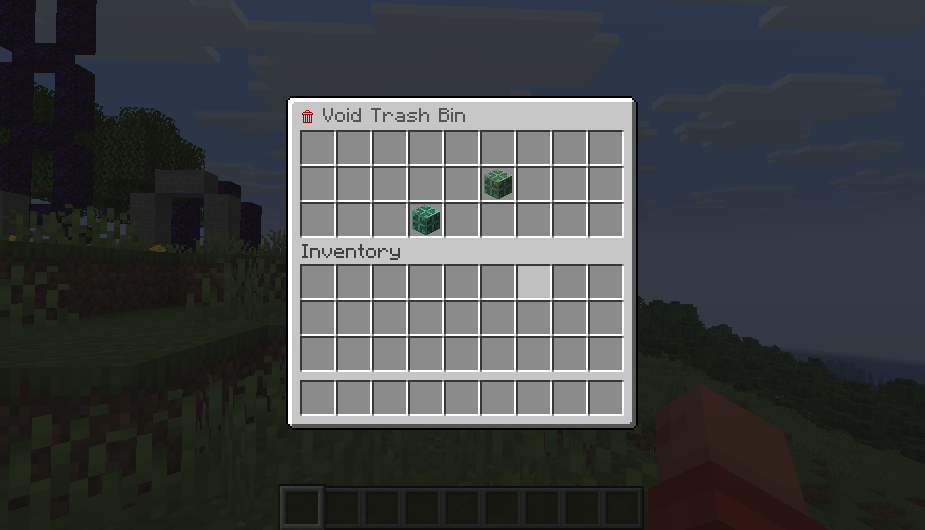 Trashbin GUI 🗑️
Versions
Files
Relations
Project Relations
More like this
Similar Mods
Suggestions use data such as tags, dependencies, dependents, descriptions, titles, and more to rank how much they overlap with this mod.
On ModDex
Community snapshot
By the numbers
Statistics


Get it on
Available Platforms
On ModDex
Community snapshot
By the numbers
Statistics
Resources