
Community listing page, reviews here may not be monitored by the author.
TotemCounterV2


No reviews yet
counts players totem pops accurate and fully customizable
Community voices
Reviews
No reviews yet. Be the first to review this project!
Get it on
Available Platforms
Compatibility
Supported Environments
Runs entirely on the client. Works on vanilla servers.
About
Project Details
For authors
Embed Badge
If you're the author of this project, you can embed a live badge anywhere that supports HTML or Markdown. It updates automatically whenever ratings change.
Use HTML for any page that supports it, or Markdown for README files and Markdown-based descriptions.
Identifiers
Platform IDs
About
Description
**Advanced Totem Pop Counter for Crystal PVP Players**
# m4lib is required for the mod! [m4lib]
TotemCounterV2 is a professional Fabric client-side mod that accurately tracks totem pops with a fully customizable, mouse-interactive HUD featuring transparent backgrounds and smooth animations.
---
## ✨ Key Features
### 🎯 Accurate Tracking
- **100% Accurate Counting** - Entity status packet detection with duplicate filtering
- **Auto-Reset on Death** - Counters automatically reset when players die
- **Distance Filter** - Show only nearby players within customizable range
- **Auto Sorting** - Players with most pops displayed first
### 🖱️ Interactive HUD
- **Mouse-Interactive** - Left-click drag to move, right-click corners to resize
- **Edit Mode** - Press **H** key for quick HUD editing
- **Transparent Backgrounds** - 40% opacity for minimal screen obstruction
- **Totem Icons** - Visual totem items in HUD (toggleable)
### 🎨 Beautiful Customization
- **Preset Soft Colors** - Beautiful pastel color palette
- Text: Soft White, Pink, Blue, Green, Yellow, Purple, Orange, Mint
- Background: Dark, Gray, Blue, Green, Purple, Very Clear (20% opacity)
- Border: White, Gold, Aqua, Red, Lime
- **Mod Menu Integration** - Full configuration through Mod Menu
- **Customizable Hotkeys** - Choose your config key (L/J/K/M)
### ⚡ Performance
- **Optimized** - Minimal CPU/RAM impact (<0.5% CPU, ~2-3 MB RAM)
- **FPS Friendly** - Less than 2 FPS impact
- **Compatible** - Works with Sodium, Iris, Lithium, Starlight
---
## 🚀 Installation
### Requirements
1. **Minecraft** 1.21.x (any 1.21 version)
2. **[Fabric Loader](https://fabricmc.net/use/)** 0.15.11 or higher
3. **[Fabric API](https://modrinth.com/mod/fabric-api)** (latest for your MC version)
4. **Java 21** or higher
### Installation Steps
1. Install Fabric Loader for Minecraft 1.21.x
2. Download latest Fabric API
3. Download TotemCounterV2 from this page
4. Place both JAR files in `.minecraft/mods` folder
5. Launch Minecraft with Fabric profile
6. First launch: Choose your config hotkey (L/J/K/M)
**Single JAR for all 1.21 versions!** Works on 1.21, 1.21.1, 1.21.2, 1.21.3, 1.21.4, and future 1.21.x releases.
---
## 🎮 How to Use
### First Time Setup
On first launch, you'll be prompted to choose your **config menu hotkey**:
- **L** (recommended) - Default config key
- **J, K, M** - Alternative options
### Basic Usage
1. Join a server or world
2. HUD automatically displays when players pop totems
3. Counters reset automatically when players die
4. Press your **config key** to open settings
5. Press **Ş** key to enter Edit Mode
### Hotkeys
- **L/J/K/M** (your choice): Open configuration menu
- **H**: Toggle Edit Mode (drag & resize HUD)
- **ESC**: Exit Edit Mode and save
### Edit Mode Controls
**Activate:** Press **H** key or click "EDIT MODE" button in settings
**Controls:**
- **Left-Click Drag HUD**: Move position
- **Right-Click Drag Corners**: Resize (yellow handles appear)
- **Save or ESC**: Save and exit
### Configuration Options
Open settings menu (default: L key) or via Mod Menu to customize:
**Display Options:**
- Show/hide Background
- Show/hide Border
- Show/hide Totem Icons
- Show/hide Self counter
- Enable/disable Distance Filter
- Set Nearby Distance (default: 50 blocks)
- Set Max Players shown (default: 10)
**Color Customization:**
- Choose from preset soft colors for text, background, and border
- All colors are carefully selected for optimal visibility
---
## 🔒 Fair Play & Security
### ✅ TotemCounterV2 is:
- Information display mod only
- Shows publicly visible game events
- Supports fair play principles
- No automation or unfair advantages
### ❌ TotemCounterV2 is NOT:
- Not a cheat or hack client
- No player advantage mechanics
- No game behavior modifications
- No automation features
**⚠️ Server Rules:** Always check individual server rules before using any mod. Some servers may have specific policies.
---
## 🛠️ Compatibility
### ✅ Compatible with:
- **Sodium** - Full compatibility
- **Iris Shaders** - Works perfectly
- **Mod Menu** - Native integration
- **Lithium** - No conflicts
- **Starlight** - Works together
- Most Fabric optimization mods
### 📊 Performance Stats
- **CPU Usage**: Less than 0.5%
- **RAM Usage**: 2-3 MB
- **FPS Impact**: Less than 2 FPS
---
## 🐛 Troubleshooting
### Mod Not Loading?
- Ensure Fabric Loader 0.15.11+ is installed
- Verify Fabric API is in mods folder
- Check Java 21+ is installed and used by Minecraft
### HUD Not Showing?
- Open settings with your config key
- Press H to enter Edit Mode
- Try toggling "Show Icon" option
- Check position values aren't off-screen
### Icons Not Displaying?
- Enable "Show Icon" in config
- May conflict with certain texture packs
- Try disabling/changing texture pack
---
## 🔄 Changelog
### Version 2.1.0
- ✅ Added Auto Counter Reset feature (BETA)
- ✅ Improved Edit Mode with corner resize handles
- ✅ Enhanced sound system with multiple sound types
- ✅ Better UI layout and organization
- ✅ Removed chat spam from auto reset
- ✅ Improved toggle UI (ON/OFF with colors)
---
## 🙏 Credits
- **uku3lig** - Original totem counting method inspiration ([totemcounter](https://github.com/uku3lig/totemcounter))
- **Fabric Team** - Excellent mod loader framework
- **Minecraft Community** - Continuous support and feedback
- **Crystal PVP Players** - Testing and feature suggestions
---
## 📞 Support & Contact
- **GitHub:** [m4ssivee/totemcounterv2](https://github.com/m4ssivee/totemcounterv2)
- **Discord:** yagiwz
- **Issues:** [Report Bug](https://github.com/m4ssivee/totemcounterv2/issues)
---
## 📜 License
This mod is licensed under the **MIT License**.
```
MIT License
Copyright (c) 2025 m4ssive

Permission is hereby granted, free of charge, to any person obtaining a copy
of this software and associated documentation files (the "Software"), to deal
in the Software without restriction, including without limitation the rights
to use, copy, modify, merge, publish, distribute, sublicense, and/or sell
copies of the Software, and to permit persons to whom the Software is
furnished to do so, subject to the following conditions:

The above copyright notice and this permission notice shall be included in all
copies or substantial portions of the Software.

THE SOFTWARE IS PROVIDED "AS IS", WITHOUT WARRANTY OF ANY KIND, EXPRESS OR
IMPLIED, INCLUDING BUT NOT LIMITED TO THE WARRANTIES OF MERCHANTABILITY,
FITNESS FOR A PARTICULAR PURPOSE AND NONINFRINGEMENT. IN NO EVENT SHALL THE
AUTHORS OR COPYRIGHT HOLDERS BE LIABLE FOR ANY CLAIM, DAMAGES OR OTHER
LIABILITY, WHETHER IN AN ACTION OF CONTRACT, TORT OR OTHERWISE, ARISING FROM,
OUT OF OR IN CONNECTION WITH THE SOFTWARE OR THE USE OR OTHER DEALINGS IN THE
SOFTWARE.
```
---
<div align="center">
**⚡ Dominate Crystal PVP with TotemCounterV2! ⚡**
Made by **m4ssive** (m4main)
</div>
TotemCounterV2
Have you ever been in a massive PvP fight, screaming "HOW MANY TOTEMS DOES THIS GUY HAVE?!" on voice chat? Yeah, we've all been there.
TotemCounterV2 is a lightweight, fully client-side Fabric mod designed to solve exactly that. It tracks every single totem popped by players around you and displays it in a clean, highly customizable HUD. Whether you're playing on vanilla SMPs, anarchy servers, or intense PvP realms (like Crystal PvP), this mod gives you the tactical advantage without needing any server-side plugins.
⚙️ Ultimate Customization
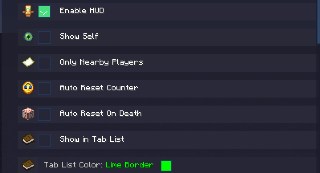
We built this mod so you can tweak literally everything. Want the counter to reset when you die? Done. Only want to track players who are actually near you? Easy. Want to show the pops directly in the Tab List with a custom colored border? You got it.
🎵 Custom Pop Sounds
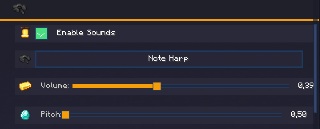
Tired of the default totem sound or just want something more noticeable in the heat of battle? You can enable custom sounds, choose your preferred note block instrument (like the Note Harp), and adjust both the volume and pitch so you never miss a pop.
🏆 Milestone Alerts
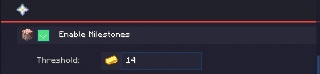
Sometimes a fight just goes on forever. With the Milestone feature, you can set a specific threshold (e.g., 14 totems). Once a player hits that insane number, the mod makes sure you know about it.
🖱️ Drag & Drop Edit Mode
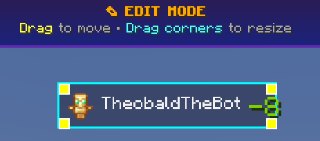
Forget about manually typing X and Y coordinates into config files. Just press the Edit Mode keybind, and simply drag the counter anywhere on your screen. You can even grab the corners to resize the nametag and icon exactly to your liking.
📦 Dependencies
This mod requires our core UI and networking library to function:
- m4lib
- Fabric API
- HUD automatically displays when players pop totems
- Counters reset automatically when players die
- Press your config key to open settings
- Press H key to enter Edit Mode
Hotkeys
- L/J/K/M (your choice): Open configuration menu
- H: Toggle Edit Mode (drag & resize HUD)
- ESC: Exit Edit Mode and save
Edit Mode Controls
Activate: Press H key or click "EDIT MODE" button in settings
Controls:
- Left-Click Drag HUD: Move position
- Right-Click Drag Corners: Resize (yellow handles appear)
- Save or ESC: Save and exit
Configuration Options
Open settings menu (default: L key) or via Mod Menu to customize:
Display Options:
- Show/hide Background
- Show/hide Border
- Show/hide Totem Icons
- Show/hide Self counter
- Enable/disable Distance Filter
- Set Nearby Distance (default: 50 blocks)
- Set Max Players shown (default: 10)
Color Customization:
- Choose from preset soft colors for text, background, and border
- All colors are carefully selected for optimal visibility
🔒 Fair Play & Security
✅ TotemCounterV2 is:
- Information display mod only
- Shows publicly visible game events
- Supports fair play principles
- No automation or unfair advantages
❌ TotemCounterV2 is NOT:
- Not a cheat or hack client
- No player advantage mechanics
- No game behavior modifications
- No automation features
⚠️ Server Rules: Always check individual server rules before using any mod. Some servers may have specific policies.
🛠️ Compatibility
✅ Compatible with:
- Sodium - Full compatibility
- Iris Shaders - Works perfectly
- Mod Menu - Native integration
- Lithium - No conflicts
- Starlight - Works together
- Most Fabric optimization mods
📊 Performance Stats
- CPU Usage: Less than 0.5%
- RAM Usage: 2-3 MB
- FPS Impact: Less than 2 FPS
🐛 Troubleshooting
Mod Not Loading?
- Ensure Fabric Loader 0.15.11+ is installed
- Verify Fabric API is in mods folder
- Check Java 21+ is installed and used by Minecraft
HUD Not Showing?
- Open settings with your config key
- Press H to enter Edit Mode
- Try toggling "Show Icon" option
- Check position values aren't off-screen
Icons Not Displaying?
- Enable "Show Icon" in config
- May conflict with certain texture packs
- Try disabling/changing texture pack
🔄 Changelog
Version 2.3.5
- ✅ Added Version Supports.
- ✅ Improved Edit Mode with corner resize handles
- ✅ Enhanced sound system with multiple sound types
- ✅ Better UI layout and organization
- ✅ Removed chat spam from auto reset
- ✅ Improved toggle UI (ON/OFF with colors)
🙏 Credits
- uku3lig - Original totem counting method inspiration (totemcounter)
- Fabric Team - Excellent mod loader framework
- Minecraft Community - Continuous support and feedback
- Crystal PVP Players - Testing and feature suggestions
📞 Support & Contact
- GitHub: m4ssivee/totemcounterv2
- Discord: yagiwz
- Issues: Report Bug
📜 License
This mod is licensed under the MIT License.
MIT License
Copyright (c) 2025 m4ssive
Permission is hereby granted, free of charge, to any person obtaining a copy
of this software and associated documentation files (the "Software"), to deal
in the Software without restriction, including without limitation the rights
to use, copy, modify, merge, publish, distribute, sublicense, and/or sell
copies of the Software, and to permit persons to whom the Software is
furnished to do so, subject to the following conditions:
The above copyright notice and this permission notice shall be included in all
copies or substantial portions of the Software.
THE SOFTWARE IS PROVIDED "AS IS", WITHOUT WARRANTY OF ANY KIND, EXPRESS OR
IMPLIED, INCLUDING BUT NOT LIMITED TO THE WARRANTIES OF MERCHANTABILITY,
FITNESS FOR A PARTICULAR PURPOSE AND NONINFRINGEMENT. IN NO EVENT SHALL THE
AUTHORS OR COPYRIGHT HOLDERS BE LIABLE FOR ANY CLAIM, DAMAGES OR OTHER
LIABILITY, WHETHER IN AN ACTION OF CONTRACT, TORT OR OTHERWISE, ARISING FROM,
OUT OF OR IN CONNECTION WITH THE SOFTWARE OR THE USE OR OTHER DEALINGS IN THE
SOFTWARE.
⚡ Dominate Crystal PVP with TotemCounterV2! ⚡
Made by m4ssive (m4main)
Screenshots
Gallery
-
 banner banner
 -
 In game usage. You can also enable to see your pops and its fully customizable!
 -
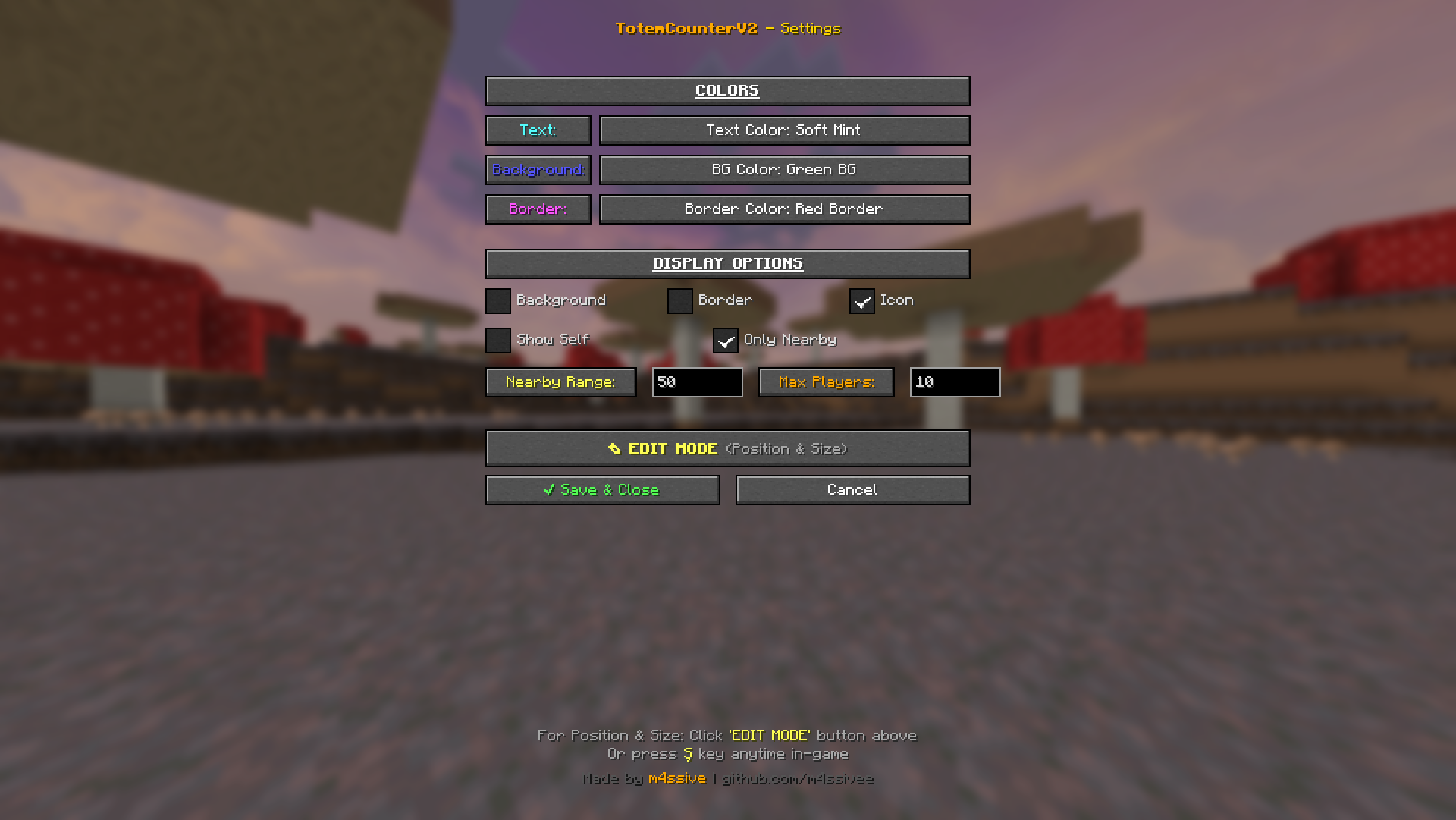 GUI of the mod Press your config key (default: L) or via **Mod Menu** Choose from beautiful preset colors (no hex codes needed!): Text Colors: - Soft White, Soft Pink, Soft Blue, Soft Green - Soft Yellow, Soft Purple, Soft Orange, Soft Mint
 -
 Resizeing the hud You can open this resizeing menu with pressing ''EDIT MODE'' and re-shape and move around!
Versions
Files
Relations
Project Relations
More like this
Similar Mods
Suggestions use data such as tags, dependencies, dependents, descriptions, titles, and more to rank how much they overlap with this mod.
On ModDex
Community snapshot
By the numbers
Statistics
Want to reach Minecraft players?
We're looking for a server hosting partner to feature here and other parts of the site. Interested? Send us a message!
Get in touchGet it on
Available Platforms
On ModDex
Community snapshot
By the numbers