
TotemSound
No reviews yet
This Minecraft mod lets you replace the default totem sound with a custom audio file up to ten seconds long.
Fabric is a mod loader for versions 1.14+ of Minecraft, particularly popular for client side and optimization mods.
Community voices
Reviews
Click once to include, again to exclude, again to clear
No reviews yet. Be the first to review this project!
Get it on
Available Platforms
 Modrinth
Compatibility
Supported Environments
About
Project Details
For authors
Embed Badge
If you're the author of this project, you can embed a live badge anywhere that supports HTML or Markdown. It updates automatically whenever ratings change.
Use HTML for any page that supports it, or Markdown for README files and Markdown-based descriptions.
Identifiers
Platform IDs
Resources
External Links
About
Description
TotemSound
A client-side Fabric mod for Minecraft 1.21.1 that allows you to replace the Totem of Undying pop sound with a custom local audio file directly in-game.
Features
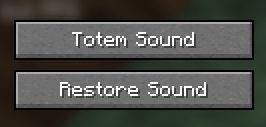
- In-Game Menu: Adds a new button to the pause menu to easily change the sound while playing.
- Local Files: Allows you to select a custom audio file directly from your PC using a file browser.
- Time Limit: The system automatically checks if the selected sound complies with the maximum limit of 10 seconds.
- Restore Function: Clicking "Restore Sound" immediately brings back the original vanilla totem sound.
- Client-Side Only: The mod only needs to be installed on the client and works perfectly on any multiplayer server.
Installation
- Install the Fabric Loader for Minecraft 1.21.1.
- Download the mod file (
totemsound.jar). - Place the file into your
%appdata%\.minecraft\modsfolder. - Launch the game using the Fabric profile.
Usage
- Open the pause menu (ESC) in-game.
- Click the Totem Sound button.
- Select your desired audio file on your PC (It has to be a .wav file you can convert your sound on some websites for example https://cloudconvert.com/audio-converter ).
- Use a totem in the game to hear the new sound.
- To get the original sound back, simply press Restore Sound in the pause menu.
Author: Petar
Platform: Fabric (Minecraft 1.21.1)
Screenshots
Gallery
Versions
Files
Relations
Project Relations
More like this
Similar Mods
Suggestions use data such as tags, dependencies, dependents, descriptions, titles, and more to rank how much they overlap with this mod.
On ModDex
Community snapshot
By the numbers
Statistics

Want to reach Minecraft players?
We're looking for a server hosting partner to feature here and other parts of the site. Interested? Send us a message!
Get in touchGet it on
Available Platforms
On ModDex
Community snapshot
By the numbers
Statistics
Resources