Community listing page, reviews here may not be monitored by the author.
Transfer Labels


No reviews yet
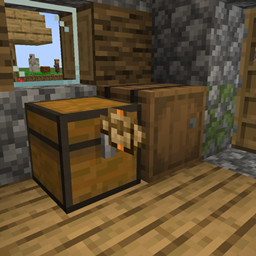
Place labels between blocks to transfer items & fluids
Community voices
Reviews
No reviews yet. Be the first to review this project!
Get it on
Available Platforms
Compatibility
Supported Environments
Must be installed on both the client and the server.
About
Project Details
For authors
Embed Badge
If you're the author of this project, you can embed a live badge anywhere that supports HTML or Markdown. It updates automatically whenever ratings change.
Use HTML for any page that supports it, or Markdown for README files and Markdown-based descriptions.
Identifiers
Platform IDs
About
Description

Transfer Labels is a mod that allows you to transfer items/fluids between blocks that are right next to each other.
How it works:
- You can place labels on blocks by sneak right clicking into blocks
- You can interact with the label by holding a label and right-clicking the placed label
- You can remove the placed label by left-clicking the label while holding a label
You can access labels through blocks using the label accessor
Filtering:
When opening the label GUI you can filter with different filter types like regulating, exact count, mod and tag.
For the filter that have an amount, you can change how much while scrolling while holding Shift/Alt/Ctrl and any combination of those keys
Acceleration:
You can accelerate the labels by adding the same item label in the amount or speed slots.
Transfer Labels is a mod that allows you to transfer items/fluids between blocks that are right next to each other.
How it works:
- You can place labels on blocks by sneak right clicking into blocks
- You can interact with the label by holding a label and right-clicking the placed label
- You can remove the placed label by left-clicking the label while holding a label
You can access labels through blocks using the label accessor
Filtering:
When opening the label GUI you can filter with different filter types like regulating, exact count, mod and tag.
For the filter that have an amount, you can change how much while scrolling while holding Shift/Alt/Ctrl and any combination of those keys
Acceleration:
You can accelerate the labels by adding the same item label in the amount or speed slots.
Screenshots
Gallery
Versions
Files
Relations
Project Relations
More like this
Similar Mods
Suggestions use data such as tags, dependencies, dependents, descriptions, titles, and more to rank how much they overlap with this mod.
On ModDex
Community snapshot
By the numbers
Statistics
Want to reach Minecraft players?
We're looking for a server hosting partner to feature here and other parts of the site. Interested? Send us a message!
Get in touchGet it on
Available Platforms
On ModDex
Community snapshot
By the numbers