
Chat Translation Mod
No reviews yet
This Minecraft mod translates chat messages into your chosen language with a single click. It uses the Google Apps Script (GAS) API for translation.
Fabric is a mod loader for versions 1.14+ of Minecraft, particularly popular for client side and optimization mods.
Community voices
Reviews
Click once to include, again to exclude, again to clear
No reviews yet. Be the first to review this project!
Get it on
Available Platforms
 Modrinth
Compatibility
Supported Environments
About
Project Details
For authors
Embed Badge
If you're the author of this project, you can embed a live badge anywhere that supports HTML or Markdown. It updates automatically whenever ratings change.
Use HTML for any page that supports it, or Markdown for README files and Markdown-based descriptions.
Identifiers
Platform IDs
Resources
External Links
About
Description
Chat Translation Mod
A mod that translates Minecraft chat messages into your specified language with a single click. The translation is done via the Google Apps Script (GAS) API. It works on the Fabric environment, Minecraft Version 1.21.11 or 26.2.
If setting it up is too much trouble, you can just copy the following link and paste to API URL (config/translator-url.txt):
https://script.google.com/macros/s/AKfycbyoiiASzJr_SNFV9Wn5388f03C8jKuz6IQMrRVt-AejbhKaDjO0BXxvQw_zp2rkv05g-w/exec
How to Use
You must complete these steps to enable translations.
Step 1. Log in to your Google account and go to https://script.google.com/.
Step 2. Create a new project. You can name it anything you like, such as "Minecraft Translation API".
Step 3. Select and delete all the default code, then paste the following code:
function doGet(e) {
  var {text, target = 'ja', source = ''} = e.parameter;
  var translatedText = LanguageApp.translate(text, source, target);
  return ContentService.createTextOutput(translatedText).setMimeType(ContentService.MimeType.TEXT);
}
Step 4. Click the "Deploy" button and choose "New deployment". Set the type to "Web app". You can enter any description. Set "Execute as" to "Me" and "Who has access" to "Anyone", then click the "Deploy" button.
Step 5. Copy the generated Web App URL (which looks like https://script.google.com/macros/s/.../exec) to complete this step. Do not share this URL with anyone!
Step 6. Place the downloaded .jar file into your mods folder.
Step 7. Launch Minecraft once and close it. This will generate the configuration files in your config folder.
Step 8. Open translator-url.txt, paste the translation API URL (GAS, etc.) you prepared in the previous step, and save the file.
Step 9. Open translator-lang.txt to change the target language code (e.g., en for English, ja for Japanese). Default language is Japanese(ja).
- If you have any questions, feature requests, or encounter issues, please send me a DM on Discord.
- Discord Username: @nuyuchi
Screenshots
Gallery
-
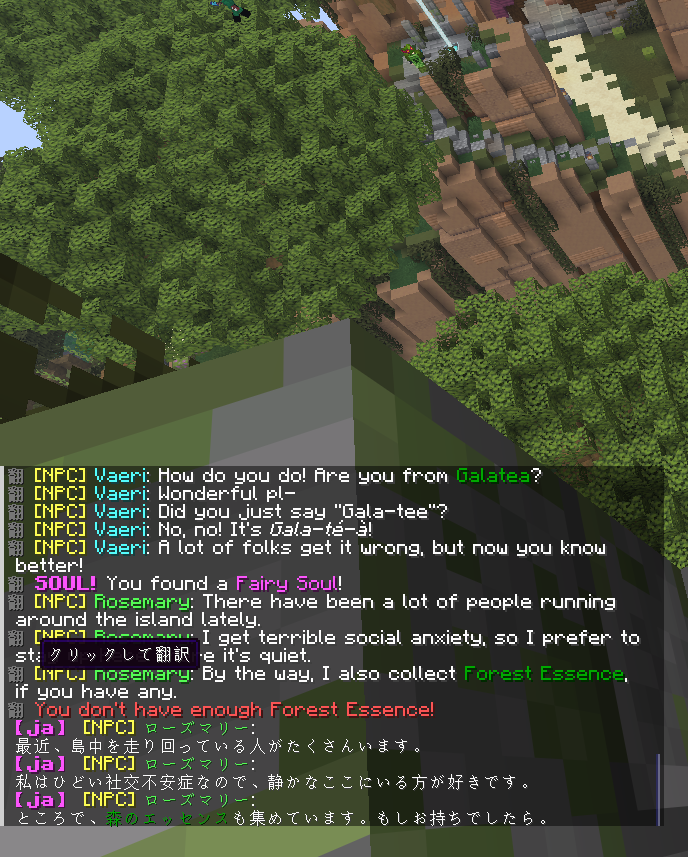 Translation Example You can translate chat text to your language like this.
 -
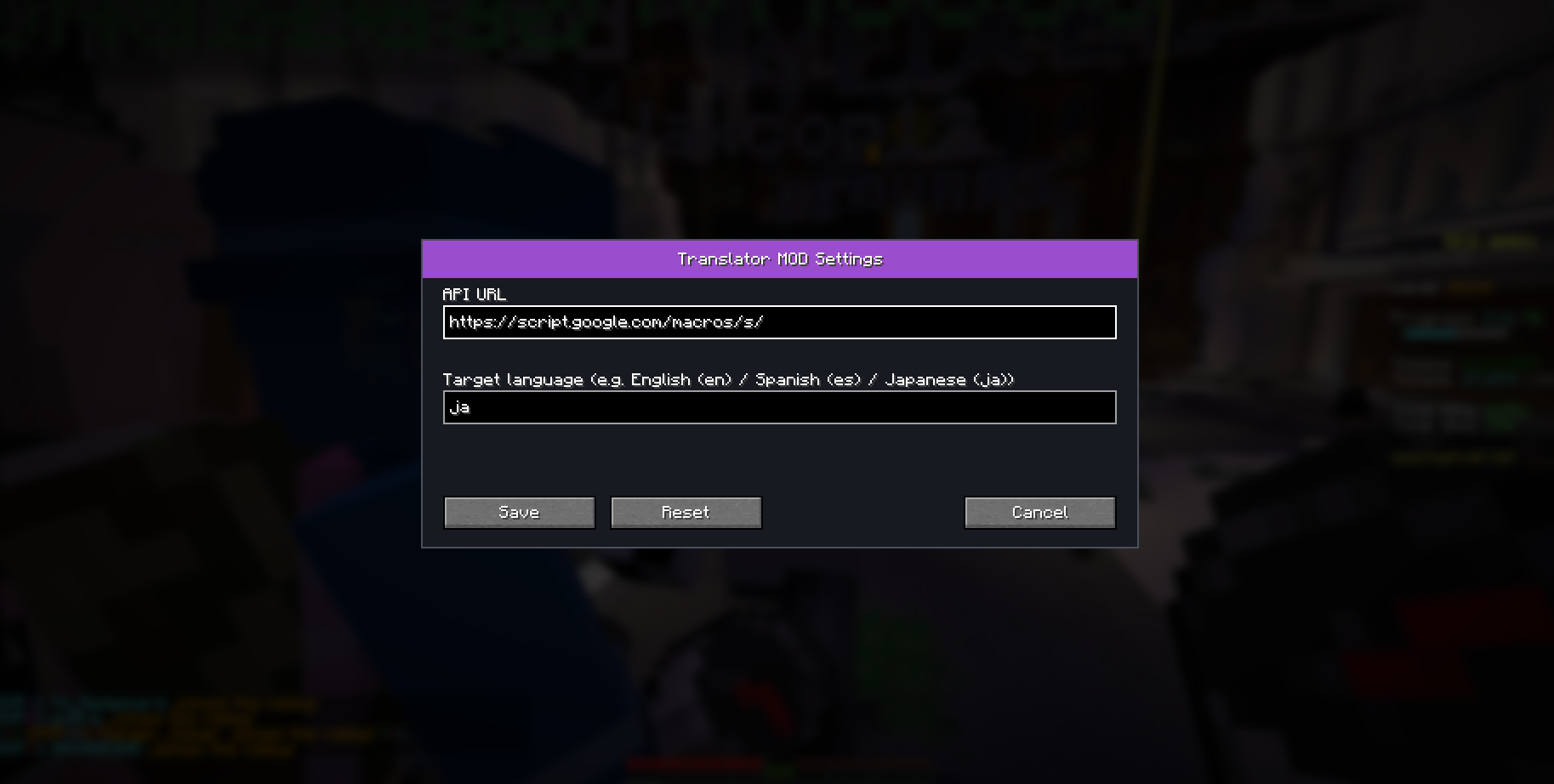 Mod Configurations You can edit your language and API URL. It can be opened from Mod Menu -> Config
Versions
Files
Relations
Project Relations
More like this
Similar Mods
Suggestions use data such as tags, dependencies, dependents, descriptions, titles, and more to rank how much they overlap with this mod.
On ModDex
Community snapshot
By the numbers
Statistics

Want to reach Minecraft players?
We're looking for a server hosting partner to feature here and other parts of the site. Interested? Send us a message!
Get in touchGet it on
Available Platforms
On ModDex
Community snapshot
By the numbers
Statistics
Resources