Community listing page, reviews may not be monitored by the author.
Transparent Chat

No reviews yet
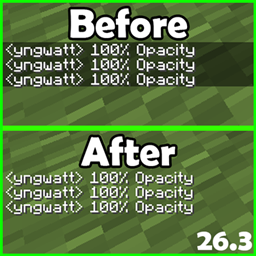
Transparent Chat removes the dark background behind in-game chat messages and adds its own settings screen, reachable from a key of your choice in the game's control options, where you can fine-tune how transparent the chat is with a slider.

Community voices
Reviews
No reviews yet. Be the first to review this project!
Get it on
Available Platforms
About
Project Details
For authors
Embed Badge
If you're the author of this project, you can embed a live badge anywhere that supports HTML or Markdown. It updates automatically whenever ratings change.
Use HTML for any page that supports it, or Markdown for README files and Markdown-based descriptions.
Identifiers
Platform IDs
Resources
External Links
About
Description
Transparent Chat
Overview
Transparent Chat removes the dark background behind in-game chat messages and adds its own settings screen, reachable from a key of your choice in the game's control options, where you can fine-tune how transparent the chat is with a slider.
Features
- Removes the dark chat background so messages float over the game world.
- Adds a new key binding ("Open Chat Settings", default F10) under the Transparent Chat section in Options → Controls.
- The settings screen includes a Chat background opacity slider (0–100%), so you can choose between fully invisible and partially see-through chat.
- Changes apply instantly while the slider is moved — no restart needed.
- Works both in the faded background chat and the full chat screen you open with T.
How to Use
- Press F10 in game (or rebind it in Options → Controls under "Transparent Chat").
- Drag the opacity slider: left for fully transparent chat, right for more background.
- Click Done to close the menu; your setting stays until you change it again.
- Open chat with T as usual — messages now appear without a dark box behind them.
Tips & Tricks
- 0% is great for screenshots and recordings; bump it up slightly if you struggle to read chat over bright terrain.
- The vanilla "Chat Text Background Opacity" option in Minecraft's chat settings still works — this mod multiplies with it, so you can layer both for fine control.
- The slider default is 50%; press it once before adjusting if you want a known starting point.
Known Limitations
- The setting is kept for the current game session only; it resets to 50% when you restart the game.
- In very crowded modded interfaces, the extra key binding may need rebinding if another mod already uses F10.
- No textures, models, or other art assets are added by this mod — everything is drawn with the game's built-in UI styles.
Screenshots
Gallery
Versions
Files
Relations
Project Relations
More like this
Similar Mods
Suggestions use data such as tags, dependencies, dependents, descriptions, titles, and more to rank how much they overlap with this mod.
On ModDex
Community snapshot
By the numbers
Statistics

Get it on
Available Platforms
On ModDex
Community snapshot
By the numbers
Statistics
Resources