
Community listing page, reviews here may not be monitored by the author.
True Hopper

No reviews yet
Simple tweak to the vanilla hopper, staying true to vanilla.
Community voices
Reviews
No reviews yet. Be the first to review this project!
Get it on
Available Platforms
About
Project Details
For authors
Embed Badge
If you're the author of this project, you can embed a live badge anywhere that supports HTML or Markdown. It updates automatically whenever ratings change.
Use HTML for any page that supports it, or Markdown for README files and Markdown-based descriptions.
Identifiers
Platform IDs
Resources
External Links
About
Description
- 1.21 Crafter-style slot locking, single-block 5-item filtering, and bulk top-off.
- Clean, vanilla-native logistics without redstone spaghetti.
Features
- 20 Items/Second Throughput (Hopper Minecart Parity):
- Built with a 1-tick transfer engine to match hopper minecart transfer speeds.
- 1.21 Crafter-Style Slot Locking:
- Click any empty slot with an empty hand to seal it. Prevents unwanted items from ever entering or clogging your line.
- Filtering:
- Click a locked slot while holding an item to assign a ghost filter. Preserves the item on your cursor.
- Single-Block 5-Item Sorter:
- Filter up to 5 distinct items in a single hopper block.
- Bulk Pull Top-Off:
- Pulling items into the hopper tops off matching stacks instantly to match hopper minecart speeds.
- Full Redstone Parity:
- Full vanilla redstone and comparator support with zero changes or quirks.
- Round-Robin:
- Cycles slot-by-slot to keep transfers balanced and vanilla-friendly:
- Transfer speed naturally scales up the more slots you dedicate to an item (up to 20 items/s across all 5 slots).
- Single slots or mixed sorting lines retain a slower, controlled rate.
Interaction Guide & Controls
| Action | Interaction | Result |
|---|---|---|
| Seal / Disable Slot | Left-Click empty slot with empty hand | Toggles slot lock (renders Crafter red cross grid). Blocks all item intake. |
| Clear Lock / Filter | Left-Click locked/filtered slot with empty hand | Unlocks slot and clears assigned filter back to standard open slot. |
| Assign Ghost Filter | Left-Click locked slot while holding an item | Locks slot to that item type (40% ghost overlay). Keeps cursor item intact. |
| Deposit / Retrieve | Normal Click / Shift-Click with matching item | Transfers items into or out of open/filtered slots exactly like vanilla. |
How to Install
- Install NeoForge for Minecraft 1.21.1 (recommended: 21.1.250+).
- Drop
truehopper-1.0.0.jarinto your.minecraft/modsfolder. - Launch the game.
Modpacks & Permissions
You are completely free to include True Hopper in any modpack on CurseForge and Modrinth.
Screenshots
Gallery
-
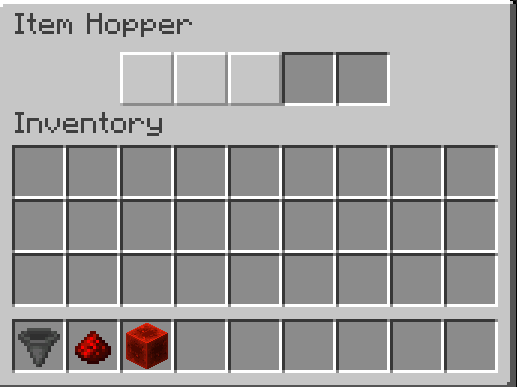 Locked Slots
 -
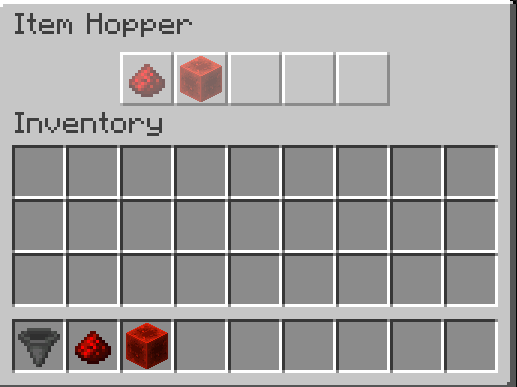 Locked Slots Filtering
 -
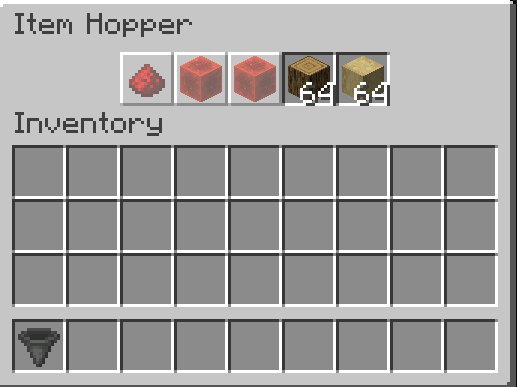 Item respecting locked slots
Versions
Files
Relations
Project Relations
More like this
Similar Mods
Suggestions use data such as tags, dependencies, dependents, descriptions, titles, and more to rank how much they overlap with this mod.
On ModDex
Community snapshot
By the numbers
Statistics
Want to reach Minecraft players?
We're looking for a server hosting partner to feature here and other parts of the site. Interested? Send us a message!
Get in touchGet it on
Available Platforms
On ModDex
Community snapshot
By the numbers
Statistics
Resources