Community listing page, reviews here may not be monitored by the author.
True-Rails


No reviews yet
Make the original railway a real transportation system.
Community voices
Reviews
No reviews yet. Be the first to review this project!
Get it on
Available Platforms
Compatibility
Supported Environments
Must be installed on both the client and the server.
About
Project Details
For authors
Embed Badge
If you're the author of this project, you can embed a live badge anywhere that supports HTML or Markdown. It updates automatically whenever ratings change.
Use HTML for any page that supports it, or Markdown for README files and Markdown-based descriptions.
Identifiers
Platform IDs
Resources
External Links
About
Description
TrueRails
Turn vanilla rails into a real transportation system.
A pure-gameplay mod: train consists, high-speed cruising, curve safety, precision station stops, redstone dispatch, and smart chunk-loading for unmanned freight. No new items, blocks, or entities — uninstall safely with zero save damage; minecarts revert to vanilla.
- Version: 1.0.0
- Platform: Minecraft 1.21.1 · NeoForge 21.1.x · Java 21
- Requirements: must be installed on both server and client
- Author: liluo23
Core Features
Train Consists
- Hold a chain and right-click a minecart to select it, then right-click another to link them (consumes 1 chain)
- Sneak + empty-hand right-click a linked cart to disconnect; the chain is returned
- Up to 8 cars; at most 1 powered minecart per train, always as the locomotive
- Only the locomotive is fully physics-simulated; cars follow its path precisely. Links auto-break if spacing exceeds 8 blocks
- Sagging chains render between adjacent cars
High-Speed Cruising
- Vanilla key driving: W to accelerate, S to decelerate, Space for emergency brake; release to lock in cruise speed
- Drive from any car — input is auto-forwarded to the locomotive
- Top straight-line cruise of 48 blocks/sec (requires a fueled powered locomotive); 24 when driven by hand
- Automatic uphill compensation and downhill braking, with a smooth target-speed model
Powered Rail Redefined
- Charged powered rail = booster: +6 blocks/sec instant impulse per tile, capable of breaking the cruise cap (absolute cap 64, configurable up to 128)
- Overspeed decays exponentially with a 7-second half-life back to the cruise target
- While overspeed, the speed readout turns orange and wheels throw sparks
Curve and Slope Safety
- The locomotive continuously pre-scans the track ahead and smoothly slows in advance per a braking envelope
- Curve limit 12, slope limit 24 — corner without derailing
Precision Stops and Stations
- Uncharged powered rail = stop marker: the train smoothly brakes and stops precisely at the rail block's center
- Redstone-charge the powered rail under any car to dispatch (manual button / hopper-clock scheduled service / comparator dispatch-when-full)
- While driving, hold W to sound the horn and force a non-stop pass
- Docking state is persistent — after a restart, trains remain at the platform awaiting signal
Fuel System
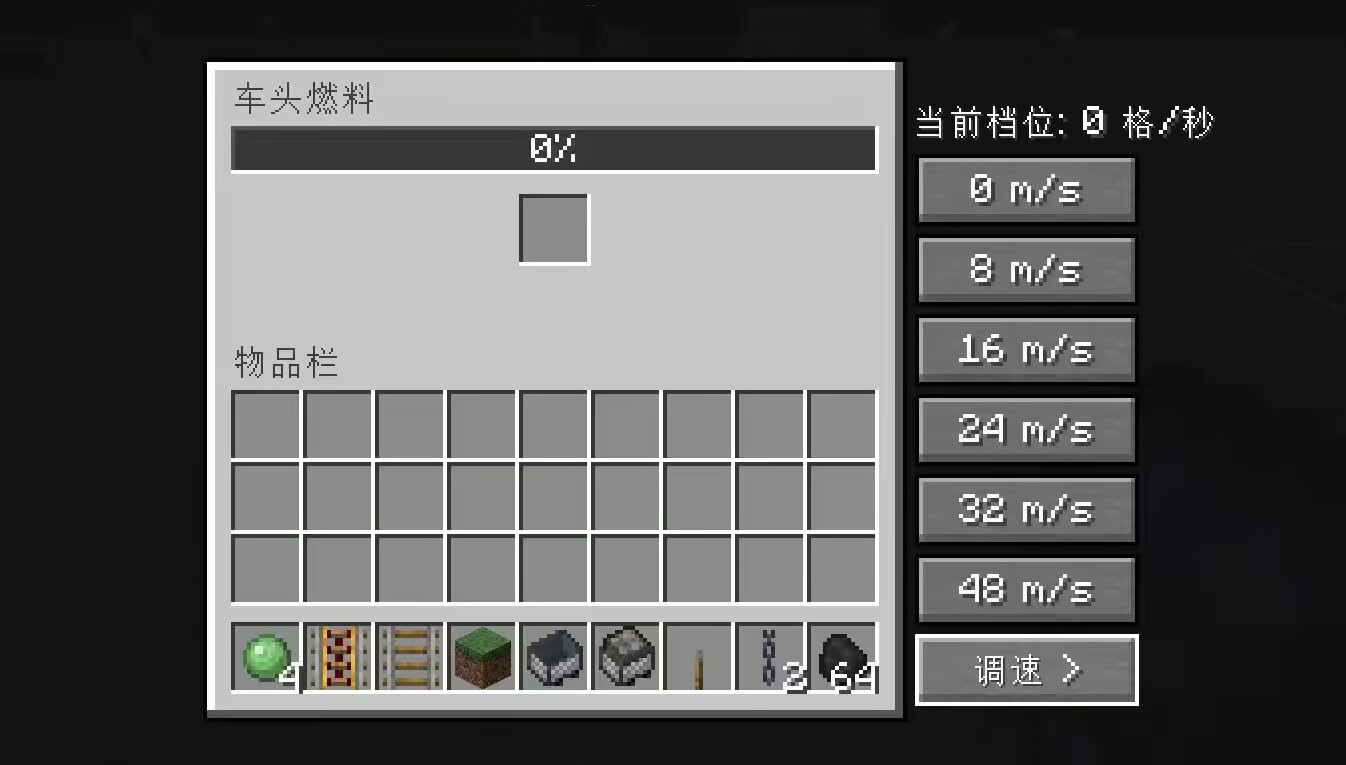
- Right-click a powered minecart to open the fuel UI; insert any furnace fuel (capacity about one stack of coal)
- A throttle panel in the bottom-right sets unmanned gears: 0/8/16/24/32/48
- Fuel consumption scales with the square of speed; trains coast freely when fuel runs out
- Low-fuel (<10%) warning sound and black-smoke cue
Unmanned Freight and Chunk Loading
- Fueled, gear-set unmanned trains run on their own — auto-arriving, docking, and redstone-dispatching
- Moving corridor loading: pre-loads chunks ahead by speed × 2 seconds; ≤24 chunks per train, ≤3 trains per owner
- After fuel runs out, loading stops following a 10-second grace period; the train freezes in place and resumes when a player approaches
Speedometer HUD
- While riding, replaces the experience bar: gradient speed bar, centered readout, cruise marker, direction arrow
- With a powered locomotive, shows a mini fuel bar and percentage
- Reverse readout is greyed; overspeed turns orange
Sound Effects
Wheel clatter (denser and higher-pitched with speed), brake squeal, departure short horn, station-pass long horn, low-fuel alarm.
Quick Start
- Lay track, place a powered minecart and several regular minecarts
- Hold a chain and link them into a train
- Right-click the powered minecart → add coal → set a gear on the throttle panel
- To drive yourself: sit in a car and press W. For unmanned operation: set a gear and walk away
- Build a station: lay a row of uncharged powered rails, wired to a button or redstone clock
Configuration
In-game: Mods → TrueRails → Config, or edit config/truerails-common.toml.
Speed caps, acceleration/deceleration, curve limits, fuel capacity, consumption, chunk-loading quotas, and more are all adjustable.
Want it faster? maxSpeed and absoluteSpeedCap go up to 128 blocks/sec.
Compatibility and Boundaries
- An unmanned, unfueled minecart crossing a powered rail behaves ≈ vanilla, compatible with redstone machines
- No cross-dimension support (entering a portal auto-breaks links); no dual locomotives
- Uninstall-safe: all data is stored as entity attachments, ignored automatically once the mod is removed, leaving no residue
Known Limitations
- Player-driven trains do not enable corridor loading (they rely on server view distance)
- Mid-train passenger cars on long consists may show slight visual offset from the formation
License
MIT
TrueRails 真·铁路
让原版铁路成为真正的交通系统。
纯玩法模组:列车编组、高速巡航、弯道安全、定点停车、红石发车、无人货运智能区块加载。 不添加任何新物品、新方块、新实体 —— 卸载后存档无损,矿车退化为原版矿车。
- 版本:1.0.0
- 平台:Minecraft 1.21.1 · NeoForge 21.1.x · Java 21
- 端要求:服务端 + 客户端均需安装
- 作者:liluo23
---
核心特性
列车编组
- 手持链条右键矿车选中,再右键另一辆完成连接(消耗 1 链条)
- 潜行空手右键已连接矿车断开,链条返还
- 最多 8 节;每列最多 1 辆动力矿车,且永远作为车头
- 只有车头真实物理模拟,车厢沿车头轨迹精确跟随;车距超过 8 格自动断链
- 相邻车厢间渲染下垂链条
高速巡航
- 原版按键驾驶:W 加速、S 减速、空格 紧急制动,松开即锁定巡航速度
- 坐任意车厢都可驾驶,输入自动转发车头
- 直线巡航最高 48 格/秒(需有燃料的动力车头);徒手驾驶 24
- 上坡自动补偿、下坡自动刹车,目标速度模型平滑控速
动力轨重定义
- 充能动力轨 = 助推器:每格 +6 格/秒瞬时冲量,可突破巡航上限(绝对上限 64,配置可放宽至 128)
- 超速部分按半衰期 7 秒指数衰减,回落到巡航目标
- 超速时速度数字变橙 + 轮部火花
弯道与坡道安全
- 车头持续预扫描前方轨道,按制动包络提前平滑降速
- 弯道限速 12、坡道限速 24,过弯不脱轨
定点停车与车站
- 未充能动力轨 = 停车标:列车自动平滑制动,精确停在轨道方块中心
- 红石充能任意车厢脚下的动力轨即发车(按钮手动 / 漏斗时钟定时班车 / 比较器满载即发)
- 驾驶时按住 W 可鸣笛强制通过不停车
- 停靠状态持久化,重启后列车仍在站台等信号
燃料系统
- 右键动力矿车打开燃料界面,投入任意熔炉燃料(容量约一组煤)
- 界面右下角调速面板:无人车档位 0/8/16/24/32/48
- 油耗与速度平方成正比;燃料耗尽自然滑行
- 低燃料(<10%)警报音 + 黑烟提示
无人货运与区块加载
- 有燃料、设了档位的无人列车自行运行,自动进站、停靠、红石发车
- 移动走廊加载:前方按速度×2 秒预加载区块,单列 ≤24 区块、每车主 ≤3 列
- 燃料耗尽 10 秒宽限后停止加载,列车原地冻结,玩家接近后恢复
速度计 HUD
- 乘车时替换经验条位置:渐变速度条、居中数字、巡航标记、方向箭头
- 有动力车头时显示燃料微缩条与百分比
- 倒车数字置灰、超速变橙
音效
车轮咔嗒(随速度变密变调)、制动尖啸、发车短笛、过站长笛、低燃料警报。
---
快速上手
- 铺轨道,放一辆动力矿车和若干普通矿车
- 手持链条把它们连成一列
- 右键动力矿车 → 投入煤炭 → 调速面板设档位
- 想自己开:坐进车厢按 W;想无人运行:设档位后离开即可
- 建车站:铺一排未充能动力轨,接上按钮或红石时钟
配置
游戏内:Mods → TrueRails → Config,或编辑 config/truerails-common.toml。
速度上限、加减速度、弯道限速、燃料容量、油耗、区块加载配额等均可调。
想要更快?maxSpeed 与 absoluteSpeedCap 最高可设 128 格/秒。
兼容性与边界
- 无人无燃料矿车经过动力轨 ≈ 原版行为,与红石机器兼容
- 不支持跨维度(进传送门自动断链)、不支持双车头
- 卸载安全:所有数据以实体附加形式存储,移除模组后自动忽略,无残留
已知限制
- 玩家驾驶的列车不启用走廊加载(依赖服务器视距)
- 长列车中部载人车厢可能与编队有轻微视觉偏差
许可
MIT
TrueRails Real Rail
Make the original railway a true transportation system. **
Pure gameplay mod: train consist, high-speed cruising, curve safety, precise parking, redstone departure, and unmanned freight intelligent block loading.
No new items, blocks, or entities added —— save files remain intact after uninstallation; minecarts revert to vanilla behavior.
- Version: 1.0.0
- Platform: Minecraft 1.21.1 · NeoForge 21.1.x · Java 21
- Installation: Required on both server and client
- Author: liluo23
---
Core Features
Train Composition
- Hold the chain in hand, right-click a minecart to select it, then right-click another cart to connect (consumes 1 chain)
- While sneaking and empty-handed, right-click a connected minecart to disconnect; the chain is returned
- Maximum of 8 links; only one powered minecart per train, which must always be at the front
- Only the lead cart undergoes realistic physics simulation; trailers precisely follow the lead cart's path; chains automatically break if carts are spaced more than 8 blocks apart
- Chains are rendered sagging between adjacent carts
High-speed cruise
- Original key controls: W to accelerate, S to decelerate, Space for emergency brake—release to lock cruise speed
- Drive from any carriage; input automatically forwards to the front car
- Maximum straight-line cruise speed of 48 tiles per second (requires a fuel-powered front car); manual driving speed is 24
- Automatic uphill compensation and downhill braking, with smooth speed control via target-speed model
Power Track Redefined
- Recharge Power Track = Booster: Provides an instant impulse of +6 units/second per tile, allowing to exceed cruise speed limit (absolute cap at 64, configurable up to 128)
- Excess speed decays exponentially with a half-life of 7 seconds, returning to the target cruise speed
- When overspeeding, the speed display turns orange and sparks appear on the wheels
Safety on Curves and Slopes
- Continuously pre-scans the track ahead and smoothly decelerates in advance according to braking envelope
- Curve speed limit 12, incline speed limit 24, ensuring no derailment when navigating curves
Fixed Parking and Stations
- Unpowered powered rails = stop sign: Train automatically brakes smoothly and stops precisely at the center of the rail block
- Redstone power applied to any powered rail beneath a car triggers departure (manual button, hopper clock for scheduled departures, or comparator-based full-load trigger)
- While driving, hold down W to sound the horn and force passage without stopping
- Stationary state is persistent; after restart, the train remains on the platform awaiting signal
Fuel System
- Right-click the powered minecart to open the fuel interface, and insert any furnace fuel (approximately one stack of coal)
- The speed control panel in the bottom-right corner of the interface: unmanned cart gears 0/8/16/24/32/48
- Fuel consumption is proportional to the square of speed; the cart will coast naturally when fuel runs out
- Low fuel (<10%) triggers an alarm sound and black smoke warning
Autonomous Freight and Block Loading
- Unmanned trains with fuel and set gear run automatically, entering stations, stopping, and departing via redstone signals
- Moving corridor loading: Blocks are preloaded ahead based on speed × 2 seconds; single train ≤24 blocks, per player ≤3 trains
- After a 10-second grace period upon fuel depletion, loading stops, the train freezes in place, and resumes when the player approaches
Speedometer HUD
- Replace the experience bar with a gradient speed bar, centered number, cruise marker, and directional arrow while driving
- Display fuel mini-bar and percentage when using a powered vehicle head
- Gray out reverse numbers and turn speed over limit to orange
Sound Effects
Wheel clicks (increasing in frequency and pitch with speed), brake screech, departure whistle, station pass flute, low fuel alarm.
---
Quick Start
- Lay down tracks and place one powered minecart along with several regular minecarts
- Use a chain to link them together in a line
- Right-click the powered minecart → insert coal → set the speed on the control panel
- To drive manually: enter the cart and press W; for unattended operation: set the speed and leave it
- Build a station: place a row of unpowered powered rails, then connect them to a button or redstone clock
Configuration
In-game: Mods → TrueRails → Config, or edit config/truerails-common.toml.
Adjustable settings include speed limit, acceleration/deceleration, curve speed limits, fuel capacity, fuel consumption, and chunk loading quota.
Want to go faster? Set maxSpeed and absoluteSpeedCap up to 128 blocks per second.
Compatibility and Boundaries
- Unmanned and unfueled minecarts passing over powered rails ≈ original behavior, compatible with redstone machinery
- Does not support cross-dimensional travel (automatically disconnects when entering portals), does not support dual locomotives
- Safe uninstallation: All data is stored as entity attachments; automatically ignored upon module removal, with no residue left behind
Known Limitations
- The train driven by the player does not enable corridor loading (depends on server view distance)
- Middle passenger cars of long trains may have slight visual offset from the formation
License
MIT
TrueRails 真·铁路
让原版铁路成为真正的交通系统。
纯玩法模组:列车编组、高速巡航、弯道安全、定点停车、红石发车、无人货运智能区块加载。 不添加任何新物品、新方块、新实体 —— 卸载后存档无损,矿车退化为原版矿车。
- 版本:1.0.0
- 平台:Minecraft 1.21.1 · NeoForge 21.1.x · Java 21
- 端要求:服务端 + 客户端均需安装
- 作者:liluo23
---
核心特性
列车编组
- 手持链条右键矿车选中,再右键另一辆完成连接(消耗 1 链条)
- 潜行空手右键已连接矿车断开,链条返还
- 最多 8 节;每列最多 1 辆动力矿车,且永远作为车头
- 只有车头真实物理模拟,车厢沿车头轨迹精确跟随;车距超过 8 格自动断链
- 相邻车厢间渲染下垂链条
高速巡航
- 原版按键驾驶:W 加速、S 减速、空格 紧急制动,松开即锁定巡航速度
- 坐任意车厢都可驾驶,输入自动转发车头
- 直线巡航最高 48 格/秒(需有燃料的动力车头);徒手驾驶 24
- 上坡自动补偿、下坡自动刹车,目标速度模型平滑控速
动力轨重定义
- 充能动力轨 = 助推器:每格 +6 格/秒瞬时冲量,可突破巡航上限(绝对上限 64,配置可放宽至 128)
- 超速部分按半衰期 7 秒指数衰减,回落到巡航目标
- 超速时速度数字变橙 + 轮部火花
弯道与坡道安全
- 车头持续预扫描前方轨道,按制动包络提前平滑降速
- 弯道限速 12、坡道限速 24,过弯不脱轨
定点停车与车站
- 未充能动力轨 = 停车标:列车自动平滑制动,精确停在轨道方块中心
- 红石充能任意车厢脚下的动力轨即发车(按钮手动 / 漏斗时钟定时班车 / 比较器满载即发)
- 驾驶时按住 W 可鸣笛强制通过不停车
- 停靠状态持久化,重启后列车仍在站台等信号
燃料系统
- 右键动力矿车打开燃料界面,投入任意熔炉燃料(容量约一组煤)
- 界面右下角调速面板:无人车档位 0/8/16/24/32/48
- 油耗与速度平方成正比;燃料耗尽自然滑行
- 低燃料(<10%)警报音 + 黑烟提示
无人货运与区块加载
- 有燃料、设了档位的无人列车自行运行,自动进站、停靠、红石发车
- 移动走廊加载:前方按速度×2 秒预加载区块,单列 ≤24 区块、每车主 ≤3 列
- 燃料耗尽 10 秒宽限后停止加载,列车原地冻结,玩家接近后恢复
速度计 HUD
- 乘车时替换经验条位置:渐变速度条、居中数字、巡航标记、方向箭头
- 有动力车头时显示燃料微缩条与百分比
- 倒车数字置灰、超速变橙
音效
车轮咔嗒(随速度变密变调)、制动尖啸、发车短笛、过站长笛、低燃料警报。
---
快速上手
- 铺轨道,放一辆动力矿车和若干普通矿车
- 手持链条把它们连成一列
- 右键动力矿车 → 投入煤炭 → 调速面板设档位
- 想自己开:坐进车厢按 W;想无人运行:设档位后离开即可
- 建车站:铺一排未充能动力轨,接上按钮或红石时钟
配置
游戏内:Mods → TrueRails → Config,或编辑 config/truerails-common.toml。
速度上限、加减速度、弯道限速、燃料容量、油耗、区块加载配额等均可调。
想要更快?maxSpeed 与 absoluteSpeedCap 最高可设 128 格/秒。
兼容性与边界
- 无人无燃料矿车经过动力轨 ≈ 原版行为,与红石机器兼容
- 不支持跨维度(进传送门自动断链)、不支持双车头
- 卸载安全:所有数据以实体附加形式存储,移除模组后自动忽略,无残留
已知限制
- 玩家驾驶的列车不启用走廊加载(依赖服务器视距)
- 长列车中部载人车厢可能与编队有轻微视觉偏差
许可
MIT
Screenshots
Gallery
Versions
Files
Relations
Project Relations
More like this
Similar Mods
Suggestions use data such as tags, dependencies, dependents, descriptions, titles, and more to rank how much they overlap with this mod.
On ModDex
Community snapshot
By the numbers
Statistics
Want to reach Minecraft players?
We're looking for a server hosting partner to feature here and other parts of the site. Interested? Send us a message!
Get in touchGet it on
Available Platforms
On ModDex
Community snapshot
By the numbers
Statistics
Resources