Community listing page, reviews here may not be monitored by the author.
Trusted Links

No reviews yet
Skip link warnings for trusted HTTP/HTTPS hostnames while preserving Minecraft’s confirmation for every other URL.
Community voices
Reviews
No reviews yet. Be the first to review this project!
Get it on
Available Platforms
Compatibility
Supported Environments
Runs entirely on the client. Works on vanilla servers.
About
Project Details
For authors
Embed Badge
If you're the author of this project, you can embed a live badge anywhere that supports HTML or Markdown. It updates automatically whenever ratings change.
Use HTML for any page that supports it, or Markdown for README files and Markdown-based descriptions.
Identifiers
Platform IDs
About
Description
Trusted Links
Trusted Links lets you skip Minecraft's external-link confirmation for websites you explicitly trust, while keeping the normal warning for every unknown link.
It is useful for links you open regularly from chat or other Minecraft screens. Instead of confirming the same website every time, click Yes & Trust Hostname once. Future HTTP and HTTPS links from that hostname will open immediately.
How it works
When Minecraft asks whether you want to open a link, Trusted Links adds a new option:
Yes & Trust Hostname
This opens the link and remembers its exact hostname. For example, trusting a link from:
https://store.example.com/products/123
saves:
store.example.com
It does not automatically trust the broader example.com domain or unrelated hostnames such as blog.example.com.
A trusted hostname also covers its deeper subdomains:
| Trusted hostname | Clicked hostname | Result |
|---|---|---|
example.com |
example.com |
Opens immediately |
example.com |
www.example.com |
Opens immediately |
store.example.com |
cdn.store.example.com |
Opens immediately |
store.example.com |
example.com |
Shows confirmation |
store.example.com |
blog.example.com |
Shows confirmation |
example.com |
example.com.evil.com |
Shows confirmation |
example.com |
evil-example.com |
Shows confirmation |
Safety
Trusted Links does not disable Minecraft's link warning globally.
- Only explicitly trusted hostnames can bypass confirmation.
- Only normal HTTP and HTTPS links are eligible.
- The real URL hostname is checked, not the visible link text.
- Malformed links and unsupported URL types keep Minecraft's normal behavior.
- If the configuration is missing or invalid, the mod safely uses an empty trust list.
Configuration
Trusted hostnames are saved in:
.minecraft/config/trusted-links.json
You can also view and remove trusted hostnames from the Mod Menu configuration screen.
You normally do not need to edit this file because hostnames can be added from the confirmation screen. If needed, it can also be edited manually while Minecraft is closed:
{
  "trustedDomains": [
    "hypixel.net",
    "store.example.com"
  ]
}
Requirements
- Minecraft Java Edition 26.1.2
- Fabric Loader
- Fabric API
- Java 25
Trusted Links is client-side only. It works on multiplayer servers without being installed on the server.
Installation
Install Trusted Links and its listed dependencies with the Modrinth App, or place the downloaded JAR in your Fabric mods folder.
Open source
Trusted Links is open source under the MIT License. Issues and contributions are welcome on GitHub.
Screenshots
Gallery
-
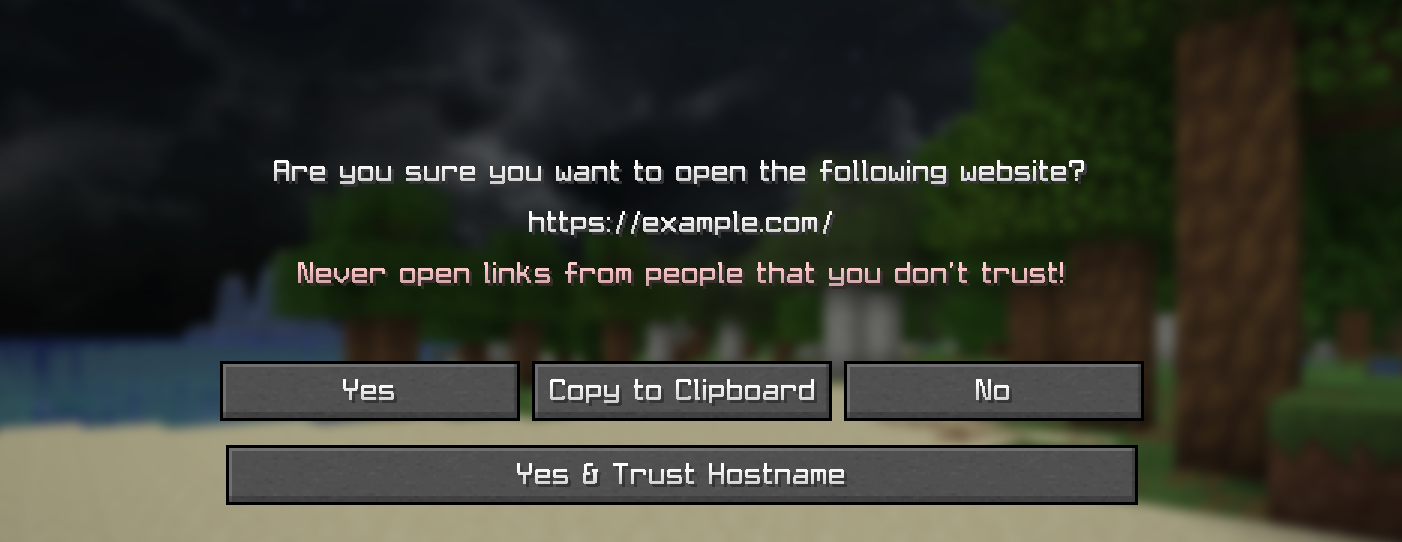 Trust Hostname Clicking links opens a new prompt alowing to trust the hostname for future clicks
Versions
Files
Relations
Project Relations
More like this
Similar Mods
Suggestions use data such as tags, dependencies, dependents, descriptions, titles, and more to rank how much they overlap with this mod.
On ModDex
Community snapshot
By the numbers
Statistics

Want to reach Minecraft players?
We're looking for a server hosting partner to feature here and other parts of the site. Interested? Send us a message!
Get in touchGet it on
Available Platforms
On ModDex
Community snapshot
By the numbers