
Community listing page, reviews here may not be monitored by the author.
Tupenter

No reviews yet
Resend chat and commands with a keybind and then even script them: chain with &&, inline math, variables, loops, conditionals, and your own commands with real autocomplete. All client-side, sending plain vanilla commands.
Community voices
Reviews
No reviews yet. Be the first to review this project!
Get it on
Available Platforms
Compatibility
Supported Environments
Runs entirely on the client. Works on vanilla servers.
About
Project Details
For authors
Embed Badge
If you're the author of this project, you can embed a live badge anywhere that supports HTML or Markdown. It updates automatically whenever ratings change.
Use HTML for any page that supports it, or Markdown for README files and Markdown-based descriptions.
Identifiers
Platform IDs
About
Description
Tupenter
Tupenter is a client-side Fabric mod that acts as a command-helper. It allows you to resend commands or messages with a keybind, use inline math and scripting, and create your own commands and scripts, with autocomplete!
It works by transforming all the custom scripting and syntax into pure vanilla commands, flattened and then sent in order to the server, if sent to the server at all. (Many pure computational scripts will only echo or show a message to the client and nothing else). All a server sees is pure /setblock commands, even if the mod is doing real compute to make it into a rainbow spiral.
Resending
The mod name comes from me always having to use the T + up + enter combo to resend commands in the past, but now, Tupenter records what you send and replays it on a keybind (default R):
- Press & Hold mode for rapid fire, or Toggle for hands-free.
- Batch the last N messages, in either order, with per-message and per-batch delays, preset message lists, and command-feedback suppression.
- The mod is highly customizable in mod menu, with a toggle and settings for almost all of the mod's features.
Scripting
For the complete reference (every directive, function,
parameter type and variable) see SCRIPTING.md on the GitHub source, or run
/tupenter reference in game to copy it to your clipboard.*
There are three main types of syntax this mod employs:
| Syntax | Meaning |
|---|---|
$...$ |
Expressions: can be used directly inline with vanilla syntax. They get evaluated, and substituted before being sent. |
#word |
Directives: instructions for Tupenter. The basis for conditionals, loops, and history modification. Never sent to the server. |
(...) |
Grouping: after a directive, parentheses hold a condition or a group of statements, as in #if (...) (...). Inside expressions they work like code, for function calls such as list(...) and blockset(...) and for math like $(2 + 3) * 4$. In plain command text they're ordinary characters. |
Chain commands
The simplest inline scripting and the one I use the most is chaining commands with &&. Each command gets its own brigadier autocomplete and syntax highlighting. Since it resolves before sending to the server, it is compatible with mods such as WorldEdit.
/time set day && /weather clear && /say ready

//undo 2 && //replacenear 30 oak_planks spruce_planks && //replacenear 30 oak_stairs ^spruce_stairs
Commenting
## followed by a space starts a note that never runs. It ends at the next && or the end of the line, so even a one-liner can carry notes between its statements:
## bottom left && /activate 1 2 3 && ## the other one && /activate 2 3 4
Compute inline
Expressions allow both simple and complex math to exist directly inside normal vanilla commands.
/give @s stick $32 + 5$
/give @s diamond $3s$                        (s = stacks of 64)
/summon $pick("zombie", "skeleton")$
/tp @s ~ ~$client.pos.y > 60 ? 10 : 0$ ~
Math is exact, 1/3 stays a third, with no floating-point drift.
Lists come in two flavours: commas compute each item, while pipes take items exactly as typed, so block and item names need no quotes.
list(1, 2 + 3)
list(oak_log | birch_log | spruce_log)
/calc <expression> prints any result locally without sending anything, which is handy for checking an expression before you use it.
Read the world
Over ninety live variables such as position, health, biome, light level, held item, what your crosshair is on, weather, the entity you're looking at, its NBT.
/echo standing on $block(client.blockpos.x, client.blockpos.y - 1, client.blockpos.z)$
#if (client.target.hit == "block") (/tp @s $client.target.blockpos$)
And many variables that aren't built in are still accessible through NBT paths directly:
/echo elytra damage: $entity("self", "nbt.equipment.chest.components.minecraft:damage", 0)$

/echo $client.target.nbt.Health$
Use /tupenter dump to browse the NBT tree and find the path you want.
Variables, loops, conditionals
Tupenter allows the creation of single-send scoped variables (#local), session persistent ones (#set), cross-session saved variables with /tupenter var save <var>, and #setdefault, which only creates a variable if it doesn't exist yet.
#set spawn = "100 64 -200"
#local roll = rand(1, 10) && /give @s stick $roll$ && /say I got $roll$!
#local c:blockpos = blockpos(-10, 20, 85) && /tp $c$
#repeat 5 (/say tick $i$)
#for $x$ in 1..10 step 2 (/summon zombie ~$x$ ~ ~)
#foreach $mob$ in list(zombie | skeleton | creeper) (/summon $mob$ ~ ~ ~)
#foreach $b$ in blockset(#minecraft:wool) (/give @s $b$)
#if (client.health < 6) (/effect give @s regeneration 5 1)
#setdefault runs = 0 && #set runs += 1 && /say run number $runs$
Registry tags resolve through the live connection, and typing # inside
blockset(...) tab-completes the tags available on that server.
Waits
Use #wait in ticks, seconds, minutes, or minecraft days to create delays between Tupenter actions. By default it counts game time, so it speeds up during /tick sprint and stops when the game is frozen or paused. Scripts evaluate lazily, meaning a value read after a #wait sees the world as it is then, not as it was when you pressed Enter.
Waiting does not prevent future commands from being run concurrently. By default, Tupenter allows 8 scripts to be running at once. /tupenter running shows all the commands and scripts that are active and their pids, and /tupenter abort lets you kill them.
/say ready && #wait 3s && /say GO
#wait 5m realtime && /echohud &ecows are ready to be fed!
/echo you're at y=$client.pos.y$ && #wait 3s && /echo now you're at y=$client.pos.y$
Silence, privacy, local output
#silent /time set day && /weather clear          (whole line)
#repeat 5 (#silent (/give @s stick) && /say hi)  (just part of it)
#norecord /msg friend secret                     (kept out of resend history)
/echo &amy y is &e$client.pos.y$                     (shown only to you, sends nothing; &-codes color it)
#unstage 2                                       (drop the newest 2 resend-history entries)
#silent hides things on your screen: the command's feedback, and the notices Tupenter prints when a #set creates or updates a variable. The commands still run normally, and anything other players would see still reaches them, like the feedback from a /setblock command.
Make your own commands
/customcommand as well as the custom commands tab accessible through mod menu and /tupenter menu allows you to create your own commands that use vanilla commands and Tupenter syntax. They can be easily edited or removed, and will be automatically updated in Mojang's Brigadier autocomplete, meaning they are never stale.
/customcommand add waves <count:int> <mob:entity> = #repeat $count$ (/summon $mob$ ~ ~ ~)
/waves 5 zombie
Here's how the pre-installed /blink is defined. (add refuses a name that already exists, so give your own version a new name, or change an existing one with /customcommand update.)
/customcommand add blink <maxdistance:int=100> "teleport to where you're looking" = #silent #local hit = raycast(maxdistance) && #if (hit == "miss") (/tp @s ^ ^ ^$maxdistance$) #else (/tp @s $hit$)
/blink is a real command with real autocomplete, typed parameters, and
optional arguments. The pre-installed /portalcalc is another:
/customcommand add portalcalc <p:blockpos=~ ~ ~> <dim:to_overworld,to_nether=$client.dimension == "minecraft:the_nether" ? "to_overworld" : "to_nether"$> = /echo $dim$: $floor(dim == "to_nether" ? p.x / 8 : p.x * 8)$ $p.y$ $floor(dim == "to_nether" ? p.z / 8 : p.z * 8)$
/portalcalc with no arguments tells you where your matching portal goes in the other dimension, and it figures out which way to convert from where you're standing. This one sends nothing to the server at all. /echo is Tupenter's client-side way to send messages to the sender alone and no one else.
There are custom functions too, for values you want to reuse inside $...$. A function computes a value and never sends anything, which is what custom commands are for:
/customfunction add midpoint <a:vec3> <b:vec3> = scale(vadd(a, b), 0.5)
/tp @s $midpoint(client.pos, spawn)$
Scripts that run every tick
Mod Menu → Tupenter → Scripts holds one-line scripts that run every tick while the master toggle is on. Each armed line is wrapped in a loop, so it's one long-running script rather than a fresh parse each tick: #set values persist across ticks and #wait works naturally.
Scripts are armed per world, so a script you wrote for creative never fires on your survival server, and a world you never configured runs nothing. /tupenter scripts shows what's armed where you stand, and /tupenter abort all is the panic switch: it stops every script and flips the master toggle off.
Since a script is a loop, events are one-tick flags you test:
#if (client.just_died) (/echo died at $client.blockpos$)
#if (client.keypress.g) (/togglenightvision)
Warning for using scripts: an unguarded command in a tick script will fire 20 times a second, which on a multiplayer server is chat spam. Guard it with #if, like the examples above.
Pre-provided commands and scripts
After downloading the mod, it will already be supplied with a list of both custom commands and scripts. These are ones that I consider useful or fun, and demonstrate many aspects of the mod's functionality. They can be easily deleted or removed, and the scripts are disabled by default.
Commands, ready to use:
| Command | What it does |
|---|---|
/blink [maxdistance] |
teleport to where you're looking, stopping at walls |
/ironkit |
a full set of iron gear |
/portalcalc [pos] [dim] |
convert coordinates between Nether and Overworld |
/tickfreeze |
toggle /tick freeze |
/launch <entity> [speed] [no_gravity] |
hurl an entity where you're looking |
Scripts, all disabled until you turn them on:
| Script | What it does |
|---|---|
rainbowTunnel |
press ] and fly, and a spiralling wool tunnel follows your motion, lit by glowstone |
itemDespawnTimer |
marks where you died and counts down your items' five minutes, pausing whenever that chunk isn't being simulated |
creeperAlert |
warns once, with the distance, when a creeper gets within 8 blocks |
elytraWarning |
a durability heads-up before your elytra gives out |
restockReminder |
villagers restock at dawn |
Quality of life
- Chat-bar syntax highlighting: each
&&segment is coloured by what it is; commands get per-argument colouring from their own parse - Chain-aware autocomplete:
/time set day && /weather cl⇥completes the second command - Selectable chat: click and drag across messages, Ctrl+C to copy
/unroll: dry-run any line and see exactly what it would send, without sending it/tupenter varslists your variables, and/tupenter var save|delete <name>manages the saved ones/tupenter menuopens the settings screen from chat; addcustomcommandsorscriptsto land on that tab- Every feature has an on/off switch in Mod Menu
Documentation
/tupenter help: Every command, directive, function and variable documents itself in game, with runnable examples/tupenter reference: Copies the entire reference to your clipboard- SCRIPTING.md: the same reference on GitHub: the model, every directive, every function, every parameter type, every variable, and the gotchas
The documentation is generated from the same registries the code uses, so it cannot drift out of date as I update the mod.
License
License is MIT, see github source for details.
Screenshots
Gallery
-
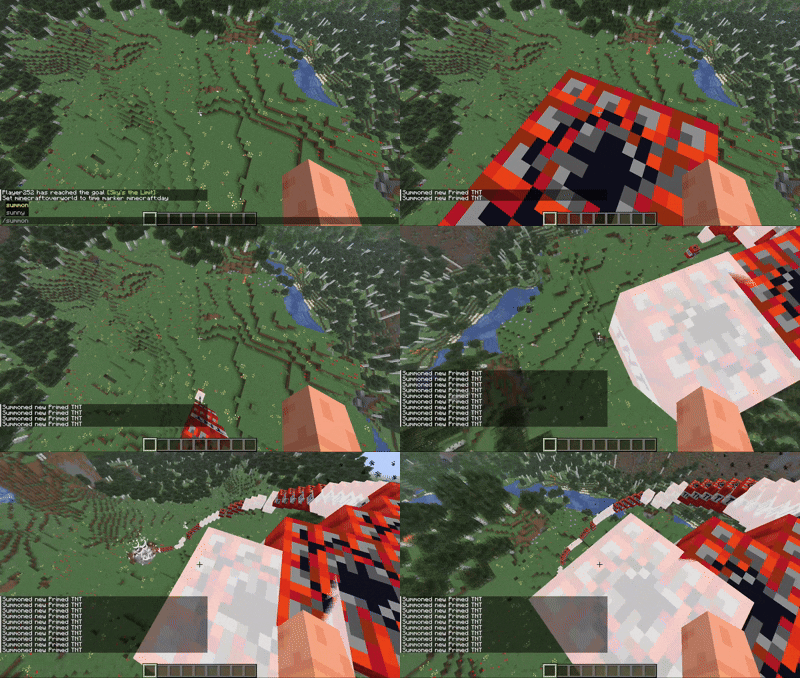 Become a walking repeating command block The resend key allows you to quickly execute your last sent command 20x/sec!
 -
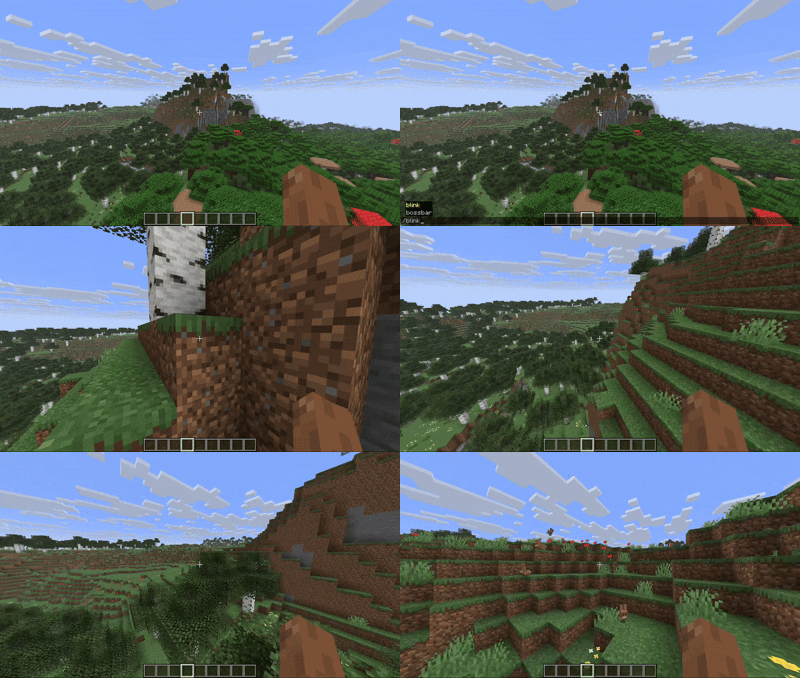 Create custom commands and resend them easily with a keybind /blink is one of my favorite custom commands I've made, it uses a raycast to teleport to a looked at surface. It also supports an optional maxDistance parameter
 -
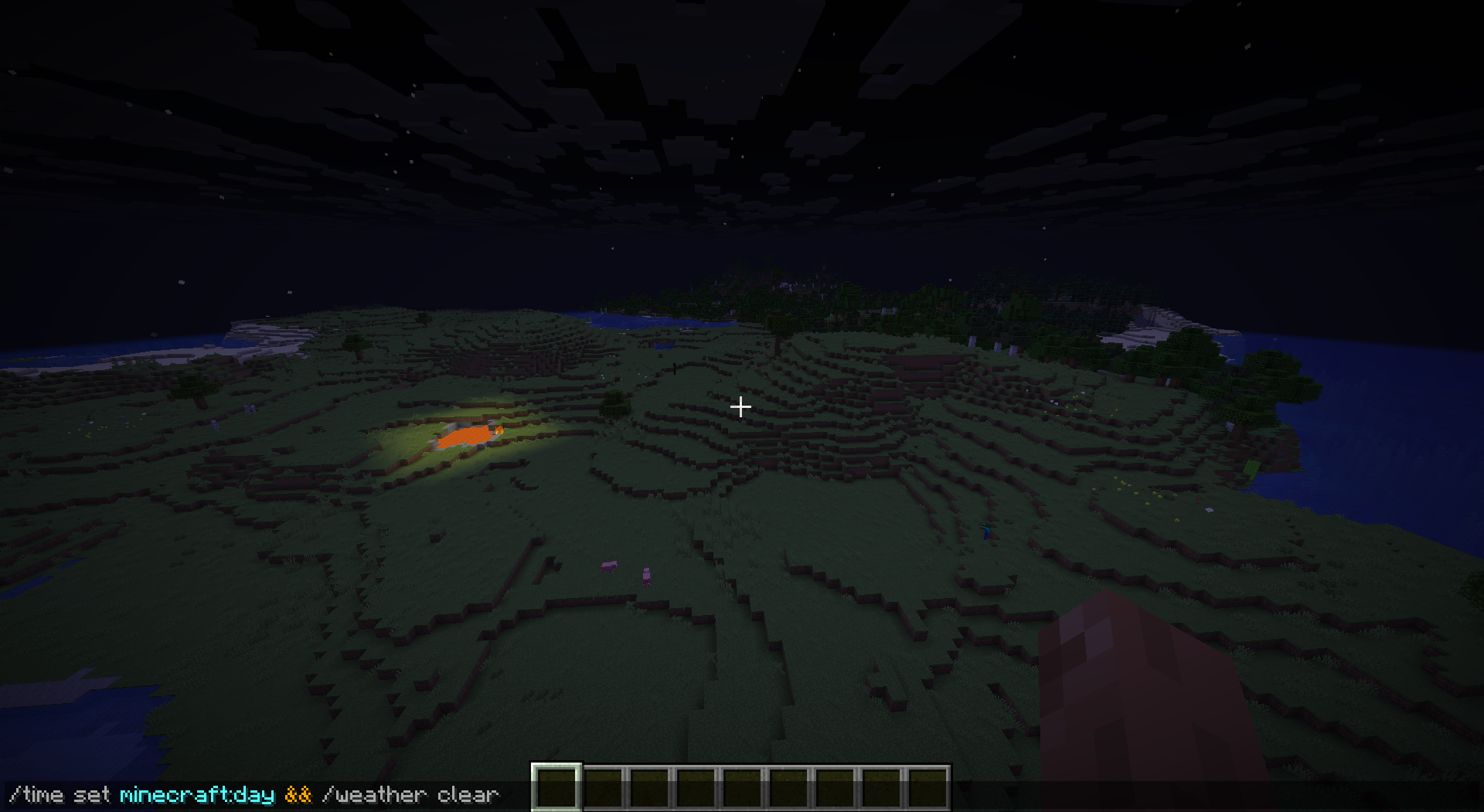 Simple command chaining Set the time to day and clear weather. Both commands still have Mojang's autocomplete and syntax highlighting
 -
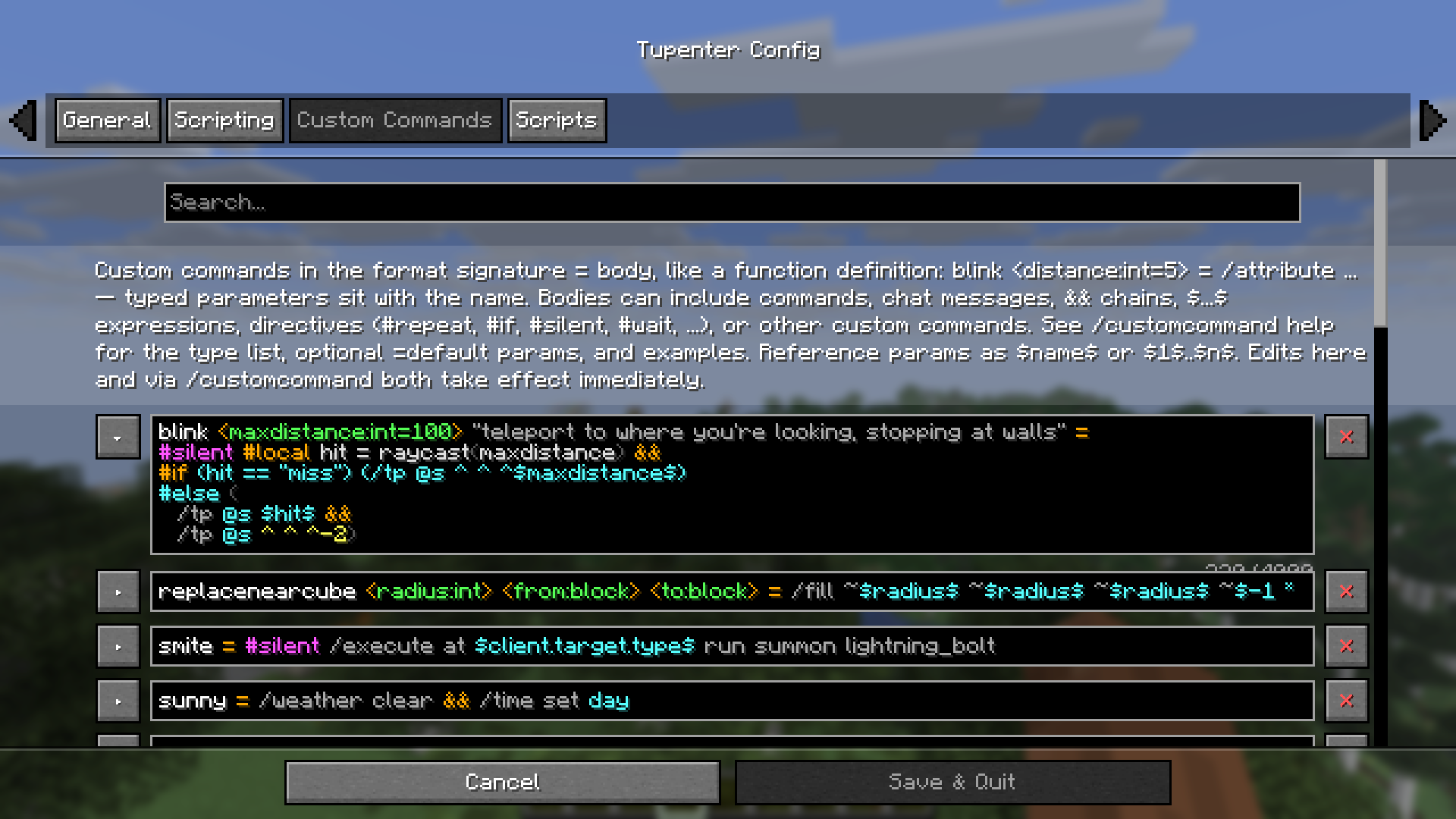 Custom commands page Uses mod menu to create a dedicated viewer and editor for custom commands
 -
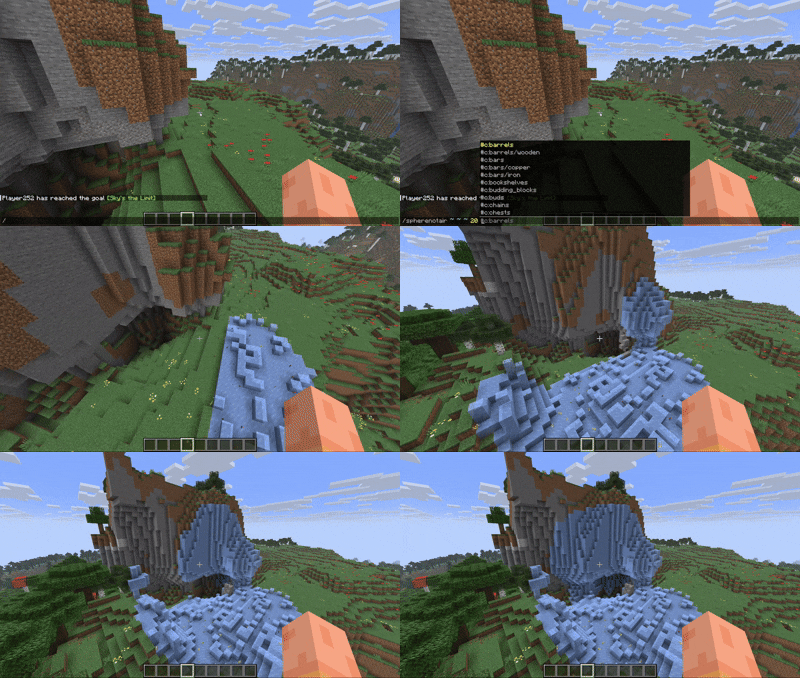 Complex custom commands with parameters This custom command replaces a spherical area of non-air blocks. Only vanilla commands get sent to the server, so if your commands/sec setting isn't too high this will work on any server with op!
 -
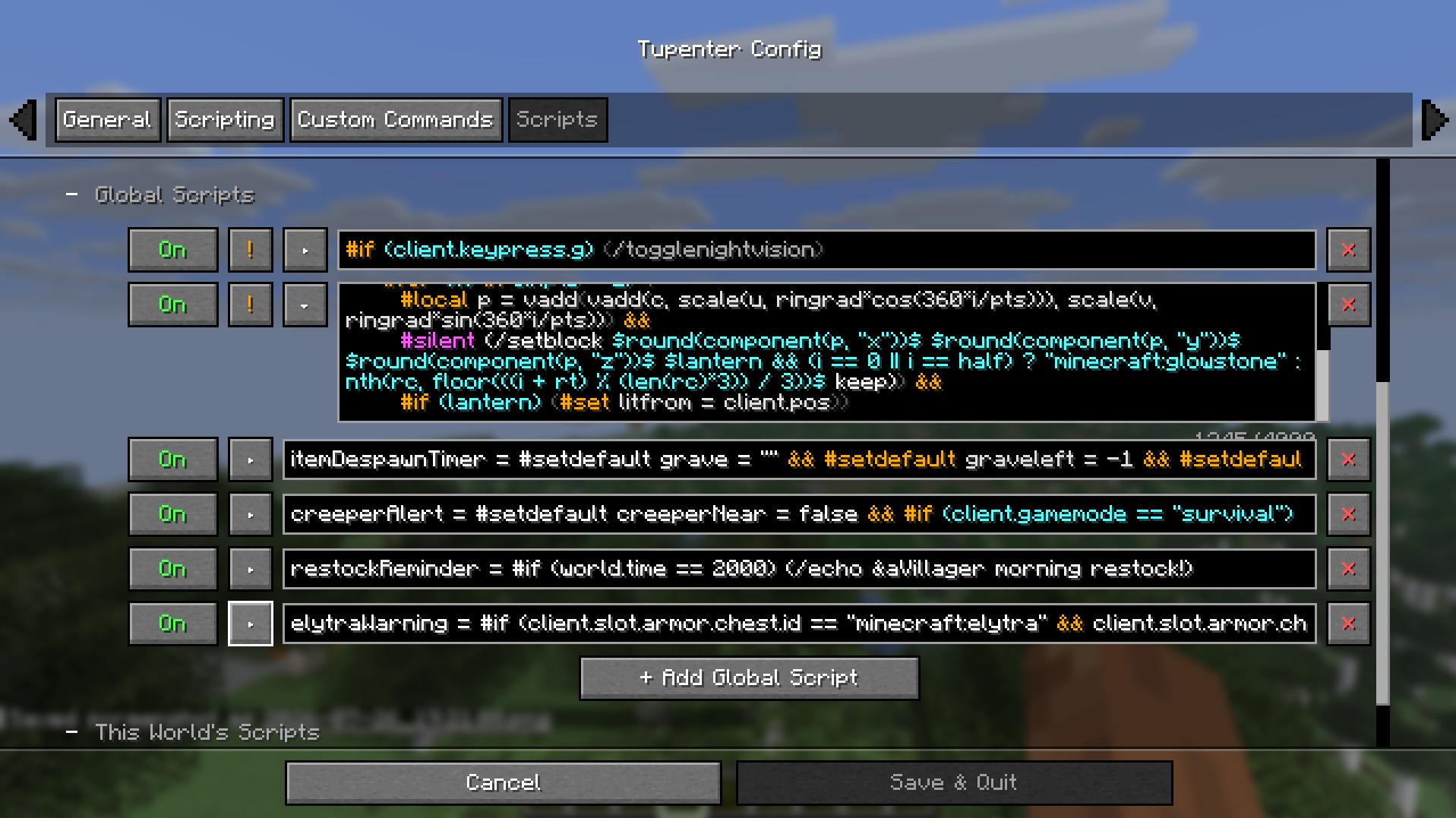 Script Editor Screen Uses mod menu to create a dedicated viewer and editor for scripts, with a per-script toggle for individual worlds and globally
 -
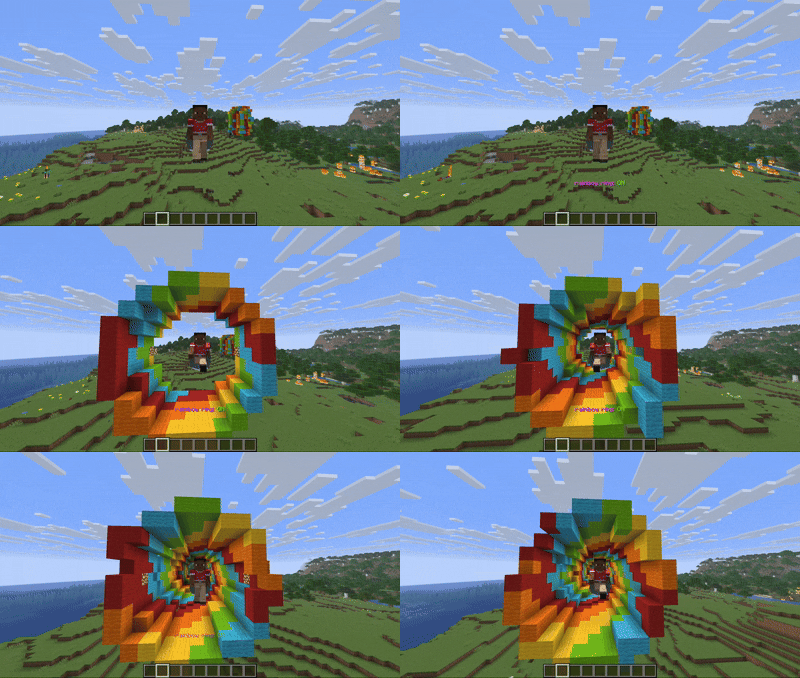 Running a complex script from a keybind Tupenter supports complex scripts that resolve into pure-vanilla setblock commands. No command blocks or datapacks used!
 -
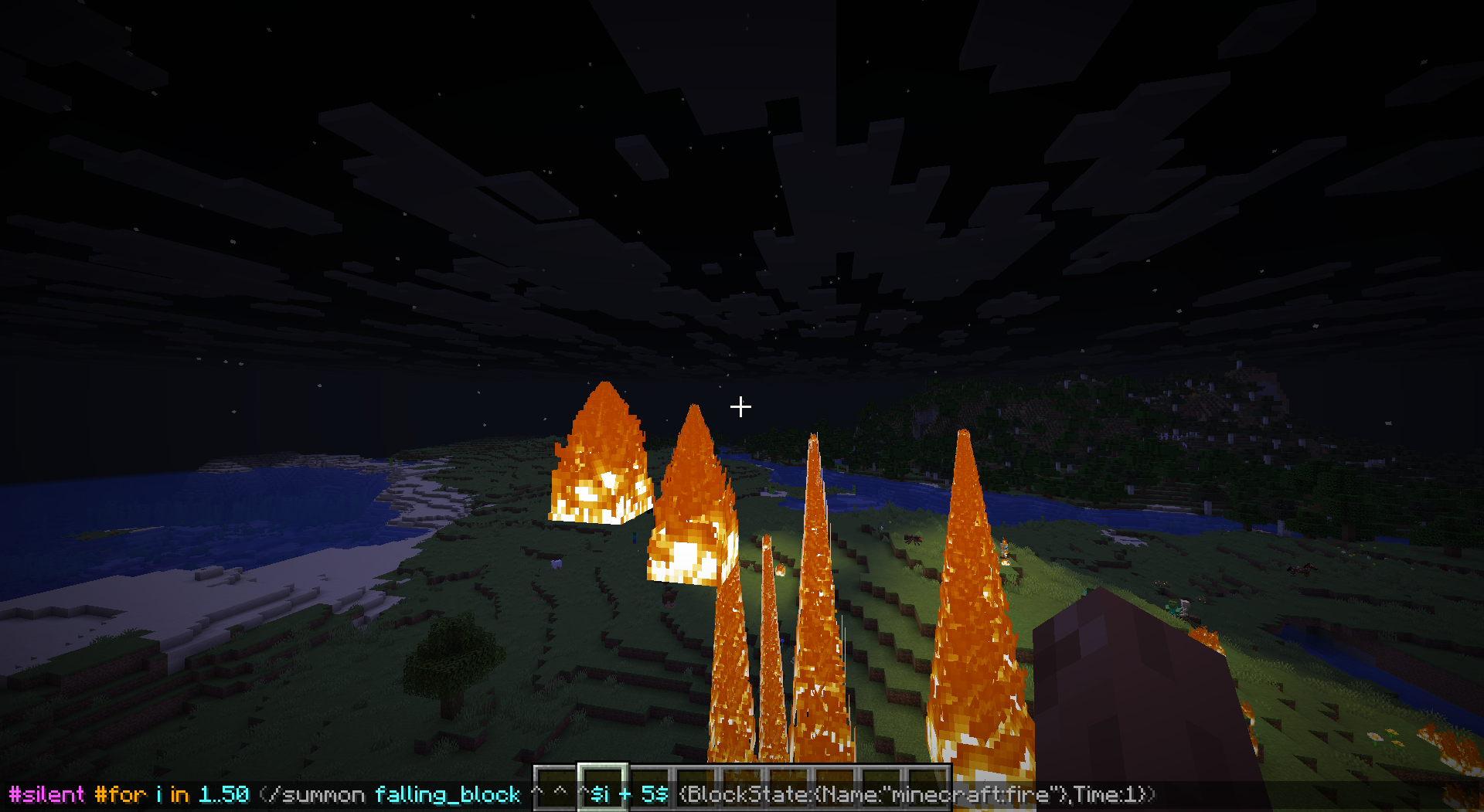 Simple chat script to breathe fire Every time enter is pressed it spawns a falling pillar of fire! Then hold the resend key to breathe continually without needing to re-open chat
Versions
Files
Relations
Project Relations
More like this
Similar Mods
Suggestions use data such as tags, dependencies, dependents, descriptions, titles, and more to rank how much they overlap with this mod.
On ModDex
Community snapshot
By the numbers
Statistics

Want to reach Minecraft players?
We're looking for a server hosting partner to feature here and other parts of the site. Interested? Send us a message!
Get in touchGet it on
Available Platforms
On ModDex
Community snapshot
By the numbers