Community listing page, reviews here may not be monitored by the author.
TurretCraft炮台


No reviews yet
TurretCraft adds placeable automated defense turrets with ammo + GUI, circular targeting range, and smooth aim/fire animations (yaw, pitch, recoil) for Forge 1.20.1.
Community voices
Reviews
No reviews yet. Be the first to review this project!
Get it on
Available Platforms
Compatibility
Supported Environments
Runs entirely on the client. Works on vanilla servers.
About
Project Details
For authors
Embed Badge
If you're the author of this project, you can embed a live badge anywhere that supports HTML or Markdown. It updates automatically whenever ratings change.
Use HTML for any page that supports it, or Markdown for README files and Markdown-based descriptions.
Identifiers
Platform IDs
About
Description
TurretCraft
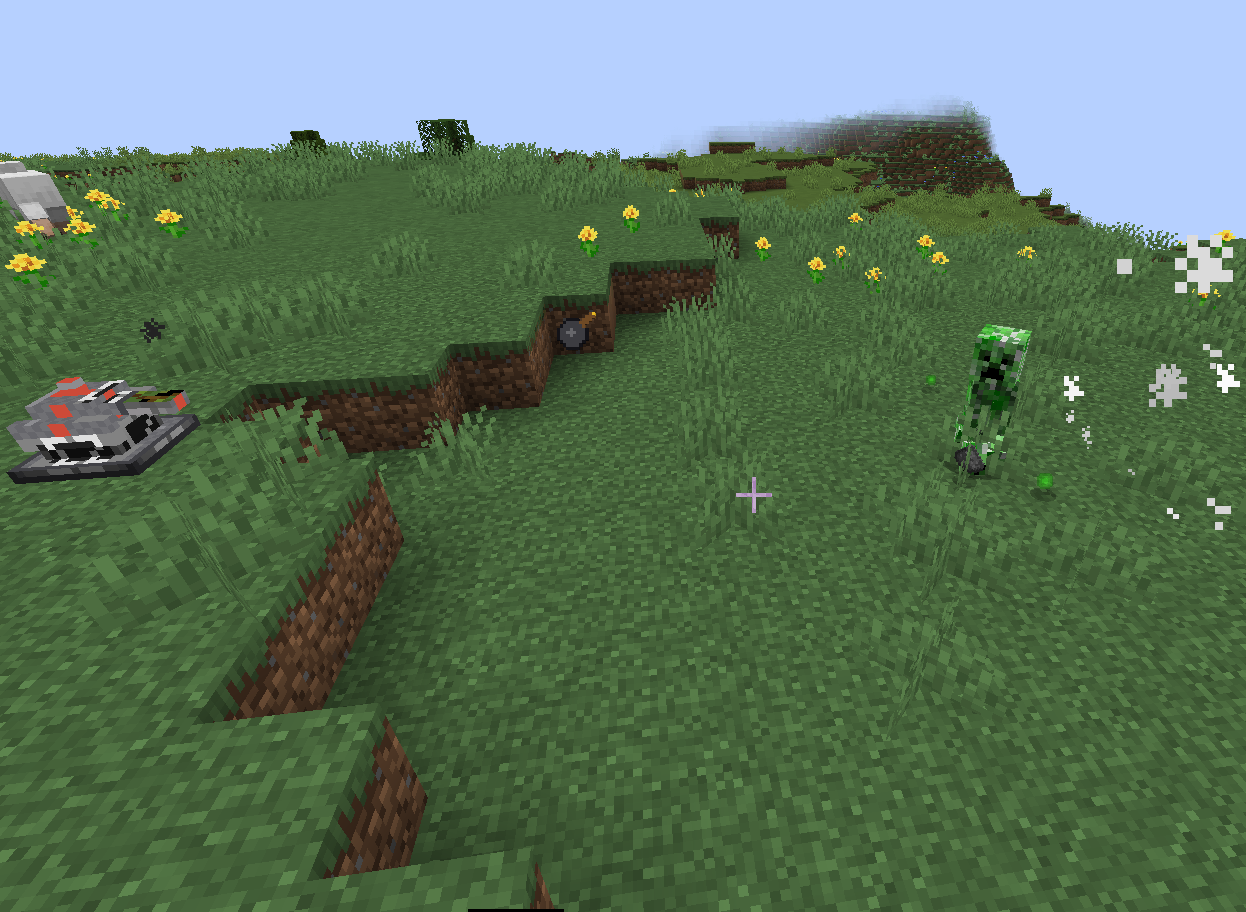
TurretCraft adds placeable automated defense turrets with ammo + GUI controls, circular targeting range, and smooth aim/fire animations (yaw, pitch, recoil) for Minecraft Forge 1.20.1.
Features
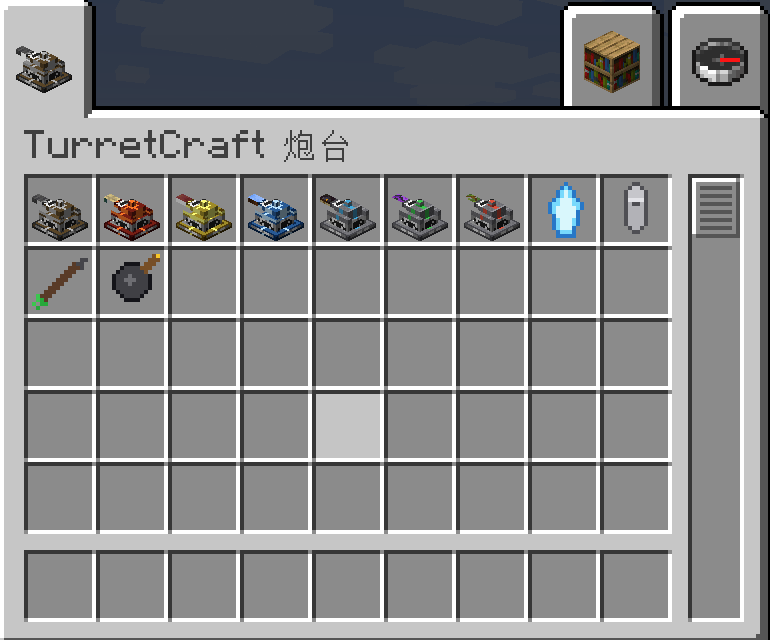
- Multiple turrets: build different turret types for base defense.
- Ammo system: load ammo in the turret GUI (per-turret ammo storage).
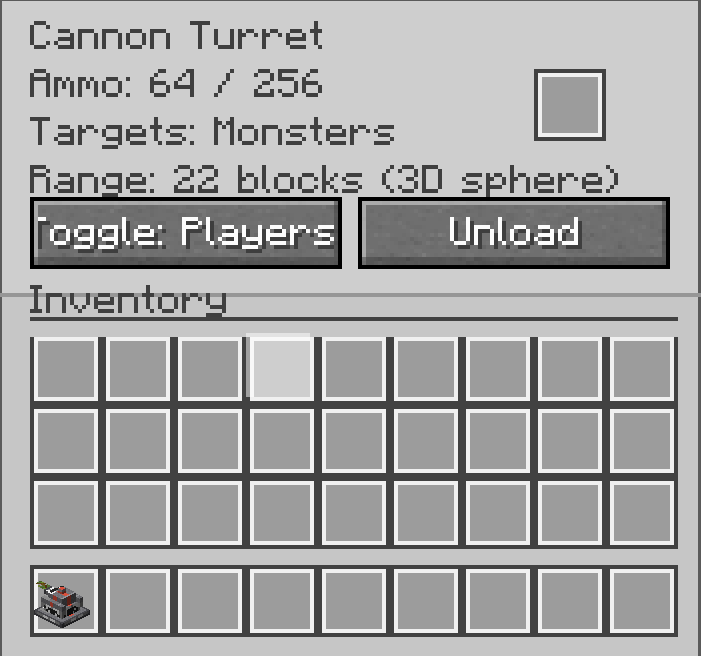
- In-game GUI: configure targeting mode and manage ammo quickly.
- Circular targeting range: turrets scan and attack targets within a round (sphere-like) radius.
- Smooth animations: turret yaw rotation, barrel pitch elevation, and firing recoil.
- Simple & lightweight: focused gameplay, easy to use.
Requirements
- Minecraft 1.20.1
- Forge 47.x
- Java 17
Installation
- Install Minecraft Forge 1.20.1 (47.x).
- Put the mod
.jarinto:- Windows:
%AppData%\.minecraft\mods - macOS:
~/Library/Application Support/minecraft/mods - Linux:
~/.minecraft/mods
- Windows:
- Launch the game with the Forge profile.
How to use
- Craft and place a turret.
- Right-click to open the Turret GUI.
- Put ammo into the turret and choose targeting mode.
- Enjoy automated defense!
Credits
- Author: cz
- Made for the community. Feedback and bug reports are welcome.
TurretCraft(中文|简体)
TurretCraft 是一个用于 Minecraft Forge 1.20.1 的炮台防御模组:可放置的自动炮台、弹药与 GUI 管理、圆形(球形)攻击半径,并带有平滑的“瞄准→发射”动画(炮台转向/炮管俯仰/后坐力)。
功能亮点
- 多种炮台:用于基地防御的不同类型炮台。
- 弹药系统:在炮台 GUI 中装填与管理弹药(炮台内部存储)。
- 炮台 GUI:快速切换目标模式、装卸弹药、查看信息。
- 圆形(球形)攻击范围:以“圆/球”半径扫描并攻击范围内目标。
- 平滑动画:炮台水平旋转、炮管俯仰、发射后坐力反馈。
- 轻量易用:专注防御玩法,上手简单。
运行环境
- Minecraft 1.20.1
- Forge 47.x
- Java 17
安装方法
- 安装 Minecraft Forge 1.20.1(47.x)。
- 将模组
.jar放入:- Windows:
%AppData%\.minecraft\mods - macOS:
~/Library/Application Support/minecraft/mods - Linux:
~/.minecraft/mods
- Windows:
- 用 Forge 配置启动游戏。
使用方法
- 合成并放置炮台。
- 右键打开 炮台 GUI。
- 放入弹药并选择目标模式。
- 开始自动防御!
作者信息
- 作者:cz
- 欢迎反馈与提交 bug。
TurretCraft(中文|繁體)
TurretCraft 是一個用於 Minecraft Forge 1.20.1 的砲台防禦模組:可放置的自動砲台、彈藥與 GUI 管理、圓形(球形)攻擊半徑,並帶有平滑的「瞄準→發射」動畫(砲台轉向/砲管俯仰/後座力)。
功能亮點
- 多種砲台:用於基地防禦的不同類型砲台。
- 彈藥系統:在砲台 GUI 中裝填與管理彈藥(砲台內部儲存)。
- 砲台 GUI:快速切換目標模式、裝卸彈藥、查看資訊。
- 圓形(球形)攻擊範圍:以「圓/球」半徑掃描並攻擊範圍內目標。
- 平滑動畫:砲台水平旋轉、砲管俯仰、發射後座力回饋。
- 輕量易用:專注防禦玩法,上手簡單。
執行環境
- Minecraft 1.20.1
- Forge 47.x
- Java 17
安裝方法
- 安裝 Minecraft Forge 1.20.1(47.x)。
- 將模組
.jar放入:- Windows:
%AppData%\.minecraft\mods - macOS:
~/Library/Application Support/minecraft/mods - Linux:
~/.minecraft/mods
- Windows:
- 以 Forge 設定檔啟動遊戲。
使用方法
- 合成並放置砲台。
- 右鍵打開 砲台 GUI。
- 放入彈藥並選擇目標模式。
- 開始自動防禦!
作者資訊
- 作者:cz
- 歡迎回饋與回報 bug。
TurretCraft(日本語)
TurretCraft は Minecraft Forge 1.20.1 向けのタレット防衛MODです。設置型の自動タレット、弾薬とGUI管理、円形(球形)範囲の索敵、そして滑らかな「照準→発射」アニメーション(ヨー回転/ピッチ上下/反動)を追加します。
特徴
- 複数のタレット:拠点防衛向けに種類を追加。
- 弾薬システム:タレットGUIで装填・管理(内部ストレージ)。
- タレットGUI:ターゲット設定や弾薬管理が簡単。
- 円形(球形)攻撃範囲:丸い半径で索敵・攻撃。
- 滑らかなアニメーション:回転・俯仰・反動を表現。
- 軽量で扱いやすい:防衛に集中したシンプル設計。
必要環境
- Minecraft 1.20.1
- Forge 47.x
- Java 17
導入方法
- Minecraft Forge 1.20.1(47.x) を導入。
.jarを以下へ入れてください:- Windows:
%AppData%\.minecraft\mods - macOS:
~/Library/Application Support/minecraft/mods - Linux:
~/.minecraft/mods
- Windows:
- Forge プロファイルで起動。
使い方
- タレットをクラフトして設置。
- 右クリックで GUI を開く。
- 弾薬を入れてターゲット設定。
- 自動防衛を楽しもう!
クレジット
- Author: cz
- フィードバック・バグ報告歓迎。
TurretCraft【cz】 (English)
TurretCraft is a Minecraft Forge 1.20.1 turret mod featuring multiple turret types, smart auto-targeting with a spherical range (includes vertical distance), an ammo GUI with mode toggles, and smooth aim/fire animations (turret yaw rotation, barrel pitch elevation, and recoil). Turret textures include a subtle 【cz】 nameplate.
✅ Features
- Multiple turret types: Arrow / Gatling / Poison / Fire / Lightning / Frost / Cannon (varies by version)
- Animations: Aim (Yaw/Pitch) + Recoil
- Spherical targeting range: Range is calculated like a sphere (vertical distance included)
- Cannon: Explosion damages entities only (no block grief)
- GUI: Load ammo, view ammo count, toggle targeting mode, unload ammo
🏹 Arrow Turret: supports many arrow types
The Arrow Turret can use various arrows such as normal arrows, spectral arrows, tipped arrows (effects preserved), and most modded arrows that extend ArrowItem.
📥 Installation
- Install Minecraft Java 1.20.1
- Install Forge 1.20.1 (47.x)
- Put
TurretCraft-1.20.1-1.0.0.jarinto:- Windows:
%appdata%\.minecraft\mods
- Windows:
- Launch with Forge 1.20.1 → check Mods menu for TurretCraft
⚙️ How to use
- Right-click a turret to open the GUI
- Put ammo into the ammo slot to load it into the turret storage
- Use GUI buttons to toggle targeting mode and unload ammo
- Turrets automatically attack targets within the spherical range
(Very close targets directly below may be ignored to avoid self-collision; anywhere the barrel can aim at should be valid.)
📌 Requirements
- Minecraft 1.20.1
- Forge 47.x
- Java 17
- Dependencies: None
Copyright / Notes
This mod is an original implementation and includes a 【cz】 nameplate on textures. If you spot suspicious re-uploads or mirrors, please report them via your feedback/issue channel with a link.
TurretCraft【cz】(中文)
TurretCraft 是一个面向 Minecraft Forge 1.20.1 的炮台模组:多种炮台、智能索敌、球形攻击半径(含上下高度)、GUI 装填与模式切换,并带有“炮塔头旋转 + 炮管俯仰 + 后坐力”的瞄准/发射动画。炮台贴图带【cz】铭牌。
✅ 主要特性
- 多种炮台:箭炮台 / 机枪炮台 / 毒镖 / 火焰 / 雷电 / 寒冰 / 加农(以版本为准)
- 动画:瞄准(Yaw/Pitch)+ 发射后坐力(Recoil)
- 球形范围:范围像“圆/球”一样计算,上下也算
- 加农炮:爆炸只伤害实体,不破坏方块
- GUI:装填弹药、查看弹量、切换索敌模式、卸载弹药
🏹 箭炮台:支持多种箭
箭炮台可装载多种箭(例如普通箭、光灵箭、药箭,并保留效果;多数模组的 ArrowItem 也可使用)。
📥 安装
- 安装 Minecraft Java 1.20.1
- 安装 Forge 1.20.1(47.x)
- 将
TurretCraft-1.20.1-1.0.0.jar放入:- Windows:
%appdata%\.minecraft\mods
- Windows:
- 使用 Forge 1.20.1 启动游戏 → 主菜单 Mods 中看到 TurretCraft 即成功
⚙️ 使用方法
- 右键炮台打开 GUI
- 把弹药放入 弹药槽 装填(会进入炮台弹仓)
- GUI 可切换索敌模式、卸载弹药
- 炮台会在球形半径内自动攻击目标
(正下方极近距离可能不攻击以避免撞到自身;炮管能瞄到的位置应可正常开火)
📌 需求
- Minecraft 1.20.1
- Forge 47.x
- Java 17
- 依赖:无
版权 / 说明
本模组为原创实现,炮台贴图含【cz】铭牌。如发现疑似盗传/镜像发布,请在反馈渠道附链接提交。
TurretCraft【cz】(日本語)
TurretCraft は Minecraft Forge 1.20.1 向けのタレットMODです。複数種類のタレット、上下を含む球形レンジでの自動索敵、弾薬GUIとモード切替、そして「旋回(Yaw)+俯仰(Pitch)+リコイル」のエイム/発射アニメーションを搭載しています。タレットのテクスチャには控えめな 【cz】 銘板があります。
✅ 特徴
- 複数のタレット:矢 / ガトリング / 毒 / 炎 / 雷 / 氷 / 砲(バージョンにより変動)
- アニメーション:エイム(Yaw/Pitch)+リコイル
- 球形レンジ:範囲は球として計算(上下方向も含む)
- 砲タレット:爆発はエンティティのみ(ブロック破壊なし)
- GUI:弾薬装填、残弾表示、ターゲット切替、弾薬取り出し
🏹 矢タレット:さまざまな矢に対応
通常の矢、スペクトラルの矢、ポーション効果付きの矢(効果保持)に加え、多くの MOD 追加矢(ArrowItem)にも対応します。
📥 導入方法
- Minecraft Java 1.20.1 を用意
- Forge 1.20.1(47.x) を導入
TurretCraft-1.20.1-1.0.0.jarを以下へ入れる:- Windows:
%appdata%\.minecraft\mods
- Windows:
- Forge 1.20.1 で起動 → Mods メニューで TurretCraft を確認
⚙️ 使い方
- タレットを右クリックして GUI を開く
- 弾薬スロットに弾薬を入れて装填(タレット内に格納)
- GUI でターゲットモード切替/弾薬取り出し
- 球形レンジ内の対象を自動攻撃
(真下の至近距離は自己衝突回避のため攻撃しない場合がありますが、砲身が狙える範囲は攻撃対象になります)
📌 必要環境
- Minecraft 1.20.1
- Forge 47.x
- Java 17
- 依存:なし
著作 / 注意
本MODはオリジナル実装で、テクスチャに【cz】銘板があります。転載は禁止アップロード等を見つけた場合は、リンク付きで報告してください。
Screenshots
Gallery
-
 picture4
 -
 picture3
 -
 picture2
 -
 picture1


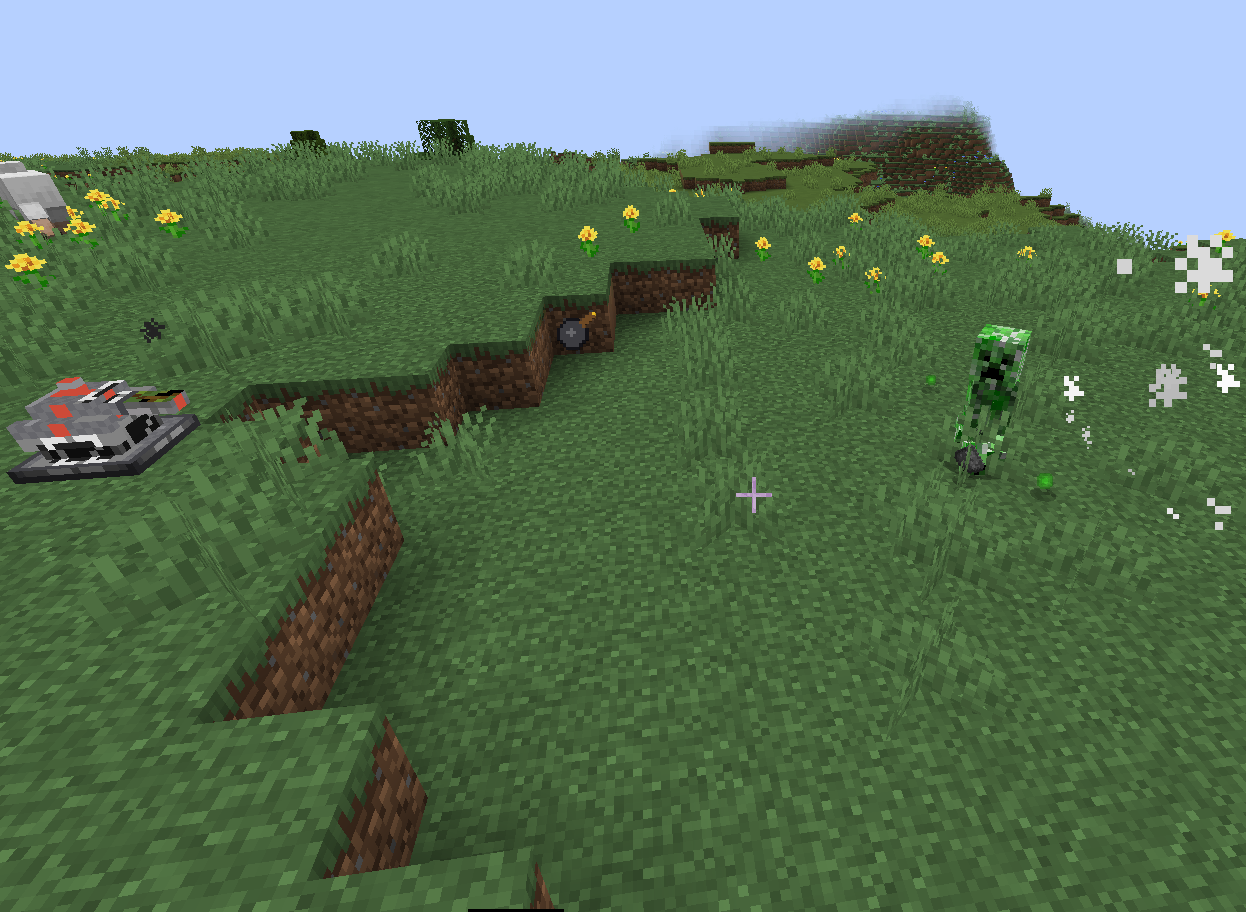

Versions
Files
Relations
Project Relations
More like this
Similar Mods
Suggestions use data such as tags, dependencies, dependents, descriptions, titles, and more to rank how much they overlap with this mod.
On ModDex
Community snapshot
By the numbers
Statistics
Want to reach Minecraft players?
We're looking for a server hosting partner to feature here and other parts of the site. Interested? Send us a message!
Get in touchGet it on
Available Platforms
On ModDex
Community snapshot
By the numbers