Community listing page, reviews may not be monitored by the author.
TwilightTeleport


No reviews yet
Adds a teleportation effect inspired by The Legend of Zelda: Twilight Princess.

Community voices
Reviews
No reviews yet. Be the first to review this project!
Get it on
Available Platforms
Compatibility
Supported Environments
Must be installed on both the client and the server.
About
Project Details
For authors
Embed Badge
If you're the author of this project, you can embed a live badge anywhere that supports HTML or Markdown. It updates automatically whenever ratings change.
Use HTML for any page that supports it, or Markdown for README files and Markdown-based descriptions.
Identifiers
Platform IDs
About
Description


About
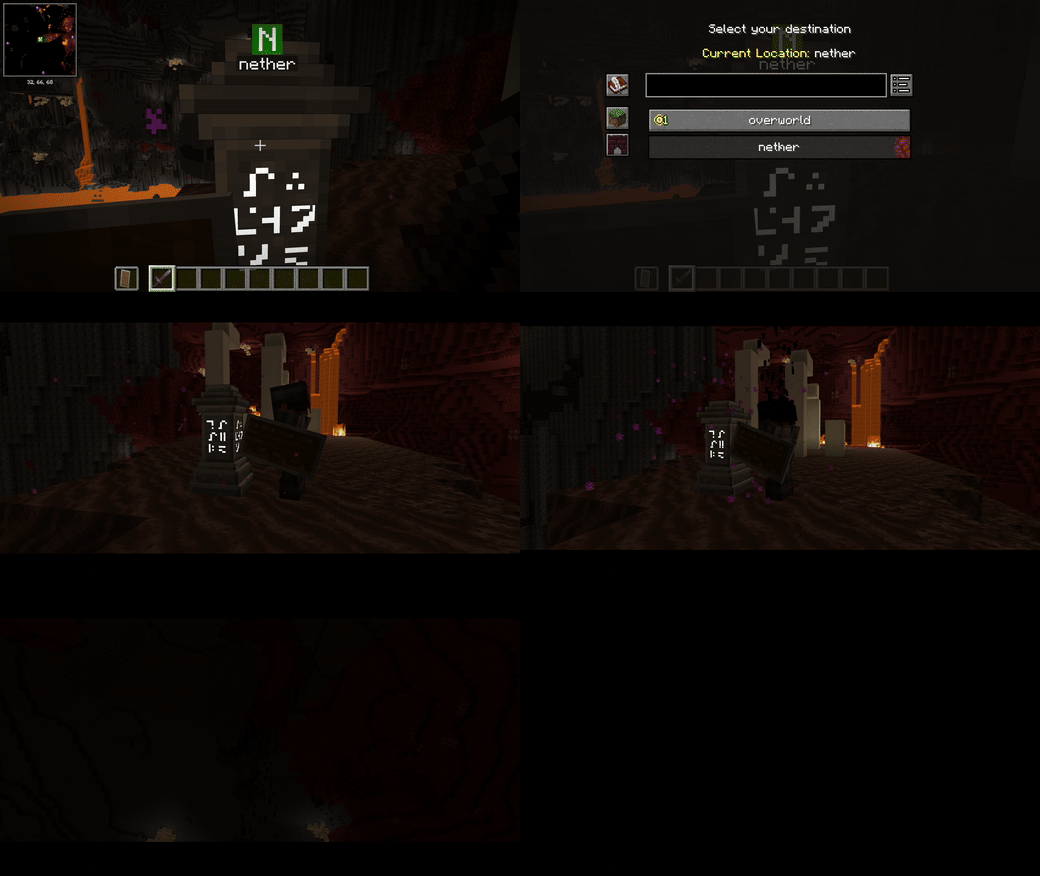
Twilight Teleport brings the teleportation effect from The Legend of Zelda: Twilight Princess to Minecraft.
Instead of vanishing instantly, your character dissolves into particles, the screen fades out, and you're rebuilt at your destination.

Features
- Dissolve and rebuild effects with animated portals
- Works with same-dimension and cross-dimension teleports
- Compatible with many teleportation mods
- Iris shader pack support on Fabric
- Client config screen, opened with
/ttpconfig - Adjustable particles, sounds, cinematic bars, loading status, and shader effect quality
- Server admin screen with search by mod name or ID
Want to skip the animation? Press Space while no menu is open. The screen stays black until your destination is ready.
Teleports that use fully custom movement systems may not trigger the effect, and very short-distance teleports may be ignored.

Compatibility
Tested with:
- Waystones
- Xaero's World Map
- Bonfires
Other mods should work too, as long as they use Minecraft's standard player teleportation methods. Results may vary depending on the Minecraft version, mod loader, and mod version.

Multiplayer
For full multiplayer support, install Twilight Teleport on both the server and the client.
The mod doesn't grant teleport permissions or bypass any server rules, costs, cooldowns, or other restrictions.

Configuration
Client Settings
Run /ttpconfig to open the client config screen. It requires permission level 0, so every player can use it, and your changes only affect your own client.
From there you can adjust particles, sounds, cinematic bars, loading status, and shader effect quality. The screen is also available through Mod Menu on Fabric and the Mods screen on Forge and NeoForge.
Player Controls
Turn off the animation for specific players with:
/ttp disable <players> all– disables the animation for every teleport/ttp disable <players> only_command– disables it only for command-based teleports, such as/tpand/teleport
To turn it back on, use /ttp enable <players>.
These commands require permission level 2 on all supported loaders.
Minimum Teleport Distance
Use /ttp minimum_distance to check the current value, or /ttp minimum_distance 16 to change it.
The range is 0–64 blocks, and the default is 4 blocks. This setting only applies to same-dimension teleports and is saved per world. Cross-dimension teleports are not affected.
This command requires permission level 2 on all supported loaders.
Server Administration
Run /ttpadmin to open the admin config screen, where you can disable the animation for teleports from specific mods across the entire server.
Use the search box to filter by mod name or ID. Search is case-insensitive, and your selections are kept even when they're hidden by the filter.
The same access rules apply on Forge, NeoForge, and Fabric:
- Dedicated servers: requires OP permission level 4.
- Singleplayer and LAN worlds: only the world host can access the admin settings. Other players can't, even with OP permission level 4.
The command must be run directly by a player, and these rules are enforced both when opening the screen and when saving changes.

Shader Packs
Shader packs are supported, but some packs may cause missing model parts, incorrect dissolve boundaries, or misaligned particles. If you run into any of these, try adjusting the Shader Pack Effect Quality setting.

Notes
- Some custom teleport systems may not be detected, and some shader packs may not render the effect correctly.
- Some translations were made with AI assistance and may contain errors.
- Twilight Teleport is released under the MIT License.
Found a bug or a translation issue? Please report it on GitHub Issues.

Credits
Twilight Teleport was developed with the help of ChatGPT and Codex, and tested and supervised by Ochibo.
Twilight Teleport
Twilight Teleport adds a teleportation effect inspired by The Legend of Zelda: Twilight Princess to Minecraft.
When teleporting, the player dissolves into particles, the screen fades out, and the player is rebuilt at the destination.
Features
- Player dissolve and rebuild effects
- Same-dimension and cross-dimension teleport support
- Compatibility with many teleportation mods
- Iris shader pack support
- Config screen through Mod Menu
- Adjustable particles, sounds, cinematic bars, loading status, and shader effect quality
Teleports using completely custom movement systems may not trigger the effect. Very short-distance teleports may also be ignored.
Tested Mods
- Waystones
- Xaero's World Map
- Bonfires
Other mods may also work if they use Minecraft's standard player teleportation methods.
Multiplayer
For full multiplayer support, Twilight Teleport must be installed on both the server and the client.
The mod does not grant teleport permissions or bypass server rules, costs, cooldowns, or other teleport restrictions.
Configuration
Particle amount can be changed with:
/ttp particle none
/ttp particle few
/ttp particle default
Reset all settings with:
/ttp reset
More options are available through the Mod Menu configuration screen.
Iris Shaders
Shader packs are supported, but some packs may cause missing model parts, incorrect dissolve boundaries, or particle misalignment.
Changing the Shader Pack Effect Quality setting may improve compatibility.
Notes
- Some custom teleport systems may not be detected.
- Some shader packs may not render the effect correctly.
- Full multiplayer functionality requires installation on both the server and client.
- Some translations were created with AI assistance and may contain errors.
Please report bugs or translation issues through GitHub Issues.
Fixes and Planned Features:
- Port to NeoForge and Forge
- (Probably) Add compatibility with camera-modifying mods such as IsoCraft
- (Maybe) Generate a mod-icon portal in the sky upon teleporting
- (Maybe) Add support for mods that alter player models/animations, like Figura or Fresh Animations
Credits
Twilight Teleport was developed with assistance from ChatGPT and Codex, with testing and supervision by Ochibo.
Screenshots
Gallery
-
 footage
Versions
Files
Relations
Project Relations
More like this
Similar Mods
Suggestions use data such as tags, dependencies, dependents, descriptions, titles, and more to rank how much they overlap with this mod.
On ModDex
Community snapshot
By the numbers
Statistics

Get it on
Available Platforms
On ModDex
Community snapshot
By the numbers