Community listing page, reviews here may not be monitored by the author.
UniLink


No reviews yet
Allows you to use resources from other directories.
Community voices
Reviews
No reviews yet. Be the first to review this project!
Get it on
Available Platforms
Compatibility
Supported Environments
Runs entirely on the client. Works on vanilla servers.
About
Project Details
For authors
Embed Badge
If you're the author of this project, you can embed a live badge anywhere that supports HTML or Markdown. It updates automatically whenever ratings change.
Use HTML for any page that supports it, or Markdown for README files and Markdown-based descriptions.
Identifiers
Platform IDs
About
Description
🔗 UniLink
A mod that allows you to use resources from other directories
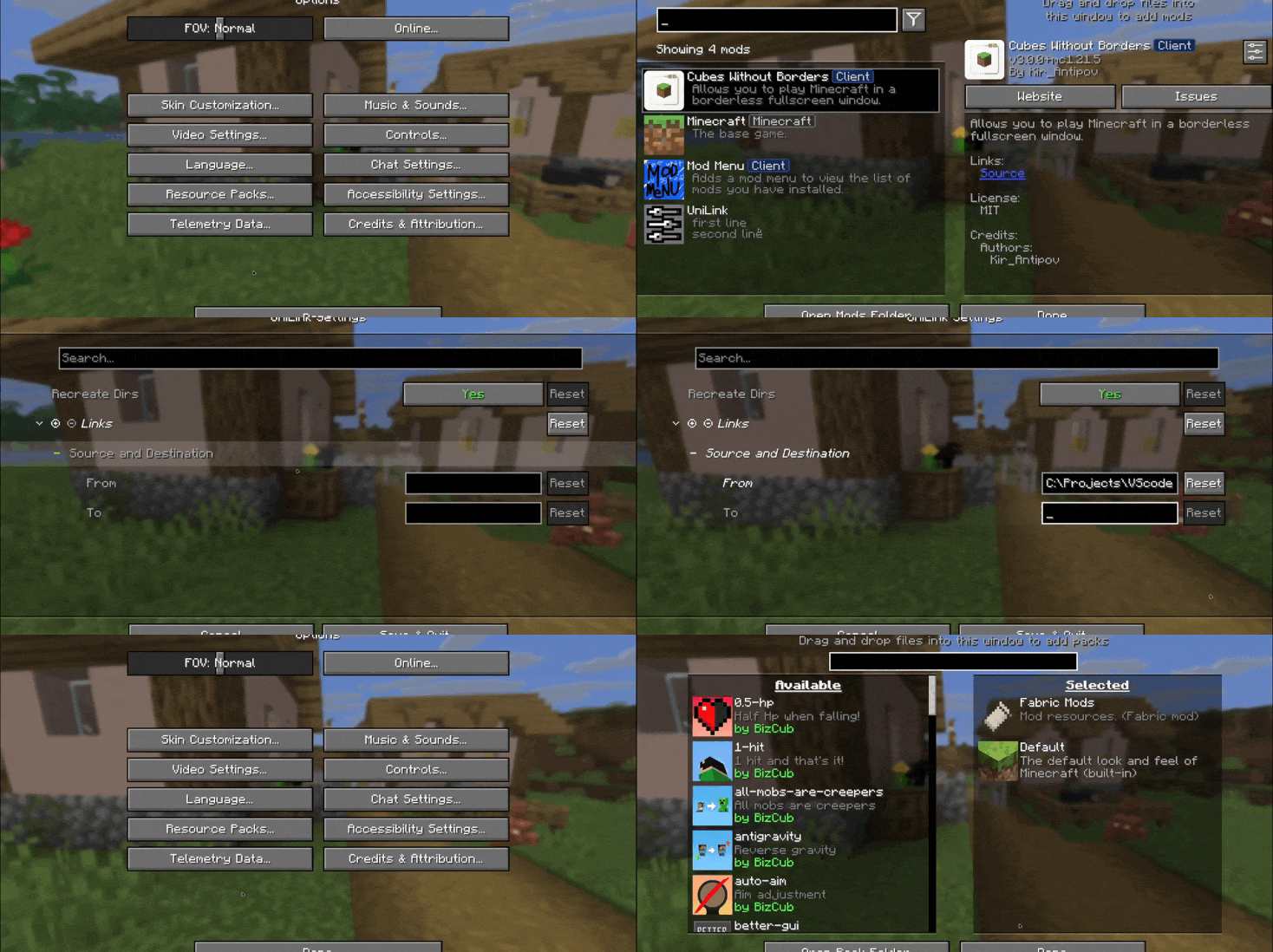
💼 Usage
This mod works using symbolic links, which can be used like a folder but don't require reusing (copying) resources. Some launchers also use symbolic links, but the mod works independently of them. It's a configuration file. The first field specifies the path to the directory to use, and the second field specifies the path to the folder where the symbolic link should be placed. The final path can be absolute (e.g., C:\...\.minecraft\saves) or abbreviated (saves).

If you change the directory used for worlds and then revert the change, the game may freeze while searching for and failing to find the required folder. For this purpose, the configuration file has an option to recreate the folders used by the game.
🛠️ How it works
By default, the mod does nothing. However, you can add data to the configuration to create a link: the path from which resources will be used and the path where the symbolic link will be created.
What follows from this:
After changing the configuration, new links will be added. Therefore, old, unused links will be deleted.
Since Minecraft creates some folders, the mod will have to delete the existing folder before creating the link. However, since the mod deletes folders without asking, it has a limitation on deleting directories with files inside. This means that if a folder contains any files, it won't be deleted and the link won't be created.
Creating symbolic links requires certain permissions. Therefore, some launchers that don't have them won't be able to create links. Solution: Run the launcher as administrator.
🤝 Support

🔗 UniLink
A mod that allows you to use resources from other directories
💼 Usage
This mod works using symbolic links, which can be used like a folder but don't require reusing (copying) resources. Some launchers also use symbolic links, but the mod works independently of them. It's a configuration file. The first field specifies the path to the directory to use, and the second field specifies the path to the folder where the symbolic link should be placed. The final path can be absolute (e.g., C:\...\.minecraft\saves) or abbreviated (saves).
If you change the directory used for worlds and then revert the change, the game may freeze while searching for and failing to find the required folder. For this purpose, the configuration file has an option to recreate the folders used by the game.
🛠️ How it works
By default, the mod does nothing. However, you can add data to the configuration to create a link: the path from which resources will be used and the path where the symbolic link will be created.
What follows from this:
-
After changing the configuration, new links will be added. Therefore, old, unused links will be deleted.
-
Since Minecraft creates some folders, the mod will have to delete the existing folder before creating the link. However, since the mod deletes folders without asking, it has a limitation on deleting directories with files inside. This means that if a folder contains any files, it won't be deleted and the link won't be created.
Creating symbolic links requires certain permissions. Therefore, some launchers that don't have them won't be able to create links. Solution: Run the launcher as administrator.
🤝 Support
Screenshots
Gallery
-
 Feature image
Versions
Files
Relations
Project Relations
More like this
Similar Mods
Suggestions use data such as tags, dependencies, dependents, descriptions, titles, and more to rank how much they overlap with this mod.
On ModDex
Community snapshot
By the numbers
Statistics
Want to reach Minecraft players?
We're looking for a server hosting partner to feature here and other parts of the site. Interested? Send us a message!
Get in touchGet it on
Available Platforms
On ModDex
Community snapshot
By the numbers