
UniversalQuestTracker
This mod allows you to track the progress of FTB quests across multiple modpacks. Works with other quest systems too.
No ratings yet
Be the first to rate it.
Community listing page
Community listing page, reviews may not be monitored by the author.

Community voices
Reviews
No reviews yet. Be the first to review this project!
Get it on
Available Platforms
Compatibility
Supported Environments
Must be installed on both the client and the server.
About
Project Details
For authors
Embed Badge
If you're the author of this project, you can embed a live badge anywhere that supports HTML or Markdown. It updates automatically whenever ratings change.
Use HTML for any page that supports it, or Markdown for README files and Markdown-based descriptions.
Identifiers
Platform IDs
About
Description
This mod allows you to track your FTB Quests progress and more across multiple modpacks!
Universal Quest Tracker works by writing each modpack’s quest progress into one shared folder on your computer. The in-game menu can then show your progress from all of them in one place.
The shared folder is set up automatically! For modpacks stored beside each other, just install the mod, load a world, and start playing.
Setup:
- Install the correct Universal Quest Tracker version in each modpack’s mods folder.
- Load up a world.
- Press U by default to open the Universal Quest Tracker menu.
- That’s it! The menu opens directly to the Modpacks tab, where you can see your tracked worlds and progress.
The mod automatically looks for a folder named UniversalQuestTrackerDataDirectory beside your modpack folders. If it doesn’t exist, the mod creates it.
For example, CurseForge modpacks stored inside the same Instances folder will automatically share their progress folder. Prism and MultiMC instance layouts are also supported.
Already using the mod, or want a different folder?
Existing custom folder settings are kept. The mod can also reuse an existing UniversalQuestTrackerData folder beside your modpacks when the new folder name isn’t present.
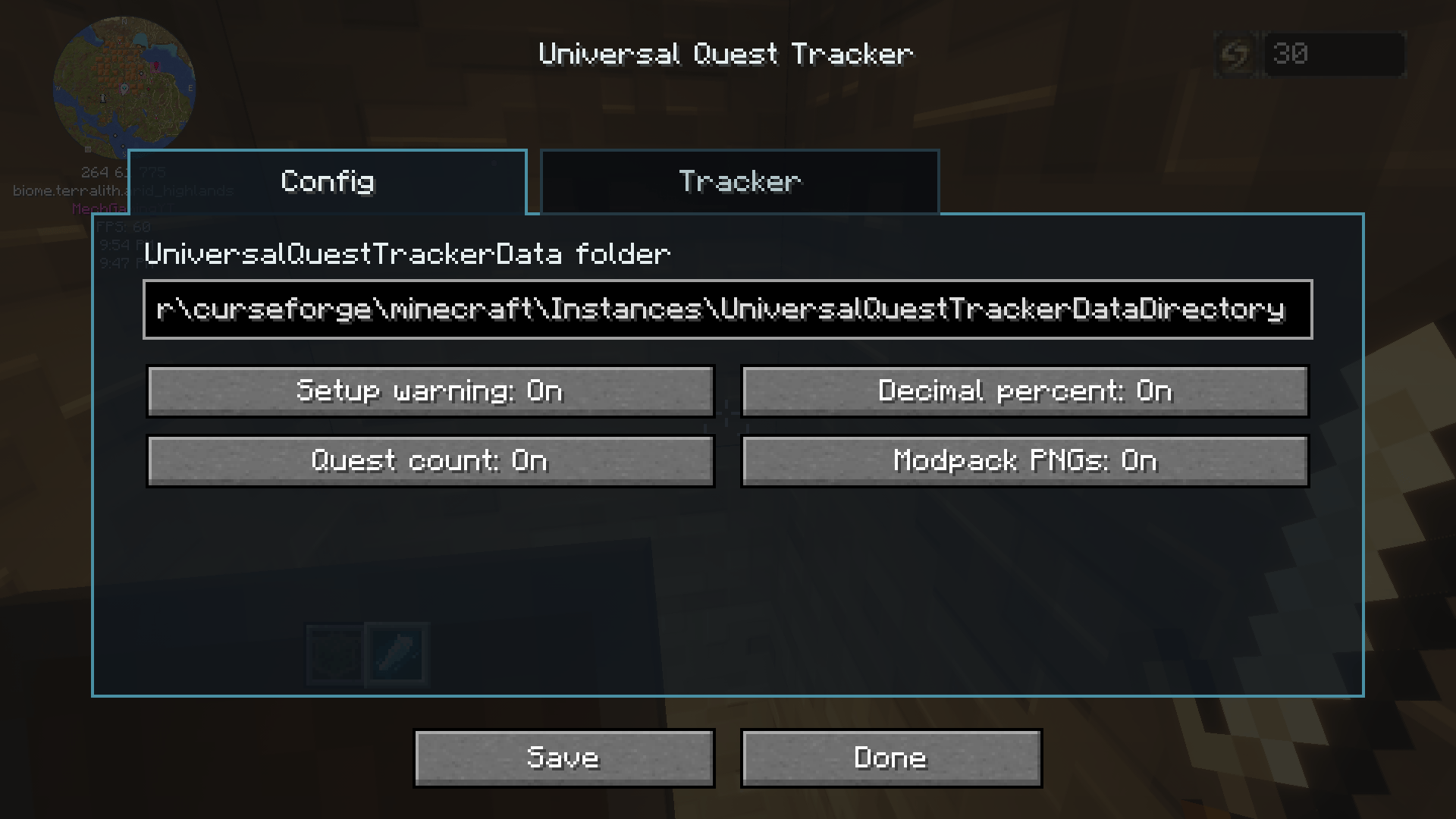
The current folder path is shown in the menu. To change it:
- Open the menu with U.
- Open Settings.
- Enter your preferred shared folder path.
- Press Save.
If your modpacks are stored in different locations or managed by different launchers, point them at the same folder through Settings.
Leaving the folder setting blank, or setting it to EMPTY, returns to automatic folder selection. Changing folders does not move or delete the data in your previous folder.
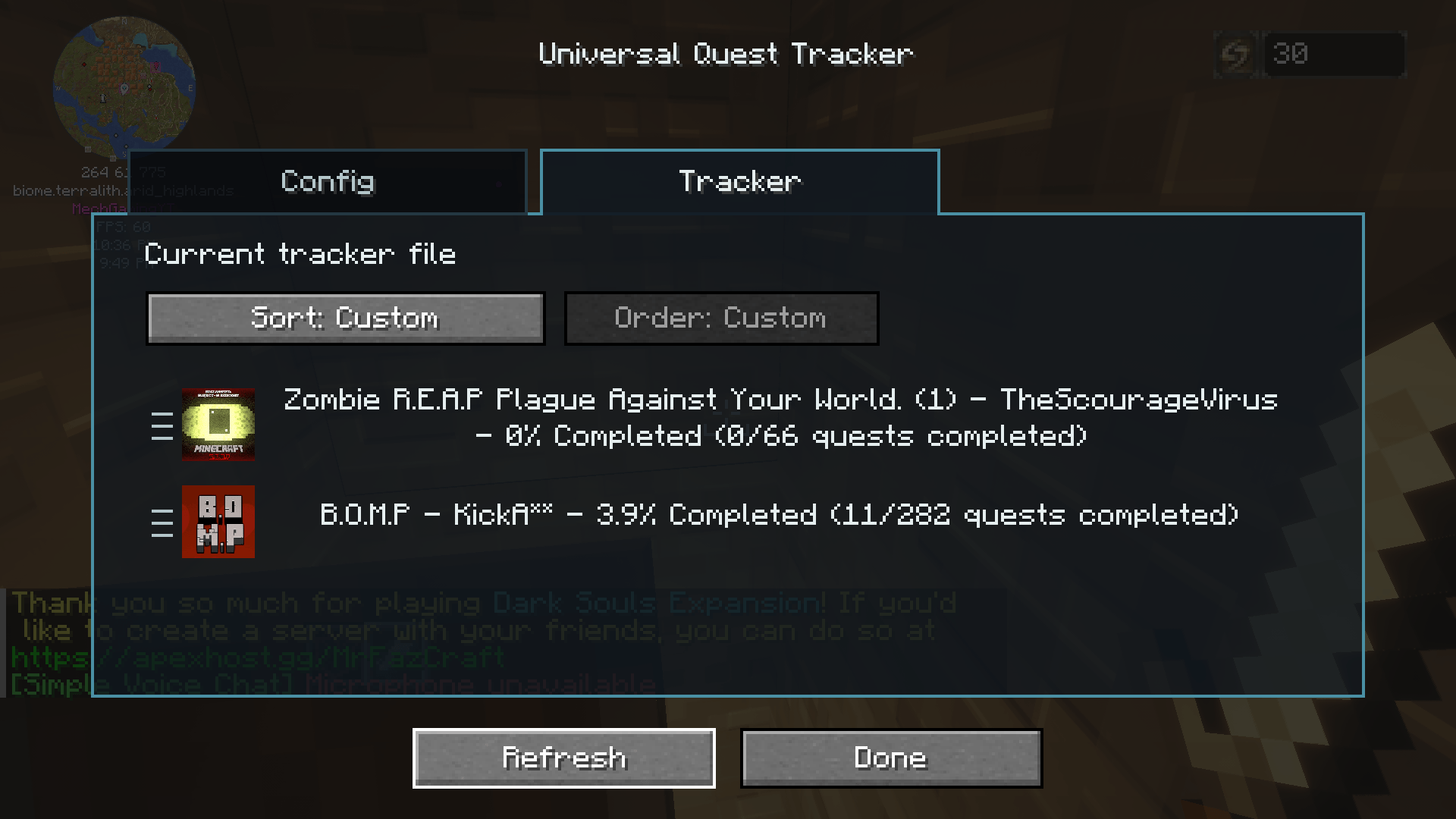
Once set up, the mod automatically saves quest progress while you play. The tracker shows the modpack name, world or server name, and completion percentage. You can also refresh it manually from the menu.
Features:
- Tracks supported quest progress across multiple modpacks
- Automatically creates or finds a shared local data folder
- Shared data format between all supported Minecraft versions
- In-game menu, opened with U by default
- Modpacks tab opens first
- Editable folder path in Settings
- Optional decimal percentages
- Optional completed quest count
- Optional modpack images
- Sorting by title, completion, or custom order
- Drag tracked entries into your preferred custom order
- Left, middle, and right text alignment
- Hide and restore individual tracked worlds across all five ports
- Multiplayer tracking for supported quest data synced to your client
- Generates a readable progress text file alongside its data file
- Protects shared files against simultaneous writes from multiple running modpacks
Important:
Universal Quest Tracker includes integrations for FTB Quests, Better Questing on Minecraft 1.12.2, and The Vault on compatible versions. Quest mod support depends on the Minecraft version, and not every integration is available in every port.
Recorded worlds without supported quest data show null instead of a completion percentage. Multiplayer tracking depends on the quest mod syncing the required data to your client.
This mod shares a progress overview through a folder on your computer. It does not transfer completed quests into another world or automatically sync between different computers.
This mod is fan-made and is not made by or affiliated with the Feed The Beast team.
Modpack Permission:
You may include Universal Quest Tracker in modpacks, including public modpacks, as long as the mod file is not modified and credit is given. Please link back to this CurseForge page when possible. Do not reupload this mod as a standalone download without permission.
Future plans:
- Port to more versions of the game based on comments I receive on this mod.
- Add playtime display.
- Add a button to automatically hide 100% completed modpacks.
- Add a button to automatically hide modpacks without a supported quest system.
- Incorporate the Advancement system... maybe with a toggle.
- Add more customization of what info is displayed.
- Add a button to permanently delete tracked entries.
- Add whatever you guys suggest in the comments :)
This mod allows you to track your FTB Quest progress and more across multiple modpacks!
Universal Quest Tracker works by writing each modpack’s quest progress into one shared folder on your computer. Once multiple modpacks are pointed at the same folder, the in-game menu can show your progress from all of them in one place.
Setup:
-
Create a folder anywhere on your computer. You can name it whatever you want, but something like UniversalQuestTrackerData is recommended.
-
Copy the folder path. On Windows, Shift + Right Click the folder, then choose “Copy as path”.
-
Load up the modpack.
-
In game, press U by default to open the Universal Quest Tracker menu. Alternatively you can directly edit the universalquesttracker-common.toml just keep in mind to change the "" in the path to "/" then reload up the modpack.
-
Paste that folder path into the UniversalQuestTrackerData folder box.
-
Press Save.
-
Repeat this for every modpack you want to track, using the same folder path each time.
-
Once set up, the mod will automatically save quest progress while you play. The tracker menu can show each modpack, world name, and completion percentage. You can also refresh the tracker manually from the menu.
Features:
- Tracks FTB Quests progress across multiple modpacks
- Shared local data folder that works between supported Minecraft versions
- In-game config menu, opened with U by default
- Optional decimal percentages
- Optional completed quest count
- Optional modpack PNG display
- Custom sorting/order for tracked entries
- Generates a readable progress text file alongside its data file
- Important:
This mod is designed for FTB Quests, Better Questing and The Vault Mod (Standalone). All compatable quest mods can also be seen in the "relations" tab of the mod listed as optionally dependent. If no questing system is installed in a modpack, Universal Quest Tracker will note that instead of showing quest progress. The mod will still add the pack to the list, it'll just read null for progress.
This mod is fan-made and is not made by or affiliated with the Feed The Beast team.
Modpack Permission:
You may include Universal Quest Tracker in modpacks, including public modpacks, as long as the mod file is not modified and credit is given. Please link back to this CurseForge page when possible. Do not reupload this mod as a standalone download without permission.
Future plans:
- Port to more versions of the game based on comments I recieve on this mod.
- Add playtime display.
- Add button to hide 100% completed modpacks.
- Add button to hide modpacks without a quest system.
- Incorporate Advancement system... maybe with a toggle.
- Add more customization of what info is displayed.
- Add delete button to tracked modpacks.
- Add whatever you guys suggest in the comments :)
Screenshots
Gallery
-
 2026-05-12_21.47.24.png 2026-05-12_21.47.24.png
-
 2026-05-12_21.49.43.png 2026-05-12_21.49.43.png
-
 Config Screen After opening the ingame menu this is what the config tab looks like. Early versions don't have tabs, all information is in one tab.
-
 Tracker Screen After opening the ingame menu and going to the second tab here is where you can track the progress of all your modpacks and worlds. In earilier versions of the mod this is found by scrolling down on the menu.
Versions
Files
Relations
Project Relations
More like this
Similar Mods
Suggestions use data such as tags, dependencies, dependents, descriptions, titles, and more to rank how much they overlap with this mod.
- Vault Crate Tooltips
- VaultBlockTags
- Vault Hunters Overworld Border Extender
- Vault Seed
- Vault Hunters: Easy Caking
- Vault Hunters Bingo Task Fix
- Vault Hunters Extra Commands
- Vault Hunters Better Gear Model Unlocks
- Vault Hunters Better Junk Table
- Vault Hunters Jewel Voiding
- Quested: Revived
- VHat Can I Roll? - Vault Hunters 3 addon
Stats
- Downloads
-
<1,000
 <1,000
 <1,000
- Used in
- 0 modpacks
- Followers
- 0
- In stacks
- 0
- Created
-
- Last synced
-
Nov 18, 2026 7:45 PM UTC
New file updates sync automatically.
When ModDex last fully re-synced this project from CurseForge or Modrinth. A new file release triggers a resync usually within minutes, and every project is also re-synced on a schedule. Edits that don't ship a file, such as a new description or screenshots, are checked every few hours and can appear before this date changes.
How syncing works
External Links

Stats
- Downloads
-
<1,000
<1,000
<1,000
- Used in
- 0 modpacks
- Followers
- 0
- In stacks
- 0
- Created
-
- Last synced
-
Nov 18, 2026 7:45 PM UTC
New file updates sync automatically.
When ModDex last fully re-synced this project from CurseForge or Modrinth. A new file release triggers a resync usually within minutes, and every project is also re-synced on a schedule. Edits that don't ship a file, such as a new description or screenshots, are checked every few hours and can appear before this date changes.
How syncing works