
Community listing page, reviews here may not be monitored by the author.
UTools

No reviews yet
Client-side all in one - Fullbright, Zoom etc.
Community voices
Reviews
No reviews yet. Be the first to review this project!
Get it on
Available Platforms
Compatibility
Supported Environments
Runs entirely on the client. Works on vanilla servers.
About
Project Details
For authors
Embed Badge
If you're the author of this project, you can embed a live badge anywhere that supports HTML or Markdown. It updates automatically whenever ratings change.
Use HTML for any page that supports it, or Markdown for README files and Markdown-based descriptions.
Identifiers
Platform IDs
About
Description





Simple tools for the survival experience. This should act as a replacement to having tons of mods for things like Fullbright, Zoom etc.
Features
Short Overview
- Fullbright / Custom Gamma / Night Vision
- Fully configurable Zoom
- Light Overlay
- Client Side Time & Weather
- Unpin all texture packs (Forced Server Resource Pack Bypass)
- Auto-Copy Screenshots
- Hide Pumpkin Overlay
- Lower Fire & Shield (Customizable)
- Show Map in Boat while moving
- Smaller totems
- Hide other players
- Show Barrier blocks
- Turn off different types of Fog individually or all together
- Auto-Attack
- Keep Mining when switching Tools (fixes annoying quartz mining with a mending tool)
Fullbright / Gamma / Night Vision

Change your Gamma above the normal limits. The intended usage is to get Fullbright, but the Gamma can also be changed to a low value. If you're using shaders, you should use Night Vision instead of custom gamma.
Usage
Use /fullbright or the Toggle Fullbright keybinding to switch between 1500% (Max) or 100% (Default) gamma.
Use /fullbright [value] to change your gamma to any positive value.!
Use the Toggle Nightvision keybinding to toggle the clientside night vision effect.
You can toggle the normal / fullbright Gamma values in the settings (Accessible via ModMenu)
Zoom
Zoom in (and out) with a simple hotkey. You can choose between easings or use an instant zoom for zoom-ins and zoom-outs individually.
Usage
Hold the Zoom keybinding to switch into zoom mode.
Visit the config to view all settings. (There are many)
Light Overlay

Display the light levels of nearby blocks in real-time. Useful to spawn-proof with torches.
Usage
Use the Toggle Light Overlay keybinding to toggle on or off.
You can set the threshold for a green texture in the settings under Light Overlay Threshold.
Client Time & Client Weather
Change your local time to DAY,NOON,NIGHT,MIDNIGHT and disable rain. This also works on servers since it is only client side.
Usage
You can change the time and weather in the settings (/utools config or in ModMenu).
Alternatively you can change the time with /clienttime set day|noon|night|midnight and reset with /clienttime reset.
Unpin Texture Packs
This allows you to unpin all texture packs. Doing so, you can move all texture packs independent of their intended order. This is especially useful when a server forces a resource pack which you don't want. To bypass, you can just move the server pack to the bottom, below the default textures since it is no longer pinned.
Usage
The setting to unpin all packs is located in the settings (/utools config or via ModMenu)
Copy Screenshots
When taking screenshots, the images will be automatically copied to the clipboard.
Usage
Toggleable in the settings
Several Visual Modifications
- Hide the pumpkin on head overlay
- Lower fire overlay (customizable)
- Lower shield (customizable)
- Show map in boat while moving
- Smaller totem in hand / in pop animation
- Show barrier blocks
Usage
Toggle / Customize in the config under the category Visual Modifications
Custom Fog
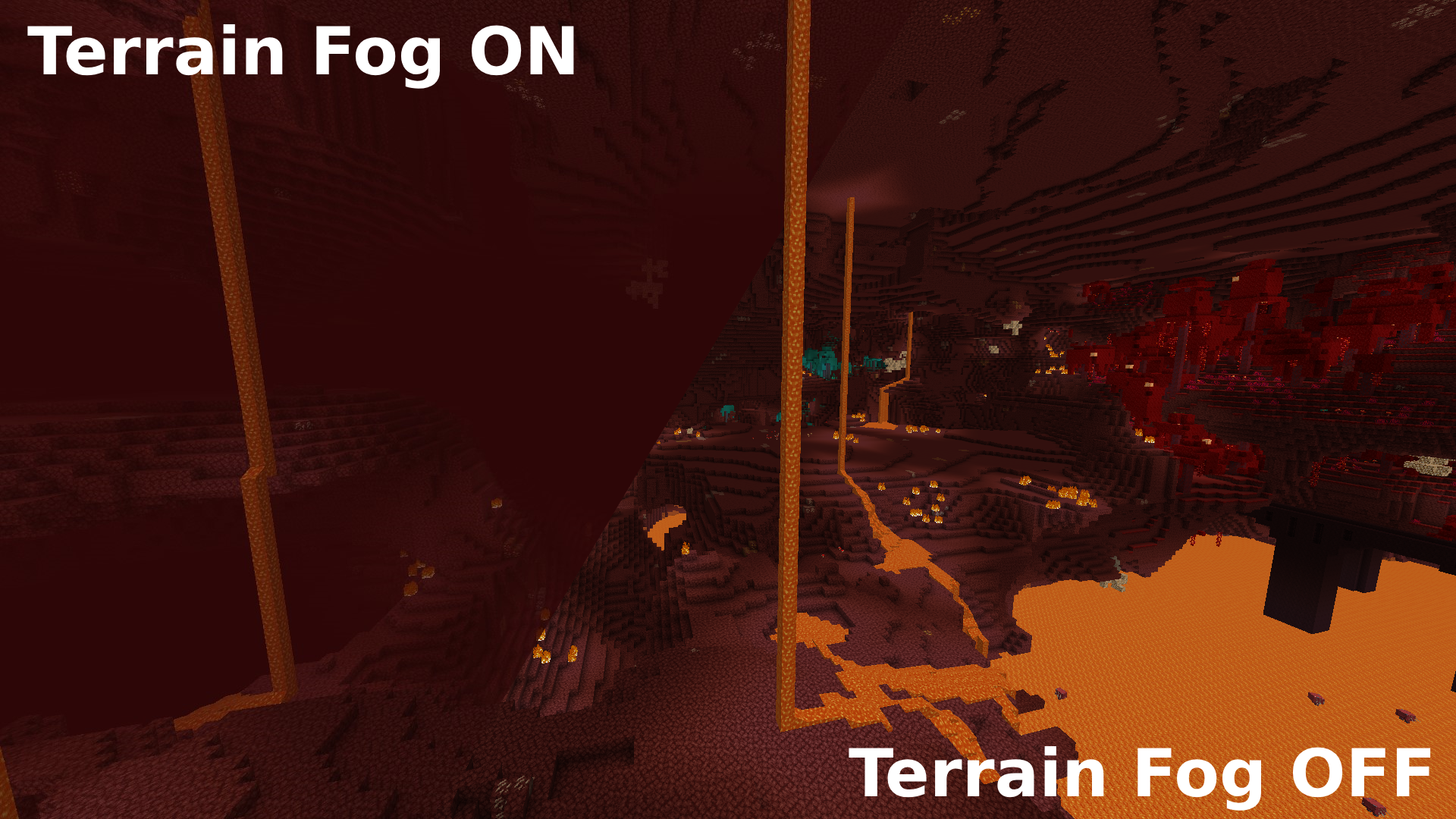
Allows you to enable / disable ALL types of fogs. See comparison in the nether for Terrain Fog below
Usage
See all fog types in config under Fog category. Turn them off to your likings.
Caution: Disabling fogs, especially darkness, blindness, lava and water fogs could be considered cheating or an unfair advantage by some players or server administrators.
Auto-Attack
Automatically clicks the attack button when your hit cooldown has finished.
Usage
Press the Toogle Autoattack keybinding to toggle on/off.
Hide other players
Allows you to hide all other players with a keybinding.
Usage
Press the Toggle Hiding other Players keybinding to toggle.
Keep Mining when switching tools
Allows you to keep your Mining progress on your block when switching tool / getting mended. Fixes annoying restart of block breaking everytime you break a quartz ore with mending.
Usage
Toggleable in the settings
Translations
en_en English: @lugosieben (Must be updated with any new feature!)
de_de German: @Kolpixx & @lugosieben
es_es Spanish: @lugosieben
License
This project is licensed under Creative Commons Attribution-NonCommercial 4.0 International.
Screenshots
Gallery
-
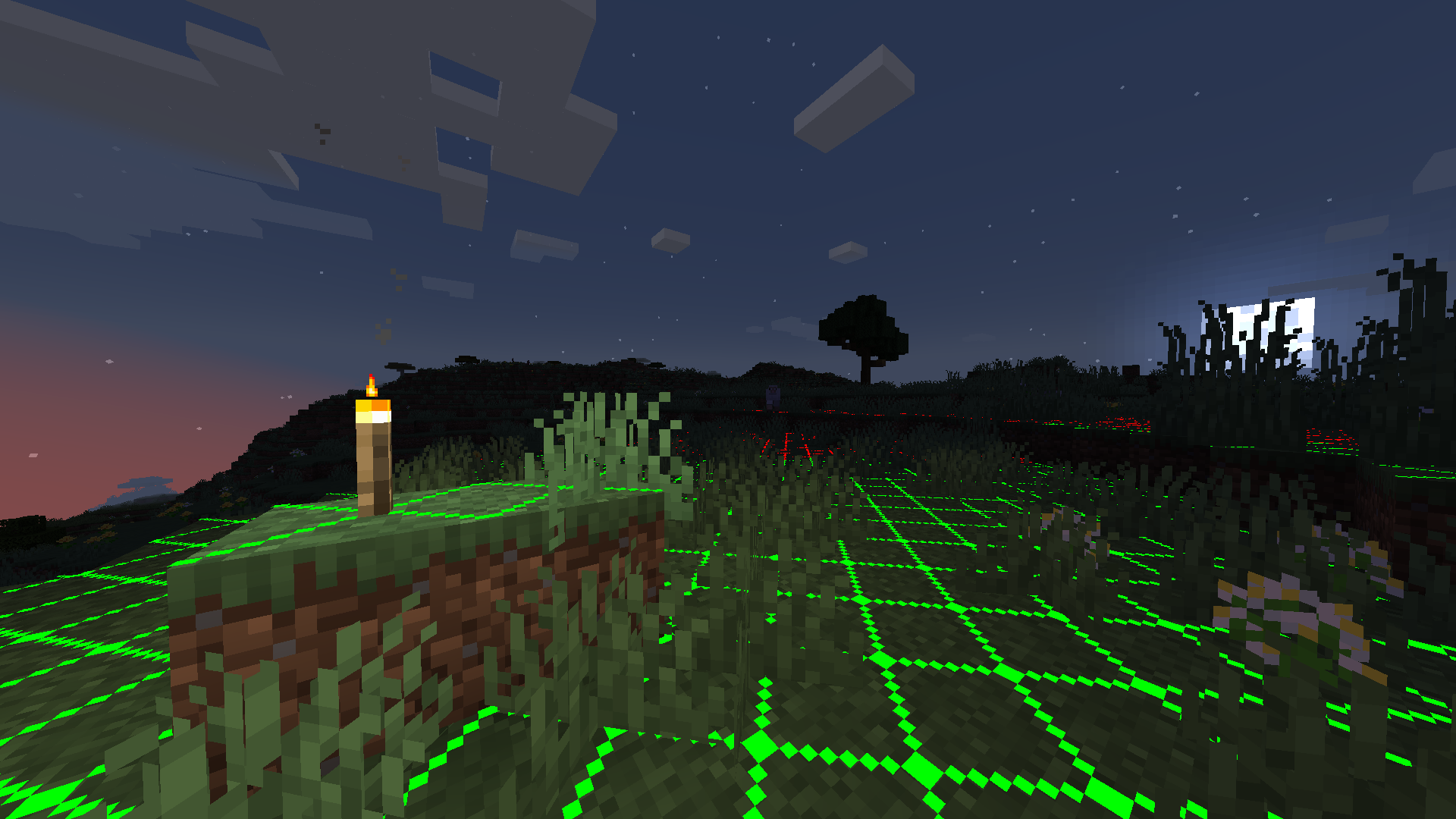 Light Overlay Showcase
 -
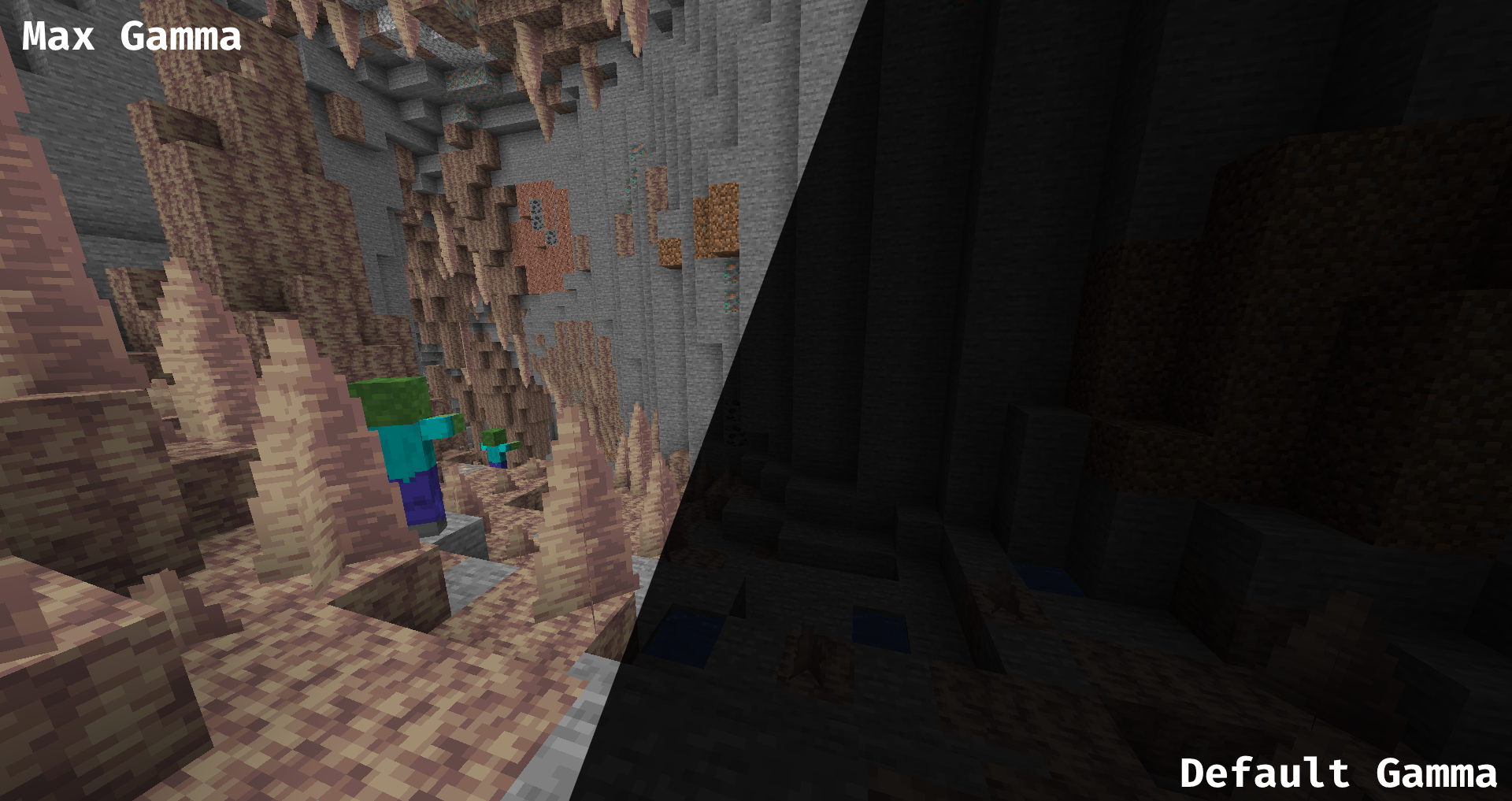 Fullbright Showcase
Versions
Files
Relations
Project Relations
More like this
Similar Mods
Suggestions use data such as tags, dependencies, dependents, descriptions, titles, and more to rank how much they overlap with this mod.
On ModDex
Community snapshot
By the numbers
Statistics

Want to reach Minecraft players?
We're looking for a server hosting partner to feature here and other parts of the site. Interested? Send us a message!
Get in touchGet it on
Available Platforms
On ModDex
Community snapshot
By the numbers