
Community listing page, reviews here may not be monitored by the author.
Variables


No reviews yet
This project adds a variables, what can simplyfing mapmaking
Community voices
Reviews
No reviews yet. Be the first to review this project!
Get it on
Available Platforms
Compatibility
Supported Environments
Runs entirely on the client. Works on vanilla servers.
About
Project Details
For authors
Embed Badge
If you're the author of this project, you can embed a live badge anywhere that supports HTML or Markdown. It updates automatically whenever ratings change.
Use HTML for any page that supports it, or Markdown for README files and Markdown-based descriptions.
Identifiers
Platform IDs
About
Description




 О моде / About the Mod
VariableMod — серверный мод для Fabric, добавляющий систему переменных для команд и чата. Создавай переменные через /variable и подставляй их в любые команды и сообщения через синтаксис v:имя. Встроенные переменные v!: автоматически отдают данные игрока — координаты, здоровье, ник, время и многое другое.
Подходит для: автоматизации команд, динамических объявлений, шаблонов команд для датапаков, серверных хабов и любых сценариев где нужны подстановки.
VariableMod is a server-side Fabric mod that adds a variable system for commands and chat. Define variables via /variable and insert them anywhere using v:name syntax. Built-in variables v!: automatically resolve player data — coordinates, health, nickname, time, and more.
Use cases: command automation, dynamic announcements, datapack command templates, server hubs, and any scenario where text substitution is needed.
Ключевые возможности / Key Features
[ RU ]
- Создавай переменные прямо в игре через команду
/variable new - Используй
v:имяв любой команде или сообщении чата — значение подставляется автоматически - Встроенные переменные
v!:— координаты, здоровье, еда, ник, измерение, время и другие - Два типа переменных:
textиnumber(number проверяет числовое значение) - Переменные сохраняются как JSON-файлы в папке мира — работают между перезапусками
- Автодополнение имён переменных в командах
- Поддержка в
/say, чате и любых перехватываемых командах
[ EN ]
- Create variables in-game via
/variable new - Use
v:namein any command or chat message — value is substituted automatically - Built-in variables
v!:— coordinates, health, food, nickname, dimension, time, and more - Two variable types:
textandnumber(number enforces numeric values) - Variables saved as JSON files in the world folder — persist across restarts
- Tab-completion for variable names in commands
- Works in
/say, chat messages, and any intercepted command
Команды / Commands
Все команды требуют права оператора (уровень 2). / All commands require operator permission (level 2).
| Команда / Command | Описание / Description |
|---|---|
/variable new <name> <value> |
Создать переменную / Create a variable |
/variable edit <name> <value> |
Изменить значение / Edit a variable's value |
/variable delete <name> |
Удалить переменную / Delete a variable |
/variable type <name> text|number |
Задать тип переменной / Set variable type |
/variable cfg <name> |
Показать значение и тип / Show value and type |
/variable list |
Список всех переменных / List all variables |
/variable builtins |
Список встроенных переменных v!: / List built-in variables |
Встроенные переменные / Built-in Variables
| Переменная / Variable | Описание / Description |
|---|---|
v!:nickname |
Отображаемое имя игрока / Player's display name |
v!:name |
Имя игрока без форматирования / Raw username |
v!:gamemode |
Режим игры / Current game mode |
v!:world |
Текущее измерение / Current dimension |
v!:x / v!:y / v!:z |
Координаты блока / Block coordinates |
v!:health |
Здоровье / Current health |
v!:food |
Уровень сытости / Food level |
v!:xp |
Суммарный опыт / Total experience points |
v!:level |
Уровень опыта / Experience level |
v!:time |
Игровое время ЧЧ:мм / In-game time HH:mm |
v!:date |
Реальная дата гггг-ММ-дд / Real-world date yyyy-MM-dd |
v!:day |
Номер игрового дня / In-game day number |
v!:onlinecnt |
Игроков онлайн / Players online |
Пример использования / Example Workflow
[ RU ]
- Создай переменную:
/variable new hub 0 64 0 - Используй в команде:
/tp @s v:hub - Объяви координаты в чате:
Я нахожусь на v!:x v!:y v!:z в v!:world - Измени значение:
/variable edit hub 100 64 -200 - Сделай числовую переменную:
/variable type lives number→/variable edit lives 3
[ EN ]
- Create a variable:
/variable new hub 0 64 0 - Use it in a command:
/tp @s v:hub - Announce coordinates in chat:
I'm at v!:x v!:y v!:z in v!:world - Change the value:
/variable edit hub 100 64 -200 - Make a numeric variable:
/variable type lives number→/variable edit lives 3
Поддерживаемые версии / Supported Versions
| Версия / Version | Поддержка / Support |
|---|---|
| 1.21 — 1.21.5 | ✅ Supported |
Fabric only — Requires Fabric API
Хранение данных / Storage
[ RU ]
Переменные сохраняются как JSON-файлы в папке мира:
<world save>/variable/commands/v/<name>.jsonФайлы можно редактировать вручную пока сервер остановлен.
[ EN ]
Variables are saved as JSON files inside the world folder:
<world save>/variable/commands/v/<name>.jsonFiles can be edited manually while the server is stopped.
Язык / Language
Русский • English
О моде / About the Mod
VariableMod — локальный мод для Fabric, добавляющий систему переменных для команд и чата. Создавай переменные через /variable и подставляй их в любые команды и сообщения через синтаксис v:имя. Встроенные переменные v!: автоматически отдают данные игрока — координаты, здоровье, ник, время и многое другое.
Подходит для: автоматизации команд, динамических объявлений, шаблонов команд для датапаков, серверных хабов и любых сценариев где нужны подстановки.
VariableMod is a local-side Fabric mod that adds a variable system for commands and chat. Define variables via /variable and insert them anywhere using v:name syntax. Built-in variables v!: automatically resolve player data — coordinates, health, nickname, time, and more.
Use cases: command automation, dynamic announcements, datapack command templates, server hubs, and any scenario where text substitution is needed.
Ключевые возможности / Key Features
[ RU ]
- Создавай переменные прямо в игре через команду
/variable new - Используй
v:имяв любой команде или сообщении чата — значение подставляется автоматически - Встроенные переменные
v!:— координаты, здоровье, еда, ник, измерение, время и другие - Два типа переменных:
textиnumber(number проверяет числовое значение) - Переменные сохраняются как JSON-файлы в папке мира — работают между перезапусками
- Автодополнение имён переменных в командах
- Поддержка в
/say, чате и любых перехватываемых командах
[ EN ]
- Create variables in-game via
/variable new - Use
v:namein any command or chat message — value is substituted automatically - Built-in variables
v!:— coordinates, health, food, nickname, dimension, time, and more - Two variable types:
textandnumber(number enforces numeric values) - Variables saved as JSON files in the world folder — persist across restarts
- Tab-completion for variable names in commands
- Works in
/say, chat messages, and any intercepted command
Команды / Commands
Все команды требуют права оператора (уровень 2). / All commands require operator permission (level 2).
| Команда / Command | Описание / Description |
|---|---|
/variable new <name> <value> |
Создать переменную / Create a variable |
/variable edit <name> <value> |
Изменить значение / Edit a variable's value |
/variable delete <name> |
Удалить переменную / Delete a variable |
/variable type <name> text|number |
Задать тип переменной / Set variable type |
/variable cfg <name> |
Показать значение и тип / Show value and type |
/variable list |
Список всех переменных / List all variables |
/variable builtins |
Список встроенных переменных v!: / List built-in variables |
Встроенные переменные / Built-in Variables
| Переменная / Variable | Описание / Description |
|---|---|
v!:nickname |
Отображаемое имя игрока / Player's display name |
v!:name |
Имя игрока без форматирования / Raw username |
v!:gamemode |
Режим игры / Current game mode |
v!:world |
Текущее измерение / Current dimension |
v!:x / v!:y / v!:z |
Координаты блока / Block coordinates |
v!:health |
Здоровье / Current health |
v!:food |
Уровень сытости / Food level |
v!:xp |
Суммарный опыт / Total experience points |
v!:level |
Уровень опыта / Experience level |
v!:time |
Игровое время ЧЧ:мм / In-game time HH:mm |
v!:date |
Реальная дата гггг-ММ-дд / Real-world date yyyy-MM-dd |
v!:day |
Номер игрового дня / In-game day number |
v!:onlinecnt |
Игроков онлайн / Players online |
Пример использования / Example Workflow
[ RU ]
- Создай переменную:
/variable new hub 0 64 0 - Используй в команде:
/tp @s v:hub - Объяви координаты в чате:
Я нахожусь на v!:x v!:y v!:z в v!:world - Измени значение:
/variable edit hub 100 64 -200 - Сделай числовую переменную:
/variable type lives number→/variable edit lives 3
[ EN ]
- Create a variable:
/variable new hub 0 64 0 - Use it in a command:
/tp @s v:hub - Announce coordinates in chat:
I'm at v!:x v!:y v!:z in v!:world - Change the value:
/variable edit hub 100 64 -200 - Make a numeric variable:
/variable type lives number→/variable edit lives 3
Поддерживаемые версии / Supported Versions
| Версия / Version | Поддержка / Support |
|---|---|
| 1.21 — 1.21.8 | ✅ Supported |
Fabric only — Requires Fabric API
Хранение данных / Storage
[ RU ]
Переменные сохраняются как JSON-файлы в папке мира:
<world save>/variable/commands/v/<name>.json
Файлы можно редактировать вручную пока сервер остановлен.
[ EN ]
Variables are saved as JSON files inside the world folder:
<world save>/variable/commands/v/<name>.json
Files can be edited manually while the server is stopped.
Язык / Language
Русский • English
Screenshots
Gallery
-
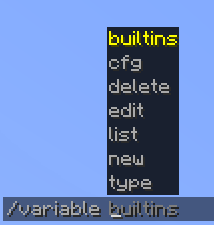 Main command
 -
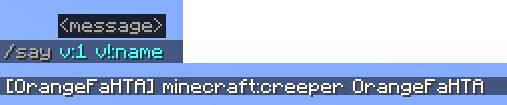 Example
 -
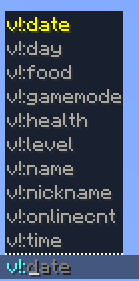 v!: example
 -
 New variable example
Versions
Files
Relations
Project Relations
More like this
Similar Mods
Suggestions use data such as tags, dependencies, dependents, descriptions, titles, and more to rank how much they overlap with this mod.
On ModDex
Community snapshot
By the numbers
Statistics
Want to reach Minecraft players?
We're looking for a server hosting partner to feature here and other parts of the site. Interested? Send us a message!
Get in touchGet it on
Available Platforms
On ModDex
Community snapshot
By the numbers