
VCHAT
No reviews yet
Elevate your servers communication — local chat, global reach, and smart moderation in one powerful mod. Поднимите коммуникацию на вашем сервере на новый уровень — локальный чат, глобальное взаимодействие и умная модерация в одном моде.
Neoforge is a fork of the Minecraft Forge available for versions 1.20.1+ of Minecraft. Many Forge mods are compatible with Neoforge and vice versa.
Fabric is a mod loader for versions 1.14+ of Minecraft, particularly popular for client side and optimization mods.
Community voices
Reviews
Click once to include, again to exclude, again to clear
No reviews yet. Be the first to review this project!
Get it on
Available Platforms
 Modrinth
Compatibility
Supported Environments
About
Project Details
For authors
Embed Badge
If you're the author of this project, you can embed a live badge anywhere that supports HTML or Markdown. It updates automatically whenever ratings change.
Use HTML for any page that supports it, or Markdown for README files and Markdown-based descriptions.
Identifiers
Platform IDs
Resources
External Links
About
Description
VChat — Advanced Chat Mod for Minecraft


VChat — это мощный и настраиваемый чат-мод для серверов Minecraft на Fabric, который добавляет локальный и глобальный чат, пузыри(текст) над головой, систему упоминаний с уведомлениями, кастомные сообщения входа/выхода и систему модерации.
🌍 Языки / Languages
🇷🇺 Русский
📋 Описание
VChat полностью заменяет стандартный чат Minecraft, добавляя много новых возможностей для улучшения коммуникации между игроками и инструменты модерации.
✨ Основные возможности
💬 Двойная система чата
- Локальный чат (L) — сообщения видны только игрокам в радиусе (по умолчанию 100 блоков)
- Глобальный чат (G) — сообщения видны всем игрокам на сервере. Чтобы написать в глобальный чат, начните сообщение с
!
Примеры:
Привет всем рядом!          → Локальный чат (видят только близкие)
!Кто-нибудь продает алмазы?  → Глобальный чат (видят все)
🫧 Пузыри над головой (Chat Bubbles)
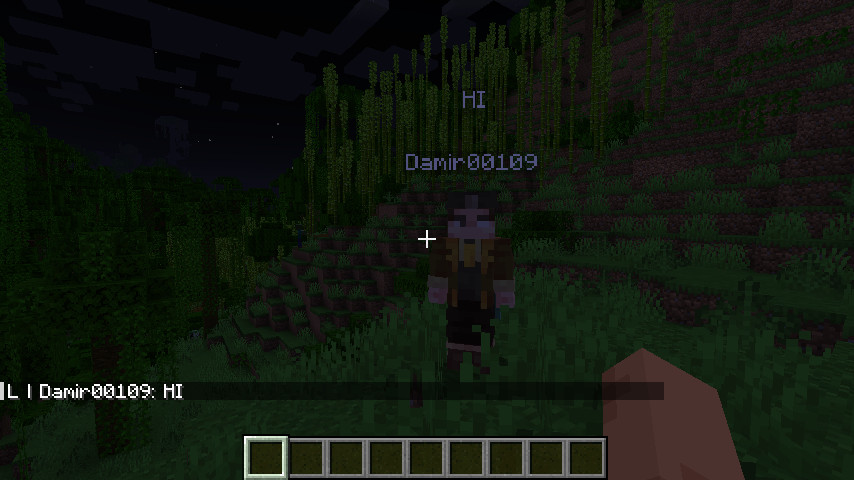
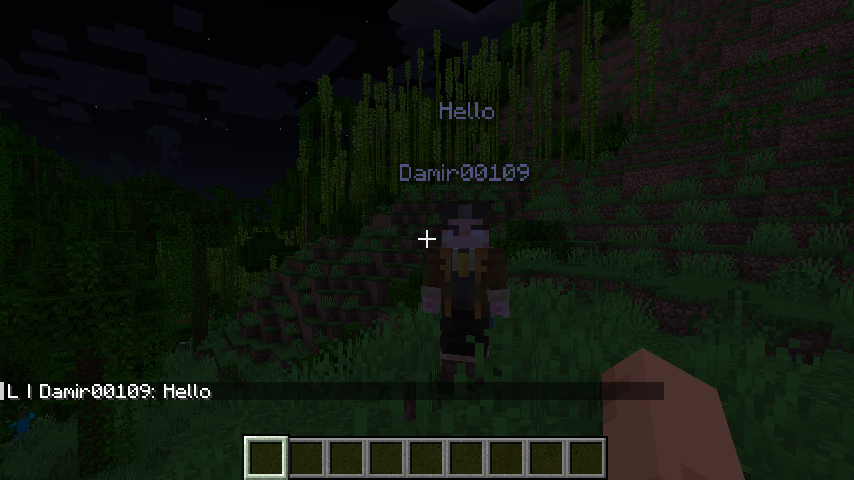
Когда игрок пишет в чат, над его головой появляется пузырь с текстом сообщения. Это позволяет видеть, что говорят другие игроки, даже если вы не смотрите в чат.
- Настраиваемая скорость появления
- Настраиваемая высота над головой
- Возможность отключения в конфиге
🔔 Система упоминаний
Когда игрок упоминает вас в чате (написав ваш ник), вы получаете:
- Подсветку имени в чате (бирюзовый цвет)
- Toast-уведомление на экране
- Звуковое уведомление (настраиваемый звук)
- Кликабельные ники — нажмите на ник игрока, чтобы написать ему в личку
Каждый игрок может настроить свой звук упоминания:
/vchat mention_sound set minecraft:block.note_block.pling 1.0 1.0
👋 Кастомные сообщения входа и выхода
Заменяет стандартные сообщения Minecraft своими:
- Первый вход — специальное сообщение для новых игроков
- Обычный вход — кастомное сообщение для всех входов
- Выход — кастомное сообщение при выходе
Все сообщения настраиваются в конфиге, поддерживают плейсхолдер {player}.
🔇 Система мута (Модерация)
Модераторы могут временно или навсегда лишить игрока возможности писать в чат:
/vchat moderation mute <игрок> [время] [причина]
Формат времени: 1d 5h 30m 10s (дни, часы, минуты, секунды)
Примеры:
/vchat moderation mute Steve 30m Спам
/vchat moderation mute Alex 1d Нарушение правил
/vchat moderation mute Notch                      → Мут навсегда
Размут:
/vchat moderation unmute <игрок>
Просмотр активных наказаний:
/vchat moderation punishment_status    → Список всех наказаний на сервере
/vchat punishment                       → Просмотр своих наказаний
📊 Управление уведомлениями
Игроки могут включать/отключать упоминания:
/vchat mention true      → Включить уведомления
/vchat mention false     → Отключить уведомления
🔧 Команды
Общие команды
| Команда | Описание | Права |
|---|---|---|
/vchat mention true/false |
Включить/отключить упоминания | Любые |
/vchat mention_sound set <звук> [громкость] [тон] |
Установить звук упоминания | Любые |
/vchat mention_sound reset |
Сбросить звук к стандартному | Любые |
/vchat punishment |
Просмотр своих наказаний | Любые |
Модераторские команды (требуют уровень доступа 2)
| Команда | Описание |
|---|---|
/vchat moderation mute <игрок> [время] [причина] |
Замутить игрока |
/vchat moderation unmute <игрок> |
Размутить игрока |
/vchat moderation punishment_status |
Список активных наказаний |
⚙️ Конфигурация
Основной конфиг — config/vchat/vchat.json
{
  "globalPrefix": "G",
  "localPrefix": "L",
  "noNearbyMessage": "&cПо близости не кого нет",
  "localChatRadius": 100.0,
  "hoverMessage": "&eНажмите чтобы написать в личку",
  "firstJoin": true,
  "firstJoinMessage": "&6{player} впервые зашел на сервер",
  "joinMessage": true,
  "joinMessageText": "&e{player} приземлился на сервер",
  "leaveMessage": true,
  "leaveMessageText": "&e{player} покинул сервер",
  "highlightPlayerMentions": true,
  "chatBubbles": true,
  "chatBubbleCharactersPerSecond": 10,
  "chatBubbleYOffset": 2.7,
  "mentionToast": true,
  "mentionToastTitle": "&bВас упомянули в чате",
  "mentionToastDescription": "&eВас упомянул в чате {player}",
  "mentionSoundEnabled": true,
  "mentionSound": "minecraft:block.note_block.pling",
  "mentionSoundVolume": 1.0,
  "mentionSoundPitch": 1.0
}
Конфиг модерации — config/vchat/moderation.json
{
  "moderation": true,
  "commandMuteSuccess": "VChat: {player} замучен на {time}. Причина: {reason}",
  "commandUnmuteSuccess": "VChat: {player} размучен",
  "chatMutedMessage": "&cВы замучены. Осталось: &e{time}&c. Причина: &e{reason}"
}
Все сообщения поддерживают:
- Цветовые коды — используйте
&вместо§(например,&c— красный,&a— зелёный) - Плейсхолдеры:
{player}— имя игрока{time}— оставшееся время{reason}— причина{moderator}— имя модератора
🛠️ Установка
- Установите Fabric Loader для Minecraft 1.21.1
- Установите Fabric API
- Скачайте VChat и поместите в папку
mods - Запустите сервер — конфиги создадутся автоматически
📋 Зависимости
- Fabric API — обязательно
- Minecraft 1.21.1
🇬🇧 English
📋 Description
VChat is a powerful and customizable chat mod for Fabric servers that adds local and global chat, chat bubbles(text) above players' heads, a mention system with notifications, custom join/leave messages, and a moderation system.
✨ Key Features
💬 Dual Chat System
- Local Chat (L) — messages only visible to players within radius (default 100 blocks)
- Global Chat (G) — messages visible to all players on the server. To write globally, start your message with
!
Examples:
Hello everyone nearby!       → Local chat (only nearby players see)
!Anyone selling diamonds?     → Global chat (everyone sees)
🫧 Chat Bubbles
When a player types in chat, a text bubble appears above their head. This lets you see what other players are saying without looking at the chat window.
- Configurable display duration
- Configurable height offset
- Can be disabled in config
🔔 Mention System
When someone mentions you in chat (types your name), you get:
- Name highlighting in chat (aqua color)
- Toast notification on screen
- Sound notification (customizable sound)
- Clickable names — click a player's name to message them privately
Each player can customize their mention sound:
/vchat mention_sound set minecraft:block.note_block.pling 1.0 1.0
👋 Custom Join & Leave Messages
Replaces vanilla Minecraft join/leave messages with customizable ones:
- First join — special message for new players
- Regular join — custom message for all joins
- Leave — custom message when players disconnect
All messages support the {player} placeholder and color codes.
🔇 Mute System (Moderation)
Moderators can temporarily or permanently prevent players from chatting:
/vchat moderation mute <player> [duration] [reason]
Duration format: 1d 5h 30m 10s (days, hours, minutes, seconds)
Examples:
/vchat moderation mute Steve 30m Spam
/vchat moderation mute Alex 1d Rule violation
/vchat moderation mute Notch                    → Permanent mute
Unmute:
/vchat moderation unmute <player>
View active punishments:
/vchat moderation punishment_status    → List all punishments
/vchat punishment                       → View your punishments
📊 Mention Preferences
Players can toggle mentions:
/vchat mention true      → Enable mentions
/vchat mention false     → Disable mentions
🔧 Commands
General Commands
| Command | Description | Permission |
|---|---|---|
/vchat mention true/false |
Toggle mentions | Any |
/vchat mention_sound set <sound> [volume] [pitch] |
Set mention sound | Any |
/vchat mention_sound reset |
Reset to default sound | Any |
/vchat punishment |
View your punishments | Any |
Moderator Commands (require permission level 2)
| Command | Description |
|---|---|
/vchat moderation mute <player> [duration] [reason] |
Mute a player |
/vchat moderation unmute <player> |
Unmute a player |
/vchat moderation punishment_status |
List active punishments |
⚙️ Configuration
Main Config — config/vchat/vchat.json
{
  "globalPrefix": "G",
  "localPrefix": "L",
  "noNearbyMessage": "&cNo one is nearby",
  "localChatRadius": 100.0,
  "hoverMessage": "&eClick to send a private message",
  "firstJoin": true,
  "firstJoinMessage": "&6{player} joined for the first time",
  "joinMessage": true,
  "joinMessageText": "&e{player} has landed on the server",
  "leaveMessage": true,
  "leaveMessageText": "&e{player} left the server",
  "highlightPlayerMentions": true,
  "chatBubbles": true,
  "chatBubbleCharactersPerSecond": 10,
  "chatBubbleYOffset": 2.7,
  "mentionToast": true,
  "mentionToastTitle": "&bYou were mentioned in chat",
  "mentionToastDescription": "&e{player} mentioned you in chat",
  "mentionSoundEnabled": true,
  "mentionSound": "minecraft:block.note_block.pling",
  "mentionSoundVolume": 1.0,
  "mentionSoundPitch": 1.0
}
Moderation Config — config/vchat/moderation.json
{
  "moderation": true,
  "commandMuteSuccess": "VChat: {player} muted for {time}. Reason: {reason}",
  "commandUnmuteSuccess": "VChat: {player} unmuted",
  "chatMutedMessage": "&cYou are muted. Remaining: &e{time}&c. Reason: &e{reason}"
}
All messages support:
- Color codes — use
&instead of§(e.g.,&c= red,&a= green) - Placeholders:
{player}— player name{time}— remaining time{reason}— reason{moderator}— moderator name
🛠️ Installation
- Install Fabric Loader for Minecraft 1.21.1
- Install Fabric API
- Download VChat and place in your
modsfolder - Start the server — configs will generate automatically
📋 Dependencies
- Fabric API — required
- Minecraft 1.21.1
📜 License
This project is available under the CC0 license. Feel free to use and modify.
🤝 Support
If you find a bug or have suggestions, feel free to open an issue!
Screenshots
Gallery
Versions
Files
Relations
Project Relations
More like this
Similar Mods
Suggestions use data such as tags, dependencies, dependents, descriptions, titles, and more to rank how much they overlap with this mod.
On ModDex
Community snapshot
By the numbers
Statistics

Want to reach Minecraft players?
We're looking for a server hosting partner to feature here and other parts of the site. Interested? Send us a message!
Get in touchGet it on
Available Platforms
On ModDex
Community snapshot
By the numbers
Statistics
Resources