

VehicleRadioAddon
Installable in-vehicle radio addon for MrCrayfish Vehicle Mod with GUI control and custom sound IDs.
No ratings yet
Be the first to rate it.
Community listing page
Community listing page, reviews may not be monitored by the author.

Community voices
Reviews
No reviews yet. Be the first to review this project!
Get it on
Available Platforms
Compatibility
Supported Environments
Must be installed on both the client and the server.
About
Project Details
For authors
Embed Badge
If you're the author of this project, you can embed a live badge anywhere that supports HTML or Markdown. It updates automatically whenever ratings change.
Use HTML for any page that supports it, or Markdown for README files and Markdown-based descriptions.
Identifiers
Platform IDs
About
Description
VehicleRadioAddon
VehicleRadioAddon is a Forge addon for MrCrayfish's Vehicle Mod on Minecraft 1.16.5.
It adds installable radios to vehicles with clean in-game controls, a modern GUI, and support for both vanilla and modded music-disc based sound events.
Main Features
- Install a radio per vehicle using Radio Module
- Open a dedicated in-vehicle control GUI using Radio Remote
- Toggle radio power, switch stations, and select tracks in one panel
- Sound follows the vehicle position correctly while driving
- Playback only works when the player is actually inside the vehicle
- Select custom registered sounds with
modid:sound_nameinput - Supports modded music-disc sounds if they are registered as sound events
Commands
/vehicleradioor/vr-> open radio GUI while in vehicle/vehicleradio gui/vehicleradio info/vehicleradio on/vehicleradio off/vehicleradio next/vehicleradio prev/vehicleradio station <0-12>/vehicleradio sound <modid:sound_name>/vehicleradio give <player> module/vehicleradio give <player> remote
Items
- Radio Module: install radio on supported vehicle entities
- Radio Remote: open GUI and control radio quickly
Compatibility
- Minecraft: 1.16.5
- Loader: Forge
- Requires: MrCrayfish's Vehicle Mod (
modid: vehicle)
Notes
- YouTube or external URL streaming is not supported directly in Forge client audio.
- Use registered in-game sound event IDs for reliable, low-latency playback.
Screenshots
Gallery
-
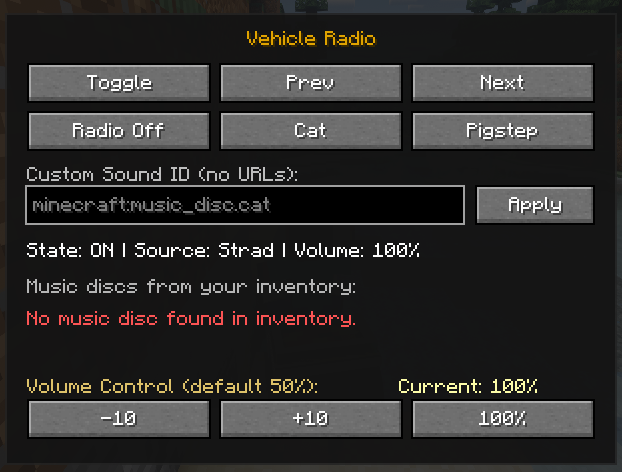 Vehicle Radio Preview #1
Versions
Files
Relations
Project Relations
More like this
Similar Mods
Suggestions use data such as tags, dependencies, dependents, descriptions, titles, and more to rank how much they overlap with this mod.
Stats
- Downloads
- <1,000
- Used in
- 0 modpacks
- Followers
- 0
- In stacks
- 0
- Created
- Last synced
-
Sep 5, 2026 5:48 PM UTC
New file updates sync automatically.
When ModDex last fully re-synced this project from CurseForge or Modrinth. A new file release triggers a resync usually within minutes, and every project is also re-synced on a schedule. Edits that don't ship a file, such as a new description or screenshots, are checked every few hours and can appear before this date changes.
How syncing works
External Links

Stats
- Downloads
- <1,000
- Used in
- 0 modpacks
- Followers
- 0
- In stacks
- 0
- Created
- Last synced
-
Sep 5, 2026 5:48 PM UTC
New file updates sync automatically.
When ModDex last fully re-synced this project from CurseForge or Modrinth. A new file release triggers a resync usually within minutes, and every project is also re-synced on a schedule. Edits that don't ship a file, such as a new description or screenshots, are checked every few hours and can appear before this date changes.
How syncing works