
VesposLocalTrims
No reviews yet
Allows the player to locally load and change their armor trims client sided.
Fabric is a mod loader for versions 1.14+ of Minecraft, particularly popular for client side and optimization mods.
Community voices
Reviews
Click once to include, again to exclude, again to clear
No reviews yet. Be the first to review this project!
Get it on
Available Platforms
 Modrinth
Compatibility
Supported Environments
About
Project Details
For authors
Embed Badge
If you're the author of this project, you can embed a live badge anywhere that supports HTML or Markdown. It updates automatically whenever ratings change.
Use HTML for any page that supports it, or Markdown for README files and Markdown-based descriptions.
Identifiers
Platform IDs
Resources
External Links
About
Description
About VesposLocalTrims
Allows the player to locally load and change their armor trims client sided.
How to use
The default bind for toggling the ui is Y. The bind is changable in the keybinds menu in the minecraft settings.
just use the arrows to switch trims and ignot, and upon completion with your trimset make sure "override" (the button uptop) is enabled, and then click on the save button
How to use configs
Once finished making your trimset, you may click on the "Save Pattern config", and then choose a name and click on save. this will upload a config .json file of your trimset to .minecraft\config\VesposLocalTrims.
To load a config, click on the "Load Config" button in the ui, and then you will see a list of your existing configs. to use one, just click on the "Load" button of the config you wish to use and just click save.
Screenshots
Gallery
-
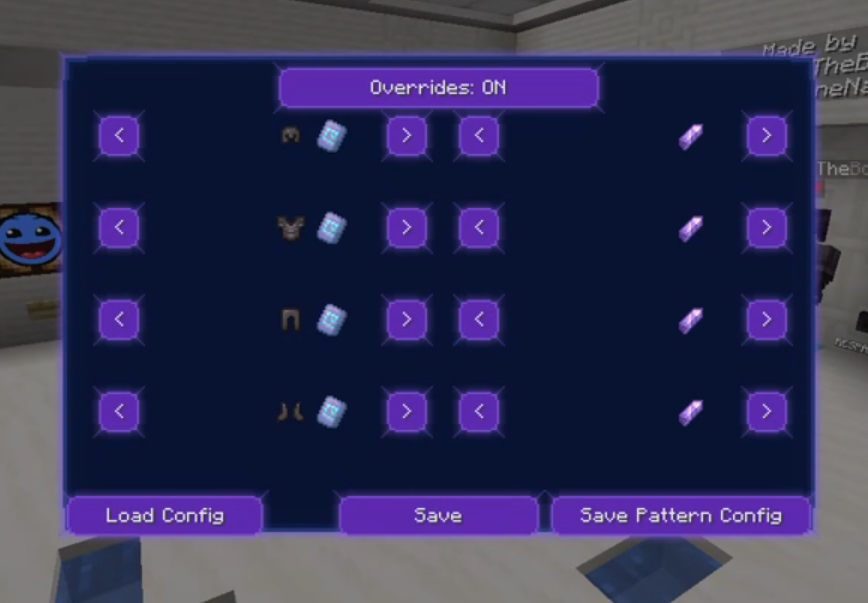 UI- look
Versions
Files
Relations
Project Relations
More like this
Similar Mods
Suggestions use data such as tags, dependencies, dependents, descriptions, titles, and more to rank how much they overlap with this mod.
On ModDex
Community snapshot
By the numbers
Statistics

Want to reach Minecraft players?
We're looking for a server hosting partner to feature here and other parts of the site. Interested? Send us a message!
Get in touchGet it on
Available Platforms
On ModDex
Community snapshot
By the numbers
Statistics
Resources