
Community listing page, reviews here may not be monitored by the author.
VexFPS

No reviews yet
A lightweight client-side FPS counter with customizable position. Toggle display with U, open position GUI with J
Community voices
Reviews
No reviews yet. Be the first to review this project!
Get it on
Available Platforms
Compatibility
Supported Environments
Runs entirely on the client. Works on vanilla servers.
About
Project Details
For authors
Embed Badge
If you're the author of this project, you can embed a live badge anywhere that supports HTML or Markdown. It updates automatically whenever ratings change.
Use HTML for any page that supports it, or Markdown for README files and Markdown-based descriptions.
Identifiers
Platform IDs
Resources
External Links
About
Description
VexFPS
VexFPS is a lightweight and minimalist FPS counter for Minecraft Fabric. It displays your current frames per second directly on the screen with a clean design and virtually no performance impact.
Designed for players who want a simple FPS display without opening the F3 debug screen.
Features
- Lightweight client-side FPS counter
- Clean and minimal HUD
- No backgrounds or unnecessary UI elements
- Fully customizable position
- Multiple color presets
- Automatic settings saving
- Smart auto-hide with the F3 screen
- Optimized for maximum performance
Display
The FPS counter is displayed in a simple format:
[144 FPS]
The text includes a shadow for improved readability while keeping the interface clean and unobtrusive.
Customization
Customize the HUD to match your preferences.
Available options:
- Enable or disable the FPS counter
- Move the counter anywhere on the screen
- Choose from multiple anchor positions
- Adjust X and Y offsets
- Select one of 8 text colors
Available colors:
- White
- Red
- Green
- Blue
- Yellow
- Cyan
- Pink
- Orange
All settings are saved automatically.
Default Hotkeys
U — Toggle the FPS counter
J — Open the settings menu
Both keybindings can be changed in Minecraft's Controls menu.
Smart Features
- Automatically hides while the F3 debug screen is open
- Works on every world and server
- Runs entirely on the client
- Safe for multiplayer servers
Performance
VexFPS is designed to be as lightweight as possible.
Performance optimizations include:
- FPS updates every 250 ms
- Minimal CPU usage
- Minimal memory usage
- Virtually zero performance impact
Installation
- Install Fabric Loader.
- Install Fabric API.
- Place the VexFPS
.jarfile into the mods folder. - Launch Minecraft.
The FPS counter appears in the bottom-left corner by default.
Compatibility
- Minecraft 1.21.11
- Fabric Loader
- Client-side
- Singleplayer
- Multiplayer
Requirements
- Fabric API
Screenshots
Gallery
-
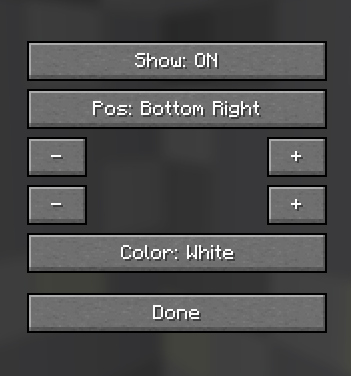 Settings convenient and quick settings section
 -
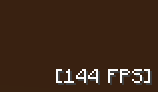 FPS interface
Versions
Files
Relations
Project Relations
More like this
Similar Mods
Suggestions use data such as tags, dependencies, dependents, descriptions, titles, and more to rank how much they overlap with this mod.
On ModDex
Community snapshot
By the numbers
Statistics

Want to reach Minecraft players?
We're looking for a server hosting partner to feature here and other parts of the site. Interested? Send us a message!
Get in touchGet it on
Available Platforms
On ModDex
Community snapshot
By the numbers
Statistics
Resources