
Community listing page, reviews here may not be monitored by the author.

Community voices
Reviews
No reviews yet. Be the first to review this project!
Get it on
Available Platforms
About
Project Details
For authors
Embed Badge
If you're the author of this project, you can embed a live badge anywhere that supports HTML or Markdown. It updates automatically whenever ratings change.
Use HTML for any page that supports it, or Markdown for README files and Markdown-based descriptions.
Identifiers
Platform IDs
Resources
External Links
About
Description
Village Masters
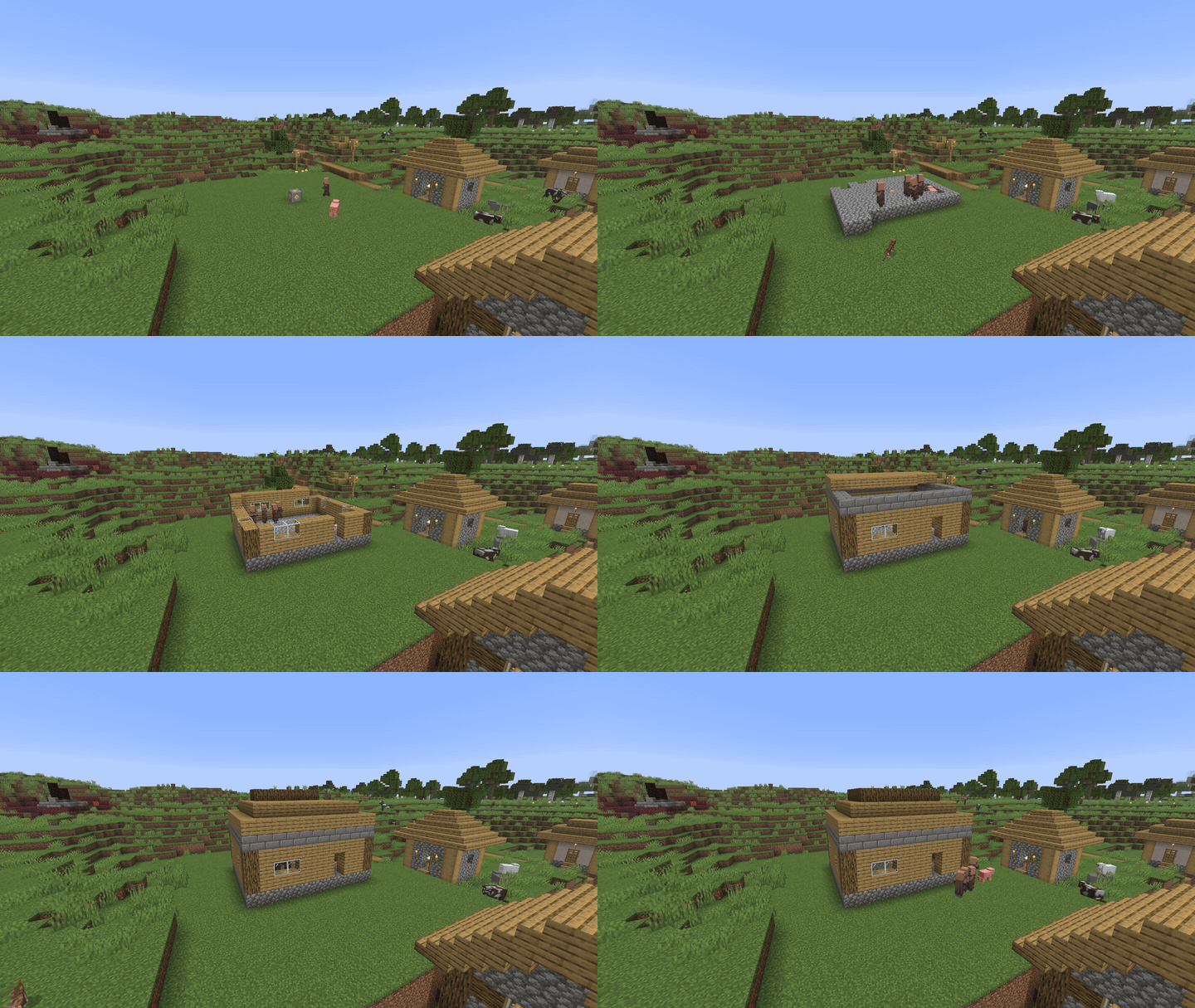
Take charge of a Minecraft village and grow it into a working town. Found a Town Hall, and the villagers who already live there become your people. They build, cut wood, farm, carry goods, eat, grow in number, ask you for favours, and defend the town. You're still an ordinary player walking around the world. Nothing happens by magic: every plank a builder places came out of a real chest, and every loaf a family eats was carried home by someone.
✨ What it adds
- 🏛️ Found a settlement with a Town Hall Charter. A green ghost shows where the building will go, and the village already standing there is adopted with its villagers, beds and workstations.
- 🔨 Villagers build for you. Builders fetch materials from your storehouses and put the Town Hall (or any building you copied) up block by block.
- 🏠 Register your buildings with the Surveyor's Rod: homes, warehouses, granaries, fields, logging zones, markets and training camps.
- 👨🌾 Real jobs: builders, lumberjacks, foresters, farm workers, warehouse haulers, market workers and soldiers. Villagers keep their vanilla trades.
- 🍞 Households and food. Families move into beds, eat every day, and stop working when they starve.
- 📈 Approval and growth. Happy towns attract newcomers and work faster. Miserable ones slow down, and eventually strike.
- 📜 Villager quests. Villagers ask you for favours. Complete them to go from Stranger to Kin.
- ⚔️ Militia and war. Raise the Town Hall, drill soldiers in armour from your armoury, and send them on patrol or to war against another settlement.
- 📐 Blueprints. Copy any building you like, and your builders will put up copies of it.
- 🛣️ Roads matter. Villagers prefer paths and move faster on dirt paths, gravel and stone.
📖 Beginner's guide
You don't need to know anything about the mod to start. Follow these steps in order.
Step 1: Craft the three tools
| Item | What it does | Recipe |
|---|---|---|
| Town Hall Charter | Founds your settlement. You need only one. | 6 Paper, 1 Ink Sac, 1 Emerald, 1 Bell |
| Surveyor's Rod | Registers your buildings with the town. | Stick + Copper Ingot + String (shapeless) |
| Blueprint | Copies buildings and places copies. (Optional, for later.) | 3 Paper + 1 Ink Sac (shapeless) |

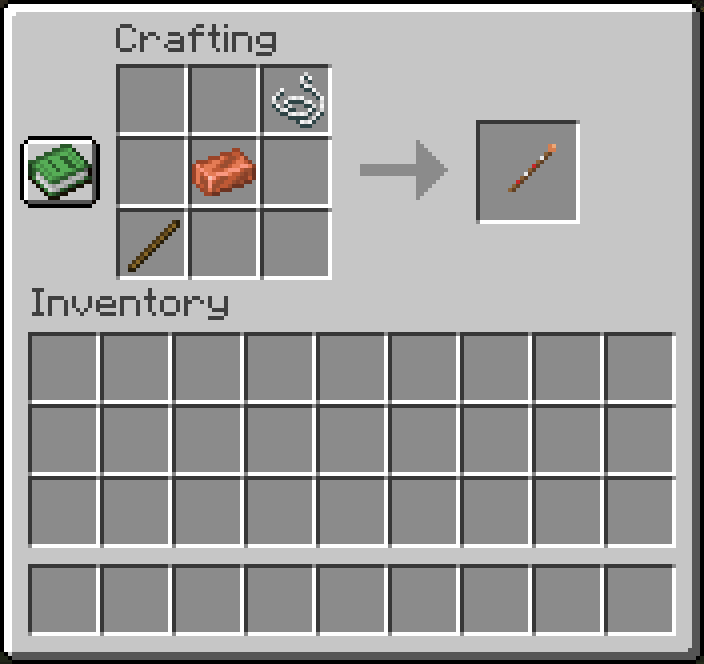
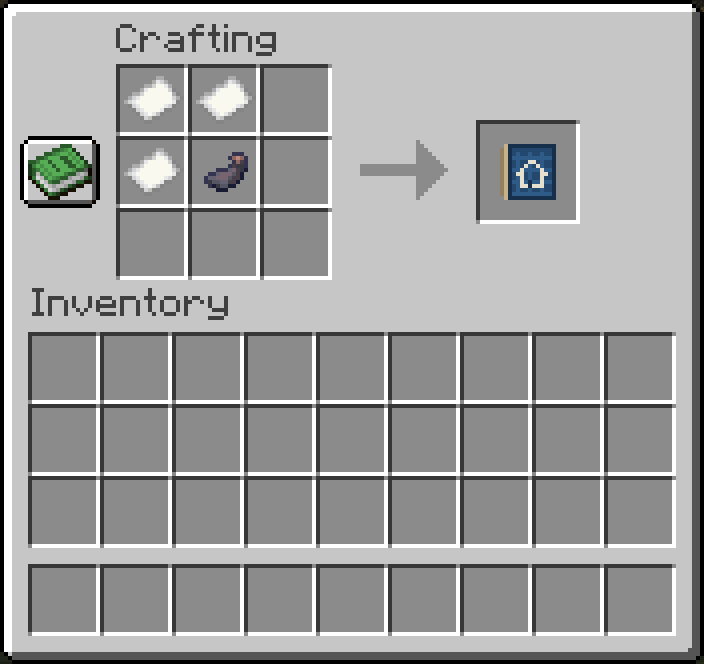

💡 Tip: the Bell is the hardest ingredient. Every village has one near its centre. You can also buy one from an Armorer or Toolsmith.
Step 2: Find a village (or pick an empty spot)
You can start anywhere, but starting next to an existing village is much easier: its villagers become your first citizens, and its houses become homes you can register.
Step 3: Place the Town Hall
Hold the Charter and right-click. A ghost of the Town Hall follows where you look.
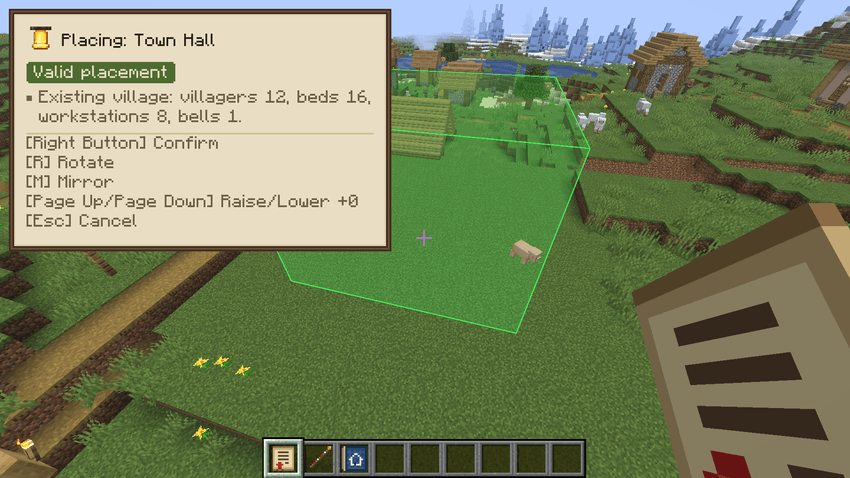
| Key | Action |
|---|---|
| Right-click | Confirm |
| R | Rotate |
| M | Mirror |
| Page Up / Page Down | Raise / lower |
| Backspace or Esc | Cancel |
- Green = good spot. Yellow = allowed, but some ground under it needs filling. Red = blocked. The panel tells you why (trees in the way, water, too far, someone else's land…).
- The panel also shows what it found nearby: "Existing village: villagers 7, beds 9…".
- The Town Hall claims a 150-block circle of land around it. That area is your settlement.
Confirm and your settlement is founded. A Foundation Core block appears in the middle of the site. It can't be blown up or broken in survival, so don't worry about creepers.
Step 4: Deliver materials for the Town Hall
Right-click the Foundation Core to open the Town Hall screen. It shows everything the building still needs (the Materials tab has the full list):

The default Town Hall needs 246 Planks (any wood), 47 Logs (any wood), 98 Cobblestone, 36 Stone Bricks and 10 Glass.
There are two ways to get the materials to the site:
- Bring them yourself: hold the materials and right-click the Foundation Core. Or sneak + right-click with an empty hand to hand over everything useful in your inventory at once.
- Let villagers fetch them: put the materials in chests inside a registered Warehouse (see Step 6). Builders walk over, pick them up and carry them to the site.
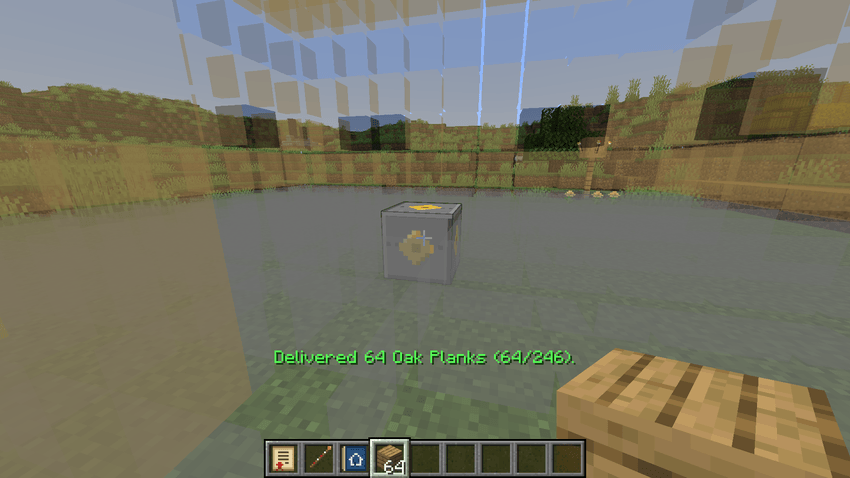
Step 5: Watch your villagers build it
Once materials arrive, a villager becomes a Builder and starts placing blocks, one at a time.
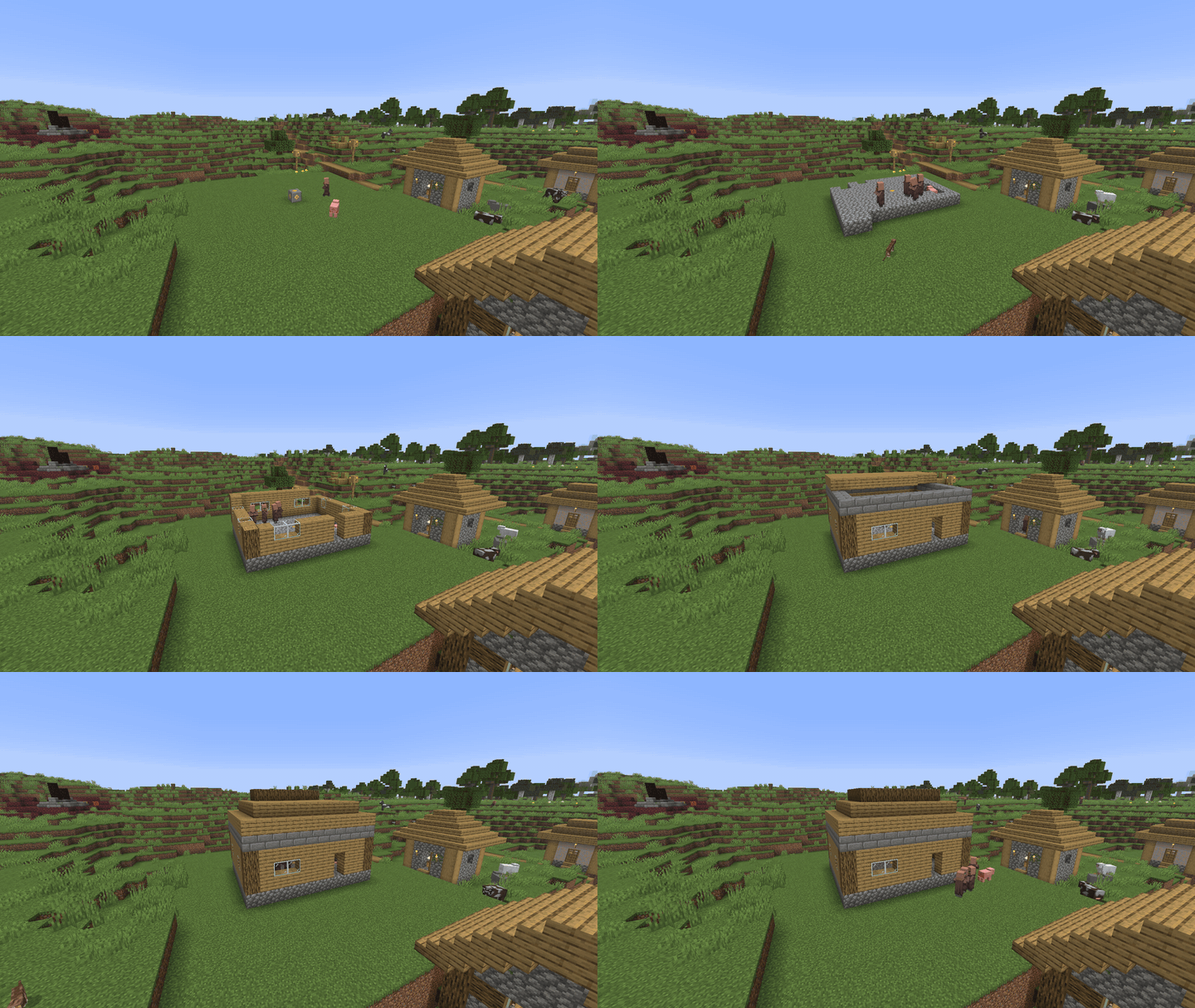
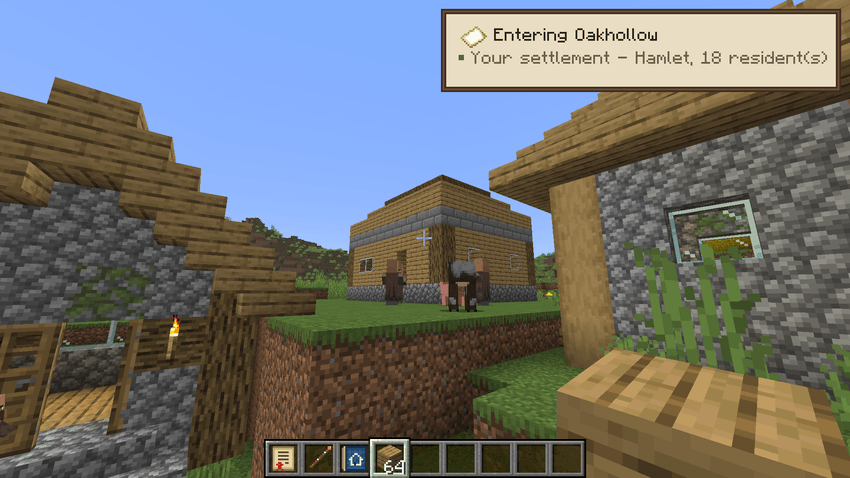
When the last block is placed, the settlement becomes Established, and everything else unlocks.


From now on, walking into your land shows a small notice with the town's name and population:
❓ Not building? Open the Town Hall screen. It always says why: "Waiting for materials", "The builder is sleeping" (villagers sleep at night), "No builders assigned" (you need an adult villager), or "Builders cannot reach the warehouse".
Step 6: Register your buildings with the Surveyor's Rod
The town only uses buildings you've registered. Chests and beds outside registered buildings are left alone, so your own base is safe.
Two ways to survey:
- Sneak + right-click a bed or a door with the Rod. It finds the walls of the house by itself.
- Right-click two opposite corners of an area. Use this for fields, forests, yards and open-air storage.
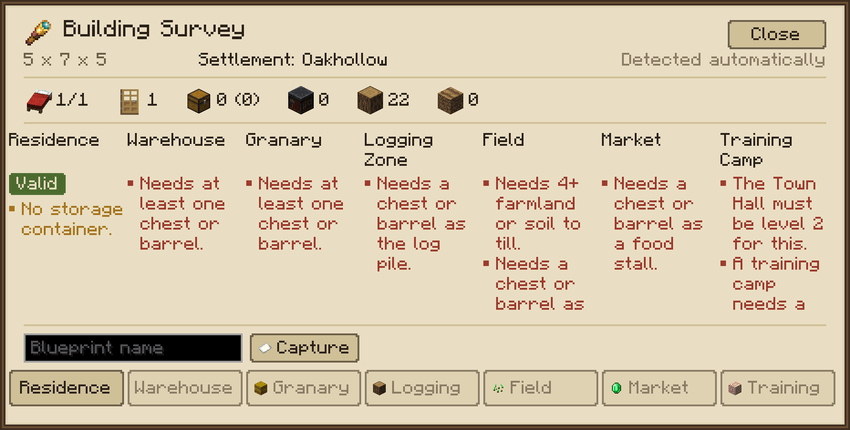
The survey screen counts beds, doors, chests and workstations, and shows every building type the area qualifies for. Green "Valid" means you can register it. Red text tells you what's missing. Click a button at the bottom to register.
Building types
| Building | What it needs | What it does |
|---|---|---|
| 🏠 Residence | At least one bed + a door or fence gate (beds should have a roof) | A home. Families move in, one person per bed. |
| 📦 Warehouse | At least one chest or barrel | Stores building materials, logs and tools. Builders fetch from here. |
| 🌾 Granary | At least one chest or barrel | Stores food. (Without a granary, food is kept in warehouses.) |
| 🌲 Logging Zone | Trees + a chest or barrel (the log pile) | Lumberjacks cut the trees, foresters replant saplings. |
| 🥕 Field | At least 4 farmland/dirt/grass + a chest or barrel (the seed store) | Farm workers till, plant, harvest and replant. |
| 🛒 Market | A chest or barrel (a food stall) | Market workers stock it with food, and families shop there. |
| ⚔️ Training Camp | A yard at least 5×5 + a chest or barrel (the armoury). Town Hall level 2. | Soldiers drill here and take weapons and armour from the armoury. |
Buildings must be inside your territory and can't overlap each other.
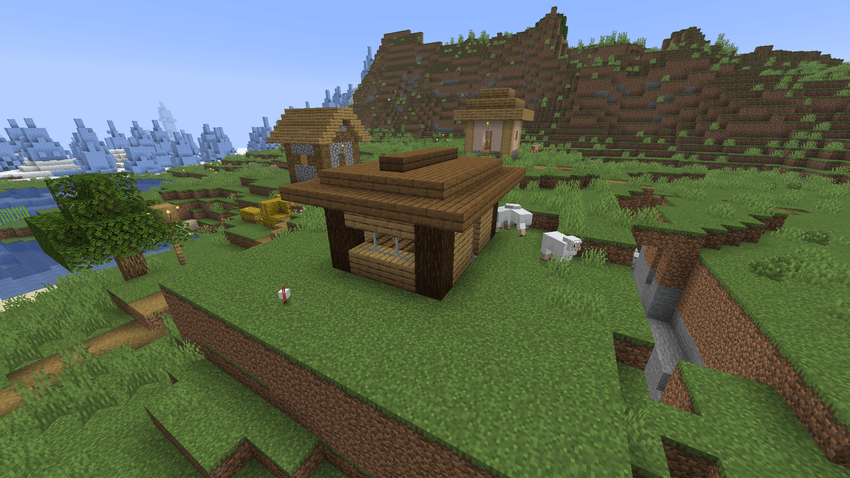
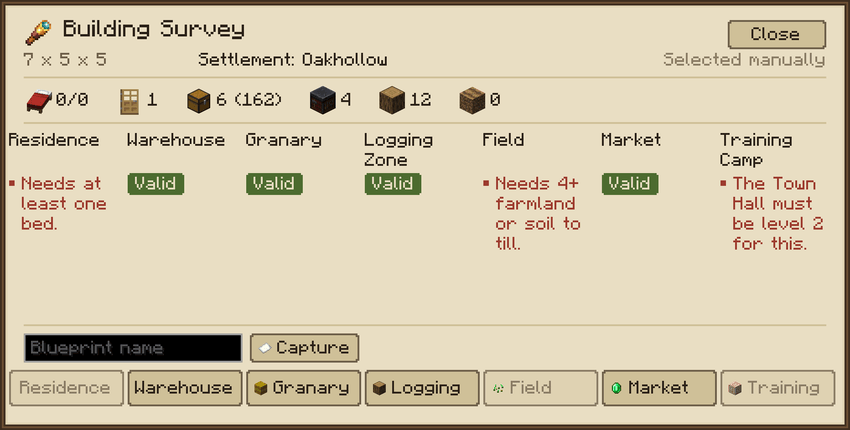
Recommended first buildings
- Residences: register the village's existing houses. That houses the whole population straight away.
- One Warehouse: fill it with building materials.
- One Granary: put bread, carrots, potatoes and wheat in it.
- A Field and a Logging Zone: your town now feeds itself and produces wood.
Step 7: Jobs, handled for you
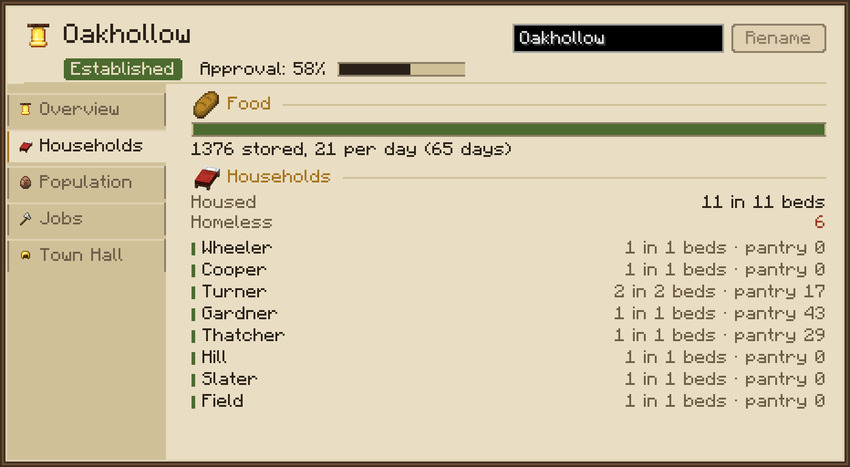
You don't assign villagers by hand. When there's work, like a field to tend, a site to build or logs to haul, the town gives the job to a free adult (unemployed villagers first). On the Jobs tab you choose the maximum number of workers for each job with + / −.
| Job | Works when you have… |
|---|---|
| Builder | Something under construction |
| Lumberjack | A Logging Zone |
| Forester | A Logging Zone (replants saplings) |
| Farm worker | A Field (grows any seed you put in its store, including modded crops) |
| Warehouse worker | Logs or harvest waiting to be hauled into storage |
| Market worker | A Market and a Warehouse or Granary |
| Soldier | A Training Camp and a military order |
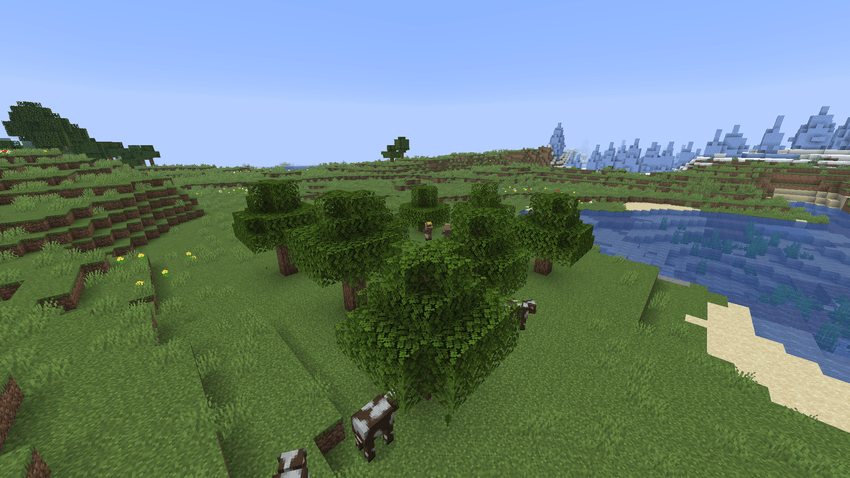
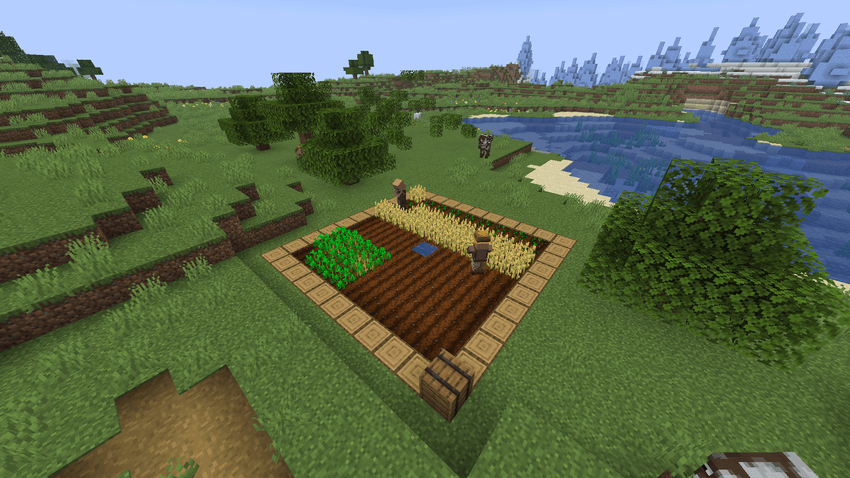
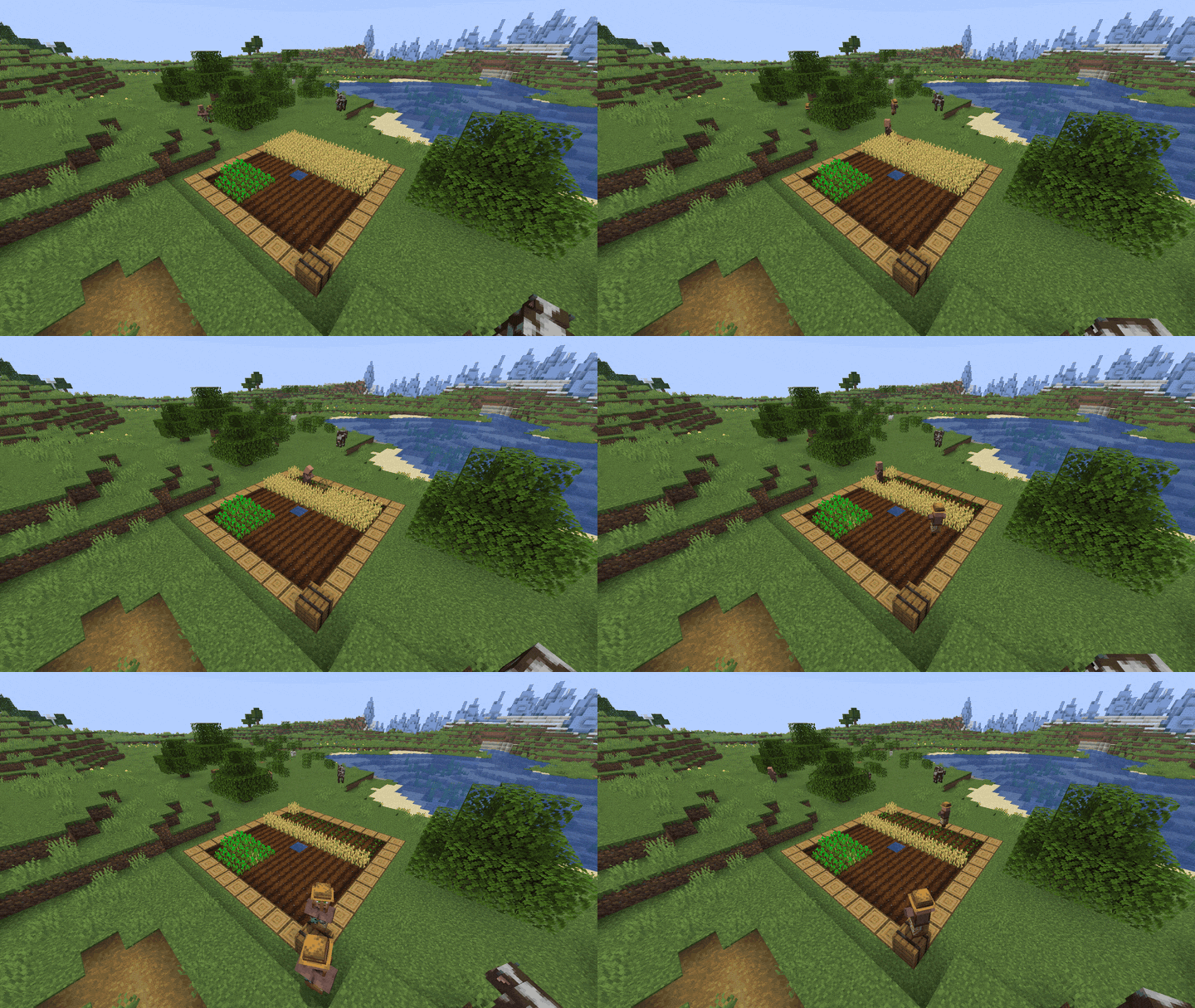
The whole supply chain is physical: tree → lumberjack → log pile → hauler → warehouse → builder → building, and field → farmer → field store → hauler → granary → market → home → dinner table.
Step 8: Keep people fed and happy
Food: once a day, each household eats from your stores (or from its own pantry, if you have a market). A household that goes without is Hungry. After 3 days it's Starving, and starving villagers stop working.
Approval (Population tab) is your town's mood, from 0 to 100%. The tab lists exactly what raises and lowers it:
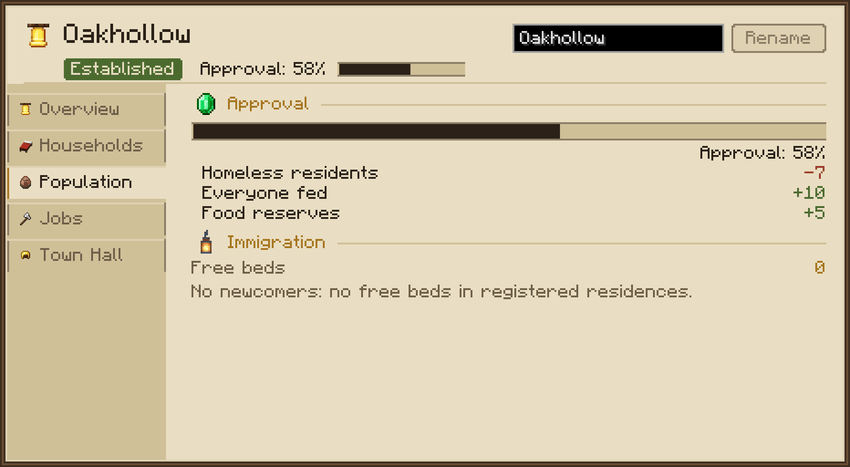
| Raises approval | Lowers approval |
|---|---|
| Everyone has a bed | Homeless residents |
| Everyone fed | Overcrowded homes |
| 5+ days of food in stock | Hungry / starving families |
| A market with food | No food reserves |
| At least half the adults employed | |
| Running errands (quests) for villagers |
Why approval matters:
- 60% or more: everyone works at full speed.
- Below 60%: all work slows down.
- 5% or less: nobody works at all.
- 50% or more, with free beds and at least 2 days of food: newcomers move in (about one every half day).
💡 Simplest way to grow: build houses with spare beds, keep the granary full, and register a field.
Step 9: Help your villagers (quests)
Sneak + right-click any villager in your town to see what they need. Or open their trade screen and click the Quests tab. Normal right-click trading still works exactly like vanilla.
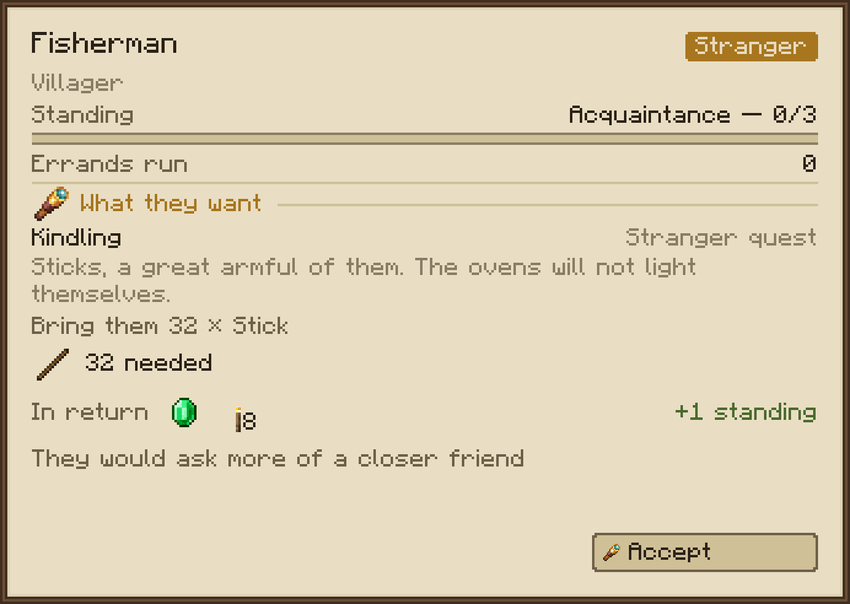
Quests include bringing items, hunting mobs that threaten the village, helping the town grow, and mapping far-away land. Each one you finish raises your standing with that villager:
Stranger → Acquaintance → Friend → Confidant → Kin
Better standing unlocks bigger requests and better rewards, and completed errands also raise the whole town's approval. Each player builds their own reputation with each villager.
Step 10: Raise the Town Hall
The Town Hall tab shows what the next level needs on the left and what you get on the right. The materials are taken from your warehouses.
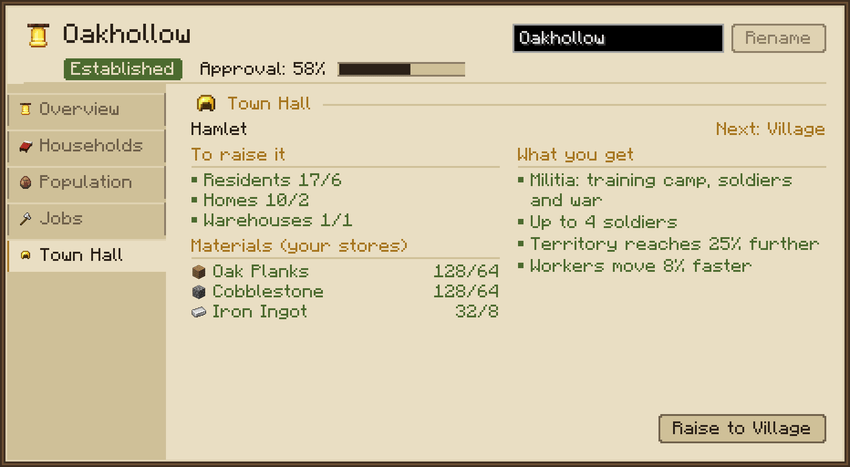
| Level | Needs | Costs | Unlocks |
|---|---|---|---|
| 1 Hamlet | — | — | Homes, stores, fields, forestry |
| 2 Village | 6 residents, 2 homes, 1 warehouse | 64 oak planks, 64 cobblestone, 8 iron ingots | Training camp, militia and war (up to 4 soldiers), +25% territory, workers 8% faster |
| 3 Town | 14 residents, 5 homes, 2 warehouses, 1 market, 3 trained soldiers | 128 stone bricks, 24 iron ingots, 8 gold ingots | Up to 8 soldiers, +60% territory, workers 16% faster |
Step 11: Raise a militia
- Reach Town Hall level 2.
- Build and register a Training Camp: a fenced yard with a chest for the armoury.
- Put weapons and armour in the armoury. Soldiers equip themselves. Modded gear works too.
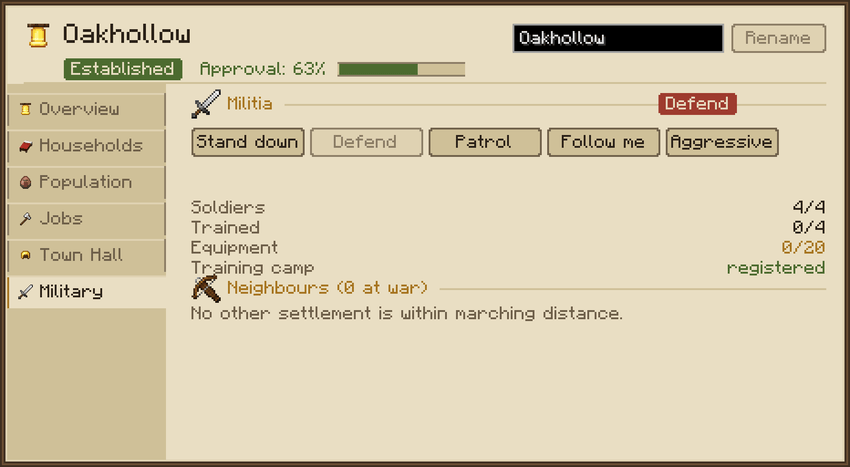
- On the Military tab, pick an order:
| Order | Soldiers will… |
|---|---|
| Stand down | Go back to their normal jobs and return their gear |
| Defend | Guard and drill at the camp (training uses food from your stores) |
| Patrol | Walk a ring around the town |
| Follow me | Escort you and fight what attacks you |
| Aggressive | Hunt hostile mobs across your land, and march on enemies during a war |
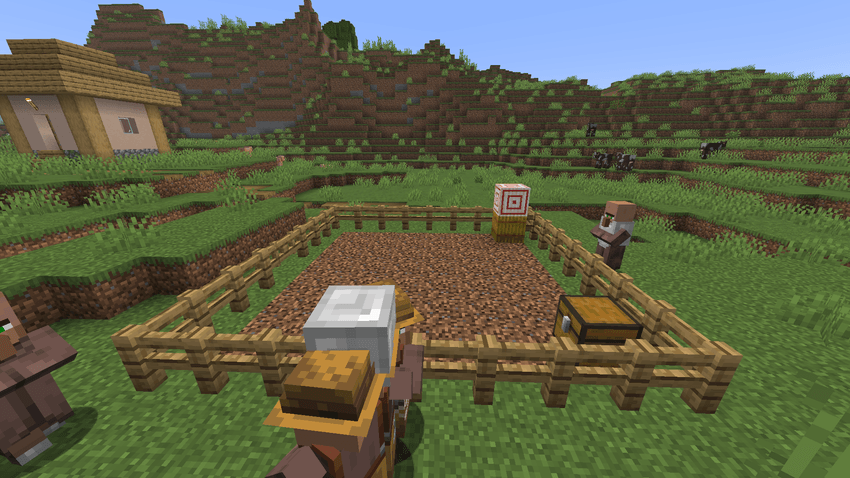
Soldiers are your own villagers, so a soldier who dies is a citizen lost. You can declare war on another settlement within 1000 blocks from the Military tab. Soldiers only fight the other town's villagers. Players are never targeted.
Step 12: Copy buildings with Blueprints
- Survey a building you like with the Surveyor's Rod (two corners).
- Hold a Blueprint, type a name in the survey screen and press Capture.
- Sneak + use the Blueprint to open the catalogue of designs.
- Use it inside your territory to place a ghost, then confirm. Builders will fetch the materials and build a copy.


Plants and blocks you can't get in survival are left out of the design automatically. A settlement builds one thing at a time. You can stop a build from the Materials tab, and unused materials go back to the warehouses.
❓ FAQ
Will it break my existing villages or trades? No. Vanilla trading, gossip and prices are untouched. Villages only change when you found a settlement on them, and chests outside registered buildings are never touched.
My villagers aren't doing anything. Open the Town Hall screen. Check the Jobs tab (is the maximum above 0?), the Population tab (approval too low? starving?) and the Materials tab (what's missing?). The screens always explain why something is stuck.
Nobody new moves in. You need free beds in registered Residences, approval of at least 50%, at least 2 days of food for everyone, and no starving households. The Population tab shows the reason.
Can I use modded crops, wood, weapons and armour? Yes. Fields grow any seed that places a crop, "any planks / any logs" accepts every wood type, and soldiers use anything with attack damage or anything wearable.
Does it work on servers? Yes, including dedicated servers. Install it on the server and on every client. Only a settlement's owner or an operator can manage it.
Does it lag? Settlements far from players run a lighter simulation, and nothing keeps chunks loaded permanently.
🛠️ Admin commands
/settlement list · info · here · rename · jobs · level · population · food · buildings · validate · restorecore Operators can also use /settlement construction <town> fillmaterials | instantbuild | cancel and /blueprint list | build | delete.
Made with care for people who love villages. Feedback and bug reports are very welcome!!
Screenshots
Gallery
Versions
Files
Relations
Project Relations
More like this
Similar Mods
Suggestions use data such as tags, dependencies, dependents, descriptions, titles, and more to rank how much they overlap with this mod.
On ModDex
Community snapshot
By the numbers
Statistics
Want to reach Minecraft players?
We're looking for a server hosting partner to feature here and other parts of the site. Interested? Send us a message!
Get in touchGet it on
Available Platforms
On ModDex
Community snapshot
By the numbers
Statistics
Resources