
Community listing page, reviews here may not be monitored by the author.
Viscord - Discord/Fluxer Server to Server


No reviews yet
Optimized for multiple servers with embed parsing and optimized antiloop for webhooks.
Community voices
Reviews
No reviews yet. Be the first to review this project!
Get it on
Available Platforms
Compatibility
Supported Environments
Runs on a dedicated server only; does not work in singleplayer.
About
Project Details
For authors
Embed Badge
If you're the author of this project, you can embed a live badge anywhere that supports HTML or Markdown. It updates automatically whenever ratings change.
Use HTML for any page that supports it, or Markdown for README files and Markdown-based descriptions.
Identifiers
Platform IDs
About
Description
Viscord
Connect your Minecraft server to Discord, Fluxer, or both.
Viscord is a server-side bidirectional chat-integration mod for dedicated Minecraft servers. It connects in-game chat and server events with Discord and Fluxer while keeping the player experience client-free: players do not need to install Viscord.
Features
- Discord and Fluxer support — Run Discord-only, Fluxer-only, both platforms independently, or enable tridirectional Discord ↔ Fluxer ↔ Minecraft bridging.
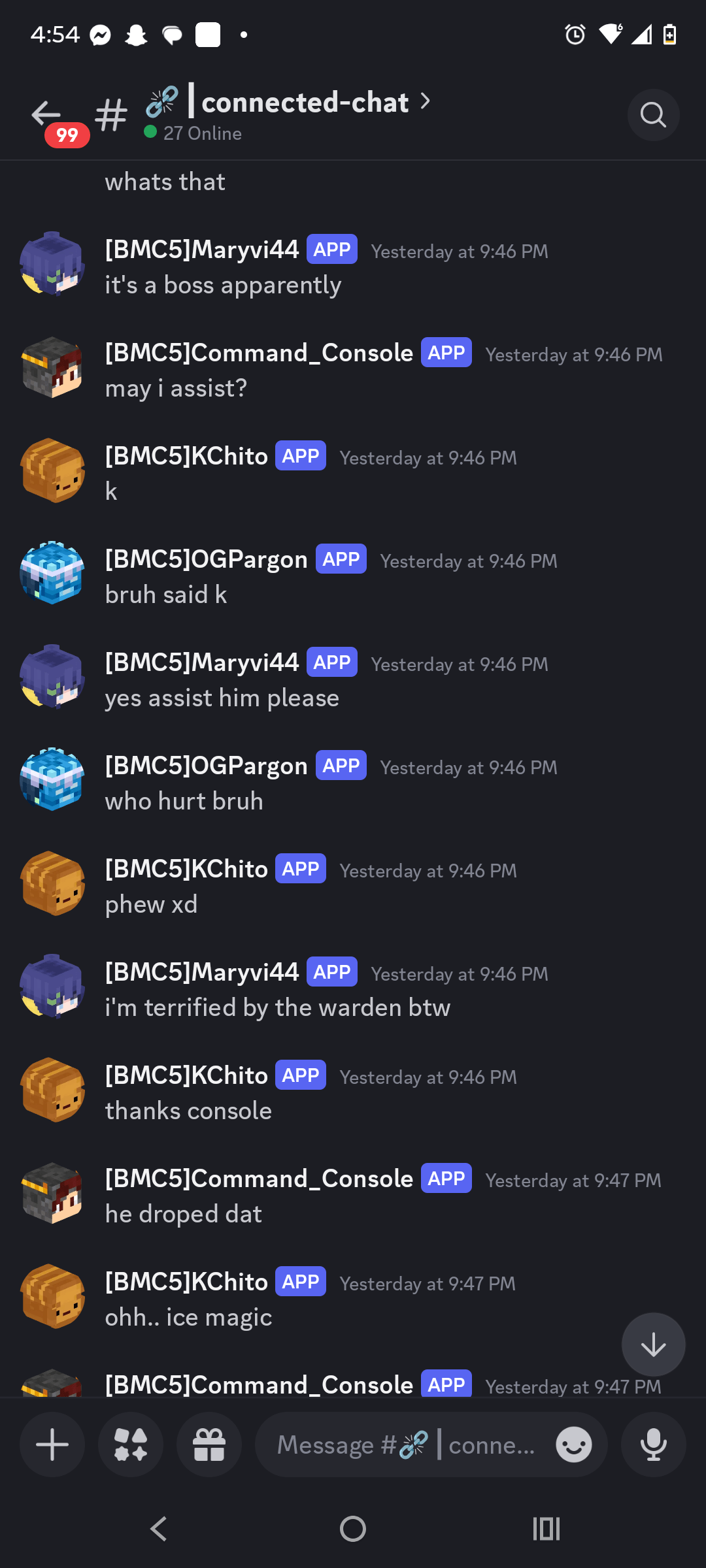
- Bidirectional chat — Send Minecraft messages to your community platforms and relay platform messages back into Minecraft.
- Rich formatting — Supports Minecraft color formatting, Discord-style formatting, configurable prefixes, and customizable message templates.
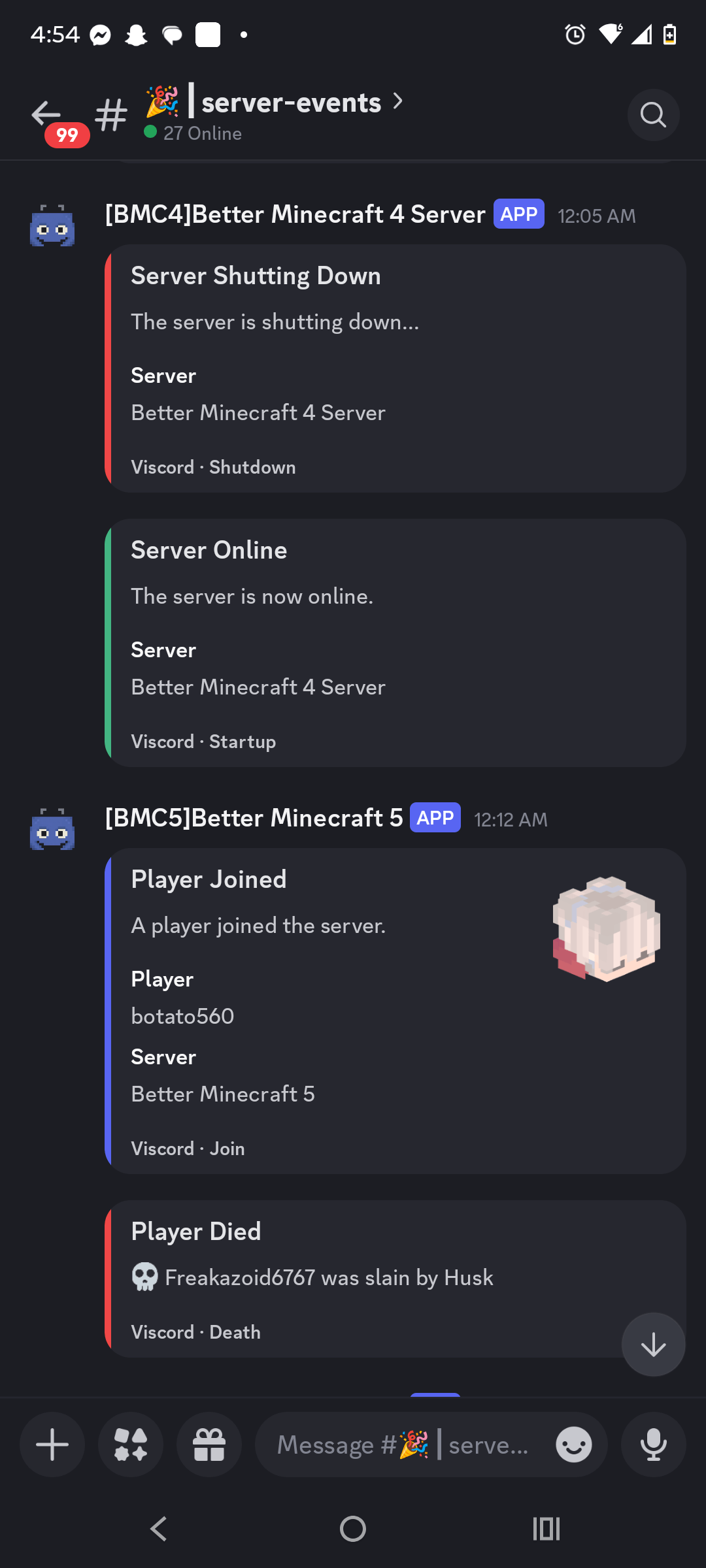
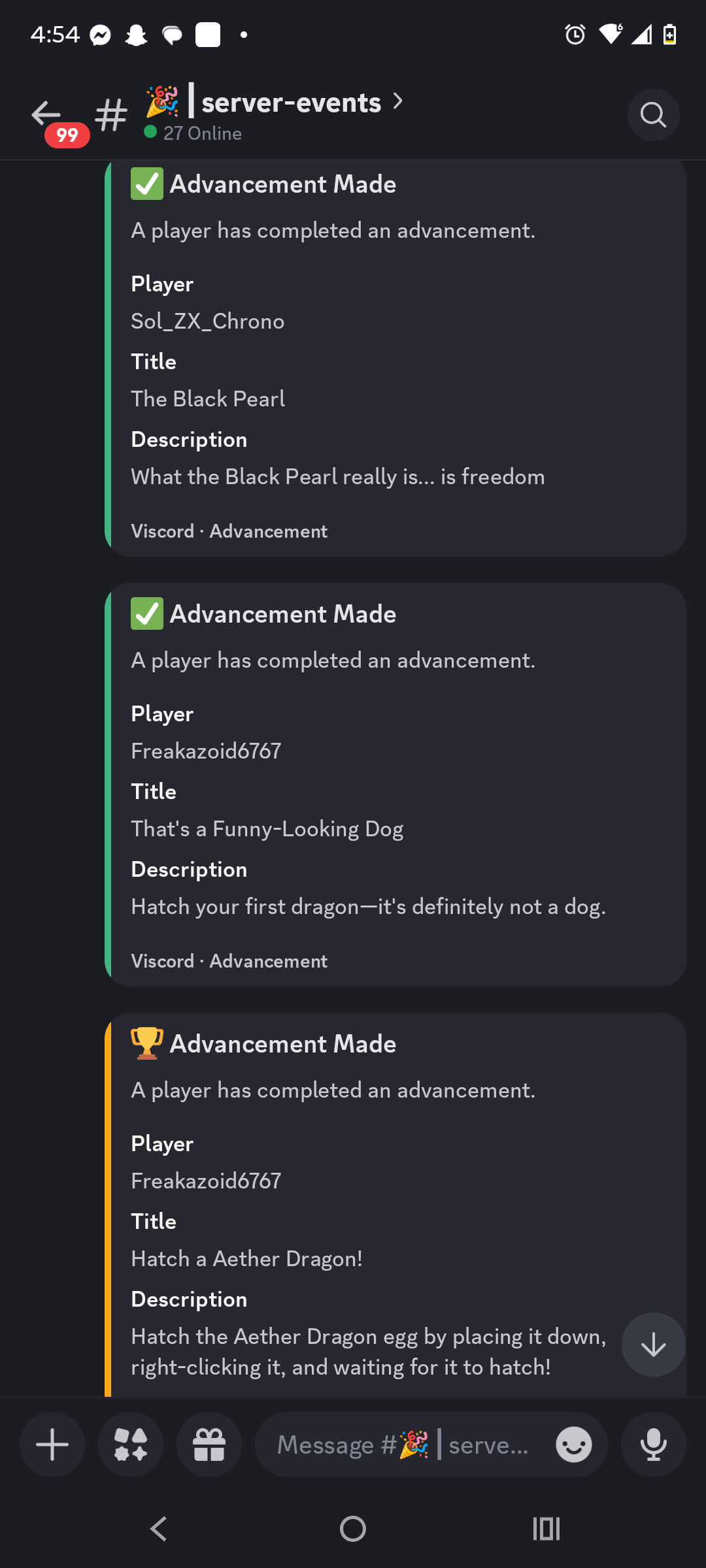
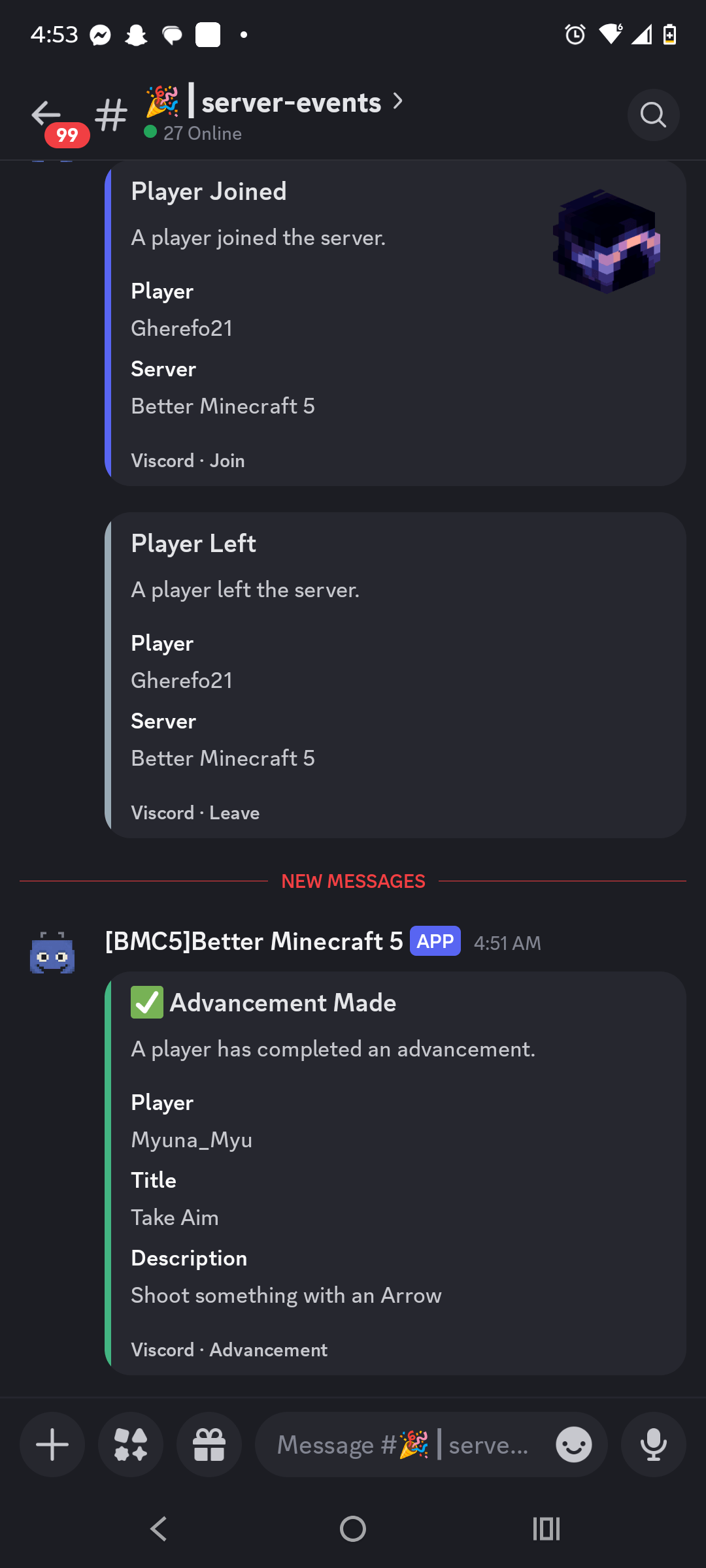
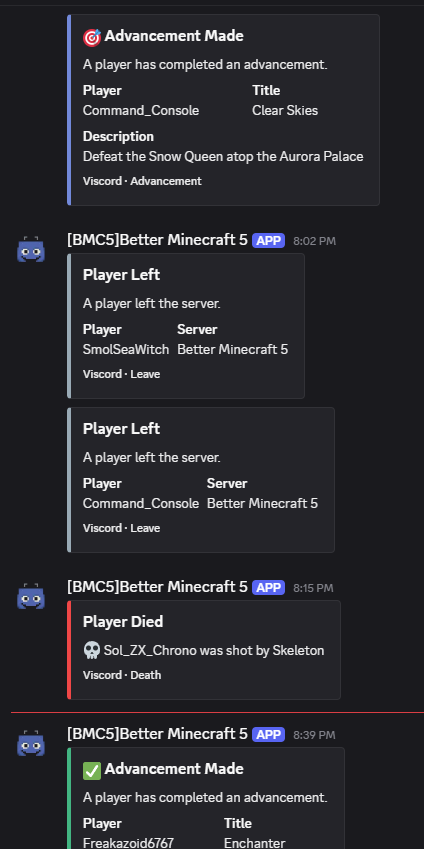
- Server events — Announce joins, leaves, deaths, advancements, server startup, and server shutdown.
- Multi-channel monitoring — Configure multiple chat and event channels for a single server connection.
- Multi-server relay — Give each server a unique prefix and use trusted bot or webhook identifiers for controlled cross-server event and message relay.
- Account linking — Link Minecraft UUIDs to Discord accounts using short-lived, securely generated verification codes.
- Player preferences — Let players independently control whether they receive bridged chat, event notifications, and system messages.
- Hot reload — Reload configuration with
/viscord reloadwithout requiring a full server restart for routine changes. - Asynchronous operation — Network work, status updates, and persistence are handled away from the Minecraft tick loop with bounded scheduling and back-pressure.
- Loop prevention — Self-originated bot, webhook, and prefixed messages are filtered to prevent echo loops between platforms.
- Server-side only — Vanilla clients can connect normally; no client mod is required.
Supported bridge modes
Discord       Minecraft ↔ Discord
Fluxer        Minecraft ↔ Fluxer
Both          Minecraft ↔ Discord and Minecraft ↔ Fluxer
Tridirectional Discord ↔ Fluxer ↔ Minecraft
Useful commands
/viscord reload                    Reload safe configuration changes
/viscord status                    Inspect bridge status
/viscord discord link              Begin account linking
/viscord discord unlink            Remove a linked account
/viscord discord messages          Toggle bridged message preferences
/viscord discord events            Toggle event notification preferences
Server-side installation
- Download the Viscord build matching your Minecraft version and loader.
- Place the JAR in the server's
mods/folder. - Start the server once to generate
config/viscord/viscord.toml. - Configure the selected platform credentials, channels, webhooks, server identity, and message formats.
- Use
/viscord reloadafter safe configuration changes.
Keep bot tokens and webhook URLs private. They belong only in the server configuration and should never be shared publicly.
Compatibility
Viscord provides version-specific Fabric, Forge, and NeoForge builds for the supported Minecraft lanes, including the 1.18.2, 1.19.2, 1.20.1, and 1.21.1 templates. Shared bridge behavior is maintained across the version-specific modules.
Community bridge for dedicated servers
Whether you want a simple Discord chat relay, a Fluxer connection, event notifications, or a three-way community bridge, Viscord keeps the integration configurable, asynchronous, and independent of client-side installation.
Project: Vonix Network
Project version: 5.0.0
Release line: V2 common rewrite


🤖 Viscord: The Ultimate Minecraft-Discord Bridge
Developed by Vonix-Network, Viscord creates a seamless, powerful, and real-time connection between your Minecraft server and your Discord community. Keep your players engaged and your staff connected, no matter where they are!
🚀 Key Features & Functionality
- Two-Way Chat Sync: Instantly syncs messages from your Minecraft server chat to a dedicated Discord channel, and relays Discord messages back into the game.
- Customizable Events: Personalize the messages displayed for player joins, leaves, and server status changes.
- Full Command Integration:
- In-Game Commands (e.g.,
/discord): Used to get the discord link (more to come) - Discord Slash Commands (e.g.
/list): List the players of one server - Discord ! Commands (e.g.
!list): List the players in all servers in channel
- In-Game Commands (e.g.,
🛠️ Command Reference
Note: Always check the official documentation or the /viscord help command for the most current and specific command usage and required permissions.
🔗 Get Started
Viscord is stable, actively maintained, and designed to foster a strong, unified community for your server.
Download Viscord today and connect your worlds!
Dependencies
Kotlin for Forge is required for OkHttp for webhooks!
Screenshots
Gallery
-
 1000013019.png 1000013019.png
 -
 1000013020.png 1000013020.png
 -
 1000013018.png 1000013018.png
 -
 1000013017.png 1000013017.png
Versions
Files
Relations
Project Relations
More like this
Similar Mods
Suggestions use data such as tags, dependencies, dependents, descriptions, titles, and more to rank how much they overlap with this mod.
On ModDex
Community snapshot
By the numbers
Statistics
Want to reach Minecraft players?
We're looking for a server hosting partner to feature here and other parts of the site. Interested? Send us a message!
Get in touchGet it on
Available Platforms
On ModDex
Community snapshot
By the numbers