
Community listing page, reviews here may not be monitored by the author.

Community voices
Reviews
No reviews yet. Be the first to review this project!
Get it on
Available Platforms
About
Project Details
For authors
Embed Badge
If you're the author of this project, you can embed a live badge anywhere that supports HTML or Markdown. It updates automatically whenever ratings change.
Use HTML for any page that supports it, or Markdown for README files and Markdown-based descriptions.
Identifiers
Platform IDs
Resources
External Links
About
Description
Vista Thermal Camera
A thermal view and a CC:Tweaked peripheral for the Vista viewfinder.
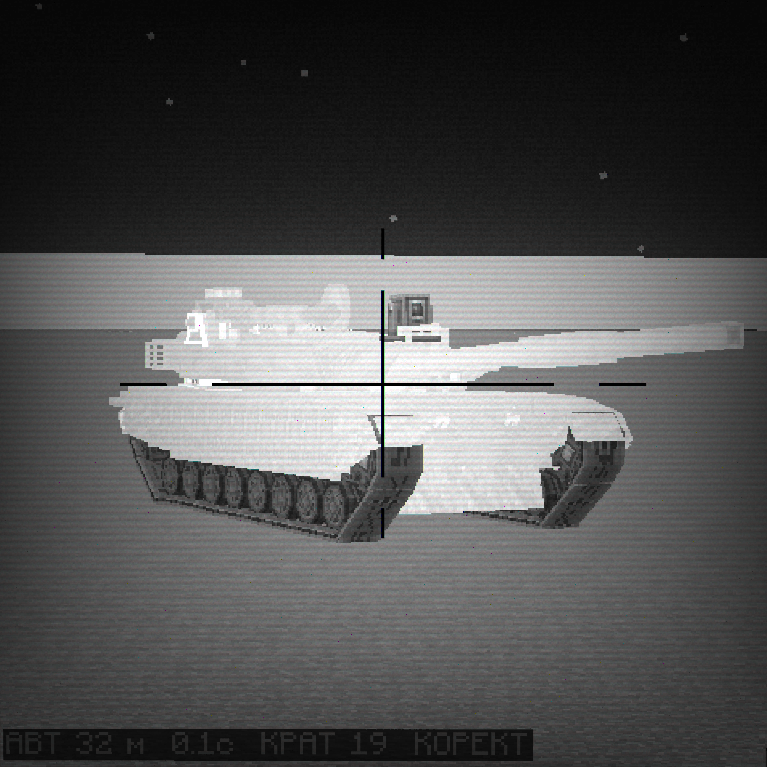
Vista already gives you a camera block (the viewfinder) that streams what it sees onto TVs. This mod adds two things on top of it. First, a thermal mode: put a piece of tinted glass into the viewfinder's lens slot and the feed turns into a thermal image, with Sable structures (vehicles, aircraft, anything built as a sublevel) drawn white-hot against a dark grey world. Second, a thermal_camera peripheral for CC:Tweaked, so a computer can aim the camera, hold it steady on a moving vehicle, lock onto other moving structures and follow them, and read back angles, ranges and velocities.
The picture never goes to Lua. TVs show it as usual; the computer gets numbers.
I built this for a tank in my own world. The camera sits on the turret, a computer drives the turret and the gun, the crew watches the feed on a TV. Most of the peripheral's features exist because that tank needed them at some point.
Requirements
- Minecraft 1.21.1, NeoForge 21.1.248 or newer
- Vista 5.4.4+ and its library Moonlight 3.5.2+
- CC:Tweaked 1.115+
- Sable 2.0.3+ (optional). Without Sable the camera is a stationary viewfinder: thermal view, reticle, overlay text and the block rangefinder work, but there is nothing to stabilize against and nothing to track.
Tested with Distant Horizons 3.3.1 and Sodium 0.8.13. Both are optional and the mod adjusts its rendering when they are present.
Thermal view without a computer
Right-click the viewfinder to open its lens slot (the one that normally takes a stained glass pane) and put in a block of tinted glass. That is it. The feed on every TV watching this camera switches to thermal. Take the glass out and it goes back to normal.
What the thermal image looks like:
- Sable sublevels are rendered flat white, regardless of lighting or texture.
- Everything else (terrain, buildings, sky) is dark grey. Night looks the same as day.
- Clouds and fog sit at their own grey levels so they still read as clouds and fog, just dim.
- Rain and snow are not drawn.
- Distant Horizons LODs are drawn in the same grey as nearby chunks, so the horizon does not turn into a bright band.
Vista's own colour lenses still work; the mod only changes what happens when the lens is tinted glass.
The peripheral
Every viewfinder is also a thermal_camera peripheral. Put a computer next to it or reach it through a wired modem:
local cam = peripheral.find("thermal_camera")
cam.setThermal(true)          -- same as the tinted glass, but from Lua
cam.setReticle(true)          -- black crosshair in the centre of the feed
cam.setOverlayText("READY")   -- text at the bottom of the feed
A short list of what the computer can do:
- aim the camera in absolute angles or nudge it by a delta
- change the zoom
- stabilize the camera against the vehicle it is mounted on (Sable), either fully in the world frame or pitch-only with the heading following the vehicle
- point it at a world coordinate and let it lock onto the nearest Sable structure there, then follow that structure automatically
- add an operator correction on top of the automatic tracking (lead, elevation) without losing the lock
- read the tracked structure's position, bounding box, range, angular error and velocity
- list every structure currently in the camera's field of view
- fire a rangefinder along the line of sight and get back the block it hits
- draw a reticle and up to 256 characters of overlay text on the feed
- read the camera's true world direction at any time, cheaply
Why the camera moves on its own
The viewfinder's gimbal in Vista has no idea it is standing on a moving vehicle. If you set an orientation and the vehicle turns, the camera turns with it. So while a computer is attached, this mod runs a small controller on the server every tick. It keeps a "held" direction for the camera and re-applies it in whatever frame you asked for:
setStabilized(false): held angles are local to the block. The camera is rigid.setStabilized(true): held angles are in the world frame. The vehicle can turn, pitch or roll and the camera keeps looking the same way.setStabilized(true, true): pitch-only. Heading follows the vehicle (useful when the camera sits on a turret that a separate motor already rotates), pitch is held in the world frame so the horizon stays level when the hull rocks.
Switching between these does not jerk the camera; the held angles are recomputed from where the camera actually points at that moment. The same goes for going into and out of automatic tracking.
When a computer is attached for the very first time, the held direction is taken from the way the block was placed, so the camera does not swing off to the south on power-up.
If no computer is attached the controller does not run at all. The camera then behaves exactly like a plain Vista viewfinder, thermal lens included.
Cue, lock, track
cue(x, y, z) tells the camera to swing toward a world point (with a slew limit of 6 degrees per tick, so it looks like a gimbal and not a teleport). While it is looking there it searches for Sable structures within a 3 degree cone of its line of sight. The one closest to the line of sight gets locked. From then on the camera follows that structure by itself: every tick it recomputes the bearing to the structure's aim point and applies it, with the same slew limit.
The aim point is not the centre of the structure by default. setAimHeightFraction(f) picks a height inside the structure's bounding box, 0 for the bottom, 0.5 for the centre, 1 for the top. It defaults to 0.5. The same point is returned by getTrack(), so a gun controller and the camera agree on where "the target" is.
While locked, correct(dYaw, dPitch) shifts the camera's line of sight away from the structure by a running offset (clamped to 20 degrees). The structure drifts off the crosshair by that amount and the tracking continues underneath. This is how an operator can put lead on a moving target while the automation keeps holding it. clearCorrection() zeroes it, and any manual aim command (setAim, nudge, cue, unlock) drops the lock and the correction together.
The lock is dropped automatically when the structure is removed from the world. Distance alone does not break it.
The camera excludes the structure it is standing on from the search, so a camera on a tank does not lock onto that tank.
The rangefinder
rangefind() casts a ray from the camera along its current line of sight, in 0.5 block steps, until it hits a world block with a collision shape, up to 1500 blocks. It returns the hit point, the block position and the distance, or nil if the ray leaves the loaded area or hits nothing. It does not force chunks to load and it does not see Sable structures (they live in Sable's own grid, not in world block space; use getContacts() for them).
API reference
Angles are radians. Yaw follows the Minecraft entity convention: 0 is south (+Z), positive turns toward west (-X). Pitch is negative upward, positive downward. Velocities are blocks per tick. Coordinates are world coordinates, already projected out of the Sable grid if the camera is on a sublevel.
The "main thread" column matters for performance. Those calls run on the server thread and the calling computer waits for the next server tick each time. The others return immediately. If you poll a main-thread function twenty times a second, your program will spend most of its time waiting. See the performance notes below.
| Function | Main thread | What it does |
|---|---|---|
setAim(yaw, pitch) |
yes | Absolute aim in the current frame (local, world, or mixed, depending on setStabilized). Drops lock, cue and correction. |
nudge(dYaw, dPitch) |
yes | Relative aim. Same side effects as setAim. |
getAimWorld() |
no | Returns yaw, pitch of where the camera actually points, in the world frame. Cheap; call it as often as you like. |
setZoom(level) / getZoom() |
yes / no | Vista zoom level, the same integer the viewfinder GUI uses. |
setStabilized(on [, pitchOnly]) / isStabilized() / isPitchOnly() |
yes / no / no | Stabilization mode, see above. Persists with the block. |
setAimHeightFraction(f) / getAimHeightFraction() |
no | Where inside a locked structure's bounding box the camera aims. |
cue(x, y, z) |
yes | Swing toward a world point and try to lock the nearest structure there. |
unlock() |
yes | Drop the lock or the cue. The camera stays where it is. |
isLocked() |
no | Whether a structure is currently locked. |
correct(dYaw, dPitch) |
yes | Add to the operator offset while locked. Returns false if not locked. |
clearCorrection() / getCorrection() |
yes / no | Zero the offset / read it as yaw, pitch. |
getTrack() |
yes | State of the locked structure, see the table below. |
getContacts() |
yes | Every Sable structure inside the field of view, up to 1500 blocks, in no particular order. |
rangefind() |
yes | Block rangefinder along the line of sight. |
setThermal(on) / isThermal() |
yes / no | Thermal view from Lua. isThermal() is also true when tinted glass is in the lens slot; the glass cannot be overridden from Lua. |
setReticle(on) / isReticle() |
yes / no | Black crosshair at the centre of the feed. |
setOverlayText(s) / getOverlayText() |
yes / no | Text at the bottom of the feed, lines separated by \n, up to 256 characters, UTF-8. |
getDebug() |
yes | Everything the controller knows: own position and frame, current and held angles, half FOV, and the unfiltered list of all sublevels with their bearings. For debugging a setup, not for the control loop. |
getTrack() returns a table:
| Key | Meaning |
|---|---|
locked |
false if nothing is locked; the other keys are absent then |
sid |
structure id (a string), stable for the lifetime of the structure |
x, y, z |
aim point in world coordinates (bounding box centre horizontally, aimFrac of the height vertically) |
ymin, ymax, aimFrac |
bounding box height range and the fraction in use |
range |
distance from the camera to the aim point |
yawErr, pitchErr |
bearing to the aim point minus the camera's current direction |
aimYaw, aimPitch |
where the camera is currently pointing (world) |
corrYaw, corrPitch |
the operator offset in effect |
vx, vy, vz |
velocity of the aim point, blocks per tick, smoothed over recent server ticks |
velSamples |
how many ticks went into that estimate; trust it once this is 3 or more |
getContacts() returns a list of tables with sid, x, y, z (structure centre), ymin, ymax, range, yawErr and pitchErr.
rangefind() returns range, x, y, z (hit point) and bx, by, bz (block position), or nil.
Example
Lock the structure closest to the crosshair and print its range while it is tracked:
local cam = peripheral.find("thermal_camera")
if not cam then error("no thermal_camera attached") end

cam.setStabilized(true)
cam.setReticle(true)

-- pick the contact nearest to the centre of the frame
local best, bestErr
for _, c in ipairs(cam.getContacts()) do
  local err = c.yawErr ^ 2 + c.pitchErr ^ 2
  if not bestErr or err < bestErr then best, bestErr = c, err end
end
if not best then error("nothing in view") end

cam.cue(best.x, best.y, best.z)

while true do
  local t = cam.getTrack()          -- main thread: once per 5 ticks is plenty
  if not t.locked then
    cam.setOverlayText("LOST")
    break
  end
  local speed = math.sqrt(t.vx ^ 2 + t.vy ^ 2 + t.vz ^ 2) * 20   -- blocks/tick -> blocks/s
  cam.setOverlayText(("RANGE %d m  V %.1f m/s"):format(math.floor(t.range + 0.5), speed))
  sleep(0.25)
end
Laser-range whatever the camera is looking at:
local r = cam.rangefind()
if r then
  print(("block %d %d %d at %.1f m"):format(r.bx, r.by, r.bz, r.range))
else
  print("no hit")
end
Performance notes
Main-thread calls are the expensive part. Each one is a round trip to the server tick, so a loop that calls getTrack() every tick runs at a fraction of the speed it could. What worked well for me:
- Call
getTrack()orgetContacts()every 3 to 5 ticks and extrapolate between samples withvx/vy/vz. - Use
getAimWorld()(not main thread) whenever you just need to know where the camera points. - Compare overlay text on the Lua side before calling
setOverlayText(). The mod also skips unchanged text, but the call still costs a tick. - Gate
setAim()behind a small threshold instead of sending it every tick.
The controller itself (stabilization and tracking) runs on the server tick and costs the computer nothing.
Limitations
getContacts()does not check line of sight. A structure behind a hill is still listed if it is inside the cone.rangefind()cannot hit Sable structures.- Cue picks by angle only. Whatever is nearest to the line of sight inside the 3 degree cone gets locked, even if it is a small structure a few blocks away and you meant the one behind it. Filter
getContacts()byrangeon the Lua side before cueing if that matters. - The thermal image is a rendering trick, not a temperature model. Sable structures are hot, everything else is cold, and that is the whole rule.
For modpack authors
Client and server both need the mod. The peripheral and the controller are server side; the thermal rendering is client side and needs the mixins in vista_thermal_camera.mixins.json, which target Vista 5.4.x, Sable's render dispatcher, and (only when present) Sodium's cloud renderer and Distant Horizons.
Credits
Vista and Moonlight are by MehVahdJukaar. CC:Tweaked is by SquidDev. Sable is by RyanHCode. This mod is glue between the three; none of the hard parts are mine.
MIT license. Do what you like with it, keep the copyright notice.
Screenshots
Gallery
-
 javaw_4cOBGEt6Mn.png javaw_4cOBGEt6Mn.png
Versions
Files
Relations
Project Relations
More like this
Similar Mods
Suggestions use data such as tags, dependencies, dependents, descriptions, titles, and more to rank how much they overlap with this mod.
On ModDex
Community snapshot
By the numbers
Statistics
Want to reach Minecraft players?
We're looking for a server hosting partner to feature here and other parts of the site. Interested? Send us a message!
Get in touchGet it on
Available Platforms
On ModDex
Community snapshot
By the numbers
Statistics
Resources